1. ആമുഖം
Thank you for choosing the Pamray S18 47-Inch Computer Desk. This manual provides detailed instructions for the assembly, usage, and maintenance of your new desk. Please read through these instructions carefully before beginning assembly to ensure a smooth and correct setup. This desk is designed for versatility and comfort, featuring a monitor stand and a convenient headphone hook, making it suitable for various environments such as home offices, bedrooms, or study areas.

Image 1.1: The Pamray S18 47-inch computer desk in pink, showcasing its monitor stand and headphone hook.
2. ഉൽപ്പന്ന സവിശേഷതകൾ
- ഒപ്റ്റിമൽ അളവുകൾ: The desk measures 47.2" (W) x 18.9" (D) x 29.2" (H), providing ample workspace while fitting comfortably in smaller areas.
- Sturdy Monitor Stand: An integrated monitor stand elevates your screen, enhancing visibility and promoting ergonomic comfort. This stand helps optimize your desktop space.
- Convenient Headphone Hook: A side hook is included for hanging headphones, bags, or other small items, helping to keep your workspace organized and clutter-free.
- ഒന്നിലധികം വർണ്ണ ഓപ്ഷനുകൾ: Available in various colors to complement diverse interior styles.
- ശക്തമായ ഘടന: Equipped with an 'X'-shaped back brace, the desk offers enhanced stability, preventing wobbling or shifting during use. The durable tabletop and metal frame provide a reliable foundation.

Image 2.1: Detailed dimensions of the Pamray S18 computer desk.

Image 2.2: The elevated monitor stand promotes ergonomic posture and maximizes workspace.
3. സജ്ജീകരണവും അസംബ്ലിയും
The Pamray S18 desk is designed for quick and straightforward assembly. All necessary tools and clear instructions are included in the accessory bag. For visual guidance, you can refer to the installation video provided below or scan the QR code on the product packaging.
3.1. അസംബ്ലി നടപടികൾ പൂർത്തിയായിview
- ഘടകങ്ങൾ അൺപാക്ക് ചെയ്യുക: Carefully remove all parts from the packaging. Verify that all components and hardware listed in the instruction manual are present.
- ഫ്രെയിം കൂട്ടിച്ചേർക്കുക: Connect the metal frame pieces using the provided screws and tools. Ensure the 'X'-shaped back brace is securely attached for stability.
- ഡെസ്ക്ടോപ്പ് അറ്റാച്ചുചെയ്യുക: Secure the main desktop surface to the assembled frame.
- Install Monitor Stand: Attach the monitor stand to the designated area on the desktop.
- Mount Headphone Hook: Secure the headphone hook to the side of the desk frame as desired.
- ലെവലിംഗ് കാലുകൾ ക്രമീകരിക്കുക: Adjust the desk's leveling feet to ensure stability on uneven surfaces.
3.2. അസംബ്ലി വീഡിയോ ഗൈഡ്
Video 3.1: An assembly guide for a Pamray computer desk. While this video demonstrates the assembly of a 32-inch model, the steps are highly similar for the 47-inch version.

Image 3.2: Detail of the integrated headphone hook.
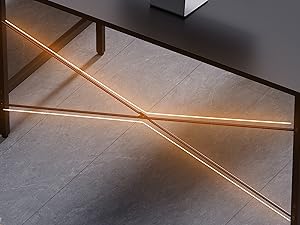
Image 3.3: The X-shaped back brace for enhanced stability.

Image 3.4: Adjustable leveling feet for stability.
4. ഉപയോഗവും പ്രവർത്തനവും
The Pamray S18 computer desk is designed for versatile use in various settings. Its compact size makes it ideal for small spaces, while its features enhance functionality and comfort.
- Ergonomic Workspace: Utilize the monitor stand to position your screen at an optimal eye level, reducing neck and eye strain. This promotes a more comfortable and productive working or gaming experience.
- Organized Desktop: The monitor stand also provides additional storage space underneath for small items, helping to keep your main desktop clear. The headphone hook keeps your audio gear or bag easily accessible and off the floor.
- ബഹുമുഖ ആപ്ലിക്കേഷൻ: This desk is suitable for use as a computer desk, writing desk, gaming desk, or study table. Its robust construction ensures it can support your equipment reliably.
5. പരിപാലനം
To ensure the longevity and appearance of your Pamray S18 computer desk, follow these simple maintenance guidelines:
- വൃത്തിയാക്കൽ: ഡെസ്ക്ടോപ്പും മെറ്റൽ ഫ്രെയിമും ഒരു സോഫ്റ്റ്, ഡി ക്ലീനർ ഉപയോഗിച്ച് തുടയ്ക്കുക.amp തുണി. കഠിനമായ രാസവസ്തുക്കളോ അബ്രാസീവ് ക്ലീനറുകളോ ഉപയോഗിക്കുന്നത് ഒഴിവാക്കുക, കാരണം ഇവ ഫിനിഷിന് കേടുവരുത്തും.
- ചോർച്ച: The tabletop is designed to be durable. In case of spills, wipe them immediately with a dry cloth to prevent any potential damage.
- ഫാസ്റ്റനറുകൾ ശക്തമാക്കുക: Periodically check and tighten all screws and fasteners to maintain the desk's stability and prevent wobbling.
- അമിത ഭാരം ഒഴിവാക്കുക: While sturdy, avoid placing excessive weight beyond the recommended capacity (150 pounds) on the desk or monitor stand.

Image 5.1: The durable tabletop is designed to resist minor spills.
6. പ്രശ്നപരിഹാരം
If you encounter any issues with your Pamray S18 computer desk, consider the following common troubleshooting steps:
- വോളിബിംഗ് ഡെസ്ക്: Ensure all screws are securely tightened. Adjust the leveling feet at the bottom of the desk legs to compensate for uneven floor surfaces.
- വിട്ടുപോയ ഭാഗങ്ങൾ: Double-check the packaging and accessory bag. If parts are genuinely missing, contact Pamray customer support with your purchase details.
- അസംബ്ലിംഗ് ബുദ്ധിമുട്ട്: Review the instruction manual and the assembly video carefully. Ensure you are using the correct hardware for each step. Do not overtighten screws, especially into particle board, to avoid stripping.
7 സ്പെസിഫിക്കേഷനുകൾ
| ഫീച്ചർ | വിശദാംശങ്ങൾ |
|---|---|
| ബ്രാൻഡ് | Pamray |
| മോഡൽ നമ്പർ | എസ് 18 |
| ഉൽപ്പന്ന അളവുകൾ | 18.9"D x 47.2"W x 29.2"H |
| നിറം | Pink (current variant) |
| ശൈലി | ആധുനികം |
| അടിസ്ഥാന മെറ്റീരിയൽ | ലോഹം |
| മികച്ച മെറ്റീരിയൽ തരം | Tabletop made of FSC-Certified Wood |
| പ്രത്യേക ഫീച്ചർ | Compact, Monitor Stand, Headphone Hook |
| പരമാവധി ഭാരം ശുപാർശ | 150 പൗണ്ട് |
| അസംബ്ലി ആവശ്യമാണ് | അതെ (എല്ലാ അസംബ്ലി ഉപകരണങ്ങളും ഉൾപ്പെടുന്നു) |
8. വാറൻ്റിയും പിന്തുണയും
Pamray is committed to providing quality home and office furniture. For any inquiries or support needs regarding your S18 computer desk, please refer to the following information:
- സംരക്ഷണ പദ്ധതികൾ: Extended protection plans are available for purchase, offering 2-Year or 3-Year coverage. Please check your purchase documentation for details on how to acquire these plans.
- സുതാര്യത പരിശോധന: Each Pamray item includes a unique code for verification before shipping, ensuring product authenticity.
- കസ്റ്റമർ സർവീസ്: For direct support, questions, or to report any issues, please contact Pamray customer service through the retailer where the product was purchased or visit the official Pamray store page for contact options.


