1. ആമുഖം
This manual provides essential information for the safe and efficient use of your XIAOMI Redmi 15C smartphone. Please read this guide thoroughly before operating your device to ensure proper functionality and to prevent damage.
The Redmi 15C is designed to offer a reliable mobile experience with its large display, powerful battery, and capable camera system.
2 സുരക്ഷാ വിവരങ്ങൾ
- ബാറ്ററി സുരക്ഷ: Do not attempt to replace the battery yourself. Use only authorized service centers. Avoid exposing the device to extreme temperatures or direct sunlight.
- ചാർജിംഗ്: Use only the original USB cable provided. A power adapter is not included; use a compatible 33W fast charger from a reputable manufacturer.
- വെള്ളവും പൊടിയും പ്രതിരോധം: The device features IP64 dust and water resistance. This rating indicates protection against dust ingress and splashing water from any direction. It is not designed for submersion in water.
- നീക്കം ചെയ്യൽ: പ്രാദേശിക നിയന്ത്രണങ്ങൾ അനുസരിച്ച് ഉപകരണവും അതിന്റെ ബാറ്ററിയും ഉത്തരവാദിത്തത്തോടെ സംസ്കരിക്കുക. ഗാർഹിക മാലിന്യങ്ങളിൽ സംസ്കരിക്കരുത്.
- ഡ്രൈവിംഗ് സുരക്ഷ: Always prioritize driving safety. Do not use your phone while driving unless absolutely necessary and in compliance with local laws.
3. പാക്കേജ് ഉള്ളടക്കം
നിങ്ങളുടെ പാക്കേജിൽ ഇനിപ്പറയുന്ന ഇനങ്ങൾ അടങ്ങിയിട്ടുണ്ടെന്ന് പരിശോധിക്കുക:
- XIAOMI Redmi 15C Smartphone
- USB കേബിൾ (ടൈപ്പ്-സി)
- സിം എജക്റ്റ് ടൂൾ
- ദ്രുത ആരംഭ ഗൈഡ്
- വാറൻ്റി കാർഡ്
Note: A power adapter is not included in the box and must be purchased separately. For optimal charging, use a 33W fast charger.
4. ഡിവൈസ് ഓവർview
Familiarize yourself with the physical components of your Redmi 15C.
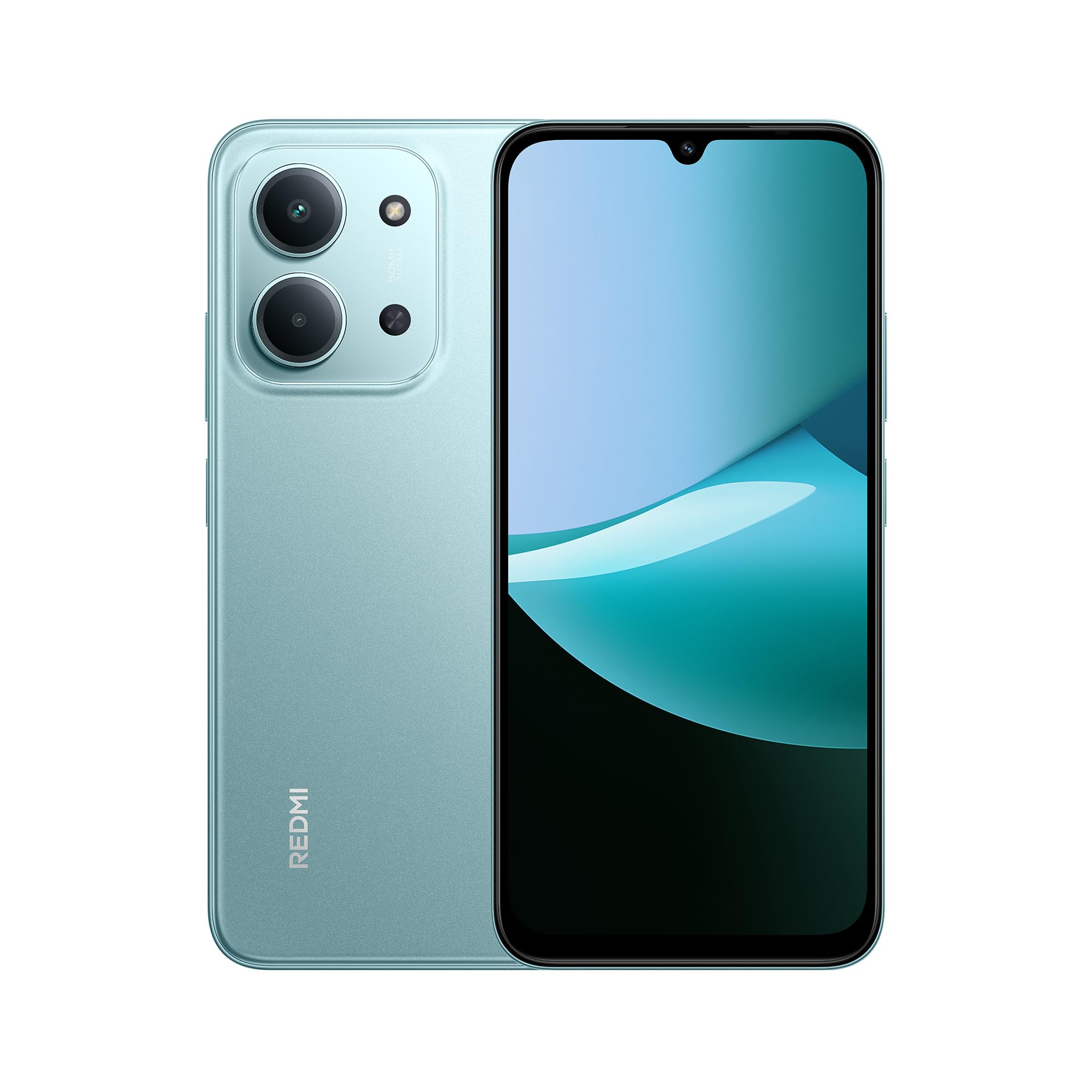
മുന്നിലും പിന്നിലും view of the XIAOMI Redmi 15C smartphone in Mint Green.

The slim 7.99mm body of the Redmi 15C, designed for comfortable handling.
ഭൗതിക ഘടകങ്ങൾ:
- പവർ ബട്ടൺ: വശത്ത് സ്ഥിതിചെയ്യുന്നു, ഉപകരണം ഓൺ/ഓഫ് ചെയ്യുന്നതിനോ സ്ക്രീൻ ഉണർത്തുന്നതിനോ ഉറങ്ങുന്നതിനോ ഉപയോഗിക്കുന്നു.
- വോളിയം ബട്ടണുകൾ: പവർ ബട്ടണിന് സമീപം സ്ഥിതിചെയ്യുന്നു, മീഡിയയും കോൾ വോളിയവും ക്രമീകരിക്കാൻ ഉപയോഗിക്കുന്നു.
- യുഎസ്ബി ടൈപ്പ്-സി പോർട്ട്: താഴെയായി സ്ഥിതിചെയ്യുന്നു, ചാർജ് ചെയ്യുന്നതിനും ഡാറ്റ കൈമാറ്റത്തിനും ഉപയോഗിക്കുന്നു.
- സിം/എസ്ഡി കാർഡ് ട്രേ: Located on the side, for inserting SIM cards and a microSD card.
- മുൻ ക്യാമറ: ഡിസ്പ്ലേയുടെ മുകളിൽ സ്ഥിതിചെയ്യുന്നു.
- പിൻ ക്യാമറ സിസ്റ്റം: Located on the back, featuring a 50MP AI dual camera.
- സ്പീക്കർ: ഓഡിയോ ഔട്ട്പുട്ടിനായി.
- മൈക്രോഫോൺ: For voice input during calls and recordings.
5. ആരംഭിക്കൽ (സജ്ജീകരണം)
5.1. Inserting SIM/SD Card
- നിങ്ങളുടെ ഉപകരണത്തിന്റെ വശത്ത് സിം കാർഡ് ട്രേ കണ്ടെത്തുക.
- ട്രേയുടെ അടുത്തുള്ള ചെറിയ ദ്വാരത്തിലേക്ക് സിം എജക്റ്റ് ടൂൾ തിരുകുക, ട്രേ പുറത്തേക്ക് വരുന്നത് വരെ ദൃഢമായി അമർത്തുക.
- Place your Nano-SIM card(s) and/or microSD card into the designated slots on the tray. Ensure the gold contacts face downwards. The device supports Dual SIM functionality.
- ഉപകരണത്തിലേക്ക് ട്രേ ശ്രദ്ധാപൂർവ്വം വീണ്ടും ചേർക്കുക.
5.2. പവർ ഓൺ/ഓഫ്
- പവർ ഓണാക്കാൻ: XIAOMI ലോഗോ ദൃശ്യമാകുന്നതുവരെ പവർ ബട്ടൺ അമർത്തിപ്പിടിക്കുക.
- പവർ ഓഫ് ചെയ്യാൻ: പവർ മെനു ദൃശ്യമാകുന്നതുവരെ പവർ ബട്ടൺ അമർത്തിപ്പിടിക്കുക, തുടർന്ന് "പവർ ഓഫ്" തിരഞ്ഞെടുക്കുക.
- പുനരാരംഭിക്കാൻ: പവർ മെനു ദൃശ്യമാകുന്നതുവരെ പവർ ബട്ടൺ അമർത്തിപ്പിടിക്കുക, തുടർന്ന് "പുനരാരംഭിക്കുക" തിരഞ്ഞെടുക്കുക.
5.3. പ്രാരംഭ സജ്ജീകരണ വിസാർഡ്
Upon first power-on, the device will guide you through the initial setup process. Follow the on-screen instructions to:
- നിങ്ങളുടെ ഭാഷയും പ്രദേശവും തിരഞ്ഞെടുക്കുക.
- ഒരു Wi-Fi നെറ്റ്വർക്കിലേക്ക് കണക്റ്റുചെയ്യുക.
- നിബന്ധനകളും വ്യവസ്ഥകളും അംഗീകരിക്കുക.
- Sign in to your Google account or create a new one.
- സ്ക്രീൻ ലോക്ക് (പിൻ, പാറ്റേൺ, പാസ്വേഡ്, ഫിംഗർപ്രിന്റ്, ഫെയ്സ് അൺലോക്ക്) സജ്ജീകരിക്കുക.
- മുമ്പത്തെ ഉപകരണത്തിൽ നിന്ന് ഡാറ്റ പുനഃസ്ഥാപിക്കുക (ഓപ്ഷണൽ).
6. അടിസ്ഥാന പ്രവർത്തനം
6.1. നാവിഗേഷൻ
The Redmi 15C features a responsive touchscreen. Use gestures such as tapping, swiping, pinching, and spreading to navigate the interface.
6.2. കോളുകൾ ചെയ്യുക, സന്ദേശങ്ങൾ അയയ്ക്കുക
- കോളുകൾ: "ഫോൺ" ആപ്പ് തുറന്ന് നമ്പർ നൽകി കോൾ ഐക്കണിൽ ടാപ്പ് ചെയ്യുക.
- സന്ദേശങ്ങൾ: Open the "Messages" app, tap the new message icon, enter the recipient and your message.
6.3. വൈഫൈയിലേക്കും ബ്ലൂടൂത്തിലേക്കും കണക്റ്റുചെയ്യുന്നു
- പോകുക ക്രമീകരണങ്ങൾ > Wi-Fi or ക്രമീകരണങ്ങൾ > ബ്ലൂടൂത്ത്.
- Toggle the respective switch to turn it on.
- Select the desired network or device from the list and enter the password if prompted.
6.4. ക്യാമറ ഉപയോഗിക്കുന്നത്
The Redmi 15C is equipped with a 50MP AI dual camera system for capturing photos and videos.

Detail of the 50MP AI dual camera system on the Redmi 15C, designed to capture clear and vibrant images.
- Open the "Camera" app.
- നിങ്ങൾക്ക് ആവശ്യമുള്ള മോഡ് തിരഞ്ഞെടുക്കുക (ഫോട്ടോ, പോർട്രെയ്റ്റ്, വീഡിയോ, മുതലായവ).
- Tap the shutter button to take a picture or start/stop recording a video.
6.5. ബാറ്ററി മാനേജ്മെന്റ്
The device features a massive 6000mAh battery for extended usage.

Illustration of the 6000mAh battery inside the Redmi 15C, providing up to 82 hours of music playback.
നിങ്ങളുടെ ഉപകരണം ചാർജ് ചെയ്യാൻ:

The Redmi 15C supports 33W fast charging, allowing the battery to reach 50% in approximately 31 minutes.
- Connect the USB Type-C cable to the device and a compatible 33W fast charger.
- Avoid overcharging; disconnect the charger once the battery is full.
- To optimize battery life, adjust screen brightness, disable unnecessary features, and close background apps.
7. വിപുലമായ സവിശേഷതകൾ
7.1. Processor Performance
The Redmi 15C is powered by a MediaTek Helio G81-Ultra octa-core processor, ensuring smooth performance for daily tasks and applications.

Visual representation of the powerful MediaTek Helio G81-Ultra octa-core processor, designed for consistent smooth performance.
7.2. Immersive Display
Experience content on the immersive 6.9-inch display with a 120Hz AdaptiveSync refresh rate, providing a smoother visual experience.

The 6.9-inch display of the Redmi 15C, featuring up to 120Hz AdaptiveSync for a fluid user interface.
7.3. AI Features with Google Gemini
The Redmi 15C integrates with Google Gemini, an AI assistant designed to help with various tasks such as writing, brainstorming, and learning.

The Redmi 15C demonstrating interaction with Google Gemini, an AI assistant for various tasks. Setup is required for this feature.
8. പരിപാലനം
8.1. ഉപകരണം വൃത്തിയാക്കൽ
- ഉപകരണത്തിൻ്റെ സ്ക്രീനും ബോഡിയും വൃത്തിയാക്കാൻ മൃദുവായ ലിൻ്റ് രഹിത തുണി ഉപയോഗിക്കുക.
- കഠിനമായ രാസവസ്തുക്കളോ ഉരച്ചിലുകളോ ഉപയോഗിക്കുന്നത് ഒഴിവാക്കുക.
- ഉപകരണത്തിലേക്ക് നേരിട്ട് ക്ലീനറുകൾ തളിക്കരുത്.
8.2. സോഫ്റ്റ്വെയർ അപ്ഡേറ്റുകൾ
നിങ്ങളുടെ ഉപകരണത്തിന് ഏറ്റവും പുതിയ ഫീച്ചറുകൾ, സുരക്ഷാ പാച്ചുകൾ, പ്രകടന മെച്ചപ്പെടുത്തലുകൾ എന്നിവ ഉണ്ടെന്ന് ഉറപ്പാക്കാൻ സോഫ്റ്റ്വെയർ അപ്ഡേറ്റുകൾ പതിവായി പരിശോധിച്ച് ഇൻസ്റ്റാൾ ചെയ്യുക.
- പോകുക ക്രമീകരണങ്ങൾ > ഫോണിനെക്കുറിച്ച് > MIUI പതിപ്പ് (or similar for Hyper OS).
- Tap "Check for updates" and follow the on-screen instructions.
8.3. സ്റ്റോറേജ് മാനേജ്മെൻ്റ്
To maintain optimal performance, regularly manage your device's storage.
- അനാവശ്യമായി ഇല്ലാതാക്കുക fileകൾ, ഫോട്ടോകൾ, വീഡിയോകൾ.
- ഉപയോഗിക്കാത്ത ആപ്ലിക്കേഷനുകൾ അൺഇൻസ്റ്റാൾ ചെയ്യുക.
- വലുതായി നീക്കുക fileമൈക്രോ എസ്ഡി കാർഡിലേക്കോ (ഇൻസ്റ്റാൾ ചെയ്തിട്ടുണ്ടെങ്കിൽ) ക്ലൗഡ് സംഭരണത്തിലേക്കോ.
9. പ്രശ്നപരിഹാരം
നിങ്ങളുടെ ഉപകരണത്തിൽ പ്രശ്നങ്ങൾ നേരിടുകയാണെങ്കിൽ, ഇനിപ്പറയുന്ന പരിഹാരങ്ങൾ പരീക്ഷിക്കുക:
| ഇഷ്യൂ | പരിഹാരം |
|---|---|
| ഉപകരണം ഓണാക്കുന്നില്ല | ബാറ്ററി ചാർജ് ചെയ്തിട്ടുണ്ടെന്ന് ഉറപ്പാക്കുക. കുറഞ്ഞത് 10 മിനിറ്റെങ്കിലും ചാർജറുമായി കണക്റ്റ് ചെയ്യുക, തുടർന്ന് പവർ ഓൺ ചെയ്യാൻ ശ്രമിക്കുക. |
| ആപ്പുകൾ ക്രാഷ് ചെയ്യുകയോ മരവിക്കുകയോ ചെയ്യുന്നു | Restart the device. Clear the cache of the problematic app (ക്രമീകരണങ്ങൾ > ആപ്പുകൾ > [ആപ്പ് നാമം] > സംഭരണം > കാഷെ മായ്ക്കുക). |
| മോശം നെറ്റ്വർക്ക് സിഗ്നൽ | Check if your SIM card is properly inserted. Try restarting the device. Ensure you are in an area with network coverage. |
| ബാറ്ററി പെട്ടെന്ന് തീരുന്നു | സ്ക്രീൻ തെളിച്ചം കുറയ്ക്കുക. പശ്ചാത്തല ആപ്പുകൾ അടയ്ക്കുക. ഉപയോഗത്തിലില്ലാത്തപ്പോൾ GPS അല്ലെങ്കിൽ ബ്ലൂടൂത്ത് പോലുള്ള അനാവശ്യ സവിശേഷതകൾ പ്രവർത്തനരഹിതമാക്കുക. |
| ഉപകരണം മന്ദഗതിയിലാണ് അല്ലെങ്കിൽ പ്രതികരിക്കുന്നില്ല. | Clear storage space. Restart the device. Check for system updates. |
If problems persist, contact customer support or visit an authorized service center.
10 സ്പെസിഫിക്കേഷനുകൾ
Detailed technical specifications for the XIAOMI Redmi 15C.
| ഫീച്ചർ | സ്പെസിഫിക്കേഷൻ |
|---|---|
| മോഡലിൻ്റെ പേര് | 15C |
| ഓപ്പറേറ്റിംഗ് സിസ്റ്റം | Hyper OS 2 |
| പ്രോസസ്സർ | MediaTek Helio G81-Ultra Octa-core |
| റാം | 4 ജിബി |
| സംഭരണ ശേഷി | 128 ജിബി |
| ഡിസ്പ്ലേ വലിപ്പം | 6.9 ഇഞ്ച് |
| ഡിസ്പ്ലേ റെസല്യൂഷൻ | 720 x 1600 |
| പുതുക്കിയ നിരക്ക് | 120 Hz |
| പിൻ ക്യാമറ | 50 MP AI Dual Camera |
| മുൻ ക്യാമറ | അതെ |
| ബാറ്ററി ശേഷി | 6000 mAh |
| സംസാര സമയം | 30 മണിക്കൂർ വരെ |
| ചാർജിംഗ് | 33W Fast Charging Compatible |
| കണക്റ്റിവിറ്റി | 4ജി, വൈ-ഫൈ, ബ്ലൂടൂത്ത്, ജിപിഎസ് |
| സിം പിന്തുണ | ഡ്യുവൽ സിം |
| അളവുകൾ (L x W x H) | 17.3 x 8.1 x 0.82 സെ.മീ |
| ഭാരം | 400 ഗ്രാം |
| പ്രത്യേക സവിശേഷതകൾ | Wi-Fi Hotspot, Integrated GPS, IP64 Dust and Water Resistance |
11. വാറൻ്റിയും പിന്തുണയും
Your XIAOMI Redmi 15C smartphone comes with a standard manufacturer's warranty. Please refer to the warranty card included in your package for specific terms and conditions, including warranty period and coverage details.
For technical support, service, or further inquiries, please visit the official XIAOMI support webസൈറ്റിൽ ബന്ധപ്പെടുക അല്ലെങ്കിൽ അവരുടെ ഉപഭോക്തൃ സേവനവുമായി ബന്ധപ്പെടുക. വാറന്റി ക്ലെയിമുകൾക്കായി നിങ്ങളുടെ വാങ്ങിയതിന്റെ തെളിവ് സൂക്ഷിക്കുക.


