ആമുഖം
This manual provides essential information for setting up, operating, maintaining, and troubleshooting your HP OmniDesk Desktop PC, model M02-0075t. Please read this guide thoroughly to ensure proper use and to maximize the performance and longevity of your device.
സജ്ജമാക്കുക
- അൺപാക്ക് ചെയ്യുന്നു: Carefully remove the HP OmniDesk Desktop PC and all accessories from the packaging. Ensure all components listed in the 'What's in the Box' section are present.
- പ്ലേസ്മെൻ്റ്: Place the desktop PC on a stable, flat surface with adequate ventilation around all sides. Avoid placing it in direct sunlight or near heat sources.
- പെരിഫറലുകൾ ബന്ധിപ്പിക്കുക:
- Connect your monitor to the appropriate video output port on the rear of the PC.
- Connect the included USB wired keyboard and mouse to any available USB-A ports.
- Connect any other desired peripherals such as speakers or external drives.
- പവർ കണക്ഷൻ: Connect the power cord to the power input on the rear of the PC, then plug the other end into a grounded electrical outlet.
- പ്രാരംഭ ബൂട്ട്-അപ്പ്: Press the power button located on the front of the PC. The system will begin the initial setup process for Windows 11 Home. Follow the on-screen instructions to complete the operating system configuration.

പ്രവർത്തന നിർദ്ദേശങ്ങൾ
- പവർ ഓൺ/ഓഫ്: Press the power button on the front of the PC to turn it on. To shut down, click the Start button in Windows, then select Power > Shut down.
- Using Ports:
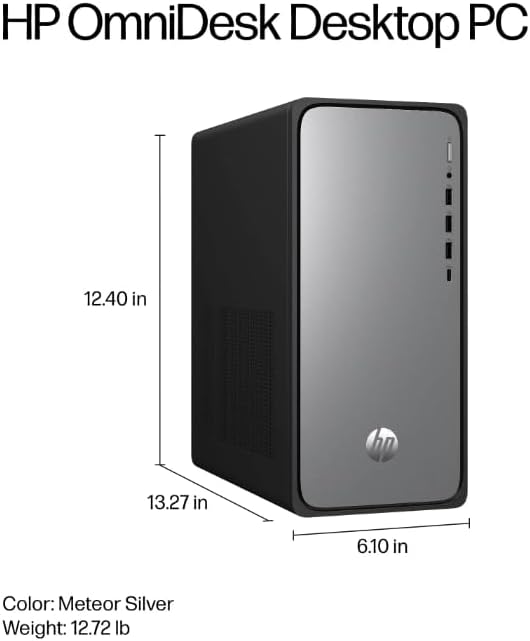
- ഫ്രണ്ട് പോർട്ടുകൾ: 1 USB Type-C (10Gbps), 3 USB Type-A (5Gbps), 1 headphone/microphone combo jack. These are ideal for frequently connected devices like USB drives, headphones, or charging cables.
- പിൻ തുറമുഖങ്ങൾ: 4 USB 2.0 Type-A, 1 3.5 mm audio jack, 1 RJ-45 Ethernet port. Use these for less frequently connected devices or for network connectivity.
- നെറ്റ്വർക്ക് കണക്റ്റിവിറ്റി:
- വൈഫൈ: The PC features Realtek Wi-Fi 6 (2x2). To connect, click the network icon in the taskbar, select your desired Wi-Fi network, and enter the password.
- ബ്ലൂടൂത്ത്: Integrated Bluetooth 5.4 allows connection to wireless peripherals. Access Bluetooth settings via the Windows Settings menu.
- ഇഥർനെറ്റ്: For a wired connection, plug an Ethernet cable into the RJ-45 port on the rear of the PC.
- കോപൈലറ്റ് കീ: The included keyboard features a Copilot key. Press this key to quickly launch the AI Assistant in Windows 11 for enhanced multitasking and productivity.

മെയിൻ്റനൻസ്
- വൃത്തിയാക്കൽ: Use a soft, dry cloth to clean the exterior of the PC. For dust accumulation in vents, use compressed air. Do not use liquid cleaners directly on the PC.
- സോഫ്റ്റ്വെയർ അപ്ഡേറ്റുകൾ: Regularly check for and install Windows updates and driver updates to ensure optimal performance and security. Access Windows Update via Settings > Windows Update.
- ഡാറ്റ ബാക്കപ്പ്: ഡാറ്റ നഷ്ടപ്പെടുന്നത് തടയാൻ, പ്രധാനപ്പെട്ട ഡാറ്റ ഇടയ്ക്കിടെ ഒരു ബാഹ്യ ഡ്രൈവിലേക്കോ ക്ലൗഡ് സ്റ്റോറേജിലേക്കോ ബാക്കപ്പ് ചെയ്യുക.
ട്രബിൾഷൂട്ടിംഗ്
- ശക്തിയില്ല: Ensure the power cord is securely connected to both the PC and the electrical outlet. Verify the outlet is functional.
- ഡിസ്പ്ലേ ഇല്ല: Check that the monitor is properly connected to the PC and its power cable is plugged in. Ensure the monitor is set to the correct input source.
- നെറ്റ്വർക്ക് കണക്റ്റിവിറ്റി പ്രശ്നങ്ങൾ: For Wi-Fi, ensure the Wi-Fi adapter is enabled and you are connected to the correct network. For wired connections, check the Ethernet cable and router status.
- Peripheral Not Responding: പെരിഫറൽ മറ്റൊരു യുഎസ്ബി പോർട്ടിലേക്ക് ബന്ധിപ്പിക്കാൻ ശ്രമിക്കുക. ആവശ്യമെങ്കിൽ ഡ്രൈവറുകൾ ഇൻസ്റ്റാൾ ചെയ്തിട്ടുണ്ടെന്ന് ഉറപ്പാക്കുക.
സ്പെസിഫിക്കേഷനുകൾ
| ഘടകം | വിശദാംശങ്ങൾ |
| മോഡൽ നമ്പർ | M02-0075t (B6NG0AA) |
| പ്രോസസ്സർ | Intel Core i7-14700 (up to 5.4 GHz, 20 cores, 28 threads) |
| റാം | 16 GB DDR5-5600 MT/s (1 x 16 GB) |
| സംഭരണം | 2 TB PCIe Gen4 NVMe M.2 SSD |
| ഗ്രാഫിക്സ് | ഇൻ്റഗ്രേറ്റഡ് ഇൻ്റൽ യുഎച്ച്ഡി ഗ്രാഫിക്സ് |
| ഓപ്പറേറ്റിംഗ് സിസ്റ്റം | വിൻഡോസ് 11 ഹോം |
| വയർലെസ് | റിയൽടെക് വൈ-ഫൈ 6 (2x2), ബ്ലൂടൂത്ത് 5.4 |
| ഫ്രണ്ട് പോർട്ടുകൾ | 1 USB Type-C (10Gbps), 3 USB Type-A (5Gbps), 1 headphone/microphone combo |
| പിൻ തുറമുഖങ്ങൾ | 4 USB 2.0 Type-A, 1 3.5 mm audio jack, 1 RJ-45 |
| അളവുകൾ (LxWxH) | 13.27 x 6.1 x 12.4 ഇഞ്ച് |
| ഭാരം | 11.49 പൗണ്ട് |
വാറൻ്റിയും പിന്തുണയും
വാറന്റി വിവരങ്ങൾക്ക്, നിങ്ങളുടെ ഉൽപ്പന്നത്തിനൊപ്പം ഉൾപ്പെടുത്തിയിരിക്കുന്ന ഡോക്യുമെന്റേഷൻ പരിശോധിക്കുക അല്ലെങ്കിൽ ഔദ്യോഗിക HP പിന്തുണ സന്ദർശിക്കുക. webസൈറ്റ്. ഡ്രൈവറുകൾ, സോഫ്റ്റ്വെയർ അപ്ഡേറ്റുകൾ, ട്രബിൾഷൂട്ടിംഗ് ഗൈഡുകൾ എന്നിവയുൾപ്പെടെ വിവിധ പിന്തുണാ ഉറവിടങ്ങൾ HP നൽകുന്നു.
For technical assistance, please contact HP Customer Support through their official channels. Have your product model number (M02-0075t or B6NG0AA) and serial number ready when contacting support.