1. ആമുഖം
Thank you for choosing the Proscenic F10 Ultra Wet Dry Vacuum Cleaner. This appliance is designed to provide efficient and versatile cleaning for various hard floor surfaces, combining vacuuming and wiping functions. Please read this manual thoroughly before initial use to ensure proper operation, maintenance, and safety. Keep this manual for future reference.
2. പ്രധാന സുരക്ഷാ നിർദ്ദേശങ്ങൾ
ഒരു ഇലക്ട്രിക്കൽ ഉപകരണം ഉപയോഗിക്കുമ്പോൾ, ഇനിപ്പറയുന്നവ ഉൾപ്പെടെ അടിസ്ഥാന മുൻകരുതലുകൾ എല്ലായ്പ്പോഴും പാലിക്കണം:
- ഈ ഉപകരണം ഉപയോഗിക്കുന്നതിന് മുമ്പ് എല്ലാ നിർദ്ദേശങ്ങളും വായിക്കുക.
- പുറത്തോ നനഞ്ഞ പ്രതലങ്ങളിലോ ഉപയോഗിക്കരുത്.
- കളിപ്പാട്ടമായി ഉപയോഗിക്കാൻ അനുവദിക്കരുത്. കുട്ടികൾ അല്ലെങ്കിൽ അടുത്ത് ഉപയോഗിക്കുമ്പോൾ വളരെ ശ്രദ്ധ ആവശ്യമാണ്.
- ഈ മാനുവലിൽ വിവരിച്ചിരിക്കുന്നതുപോലെ മാത്രം ഉപയോഗിക്കുക. നിർമ്മാതാവ് ശുപാർശ ചെയ്യുന്ന അറ്റാച്ചുമെന്റുകൾ മാത്രം ഉപയോഗിക്കുക.
- കേടായ ചരടോ പ്ലഗോ ഉപയോഗിച്ച് ഉപയോഗിക്കരുത്. ഉപകരണം ശരിയായി പ്രവർത്തിക്കുന്നില്ലെങ്കിൽ, അത് താഴെ വീണിട്ടുണ്ടെങ്കിൽ, കേടുപാടുകൾ സംഭവിച്ചിട്ടുണ്ടെങ്കിൽ, പുറത്ത് വച്ചിട്ടുണ്ടെങ്കിൽ, അല്ലെങ്കിൽ വെള്ളത്തിൽ വീണിട്ടുണ്ടെങ്കിൽ, അത് ഒരു സർവീസ് സെന്ററിലേക്ക് തിരികെ നൽകുക.
- ചരട് ഉപയോഗിച്ച് വലിക്കുകയോ കൊണ്ടുപോകുകയോ ചെയ്യരുത്, ചരട് ഒരു ഹാൻഡിലായി ഉപയോഗിക്കുക, ചരടിൽ ഒരു വാതിൽ അടയ്ക്കുക, അല്ലെങ്കിൽ മൂർച്ചയുള്ള അരികുകളിലോ മൂലകളിലോ ചരട് വലിക്കുക. ചരടിന് മുകളിലൂടെ ഉപകരണം പ്രവർത്തിപ്പിക്കരുത്. ചൂടായ പ്രതലങ്ങളിൽ നിന്ന് ചരട് സൂക്ഷിക്കുക.
- ചരട് വലിച്ചുകൊണ്ട് അൺപ്ലഗ് ചെയ്യരുത്. അൺപ്ലഗ് ചെയ്യാൻ, പ്ലഗ് പിടിക്കുക, ചരടല്ല.
- നനഞ്ഞ കൈകളാൽ പ്ലഗ്ഗോ ഉപകരണമോ കൈകാര്യം ചെയ്യരുത്.
- ഒരു വസ്തുവും തുറസ്സുകളിൽ ഇടരുത്. ഒരു ഓപ്പണിംഗും തടഞ്ഞിരിക്കുമ്പോൾ ഉപയോഗിക്കരുത്; പൊടി, ലിൻ്റ്, മുടി, വായുപ്രവാഹം കുറയ്ക്കുന്ന എന്തും എന്നിവ ഒഴിവാക്കുക.
- മുടി, അയഞ്ഞ വസ്ത്രങ്ങൾ, വിരലുകൾ, ശരീരത്തിൻ്റെ എല്ലാ ഭാഗങ്ങളും തുറസ്സുകളിൽ നിന്നും ചലിക്കുന്ന ഭാഗങ്ങളിൽ നിന്നും അകറ്റി നിർത്തുക.
- കത്തുന്നതോ പുകവലിക്കുന്നതോ ആയ സിഗരറ്റ്, തീപ്പെട്ടി, ചൂടുള്ള ചാരം എന്നിവയൊന്നും എടുക്കരുത്.
- ഗ്യാസോലിൻ പോലുള്ള കത്തുന്നതോ കത്തുന്നതോ ആയ ദ്രാവകങ്ങൾ എടുക്കാനോ അവ ഉള്ള സ്ഥലങ്ങളിൽ ഉപയോഗിക്കാനോ ഉപയോഗിക്കരുത്.
- ക്ലോറിൻ ബ്ലീച്ച്, അമോണിയ, ഡ്രെയിൻ ക്ലീനർ തുടങ്ങിയ വിഷാംശമുള്ള വസ്തുക്കൾ എടുക്കരുത്.
- ടാങ്കുകളും ഫിൽട്ടറുകളും ഇല്ലാതെ ഉപയോഗിക്കരുത്.
- അൺപ്ലഗ് ചെയ്യുന്നതിനുമുമ്പ് എല്ലാ നിയന്ത്രണങ്ങളും ഓഫാക്കുക.
- കോണിപ്പടികളിൽ വൃത്തിയാക്കുമ്പോൾ കൂടുതൽ ശ്രദ്ധിക്കണം.
- ഗ്ലാസ്, നഖങ്ങൾ, സ്ക്രൂകൾ, നാണയങ്ങൾ തുടങ്ങിയ കടുപ്പമുള്ളതോ മൂർച്ചയുള്ളതോ ആയ വസ്തുക്കൾ എടുക്കാൻ ഉപയോഗിക്കരുത്.
- ബോധപൂർവമല്ലാത്ത തുടക്കം തടയുക. ബാറ്ററി പാക്കിലേക്ക് കണക്റ്റ് ചെയ്യുന്നതിനും ഉപകരണം എടുക്കുന്നതിനും കൊണ്ടുപോകുന്നതിനും മുമ്പ് സ്വിച്ച് ഓഫ് പൊസിഷനിൽ ആണെന്ന് ഉറപ്പാക്കുക.
- നിർമ്മാതാവ് വ്യക്തമാക്കിയ ചാർജർ ഉപയോഗിച്ച് മാത്രം റീചാർജ് ചെയ്യുക.
3. ഉൽപ്പന്ന ഘടകങ്ങൾ
Familiarize yourself with the parts of your Proscenic F10 Ultra Wet Dry Vacuum Cleaner.
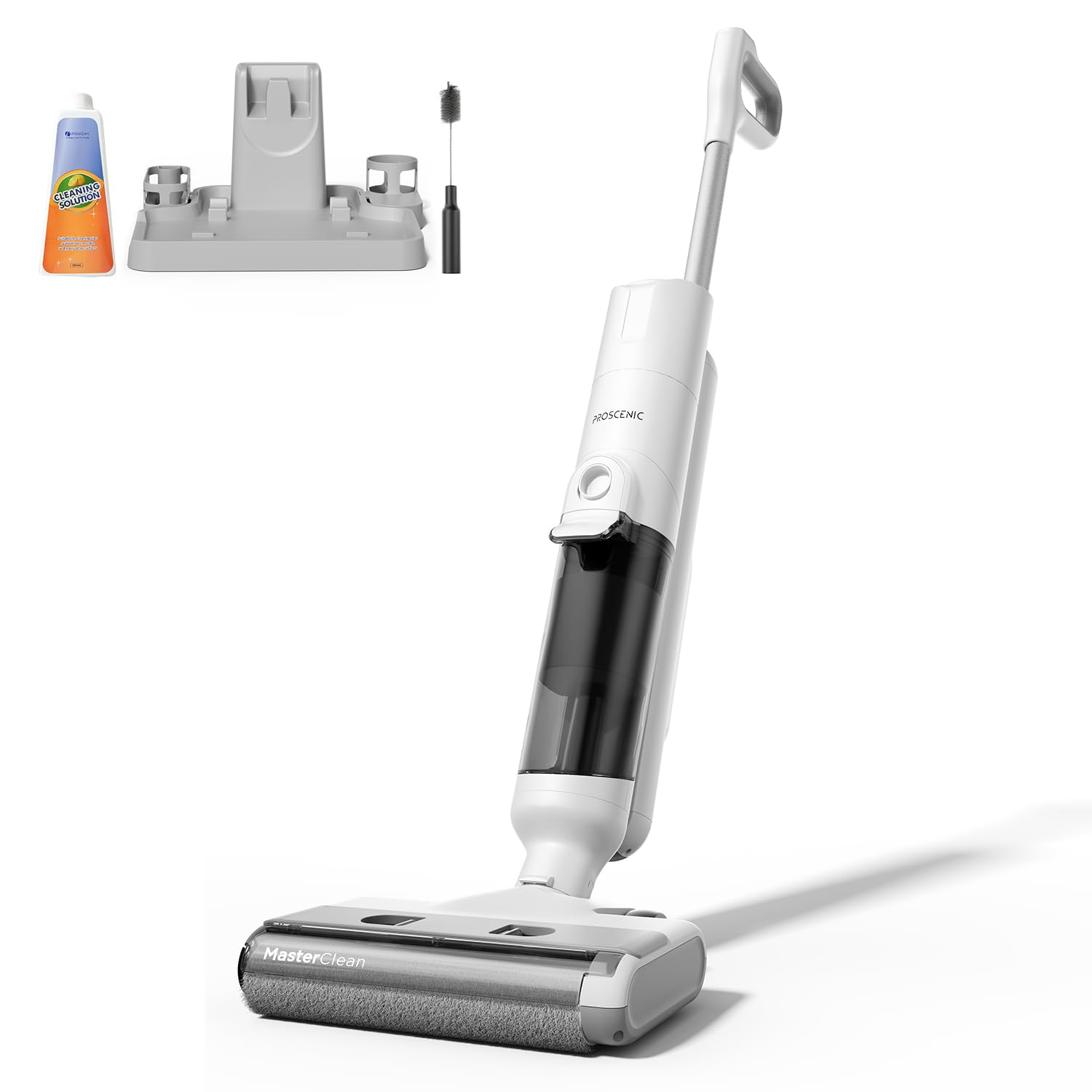
Image 1: Proscenic F10 Ultra Wet Dry Vacuum Cleaner. This image displays the main body of the vacuum cleaner, showcasing its sleek design and primary components such as the handle, main unit, and floor head.
പാക്കേജ് ഉള്ളടക്കം:
- പ്രധാന വാക്വം യൂണിറ്റ്
- അസംബ്ലി കൈകാര്യം ചെയ്യുക
- ശുദ്ധമായ വാട്ടർ ടാങ്ക്
- വൃത്തികെട്ട വാട്ടർ ടാങ്ക്
- ചാർജിംഗ് ബേസ്
- പവർ അഡാപ്റ്റർ
- ക്ലീനിംഗ് ബ്രഷ് ടൂൾ
- HEPA ഫിൽറ്റർ (മുൻകൂട്ടി ഇൻസ്റ്റാൾ ചെയ്തതോ സ്പെയർ ആയതോ)
- ഉപയോക്തൃ മാനുവൽ (ഈ പ്രമാണം)
പ്രധാന ഘടകങ്ങൾ:
- LED ഡിസ്പ്ലേ: Provides real-time information on battery status, cleaning mode, and alerts.
- വോയ്സ് നിർദ്ദേശങ്ങൾ: Guides users through operation and maintenance tasks.
- ശുദ്ധമായ വാട്ടർ ടാങ്ക്: Holds fresh water and cleaning solution.
- വൃത്തികെട്ട വാട്ടർ ടാങ്ക്: Collects dirty water and debris.
- ബ്രഷ് റോൾ: Actively scrubs and cleans floors.
- ഇൻഫ്രാറെഡ് സെൻസറുകൾ: Detects dirt levels in Smart Mode.
- സ്വയം വൃത്തിയാക്കൽ ബട്ടൺ: Initiates the automatic brush cleaning cycle.
4. സജ്ജീകരണവും പ്രാരംഭ ഉപയോഗവും
4.1 അസംബ്ലി
- ഹാൻഡിൽ അസംബ്ലി പ്രധാന യൂണിറ്റിലേക്ക് സുരക്ഷിതമായി ക്ലിക്കുചെയ്യുന്നത് വരെ തിരുകുക.
- വൃത്തിയുള്ള വാട്ടർ ടാങ്കും വൃത്തികെട്ട വാട്ടർ ടാങ്കും അവയുടെ സ്ഥാനങ്ങളിൽ ശരിയായി സ്ഥാപിച്ചിട്ടുണ്ടെന്ന് ഉറപ്പാക്കുക.
4.2 ബാറ്ററി ചാർജ് ചെയ്യുന്നു
- Place the vacuum cleaner on its charging base.
- Connect the power adapter to the charging base and then to a power outlet.
- The LED display will indicate the charging status. A full charge takes approximately 4 hours.
- Ensure the appliance is fully charged before its first use to maximize battery life.
4.3 ശുദ്ധജല ടാങ്ക് നിറയ്ക്കൽ
- പ്രധാന യൂണിറ്റിൽ നിന്ന് ശുദ്ധജല ടാങ്ക് നീക്കം ചെയ്യുക.
- Open the tank cap and fill with clean tap water. You may add a small amount of non-foaming cleaning solution suitable for wet/dry vacuums, following the solution's instructions. Do not overfill.
- Close the cap securely and reinsert the tank into the vacuum cleaner.
5. പ്രവർത്തന നിർദ്ദേശങ്ങൾ
5.1 പവർ ഓൺ/ഓഫ്
Press the Power button on the handle to turn the vacuum cleaner on or off. The LED display will illuminate, and voice prompts will guide you.
5.2 Selecting Cleaning Modes
The Proscenic F10 Ultra offers three cleaning modes:
- സ്മാർട്ട് മോഡ്: Infrared sensors automatically detect the level of dirt and adjust suction power and water flow accordingly. Ideal for general cleaning and varying dirt levels.
- വാക് മോഡ്: Provides economical cleaning with reduced water output, suitable for wooden floors or light dry debris.
- പരമാവധി മോഡ്: Delivers intensive stain removal with maximum suction and water flow, recommended for heavily soiled areas like kitchens and terraces.
Press the Mode button on the handle to cycle through the available cleaning modes. The selected mode will be displayed on the LED screen.
5.3 ശുചീകരണ പ്രക്രിയ
- ശുദ്ധജല ടാങ്ക് നിറഞ്ഞിട്ടുണ്ടെന്നും വൃത്തികെട്ട വാട്ടർ ടാങ്ക് ശൂന്യമാണെന്നും ഉറപ്പാക്കുക.
- Turn on the appliance and select your desired cleaning mode.
- Tilt the vacuum cleaner back to engage the brush roll and begin cleaning. The self-propelled design assists in effortless movement.
- Move the vacuum cleaner slowly over the floor surface, allowing it to vacuum and wipe simultaneously.
- For edge cleaning, guide the vacuum cleaner along walls and baseboards.
- Monitor the LED display for battery status and any alerts. Voice prompts will also provide guidance.
- When finished, turn off the appliance and return it to the charging base.
6. പരിപാലനവും പരിചരണവും
Regular maintenance ensures optimal performance and extends the lifespan of your Proscenic F10 Ultra.
6.1 സ്വയം വൃത്തിയാക്കൽ പ്രവർത്തനം
- After each use, place the vacuum cleaner on its charging base.
- ശുദ്ധജല ടാങ്കിൽ ആവശ്യത്തിന് ശുദ്ധജലം ഉണ്ടെന്ന് ഉറപ്പാക്കുക.
- Press the Self-Cleaning button (usually indicated by a water drop icon).
- The appliance will automatically clean the brush roll and internal pathways. This process typically takes about 1 minute.
- Once the self-cleaning cycle is complete, empty the dirty water tank.
6.2 വൃത്തികെട്ട വാട്ടർ ടാങ്ക് കാലിയാക്കലും വൃത്തിയാക്കലും
- പ്രധാന യൂണിറ്റിൽ നിന്ന് വൃത്തികെട്ട വാട്ടർ ടാങ്ക് നീക്കം ചെയ്യുക.
- Carefully open the tank and dispose of the dirty water and debris.
- ശുദ്ധജലം ഉപയോഗിച്ച് ടാങ്ക് നന്നായി കഴുകുക.
- Clean the filter assembly within the dirty water tank.
- വീണ്ടും കൂട്ടിച്ചേർക്കുന്നതിന് മുമ്പ് എല്ലാ ഭാഗങ്ങളും പൂർണ്ണമായും വായുവിൽ ഉണങ്ങാൻ അനുവദിക്കുക.
6.3 ബ്രഷ് റോൾ വൃത്തിയാക്കൽ
- Even with the self-cleaning function, periodic manual cleaning of the brush roll is recommended.
- ഉപകരണം ഓഫാക്കി അൺപ്ലഗ് ചെയ്യുക.
- Remove the brush roll cover and then the brush roll itself.
- Use the provided cleaning brush tool to remove any tangled hair or debris from the brush roll.
- ഒഴുകുന്ന വെള്ളത്തിനടിയിൽ ബ്രഷ് റോൾ കഴുകുക.
- Allow the brush roll to air dry completely before reinstalling.
6.4 HEPA ഫിൽട്ടർ വൃത്തിയാക്കൽ
The HEPA filter should be cleaned regularly and replaced every 3-6 months, depending on usage.
- Locate and remove the HEPA filter, typically found within the dirty water tank assembly.
- Tap the filter gently to dislodge dust and debris. You may rinse it under cool running water.
- Ensure the filter is completely dry before reinstallation to prevent mold growth and maintain suction performance.
7. പ്രശ്നപരിഹാരം
പൊതുവായ പ്രശ്നങ്ങളും അവയുടെ പരിഹാരങ്ങളും അറിയാൻ ഈ വിഭാഗം കാണുക.
| പ്രശ്നം | സാധ്യമായ കാരണം | പരിഹാരം |
|---|---|---|
| ഉപകരണം ഓണാക്കുന്നില്ല. | ബാറ്ററി തീർന്നു. | ഉപകരണം പൂർണ്ണമായും ചാർജ് ചെയ്യുക. |
| പവർ ബട്ടൺ ശരിയായി അമർത്തിയിട്ടില്ല. | പവർ ബട്ടൺ ദൃഡമായി അമർത്തിയെന്ന് ഉറപ്പാക്കുക. | |
| മോശം സക്ഷൻ അല്ലെങ്കിൽ ക്ലീനിംഗ് പ്രകടനം. | വൃത്തികെട്ട വാട്ടർ ടാങ്ക് നിറഞ്ഞു. | വൃത്തിഹീനമായ വാട്ടർ ടാങ്ക് ശൂന്യമാക്കി വൃത്തിയാക്കുക. |
| ബ്രഷ് റോൾ പിണഞ്ഞുപോയതോ വൃത്തികെട്ടതോ ആണ്. | Clean the brush roll, remove any hair or debris. | |
| HEPA ഫിൽട്ടർ അടഞ്ഞുപോയി. | HEPA ഫിൽട്ടർ വൃത്തിയാക്കുക അല്ലെങ്കിൽ മാറ്റിസ്ഥാപിക്കുക. | |
| ശുദ്ധമായ വാട്ടർ ടാങ്ക് കാലിയാണ്. | ശുദ്ധജല ടാങ്ക് വീണ്ടും നിറയ്ക്കുക. | |
| വെള്ളം ചോർച്ച. | Tanks not properly installed. | Ensure both clean and dirty water tanks are securely in place. |
| Tank caps are not sealed. | Check that all tank caps are tightly closed. | |
| Self-cleaning function not working. | Insufficient water in clean water tank. | Ensure the clean water tank is filled above the minimum level. |
| വൃത്തികെട്ട വാട്ടർ ടാങ്ക് നിറഞ്ഞു. | Empty the dirty water tank before initiating self-cleaning. |
8 സ്പെസിഫിക്കേഷനുകൾ
| ബ്രാൻഡ് | പ്രോസെനിക് |
| മോഡൽ | F10 അൾട്രാ |
| ഇനത്തിൻ്റെ ഭാരം | 8.8 പൗണ്ട് |
| ഫോം ഫാക്ടർ | Handheld (referring to the main unit's design for maneuverability) |
| ബാറ്ററി തരം | ലിഥിയം-അയൺ |
| ഫിൽട്ടർ തരം | HEPA ഫിൽട്ടർ |
| പവർ ഉറവിടം | ബാറ്ററി പവർ |
| വാല്യംtage | 28.8 വോൾട്ട് |
| Capacity (Water Tanks) | 1.3 ലിറ്റർ |
| വാട്ട്tage | 350 വാട്ട്സ് |
| ചാർജിംഗ് സമയം | 4 മണിക്കൂർ |
| റണ്ണിംഗ് ടൈം | 60 മിനിറ്റ് വരെ (മോഡ് അനുസരിച്ച്) |
| നിറം | വെള്ള |
9. വാറണ്ടിയും ഉപഭോക്തൃ പിന്തുണയും
Proscenic products are manufactured to high-quality standards. For specific warranty information, please refer to the warranty card included with your purchase or visit the official Proscenic website. If you encounter any issues or have questions regarding your Proscenic F10 Ultra Wet Dry Vacuum Cleaner, please contact Proscenic customer support for assistance.
നിർമ്മാതാവ്: പ്രോസെനിക്
കൂടുതൽ പിന്തുണയ്ക്ക്, സന്ദർശിക്കുക Proscenic Store on Amazon.


