ആമുഖം
Welcome to the user manual for your Lenovo Tab M9 Android 12 Tablet. This document provides essential information to help you get started, operate, maintain, and troubleshoot your device. The Lenovo Tab M9 combines portability with performance, featuring a 9-inch HD IPS display, Dolby Atmos audio, and an Octa-core MediaTek Helio G80 processor. It comes with 3GB RAM and 96GB of storage (32GB internal + 64GB microSD card), making it suitable for various tasks from streaming to light gaming. Enhanced with features like Google Lens and facial recognition, and bundled with a folio case, screen film, and stylus pen, this tablet is designed for a versatile user experience.
ബോക്സിൽ എന്താണുള്ളത്
Upon unboxing your Lenovo Tab M9, please ensure all the following items are present:
- Lenovo Tab M9 Android 12 Tablet
- 64GB മൈക്രോഎസ്ഡി കാർഡ് (മുൻകൂട്ടി ഇൻസ്റ്റാൾ ചെയ്തതോ പ്രത്യേകം)
- ഫോളിയോ കേസ്
- സ്ക്രീൻ പ്രൊട്ടക്ടർ ഫിലിം
- സ്റ്റൈലസ് പേന
- USB-C ചാർജിംഗ് കേബിൾ
- പവർ അഡാപ്റ്റർ
- ക്വിക്ക് സ്റ്റാർട്ട് ഗൈഡ് (പ്രത്യേകമായി ഉൾപ്പെടുത്തിയേക്കാം)
സജ്ജമാക്കുക
1. പ്രാരംഭ ചാർജിംഗും പവർ ഓണും
Before first use, it is recommended to fully charge your tablet. Connect the USB-C charging cable to the tablet's USB-C port and the power adapter, then plug it into a wall outlet. The battery indicator on the screen will show charging status. Once sufficiently charged, press and hold the power button (usually located on the side) until the Lenovo logo appears.
2. Basic Setup Steps
പ്രാരംഭ സജ്ജീകരണം പൂർത്തിയാക്കാൻ ഓൺ-സ്ക്രീൻ നിർദ്ദേശങ്ങൾ പാലിക്കുക:
- ഭാഷ തിരഞ്ഞെടുക്കൽ: നിങ്ങൾ തിരഞ്ഞെടുത്ത ഭാഷ തിരഞ്ഞെടുക്കുക.
- Wi-Fi കണക്ഷൻ: നിങ്ങളുടെ വൈഫൈ നെറ്റ്വർക്ക് തിരഞ്ഞെടുത്ത് ഇന്റർനെറ്റിലേക്ക് കണക്റ്റുചെയ്യാൻ പാസ്വേഡ് നൽകുക.
- Google അക്കൗണ്ട്: നിങ്ങളുടെ ഗൂഗിൾ അക്കൗണ്ട് ഉപയോഗിച്ച് സൈൻ ഇൻ ചെയ്യുകയോ പുതിയൊരെണ്ണം സൃഷ്ടിക്കുകയോ ചെയ്യുക. ഗൂഗിൾ പ്ലേ സ്റ്റോറും മറ്റ് ഗൂഗിൾ സേവനങ്ങളും ആക്സസ് ചെയ്യുന്നതിന് ഇത് അത്യാവശ്യമാണ്.
- തീയതിയും സമയവും: ശരിയായ തീയതിയും സമയവും സജ്ജമാക്കുക, അല്ലെങ്കിൽ നെറ്റ്വർക്ക് വഴി ടാബ്ലെറ്റിന് അത് യാന്ത്രികമായി സജ്ജമാക്കാൻ അനുവദിക്കുക.
- സുരക്ഷ: Set up a screen lock (PIN, pattern, password, or facial recognition) to protect your device.
3. ആക്സസറികൾ ഇൻസ്റ്റാൾ ചെയ്യുന്നു
Your tablet comes with a folio case, screen protector, and stylus pen.
- സ്ക്രീൻ പ്രൊട്ടക്ടർ: Carefully apply the screen protector film to the tablet's display, ensuring no dust or air bubbles.
- Folio Case: Insert the tablet into the folio case for protection and to enable stand functionality.
- മൈക്രോ എസ്ഡി കാർഡ്: If not pre-installed, locate the microSD card slot (refer to the physical overview image) and insert the 64GB microSD card for expanded storage.

Image: Lenovo Tab M9 tablet with its folio case open, showcasing the display. This illustrates the tablet ready for use with its protective cover.
ടാബ്ലെറ്റ് പ്രവർത്തിപ്പിക്കുന്നു
1. നാവിഗേഷനും ഉപയോക്തൃ ഇന്റർഫേസും
The Lenovo Tab M9 runs on Android 12. Navigate using touch gestures: swipe up for the app drawer, swipe down for notifications and quick settings, tap to open apps, and pinch to zoom.
2. ഡിസ്പ്ലേയും ഓഡിയോയും
The 9-inch HD IPS display (1340x800 resolution) provides clear visuals. Audio is enhanced by Dolby Atmos through dual speakers, offering an immersive sound experience for media consumption.
3. ക്യാമറ ഉപയോഗം
The tablet features an 8.0MP rear camera and a 2.0MP front camera. Open the Camera app to take photos or record videos. The front camera is suitable for video calls.
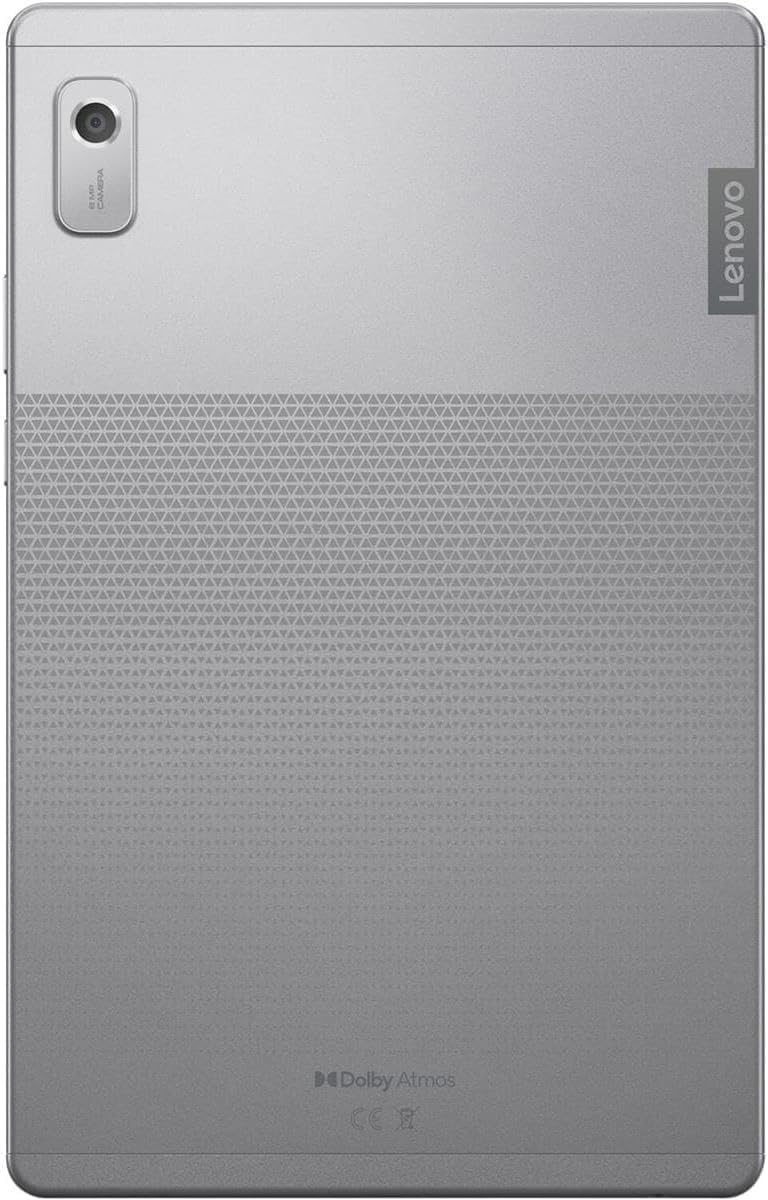
Image: The back of the Lenovo Tab M9 tablet, highlighting the rear camera and the Dolby Atmos logo, indicating its audio capabilities.
4. കണക്റ്റിവിറ്റി
Connect to the internet via Wi-Fi 5 (802.11ac). Bluetooth 5.1 allows connection to wireless headphones, speakers, and other compatible accessories.
5. ബാറ്ററി മാനേജ്മെന്റ്
The integrated 5100mAh battery provides up to 13 hours of video playback. To optimize battery life, adjust screen brightness, close unused apps, and enable battery saver mode when needed.
6. സ്മാർട്ട് ഫീച്ചറുകൾ
Utilize Google Lens for real-time translation, object identification, and smart text selection. Facial recognition provides a quick and secure way to unlock your tablet.

Image: The Lenovo Tab M9 tablet positioned in its folio case, illustrating how the case can act as a stand. The side view reveals the USB-C port and headphone jack.
മെയിൻ്റനൻസ്
1. ടാബ്ലെറ്റ് വൃത്തിയാക്കൽ
ടാബ്ലെറ്റിന്റെ സ്ക്രീനും ബോഡിയും വൃത്തിയാക്കാൻ മൃദുവായ, ലിന്റ് രഹിത തുണി ഉപയോഗിക്കുക. കഠിനമായ പാടുകൾക്ക്, ചെറുതായി ഡി.ampതുണിയിൽ വെള്ളം അല്ലെങ്കിൽ സ്ക്രീൻ-ക്ലീനിംഗ് ലായനി ഉപയോഗിക്കുക. കഠിനമായ രാസവസ്തുക്കളോ ഉരച്ചിലുകളോ ഉള്ള വസ്തുക്കൾ ഒഴിവാക്കുക.
2. ബാറ്ററി പരിചരണം
To prolong battery lifespan, avoid extreme temperatures. Do not leave the tablet fully charged or fully discharged for extended periods. Use the provided charger for optimal performance.
3. സോഫ്റ്റ്വെയർ അപ്ഡേറ്റുകൾ
Regularly check for and install system updates. These updates often include security patches, performance improvements, and new features. Go to ക്രമീകരണങ്ങൾ > സിസ്റ്റം > സിസ്റ്റം അപ്ഡേറ്റ് അപ്ഡേറ്റുകൾ പരിശോധിക്കാൻ.
4. സ്റ്റോറേജ് മാനേജ്മെൻ്റ്
Monitor your storage usage (32GB internal, expandable with 64GB microSD). Regularly delete unnecessary files ഉപയോഗിക്കുക, ഉപയോഗിക്കാത്ത ആപ്പുകൾ അൺഇൻസ്റ്റാൾ ചെയ്യുക, വലിയ മീഡിയ നീക്കുക files to the microSD card or cloud storage to maintain optimal performance.
ട്രബിൾഷൂട്ടിംഗ്
നിങ്ങളുടെ Lenovo Tab M9-ൽ നിങ്ങൾ നേരിട്ടേക്കാവുന്ന സാധാരണ പ്രശ്നങ്ങൾ ഈ വിഭാഗം അഭിസംബോധന ചെയ്യുന്നു.
- ടാബ്ലെറ്റ് പവർ ഓൺ ചെയ്യുന്നില്ല: Ensure the tablet is charged. Connect it to the charger for at least 30 minutes, then try pressing and holding the power button for 10-15 seconds.
- വൈഫൈ കണക്ഷൻ പ്രശ്നങ്ങൾ: Check if Wi-Fi is enabled in settings. Restart your tablet and your Wi-Fi router. Ensure you are within range of the Wi-Fi signal and have entered the correct password.
- Slow performance or apps crashing: Close unused apps running in the background. Clear app caches (ക്രമീകരണങ്ങൾ > ആപ്പുകൾ > [ആപ്പ് നാമം] > സംഭരണം > കാഷെ മായ്ക്കുക). Ensure you have sufficient free storage space. A system update might also resolve performance issues.
- സ്ക്രീൻ പ്രതികരിക്കുന്നില്ല: Try restarting the tablet by holding the power button until it reboots. If the issue persists, ensure the screen is clean and free from damage.
- ബാറ്ററി പെട്ടെന്ന് തീർന്നു പോകുന്നു: Reduce screen brightness, disable unnecessary features like Bluetooth or GPS when not in use, and identify power-hungry apps in battery usage settings.
- ഫാക്ടറി പുന et സജ്ജമാക്കുക: സ്ഥിരമായ സോഫ്റ്റ്വെയർ പ്രശ്നങ്ങൾക്കുള്ള അവസാന ആശ്രയമെന്ന നിലയിൽ, നിങ്ങൾക്ക് ഫാക്ടറി റീസെറ്റ് നടത്താം. മുന്നറിയിപ്പ്: ഇത് നിങ്ങളുടെ ടാബ്ലെറ്റിലെ എല്ലാ ഡാറ്റയും മായ്ക്കും. തുടരുന്നതിന് മുമ്പ് പ്രധാനപ്പെട്ട ഡാറ്റയുടെ ബാക്കപ്പ് എടുക്കുക. പോകുക ക്രമീകരണങ്ങൾ > സിസ്റ്റം > റീസെറ്റ് ഓപ്ഷനുകൾ > എല്ലാ ഡാറ്റയും മായ്ക്കുക (ഫാക്ടറി റീസെറ്റ്).
സ്പെസിഫിക്കേഷനുകൾ
Below are the key technical specifications for the Lenovo Tab M9 tablet:
| ഫീച്ചർ | സ്പെസിഫിക്കേഷൻ |
|---|---|
| മോഡലിൻ്റെ പേര് | ലെനോവോ ടാബ് എം 9 |
| പ്രദർശിപ്പിക്കുക | 9-inch HD IPS (1340x800) 400nits Anti-fingerprint, Touch |
| പ്രോസസ്സർ | MediaTek Helio G80 Octa-core (2x A75 @2.0GHz + 6x A55 @1.8GHz) |
| ഗ്രാഫിക്സ് കോപ്രൊസസർ | ഇൻ്റഗ്രേറ്റഡ് ആം മാലി-ജി52 എംസി2 ജിപിയു |
| റാം | 3GB LPDDR4x |
| സംഭരണം | 32GB Internal + 64GB MicroSD Card (Total 96GB) |
| ഓപ്പറേറ്റിംഗ് സിസ്റ്റം | Android 12 (or Later) |
| ക്യാമറകൾ | മുൻഭാഗം 2.0MP / പിൻഭാഗം 8.0MP |
| ഓഡിയോ | Dual speakers optimized with Dolby Atmos |
| ബാറ്ററി | Integrated 5100mAh (Up to 13 hours video playback) |
| വയർലെസ് കണക്റ്റിവിറ്റി | Wi-Fi 5 (802.11ac 1x1), Bluetooth 5.1 |
| തുറമുഖങ്ങൾ | 1x USB-C 2.0 (data transfer, charging, digital headset), 1x 3.5mm headphone/microphone jack, 1x Micro SD Card slot |
| അളവുകൾ (LxWxH) | 8.48 x 5.38 x 0.31 ഇഞ്ച് |
| ഭാരം | 0.76 lbs (approx. 1.87 pounds listed in specifications, using product description value) |
| നിറം | ആർട്ടിക് ഗ്രേ |

ചിത്രം: വിശദമായ ഒരു വശം view of the Lenovo Tab M9 tablet, illustrating the placement of the USB-C port, 3.5mm headphone jack, and microphone opening.
വാറൻ്റിയും പിന്തുണയും
1. ഉൽപ്പന്ന വാറൻ്റി
Your Lenovo Tab M9 tablet is covered by a standard limited warranty. Specific warranty terms and conditions may vary by region and retailer. Please refer to the warranty card included with your product or visit the official Lenovo support website for detailed information regarding warranty coverage, duration, and service procedures.
2. സാങ്കേതിക പിന്തുണ
For technical assistance, troubleshooting beyond this manual, or service requests, please contact Lenovo customer support. You can find contact information, FAQs, and additional resources on the official Lenovo support website. When contacting support, please have your tablet's model number (Tab M9) and serial number ready.
ലെനോവോ പിന്തുണ Webസൈറ്റ്: support.lenovo.com