ആമുഖം
This manual provides essential information for the proper setup, operation, and maintenance of your VSDISPLAY 7-inch IPS LCD Monitor. Please read this manual thoroughly before using the product to ensure optimal performance and longevity.

ചിത്രം: The 7-inch IPS LCD monitor, showcasing അതിന്റെ മിനുസമാർന്ന രൂപകൽപ്പനയും വ്യക്തമായ ഡിസ്പ്ലേയും.
ഉൽപ്പന്നം കഴിഞ്ഞുview
The VSDISPLAY 7-inch IPS LCD Monitor features a 1280x800 high-resolution display with a wide 178° viewing angle, ensuring clear and vivid images. It supports brightness adjustment and is designed for versatile applications, including use as a secondary display for PCs, laptops, or for monitoring GPU/CPU temperature data within a PC case.

ചിത്രം: The 7-inch IPS LCD monitor showcasing its wide 178-degree viewing angle, ideal for various display needs.
പാക്കേജ് ഉള്ളടക്കം
നിങ്ങളുടെ പാക്കേജിൽ എല്ലാ ഇനങ്ങളും ഉണ്ടെന്ന് ഉറപ്പാക്കുക:
- 1 × VSDISPLAY 7-inch 1280x800 VS070ZJ01A-B LCD Monitor
- 1 × USB-C പവർ കേബിൾ
- 1 × Signal Cable (Mini H-D compatible)

ചിത്രം: The monitor's dimensions and the standard accessories included in the package.
സജ്ജമാക്കുക
- പവർ ബന്ധിപ്പിക്കുക: Connect the provided USB-C power cable to the monitor's USB-C port and to a suitable power source (e.g., PC USB port, USB power adapter).
- സിഗ്നൽ ബന്ധിപ്പിക്കുക: Connect the provided signal cable (Mini H-D compatible) to the monitor's Mini H-D port and to your PC or laptop's HDMI output.
- Driver Installation (Windows PC):
After connecting the monitor, navigate to "My PC" on your computer. Locate and open the U Disk (often labeled as a removable drive). Run the "AicUsbDisplayDriver" executable to install the necessary drivers. Follow the on-screen prompts to complete the installation.
വീഡിയോ: This video demonstrates the process of installing the display driver on a Windows PC, which is crucial for the monitor's functionality.
- ഡിസ്പ്ലേ ക്രമീകരണങ്ങൾ കോൺഫിഗർ ചെയ്യുക:
Once connected and drivers are installed, right-click on your desktop and select "Display settings." Your computer should detect the VSDISPLAY monitor as a secondary display. You can then configure it for വിപുലീകരിച്ച മോഡ്, ഡ്യൂപ്ലിക്കേറ്റ് മോഡ്, അല്ലെങ്കിൽ a ആയി Second Screen Only.
വീഡിയോ: This video illustrates how to connect the 7-inch monitor to a PC/laptop and configure it for extended, duplicate, or second screen modes, as well as connecting to a Fire TV Stick and DIY development board. Note: The video may show a 1024x600 resolution, but this product supports 1280x800.
പ്രവർത്തന നിർദ്ദേശങ്ങൾ
വിപുലീകരിച്ച മോഡ്
In extended mode, the VSDISPLAY monitor acts as an additional workspace, allowing you to spread your applications across multiple screens. This is ideal for multitasking.
ഡ്യൂപ്ലിക്കേറ്റ് മോഡ്
Duplicate mode mirrors your primary display's content onto the VSDISPLAY monitor. This is useful for presentations or sharing your screen with others.
Second Screen Only Mode
In this mode, only the VSDISPLAY monitor will show content, with your primary display turned off. This is useful for focusing on content on the smaller screen or for specific applications.

ചിത്രം: The monitor seamlessly integrated into a multi-monitor setup, extending the desktop workspace.
കണക്റ്റിവിറ്റി
The monitor is equipped with the following ports:
- Mini H-D Compatible Port: വീഡിയോ സിഗ്നൽ ഇൻപുട്ടിനായി.
- യുഎസ്ബി-സി പോർട്ട്: വൈദ്യുതി വിതരണത്തിനായി.
- VGA പോർട്ട്: For video signal input (as seen in some product media).
- എവി പോർട്ട്: For analog video input (as seen in some product media).
- ഓഡിയോ ഔട്ട്പുട്ട്: ബാഹ്യ ഓഡിയോ ഉപകരണങ്ങൾക്കായി 3.5mm ജാക്ക്.

ചിത്രം: വിശദമായി view of the monitor's input and power ports, along with the brightness control.
മൗണ്ടിംഗ് ഓപ്ഷനുകൾ
The monitor features 75x75mm VESA mounting holes on the back, allowing for flexible installation with compatible desk or wall mounts. This provides convenience for various setup configurations.
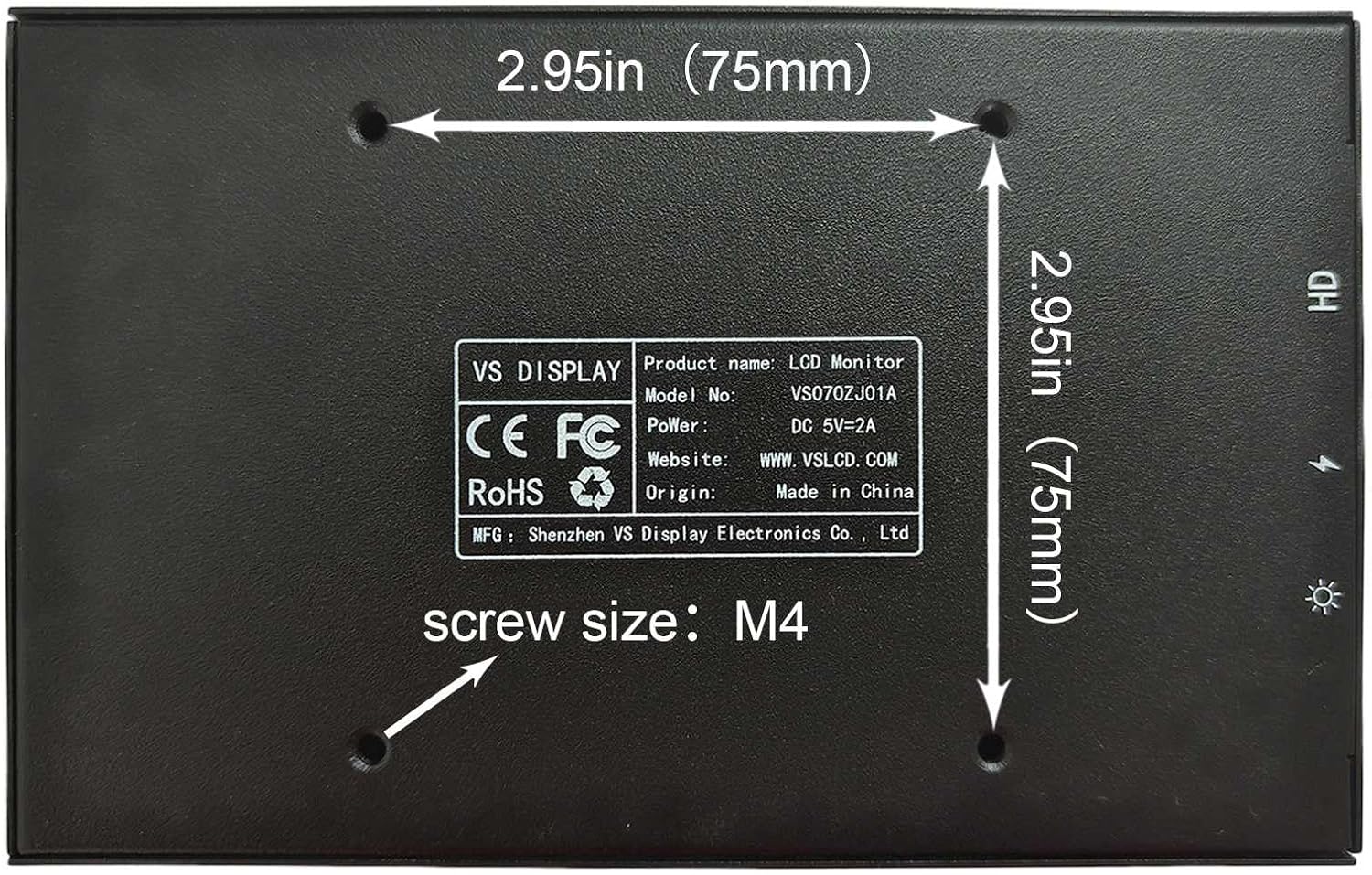
ചിത്രം: The back panel of the monitor, showing the VESA mounting points for easy installation.
തെളിച്ചം ക്രമീകരിക്കൽ
The monitor supports brightness adjustment. A dedicated button or joystick (depending on the specific model variant) is located on the side or back of the unit to control the screen brightness. Refer to the physical unit for the exact location and operation of the brightness control.
PC Case Monitoring
This monitor can be used as an internal PC case screen to display real-time GPU and CPU temperature data. To achieve this, you will need to download and configure third-party monitoring software (e.g., AIDA64, Rainmeter) on your PC. The monitor itself does not come with pre-installed monitoring software.
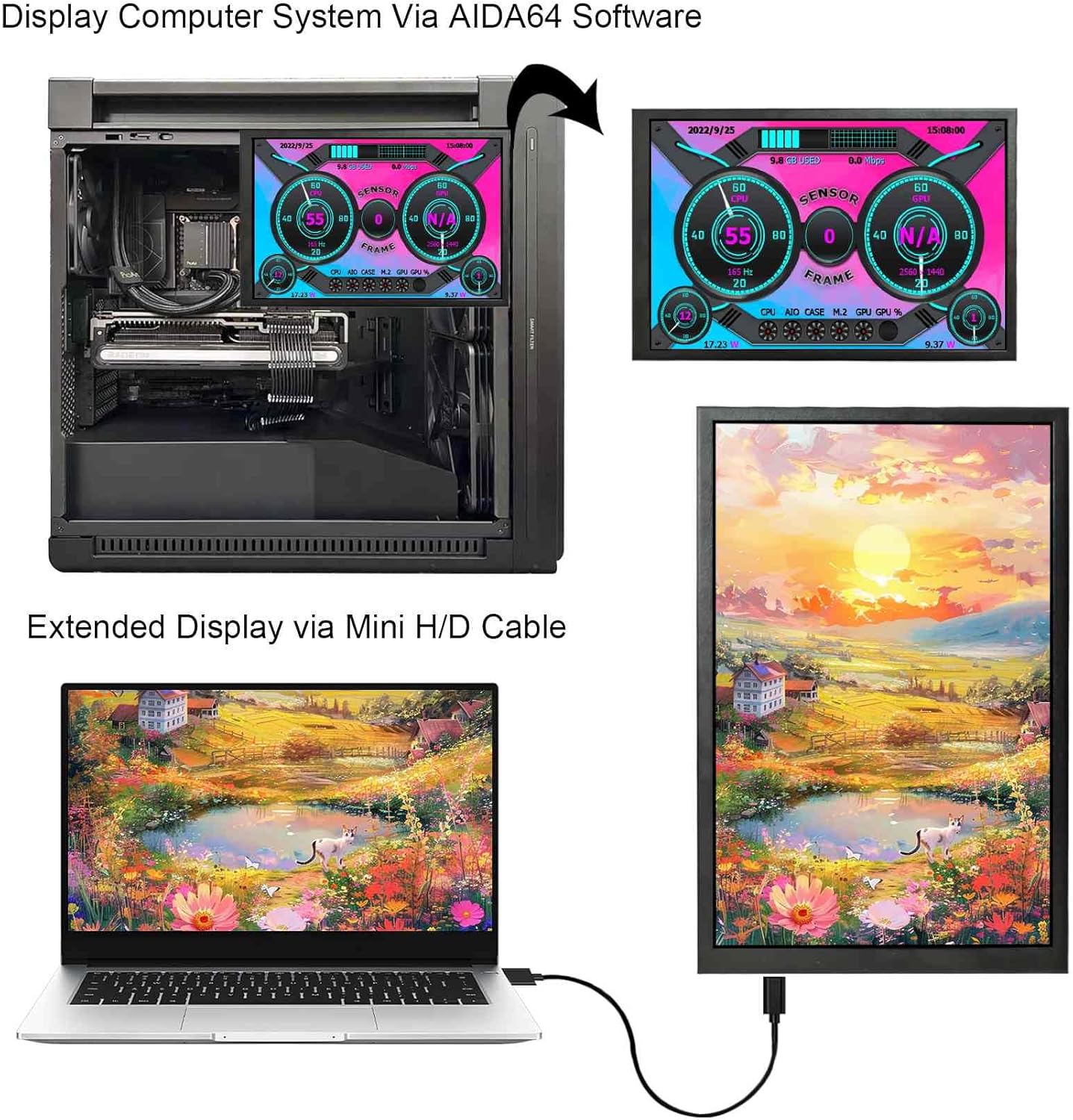
ചിത്രം: The monitor displaying system information within a PC case, demonstrating its utility for hardware monitoring.
വീഡിയോ: This video demonstrates how the monitor can be used as a PC case display, showing various themes and data monitoring capabilities through compatible software.
സ്പെസിഫിക്കേഷനുകൾ
| ഫീച്ചർ | വിശദാംശങ്ങൾ |
|---|---|
| സ്ക്രീൻ വലിപ്പം | 7 ഇഞ്ച് |
| റെസലൂഷൻ | 1280x800 പിക്സലുകൾ |
| വീക്ഷണാനുപാതം | 16:10 |
| പാനൽ തരം | ഐ.പി.എസ് |
| Viewing ആംഗിൾ | വീതി (178°) |
| സ്ക്രീൻ തെളിച്ചം | 350 cd/m2 |
| സ്ക്രീൻ കോൺട്രാസ്റ്റ് | 800:1 |
| സ്ക്രീൻ ഉപരിതലം | തിളങ്ങുന്ന |
| ഉൽപ്പന്ന അളവുകൾ | 0.55 x 6.5 x 4.09 ഇഞ്ച് |
| ഇനത്തിൻ്റെ ഭാരം | 1.1 പൗണ്ട് |
| മൗണ്ടിംഗ് | 75x75mm VESA compatible |
| കണക്റ്റിവിറ്റി | Mini H-D compatible (Signal), USB-C (Power) |
ട്രബിൾഷൂട്ടിംഗ്
- ഡിസ്പ്ലേ ഇല്ല:
- Ensure both the USB-C power cable and the signal cable are securely connected.
- Verify that the correct input source is selected on the monitor (if applicable, via OSD menu).
- Check your PC's display settings to ensure the monitor is detected and configured correctly (Extended, Duplicate, or Second Screen Only mode).
- Reinstall the display driver if necessary.
- ശക്തിയില്ല:
- Confirm the USB-C power cable is connected to a functional power source.
- മറ്റൊരു USB പോർട്ട് അല്ലെങ്കിൽ പവർ അഡാപ്റ്റർ പരീക്ഷിക്കുക.
- ചിത്രത്തിന്റെ ഗുണനിലവാര പ്രശ്നങ്ങൾ:
- Adjust the brightness using the dedicated button/joystick.
- Check the resolution settings on your PC to ensure it matches the monitor's native 1280x800 resolution.
- Ensure the signal cable is not damaged.
വാറൻ്റിയും പിന്തുണയും
വാറന്റി വിവരങ്ങൾക്കും സാങ്കേതിക പിന്തുണയ്ക്കും, ദയവായി നിർമ്മാതാവിന്റെ ഉദ്യോഗസ്ഥനെ കാണുക. webസൈറ്റിൽ ബന്ധപ്പെടുക അല്ലെങ്കിൽ അവരുടെ ഉപഭോക്തൃ സേവനവുമായി നേരിട്ട് ബന്ധപ്പെടുക. വാറന്റി ക്ലെയിമുകൾക്കായി നിങ്ങളുടെ വാങ്ങൽ രസീത് സൂക്ഷിക്കുക.
