ആമുഖം
This manual provides comprehensive instructions for the setup, operation, and maintenance of your Hiseeu 5MP Wireless Security Camera System. This system features 5MP HD video quality, a pre-installed 3TB HDD for 24/7 recording, a combination of PTZ and fixed bullet cameras, IP66 waterproofing, smart motion alerts with humanoid detection, and remote access via the EseeCloud App. The system is designed for stable and reliable surveillance for your home or business.
പാക്കേജ് ഉള്ളടക്കം
- ക്യാമറ x 8
- NVR x 1
- എച്ച്ഡിഎംഐ കേബിൾ x 1
- ഇഥർനെറ്റ് കേബിൾ x 1
- ഉപയോക്തൃ മാനുവൽ x 1

Figure 1: All components included in the Hiseeu 5MP Wireless Security Camera System package.
വീഡിയോ 1: അൺബോക്സിംഗ്, പിന്നെയുംview of the Hiseeu security camera system components.
സിസ്റ്റം ഓവർview & ഘടകങ്ങൾ
The Hiseeu security camera system consists of a Network Video Recorder (NVR) and multiple cameras (PTZ and Bullet types). Each component has specific ports and features for optimal performance.

Figure 2: Detailed diagram illustrating the ports and features of the NVR, PTZ camera, and Bullet camera.
NVR Ports:
- വൈഫൈ ആന്റിന: Double antennas to receive WiFi signal.
- ഓഡിയോ ഔട്ട്പുട്ട്: Connect to external audio devices.
- Monitor (VGA): Connect with VGA cable to view on VGA monitor.
- Monitor (HDMI): Connect with HDMI cable to view on HDTV.
- Router (WAN): Connect your NVR to the internet or for data transmission with cameras.
- USB: Connect with mouse or insert flash drive for backup.
- DC 12V 2A Power Supply: Power input for the NVR.
Camera Ports (PTZ & Bullet):
- DC 12V 1A Port: Input power for the camera.
- നെറ്റ്വർക്ക് പോർട്ട്: For wired connection to the network.
- റീസെറ്റ് ബട്ടൺ: Press for 6 seconds to reset camera to factory settings or pair with NVR via WiFi.
- ആൻ്റിന: Ensure antenna is vertical when installed outside for optimal signal.
- SD കാർഡ് സ്ലോട്ട്: For local storage (if used standalone).
സജ്ജമാക്കുക
NVR Initial Setup
- Connect the NVR to a power source using the provided 12V 2A DC supply.
- Connect the NVR to a monitor (TV or VGA monitor) using the HDMI or VGA cable.
- Connect the NVR to your home router via an Ethernet cable for internet access, or configure wireless network settings during the setup wizard.
- Upon first boot, the system will guide you through a setup wizard. Follow the on-screen prompts to select language, set date and time, and create a password.
- The NVR comes with a pre-installed 3TB HDD for continuous recording. Ensure the storage status is working properly during setup.

Figure 3: NVR connected to a monitor, showing multiple camera views.
Video 2: A video guide demonstrating the EseeCloud App setup and navigation.
ക്യാമറ ഇൻസ്റ്റാളേഷൻ
- Choose suitable locations for your cameras, ensuring a clear field of view and strong WiFi signal.
- Use the provided mounting screws and anchors to securely attach the camera brackets to the desired surface (wall or ceiling). A template is included to assist with drilling holes.
- Attach the camera to the mounted bracket. Adjust the camera angle as needed.
- Connect each camera to a power source using its 12V 1A DC supply. The cameras are pre-paired to the NVR for plug-and-play functionality.
- For outdoor installations, ensure the waterproof caps are correctly installed over the network and power connections to protect against weather elements.
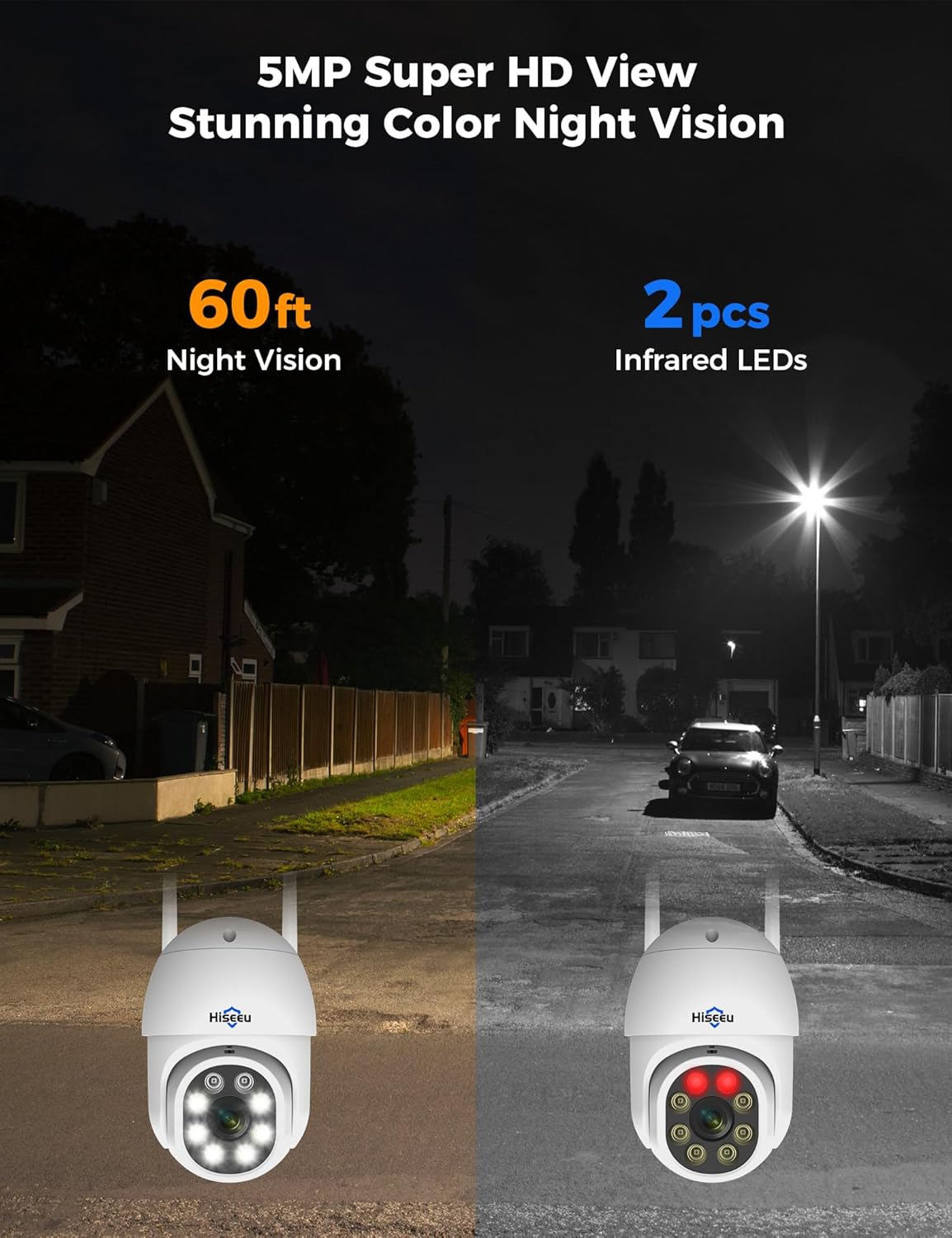
Figure 4: A Hiseeu PTZ camera securely mounted on an exterior wall, ready for surveillance.
Video 3: Demonstration of how to properly use a waterproof cap for camera connections.
പ്രവർത്തന നിർദ്ദേശങ്ങൾ
തത്സമയം View & പ്ലേബാക്ക്
- Access live camera feeds directly from the NVR connected to a monitor or through the EseeCloud App on your smartphone.
- The NVR supports various display layouts (e.g., 4-split, 9-split, 16-split) to view multiple cameras simultaneously.
- Use the NVR's interface (with a USB mouse) or the app to navigate through recorded footage. The 3TB HDD provides continuous 24/7 recording.

ചിത്രം 5: ലൈവ് view of multiple camera feeds displayed on a monitor connected to the NVR.
മോഷൻ ഡിറ്റക്ഷനും അലേർട്ടുകളും
- The system features smart humanoid detection, which minimizes false alarms by focusing on human shapes.
- Receive instant motion detection alerts directly to your smartphone via the EseeCloud App.
- Configure activity zones to monitor specific areas and reduce unnecessary notifications.

Figure 6: A smartphone screen showing an instant motion detection alert from the EseeCloud App.
നൈറ്റ് വിഷൻ
- Experience crystal clear 5MP HD video quality day and night.
- The cameras are equipped with color night vision technology, providing vivid details even in low-light conditions.

Figure 7: A visual comparison demonstrating the effectiveness of 60ft night vision and color night vision with infrared LEDs.
ടു-വേ ഓഡിയോ
- Utilize the built-in microphone and speaker on the cameras for two-way communication.
- Speak to visitors or deter intruders directly through the EseeCloud App.

Figure 8: A user engaging in clear two-way communication through the camera via their smartphone.
Remote Access & Sharing
- Access your security system remotely from anywhere with a stable internet connection using the EseeCloud App.
- View live feeds, play back recordings, and adjust camera settings on the go.
- Share access to your security system with family members or trusted individuals.

ചിത്രം 9: റിമോട്ട് viewing of the security system on various devices, including smartphones, tablets, and computers.
മെയിൻ്റനൻസ്
പതിവ് അറ്റകുറ്റപ്പണികൾ നിങ്ങളുടെ സുരക്ഷാ സംവിധാനത്തിന്റെ ഒപ്റ്റിമൽ പ്രകടനവും ദീർഘായുസ്സും ഉറപ്പാക്കുന്നു.
- Periodically clean camera lenses to ensure clear image quality.
- Check all cable connections for secure fit and signs of wear.
- The cameras are IP66 waterproof, designed to withstand rain, dust, and harsh weather conditions. However, avoid direct high-pressure water jets.
- അമിതമായി ചൂടാകുന്നത് തടയാൻ നന്നായി വായുസഞ്ചാരമുള്ള സ്ഥലത്ത് NVR സ്ഥാപിച്ചിട്ടുണ്ടെന്ന് ഉറപ്പാക്കുക.

Figure 10: The IP66 waterproof rating ensures the camera's durability in diverse outdoor environments, from extreme cold to intense heat.
ട്രബിൾഷൂട്ടിംഗ്
If you encounter any issues, refer to the following common troubleshooting steps:
- No Camera Signal: Ensure cameras are powered on and within range of the NVR's WiFi signal. Check antenna positioning. If issues persist, try re-pairing the camera using the reset button.
- ദുർബലമായ വൈഫൈ സിഗ്നൽ: Position the NVR centrally or use the dual-band WiFi Pro chipset for stronger signal penetration.
- അമിതമായ ചലന മുന്നറിയിപ്പുകൾ: Verify that humanoid detection is enabled in the app settings. Adjust activity zones to exclude areas with frequent non-human movement.
- റെക്കോർഡിംഗ് പ്രശ്നങ്ങൾ: Check the NVR's storage management settings to ensure the 3TB HDD is formatted and functioning correctly.
- റിമോട്ട് ആക്സസ് പ്രശ്നങ്ങൾ: Ensure the NVR has a stable internet connection and your smartphone has network access. Verify app login credentials.
സ്പെസിഫിക്കേഷനുകൾ
- ബ്രാൻഡ്: ഹിസ്യു
- കണക്റ്റിവിറ്റി ടെക്നോളജി: വയർലെസ്
- വീഡിയോ ക്യാപ്ചർ റെസല്യൂഷൻ: 5എംപി
- പ്രത്യേക സവിശേഷതകൾ: Human Detection, Motion Sensor, Night Vision, Siren Alarm, Two-Way Audio
- മെമ്മറി സ്റ്റോറേജ് കപ്പാസിറ്റി: 3TB HDD (പ്രി-ഇൻസ്റ്റാൾ ചെയ്തത്)
- ഊർജ്ജ സ്രോതസ്സ്: കോർഡഡ് ഇലക്ട്രിക്
- ഇനത്തിന്റെ അളവുകൾ L x W x H: 15.28 x 12.99 x 9.96 ഇഞ്ച്
- ശുപാർശ ചെയ്യുന്ന ഉപയോഗങ്ങൾ: ഇൻഡോർ, ഔട്ട്ഡോർ
- അനുയോജ്യമായ ഉപകരണങ്ങൾ: Smartphones, TV
- ലോ ലൈറ്റ് ടെക്നോളജി: നൈറ്റ് വിഷൻ
- നൈറ്റ് വിഷൻ ശ്രേണി: 65 അടി
- വാട്ടർപ്രൂഫ് റേറ്റിംഗ്: IP66
- പ്രവർത്തന താപനില പരിധി: -13°F മുതൽ 122°F വരെ (-25°C മുതൽ 50°C വരെ)
- പിന്തുണയ്ക്കുന്ന ചാനലുകൾ: 16 വരെ
വാറൻ്റിയും പിന്തുണയും
Hiseeu products are designed for reliability and performance. For specific warranty details, please refer to the warranty card included in your package or contact customer support.
For 24/7 online support and technical assistance, please use the following contact information:
- ഇമെയിൽ: johnny@hiseeu.com എന്ന വിലാസത്തിൽ ഇമെയിൽ അയയ്ക്കുക.
- Webസൈറ്റ്: www.hiseeu.com
- YouTube Search: @HiseeuOfficial
- Whatsapp: +8613392818423


