1. ആമുഖം
Welcome to the user manual for your CINMOORE CM-C2LU 2.5K Indoor Camera. This guide provides essential information for the proper installation, operation, and maintenance of your device. Please read this manual thoroughly before using the camera to ensure optimal performance and safety.
2. ഉൽപ്പന്നം കഴിഞ്ഞുview
The CINMOORE CM-C2LU is an advanced indoor security camera designed for monitoring homes, pets, and babies. It features 2.5K Ultra HD resolution, pan and tilt functionality, AI-powered detection, two-way audio, and flexible storage options.
പ്രധാന സവിശേഷതകൾ:
- 2.5K അൾട്രാ എച്ച്ഡി വീഡിയോ: വ്യക്തവും വിശദവുമായ വീഡിയോ ഫൂ നൽകുന്നുtage.
- പാൻ & ടിൽറ്റ് പ്രവർത്തനം: Offers 360° horizontal and 109° vertical coverage.
- AI കണ്ടെത്തൽ: Free, non-subscription detection for persons, pets, and baby crying.
- Full Duplex 2-Way Audio: Allows simultaneous speaking and listening.
- മെച്ചപ്പെടുത്തിയ രാത്രി കാഴ്ച: Clear infrared night vision for monitoring in low-light conditions.
- ഫ്ലെക്സിബിൾ സ്റ്റോറേജ്: Supports local SD card storage (up to 512GB, not included) and optional AWS cloud storage.
- 2.4GHz Wi-Fi & Bluetooth Setup: Ensures quick and stable connection.
- സ്വകാര്യത മോഡ്: Physically covers the lens for enhanced privacy.
പാക്കേജ് ഉള്ളടക്കം:
- CINMOORE CM-C2LU Security Camera (x1 per unit in pack)
- Mounting Screws (x1 set per unit in pack)
- ക്വിക്ക് ഗൈഡ് (x1)
- Power Cable (x1 per unit in pack)

Image 2.1: CINMOORE CM-C2LU Indoor Camera (2-pack shown).

ചിത്രം 2.2: കഴിഞ്ഞുview of CINMOORE CM-C2LU camera features and 360-degree coverage.
3. സജ്ജീകരണം
3.1 പ്രാരംഭ സജ്ജീകരണം
- ആപ്പ് ഡൗൺലോഡ് ചെയ്യുക: ഇതിനായി തിരയുക the official CINMOORE app on your smartphone's app store (iOS or Android) and install it.
- ഒരു അക്കൗണ്ട് സൃഷ്ടിക്കുക: ആപ്പ് തുറന്ന് സ്ക്രീനിലെ നിർദ്ദേശങ്ങൾ പാലിച്ച് പുതിയൊരു അക്കൗണ്ട് രജിസ്റ്റർ ചെയ്യുക അല്ലെങ്കിൽ നിങ്ങൾക്ക് ഇതിനകം അക്കൗണ്ട് ഉണ്ടെങ്കിൽ ലോഗിൻ ചെയ്യുക.
- ക്യാമറ ഓൺ: Connect the camera to a power source using the provided power cable. The camera will power on and indicate its status (e.g., a blinking LED light).
- ഉപകരണം ചേർക്കുക: In the app, tap the '+' icon to add a new device. Select your camera model from the list.
- വൈഫൈയിലേക്ക് കണക്റ്റുചെയ്യുക: The camera uses 2.4GHz Wi-Fi. Ensure your smartphone is connected to a 2.4GHz Wi-Fi network. The app will guide you through connecting the camera to your Wi-Fi network using Bluetooth for a faster setup. കുറിപ്പ്: 5GHz വൈഫൈ നെറ്റ്വർക്കുകൾ പിന്തുണയ്ക്കുന്നില്ല.
- പ്ലേസ്മെൻ്റ്: Position the camera in your desired location.
3.2 മൗണ്ടിംഗ് ഓപ്ഷനുകൾ
The CINMOORE CM-C2LU camera offers versatile mounting options:
- ടേബിൾടോപ്പ് മൗണ്ട്: Place the camera on any flat surface.
- വാൾ മൗണ്ട്: Use the included mounting screws to secure the camera to a wall.
- സീലിംഗ് മൗണ്ട്: Attach the camera to the ceiling for an overhead view.
Ensure the camera is securely mounted and has a clear line of sight to the area you wish to monitor.
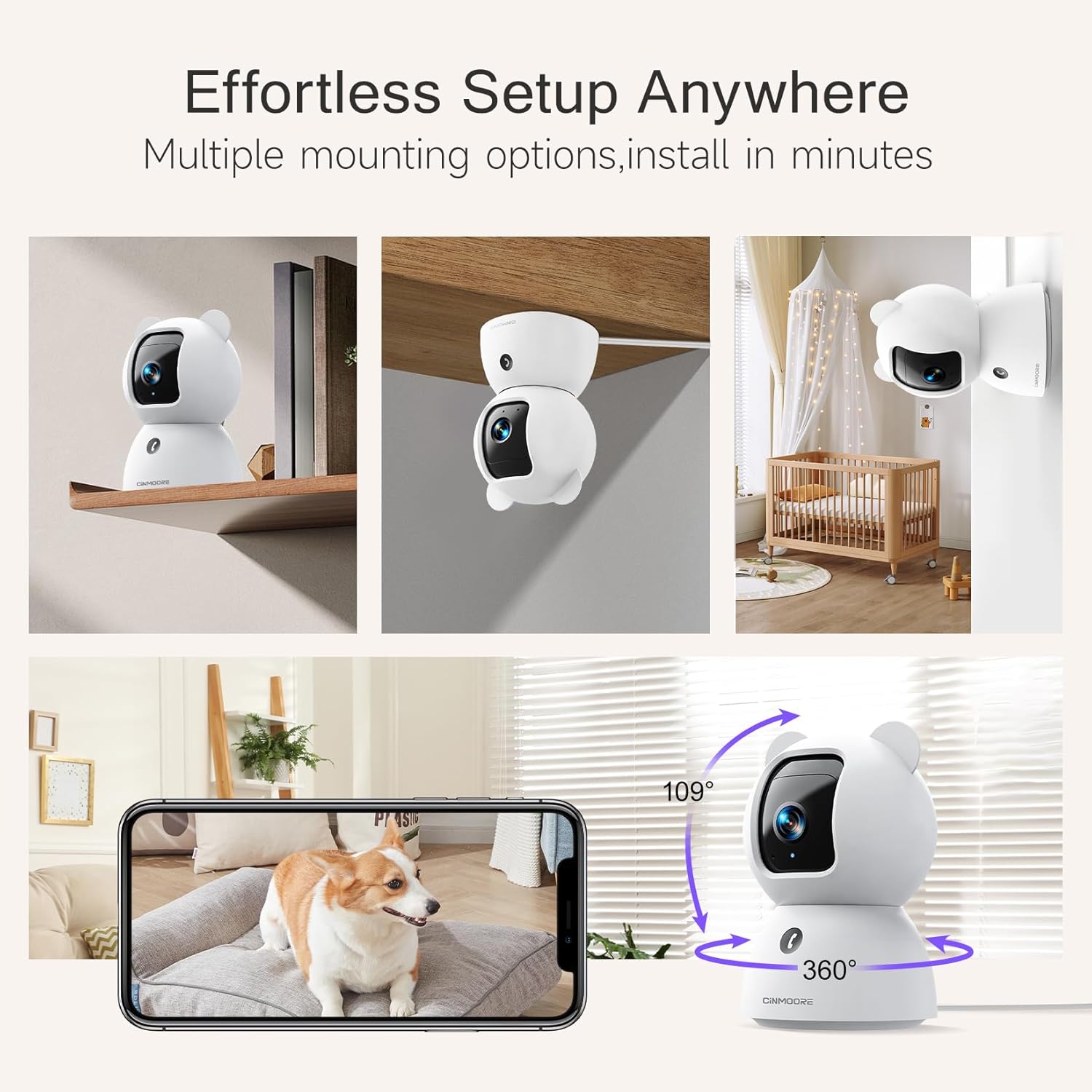
Image 3.1: Multiple mounting options for the camera.
4. പ്രവർത്തന നിർദ്ദേശങ്ങൾ
4.1 തത്സമയം View കൂടാതെ പാൻ/ടിൽറ്റ് നിയന്ത്രണം
Once connected, open the app to view the live feed from your camera. Use the on-screen controls to pan (rotate horizontally) and tilt (rotate vertically) the camera lens to adjust your viewing ആംഗിൾ.
4.2 ടു-വേ ഓഡിയോ
The camera supports full duplex two-way audio, allowing you to speak and listen simultaneously through the app. Tap the microphone icon in the live view to activate the audio feature. The camera also features a one-click call button for quick communication.

Image 4.1: Full Duplex 2-Way Audio in action.
4.3 AI കണ്ടെത്തലും അലേർട്ടുകളും
The camera features built-in AI for detecting persons, pets, and baby crying without requiring a subscription. You can customize detection zones and sensitivity settings within the app to receive relevant alerts.
- വ്യക്തി കണ്ടെത്തൽ: മനുഷ്യ സാന്നിധ്യം തിരിച്ചറിയുന്നു.
- വളർത്തുമൃഗങ്ങളെ കണ്ടെത്തൽ: Recognizes pet activity.
- കരച്ചിൽ കണ്ടെത്തൽ: Alerts you to a baby's crying sounds.
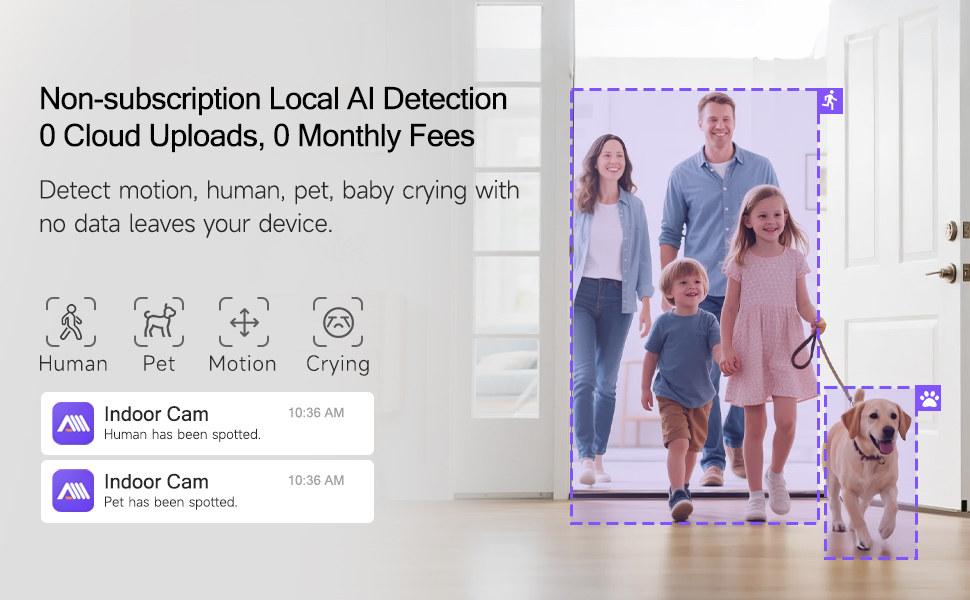
Image 4.2: Non-subscription local AI detection for human and pet activity.

Image 4.3: AI-enabled baby cry detection providing instant alerts.
4.4 നൈറ്റ് വിഷൻ
The camera automatically switches to infrared night vision in low-light conditions, providing clear black-and-white footage. This ensures continuous monitoring day and night.

Image 4.4: Clear IR Night Vision for monitoring in the dark.
4.5 സംഭരണ ഓപ്ഷനുകൾ
The camera offers two primary storage methods for recorded footage:
- ലോക്കൽ SD കാർഡ് സംഭരണം: Insert a microSD card (up to 512GB, not included) into the camera's SD slot for 24/7 continuous recording. An advanced SD Card Encryption mode ensures your local footage is only viewable through the CINMOORE App.
- ക്ലൗഡ് സംഭരണം: Optional AWS cloud storage with bank-level encryption is available. Check the app for details on subscription plans and free trials.

Image 4.5: Storage options including SD card and cloud storage.
4.6 സ്വകാര്യത മോഡ്
Activate Privacy Mode through the app to physically rotate the camera lens downwards, blocking its view and ensuring your privacy when needed.
4.7 Customized Detection Zones
ക്യാമറയ്ക്കുള്ളിലെ നിർദ്ദിഷ്ട മേഖലകൾ നിർവചിക്കുക view for motion detection. This helps reduce false alarms by focusing on critical zones and ignoring irrelevant movements.
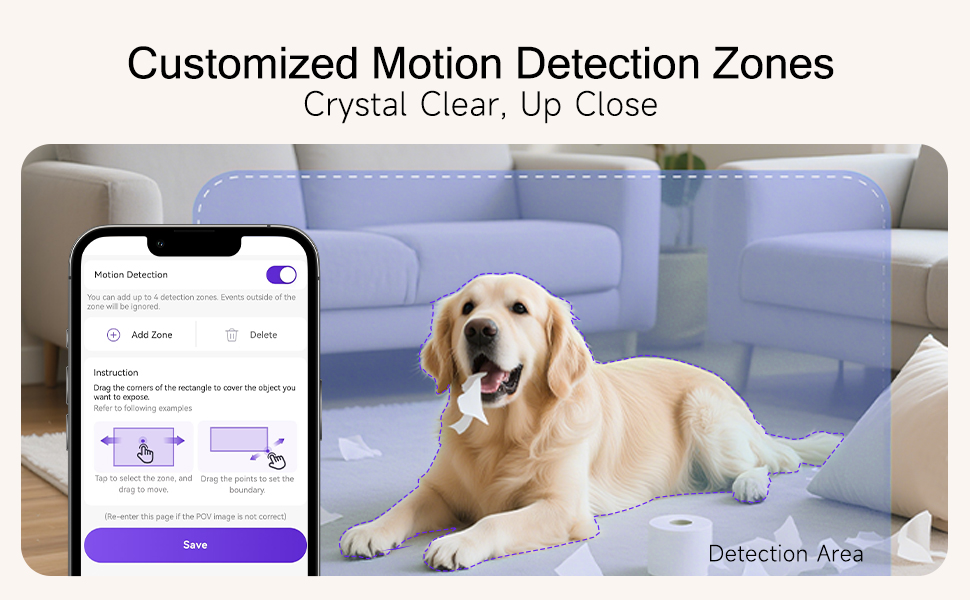
Image 4.6: Setting up customized motion detection zones.
5. പരിപാലനം
5.1 ക്യാമറ വൃത്തിയാക്കൽ
To maintain optimal image quality, periodically clean the camera lens with a soft, dry, lint-free cloth. Do not use harsh chemicals or abrasive cleaners.
5.2 ഫേംവെയർ അപ്ഡേറ്റുകൾ
Ensure your camera's firmware is up to date for the best performance and security. Check the CINMOORE app regularly for available firmware updates and follow the in-app instructions to install them.
5.3 ഉപകരണം പുനഃസജ്ജമാക്കുന്നു
If you encounter persistent issues, you may need to reset the camera. Locate the reset button (often a small pinhole) on the camera (refer to Image 4.5 for location). Use a pin or paperclip to press and hold the reset button for approximately 5-10 seconds until you hear a prompt or see a change in the LED indicator. This will restore the camera to its factory settings, and you will need to set it up again.
6. പ്രശ്നപരിഹാരം
This section addresses common issues you might encounter with your CINMOORE CM-C2LU camera.
| പ്രശ്നം | സാധ്യമായ കാരണം | പരിഹാരം |
|---|---|---|
| Camera fails to connect to Wi-Fi | Incorrect Wi-Fi password; 5GHz Wi-Fi network; Weak Wi-Fi signal; Camera too far from router. | Ensure correct 2.4GHz Wi-Fi password. Confirm your router broadcasts a 2.4GHz network. Move camera closer to the router. Restart router and camera. |
| തത്സമയം ഇല്ല view or offline status | No power; Internet connection issue; App malfunction. | Check power connection. Verify home internet is working. Restart the app. If issue persists, reset camera and re-add. |
| മോശം വീഡിയോ നിലവാരം | Dirty lens; Insufficient bandwidth; Low light conditions. | Clean the camera lens. Ensure stable and sufficient internet bandwidth. Night vision activates automatically in low light. |
| AI കണ്ടെത്തൽ പ്രവർത്തിക്കുന്നില്ല | Detection settings disabled; Incorrect detection zone setup; Firmware outdated. | Check app settings to ensure detection types are enabled. Adjust detection zones and sensitivity. Update camera firmware. |
| ടു-വേ ഓഡിയോ പ്രശ്നങ്ങൾ | Microphone/speaker muted in app; App permissions; Network latency. | Ensure microphone and speaker are enabled in the app. Check app permissions for microphone access. Verify stable internet connection. |
| SD കാർഡ് റെക്കോർഡ് ചെയ്യുന്നില്ല | SD കാർഡ് നിറഞ്ഞിരിക്കുന്നു അല്ലെങ്കിൽ കേടായിരിക്കുന്നു; തെറ്റായ ഫോർമാറ്റ്; SD കാർഡ് ശരിയായി ചേർത്തിട്ടില്ല. | Check SD card status in app. Format SD card via app if needed. Reinsert SD card. Replace with a new SD card if corrupted. |
7 സ്പെസിഫിക്കേഷനുകൾ
| ഫീച്ചർ | വിശദാംശങ്ങൾ |
|---|---|
| മോഡൽ നമ്പർ | CM-C2LU |
| ഇൻഡോർ/ഔട്ട്ഡോർ ഉപയോഗം | ഇൻഡോർ |
| വീഡിയോ ക്യാപ്ചർ റെസല്യൂഷൻ | 2.5K (1920p) |
| കണക്റ്റിവിറ്റി ടെക്നോളജി | വയേർഡ് (പവർ), വൈ-ഫൈ (ഡാറ്റ) |
| വയർലെസ് കമ്മ്യൂണിക്കേഷൻ | 2.4GHz വൈ-ഫൈ, ബ്ലൂടൂത്ത് |
| പവർ ഉറവിടം | കോർഡഡ് ഇലക്ട്രിക് |
| പ്രത്യേക സവിശേഷതകൾ | 2-Way Audio, Cry Detection, Night Vision, PTZ Technology, Time-Lapse |
| മൗണ്ടിംഗ് തരം | Ceiling Mount, Tabletop Mount, Wall Mount |
| അനുയോജ്യമായ ഉപകരണങ്ങൾ | സ്മാർട്ട്ഫോൺ (iOS, Android) |
| കൺട്രോളർ തരം | Amazon Alexa (Voice Control) |
| മെറ്റീരിയൽ | അക്രിലോണിട്രൈൽ ബ്യൂട്ടാഡീൻ സ്റ്റൈറൈൻ (എബിഎസ്) |
| ഉൽപ്പന്ന അളവുകൾ | 3 x 4.7 x 3 ഇഞ്ച് |
| ഇനത്തിൻ്റെ ഭാരം | 1.59 പൗണ്ട് |
| സംഭരണം | MicroSD Card (up to 512GB, not included), Cloud Storage (optional) |
8. വാറൻ്റിയും പിന്തുണയും
For warranty information, technical support, or any inquiries regarding your CINMOORE CM-C2LU camera, please refer to the contact details provided on the official CINMOORE website or within the CINMOORE mobile application. Keep your purchase receipt as proof of purchase for warranty claims.


