ഉൽപ്പന്നം കഴിഞ്ഞുview
The COLMI R02 Smart Ring is a sophisticated wearable device designed to monitor various health metrics and track daily activities. It offers continuous monitoring of heart rate, blood oxygen levels, and sleep patterns, providing comprehensive insights into your well-being. Additionally, it features activity tracking and remote camera control for enhanced convenience. The ring comes with a portable charging case for on-the-go power.

Image: The COLMI R02 Smart Ring, its portable charging case, and a smartphone displaying the health monitoring application interface.
സജ്ജീകരണ ഗൈഡ്
Follow these steps to set up your COLMI R02 Smart Ring for optimal use.
1. Choosing the Correct Ring Size
വാങ്ങുന്നതിന് മുമ്പ്asing the COLMI R02 Smart Ring, it is highly recommended to obtain a COLMI Sizing Kit to determine your accurate ring size. A proper fit is crucial for accurate health data collection.
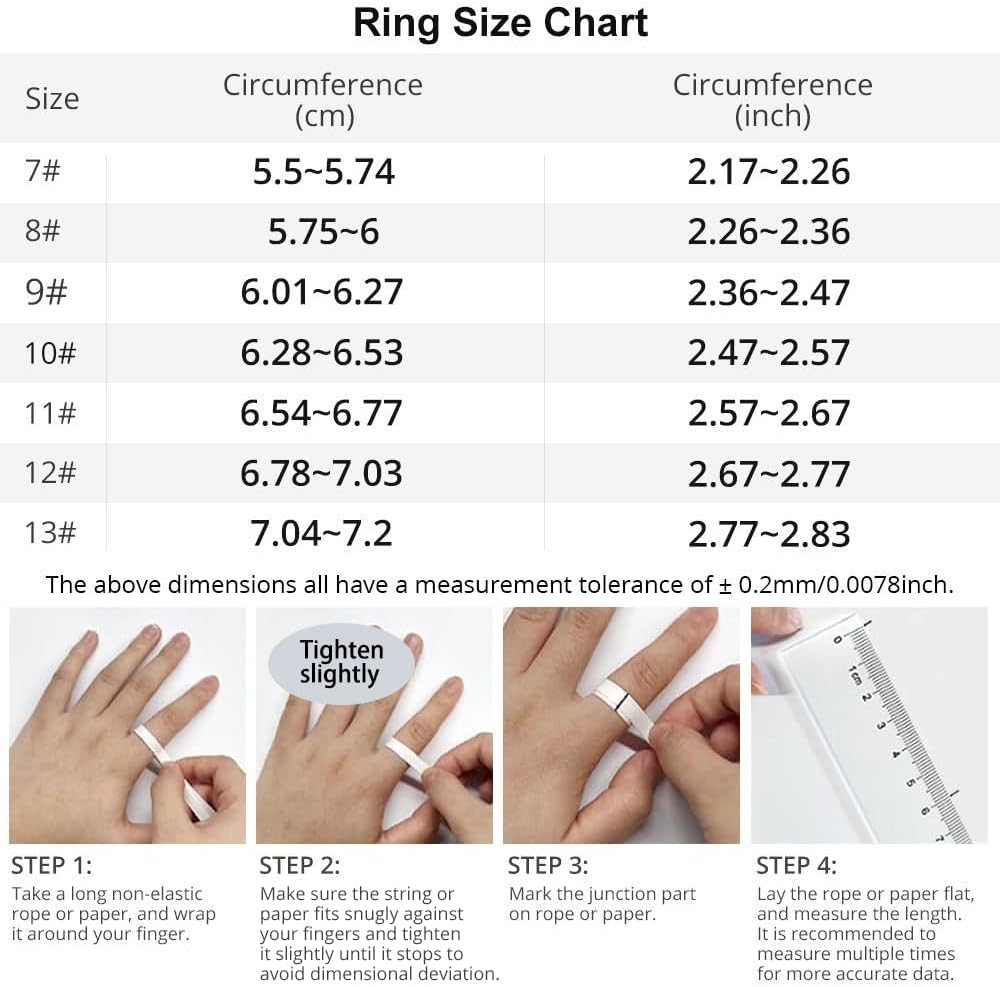
Image: A detailed ring size chart showing circumference in centimeters and inches, along with a four-step guide on how to measure your finger using a string or paper.
അളക്കൽ ഘട്ടങ്ങൾ:
- ഘട്ടം 1: Take a long non-elastic rope or paper, and wrap it around your finger.
- ഘട്ടം 2: Make sure the string or paper fits snugly against your fingers and tighten it slightly until it stops to avoid dimensional deviation.
- ഘട്ടം 3: Mark the junction part on the rope or paper.
- ഘട്ടം 4: Lay the rope or paper flat, and measure the length. It is recommended to measure multiple times for more accurate data.
2. പ്രാരംഭ ചാർജിംഗ്
Before first use, ensure your COLMI R02 Smart Ring is fully charged. Place the ring into its portable charging case. Connect the charging cable (included) to the charging case and a suitable USB power source. The indicator light on the charging case will show the charging status.

Image: The COLMI R02 Smart Ring placed inside its compact charging case, demonstrating its small size and portability.
3. ആപ്പ് ഡൗൺലോഡും ജോടിയാക്കലും
To access and manage your health data, you need to download the official "Q Ring" application on your smartphone (compatible with Android and iPhone operating systems).
- ഘട്ടം 1: Download the "Q Ring" app from your device's app store.
- ഘട്ടം 2: ഒരു അക്കൗണ്ട് സൃഷ്ടിക്കുന്നതിനോ ലോഗിൻ ചെയ്യുന്നതിനോ ആപ്പ് തുറന്ന് ഓൺ-സ്ക്രീൻ നിർദ്ദേശങ്ങൾ പാലിക്കുക.
- ഘട്ടം 3: Ensure your COLMI R02 Smart Ring is charged and within Bluetooth range of your phone.
- ഘട്ടം 4: In the app, navigate to the device pairing section and select your COLMI R02 Smart Ring from the list of available devices.
- ഘട്ടം 5: Confirm the pairing on both the app and, if prompted, on the ring (though the R02 typically pairs automatically once selected).
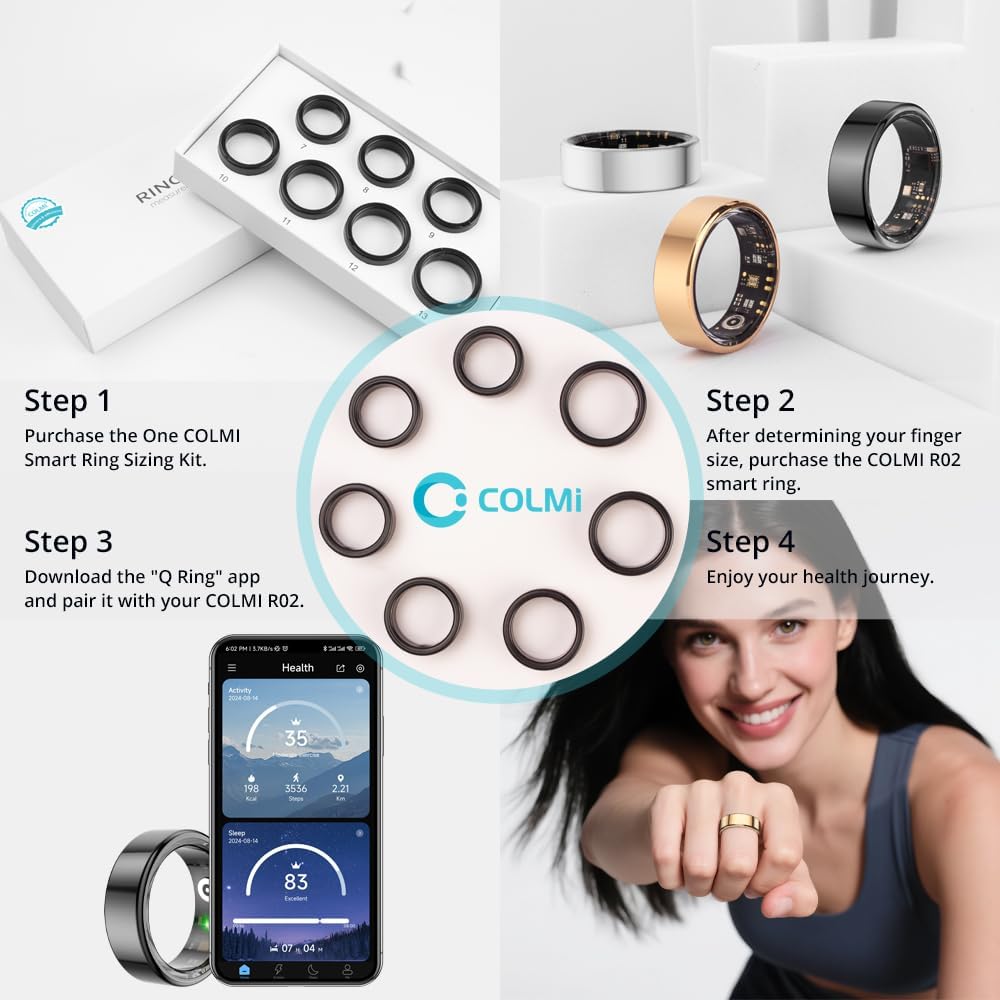
Image: A visual guide illustrating the four steps for setting up the COLMI R02 Smart Ring, including purchasing a sizing kit, selecting the ring, downloading the "Q Ring" app, and beginning your health journey.
പ്രവർത്തന നിർദ്ദേശങ്ങൾ
The COLMI R02 Smart Ring continuously monitors your health data. All collected data can be viewed and analyzed within the "Q Ring" application.
ഹൃദയമിടിപ്പ് നിരീക്ഷണം
The ring features a high-performance heart rate sensor that automatically collects heart rate data every half hour. It intelligently identifies abnormal heart rate and provides personalized guidance. You can view your heart rate trends and detailed reports in the "Q Ring" app.

Image: A man wearing the COLMI R02 Smart Ring, with accompanying graphics illustrating heart rate and blood oxygen monitoring data.
രക്ത ഓക്സിജൻ നിരീക്ഷണം
The COLMI R02 Smart Ring records your blood oxygen data, which is an important indicator of human health. Access your blood oxygen levels and historical data through the "Q Ring" application.
Sleep Measurement
The ring detects when you fall asleep and wake up, monitoring your sleep quality and duration. It generates concise reports to help you understand your sleep patterns and adjust habits for more restful sleep. The app provides detailed breakdowns of deep sleep, light sleep, and awake time.

Image: A man sleeping while wearing the COLMI R02 Smart Ring, with a smartphone displaying detailed sleep analysis data from the accompanying application.
പ്രവർത്തന ട്രാക്കിംഗ്
The COLMI R02 Smart Ring easily tracks your daily steps, distance covered, and calories burned. This data motivates you to stay active and helps you monitor your fitness progress. Multiple exercise modes are supported.

Image: The COLMI R02 Smart Ring surrounded by icons representing its key features: motion, heart rate, sleep, photo control, stress, and blood oxygen. A smartphone screen displays the activity tracking interface of the app.
ഫോട്ടോ നിയന്ത്രണം
Utilize the remote camera control function to capture photos with a simple flick of your finger. This feature makes taking selfies, group photos, and creative photography more convenient. Ensure the remote camera function is enabled in the "Q Ring" app.

Image: A woman using the COLMI R02 Smart Ring to remotely control her smartphone's camera, demonstrating the convenience of the photo control feature.
മെയിൻ്റനൻസ്
Proper maintenance ensures the longevity and optimal performance of your COLMI R02 Smart Ring.
- വൃത്തിയാക്കൽ: Regularly wipe the ring and charging case with a soft, dry, lint-free cloth. For stubborn smudges, slightly dampen the cloth with water. Avoid using harsh chemicals, abrasive materials, or strong detergents, as these can damage the device.
- ജല പ്രതിരോധം: The COLMI R02 Smart Ring is designed for daily wear, but it is not specified as fully waterproof for swimming or showering. Avoid prolonged exposure to water and do not submerge the device.
- ചാർജിംഗ് കേസ് കെയർ: Keep the charging case clean and free of debris. Ensure the charging contacts on both the ring and the case are clean to facilitate proper charging.
- സംഭരണം: When not in use for extended periods, store the ring and charging case in a cool, dry place away from direct sunlight and extreme temperatures.
- ബാറ്ററി ലൈഫ്: To maximize battery life, avoid fully discharging the ring frequently. Charge it regularly, especially when the battery level is low.
ട്രബിൾഷൂട്ടിംഗ്
If you encounter issues with your COLMI R02 Smart Ring, refer to the following common solutions.
- Ring Not Pairing with App:
- നിങ്ങളുടെ സ്മാർട്ട്ഫോണിൽ ബ്ലൂടൂത്ത് പ്രവർത്തനക്ഷമമാക്കിയിട്ടുണ്ടെന്ന് ഉറപ്പാക്കുക.
- Make sure the ring is charged and within close proximity to your phone.
- Restart both your phone and the "Q Ring" app.
- If previously paired, try unpairing and re-pairing the device in the app's settings.
- കൃത്യമല്ലാത്ത ആരോഗ്യ ഡാറ്റ:
- Verify that the ring is worn correctly and snugly on your finger. A loose fit can affect sensor accuracy.
- Ensure the sensors on the inside of the ring are clean and free from dirt or sweat.
- Calibrate the device if the app provides such an option.
- Ring Not Charging:
- Check if the charging cable is securely connected to both the charging case and the power source.
- Ensure the charging contacts on the ring and inside the case are clean.
- മറ്റൊരു USB പോർട്ട് അല്ലെങ്കിൽ പവർ അഡാപ്റ്റർ പരീക്ഷിക്കുക.
- ചാർജിംഗ് കേസിന് തന്നെ പവർ ഉണ്ടെന്ന് ഉറപ്പാക്കുക.
- ആപ്പ് ക്രാഷാകൽ അല്ലെങ്കിൽ മരവിപ്പിക്കൽ:
- Close and reopen the "Q Ring" app.
- നിങ്ങളുടെ ആപ്പ് ഏറ്റവും പുതിയ പതിപ്പിലേക്ക് അപ്ഡേറ്റ് ചെയ്തിട്ടുണ്ടെന്ന് ഉറപ്പാക്കുക.
- Clear the app's cache (Android) or reinstall the app (iOS/Android) if issues persist.
ഈ ഘട്ടങ്ങൾ നിങ്ങളുടെ പ്രശ്നം പരിഹരിക്കുന്നില്ലെങ്കിൽ, കൂടുതൽ സഹായത്തിനായി ദയവായി പിന്തുണ വിഭാഗം പരിശോധിക്കുക.
സ്പെസിഫിക്കേഷനുകൾ
| ഫീച്ചർ | വിശദാംശങ്ങൾ |
|---|---|
| മോഡലിൻ്റെ പേര് | COLMI R02 |
| ബ്രാൻഡ് | COLMI |
| ആകൃതി | വൃത്താകൃതി |
| ഇനത്തിൻ്റെ ഭാരം | 3.53 ഔൺസ് |
| പാക്കേജ് അളവുകൾ | 3.94 x 3.15 x 0.79 ഇഞ്ച് |
| ബാറ്ററികൾ | 1 നിലവാരമില്ലാത്ത ബാറ്ററി (ഉൾപ്പെടുത്തിയിരിക്കുന്നു) |
| ബാറ്ററി ശേഷി | 15 മില്ലിamp മണിക്കൂറുകൾ |
| കണക്റ്റിവിറ്റി ടെക്നോളജി | ബ്ലൂടൂത്ത് |
| ഓപ്പറേറ്റിംഗ് സിസ്റ്റം | ആൻഡ്രോയിഡ്, ഐഫോൺ |
| മെമ്മറി സ്റ്റോറേജ് കപ്പാസിറ്റി | 1 MB |
| പ്രത്യേക സവിശേഷതകൾ | Heart rate, Photo Control, Sleep Measurement |
| ജിപിഎസ് | GPS ഇല്ല |
| നിർമ്മാതാവ് | Shenzhen COLMl Technology Co., Ltd |
| ആദ്യ തീയതി ലഭ്യമാണ് | ഓഗസ്റ്റ് 1, 2025 |
വാറൻ്റിയും പിന്തുണയും
COLMI is committed to providing excellent after-sales service for the R02 Smart Ring.
ഉപഭോക്തൃ പിന്തുണ
If you have any usage questions, quality issues, or require technical assistance with your COLMI R02 Smart Ring, please do not hesitate to contact our professional after-sales service team. Refer to your purchase documentation or the official COLMI webനിർദ്ദിഷ്ട ബന്ധപ്പെടാനുള്ള വിവരങ്ങൾക്കായി സൈറ്റ്.
ഉൾപ്പെടുത്തിയ ആക്സസറികൾ:
- 1 Smart Ring (COLMI R02)
- 1 പോർട്ടബിൾ ചാർജിംഗ് കേസ്
- 1 ചാർജിംഗ് കേബിൾ
- 1 നിർദ്ദേശ മാനുവൽ (ഈ പ്രമാണം)
വാറൻ്റി വിവരങ്ങൾ
Specific warranty terms and conditions may vary by region and retailer. Please retain your proof of purchase. For detailed warranty information, including coverage period and claims process, please consult the warranty card included with your product or visit the official COLMI website. This manual does not constitute a warranty statement.


