1. ആമുഖം
Thank you for choosing the SGIN C10 10.1-inch Kids Tablet. This device is designed to provide an engaging and safe digital experience for children, featuring parental controls and educational content. This manual will guide you through the setup, operation, and maintenance of your tablet to ensure optimal performance and user safety.
2. ഉൽപ്പന്നം കഴിഞ്ഞുview
2.1 പാക്കേജ് ഉള്ളടക്കം
അൺപാക്ക് ചെയ്യുമ്പോൾ, താഴെ ലിസ്റ്റ് ചെയ്തിരിക്കുന്ന എല്ലാ ഇനങ്ങളും ഉണ്ടെന്ന് ഉറപ്പാക്കുക:
- SGIN C10 10.1-inch Tablet
- സംരക്ഷണ കേസ്
- ചാർജർ
- USB കേബിൾ
- ഇൻസ്ട്രക്ഷൻ മാനുവൽ

Image: Diagram showing the tablet's ports and buttons, along with the included accessories: tablet, protective case, charger, USB cable, and instruction manual.
2.2 ടാബ്ലെറ്റ് ഘടകങ്ങൾ
Familiarize yourself with the physical components of your SGIN C10 tablet:
- പവർ ബട്ടൺ: Located on the side, used to turn the tablet on/off or put it to sleep.
- വോളിയം ബട്ടണുകൾ: ഓഡിയോ ഔട്ട്പുട്ട് ലെവൽ ക്രമീകരിക്കുക.
- ഹെഡ്ഫോൺ ജാക്ക്: വയർഡ് ഹെഡ്ഫോണുകൾ ബന്ധിപ്പിക്കുന്നതിന്.
- USB പോർട്ട്: ചാർജിംഗിനും ഡാറ്റ കൈമാറ്റത്തിനും.
- ടിഎഫ് കാർഡ് സ്ലോട്ട്: For expanding storage with a microSD card.
- മുൻ ക്യാമറ: വീഡിയോ കോളുകൾക്കും സെൽഫികൾക്കും.
- പിൻ ക്യാമറ: ഫോട്ടോകളും വീഡിയോകളും എടുക്കുന്നതിന്.
- സ്പീക്കറുകൾ: ഓഡിയോ ഔട്ട്പുട്ടിനായി.
- 10.1 ഇഞ്ച് HD IPS ടച്ച് സ്ക്രീൻ: Main display for interaction.
- സ്റ്റാൻഡോടുകൂടിയ സംരക്ഷണ കേസ്: Provides protection and allows for hands-free viewing.
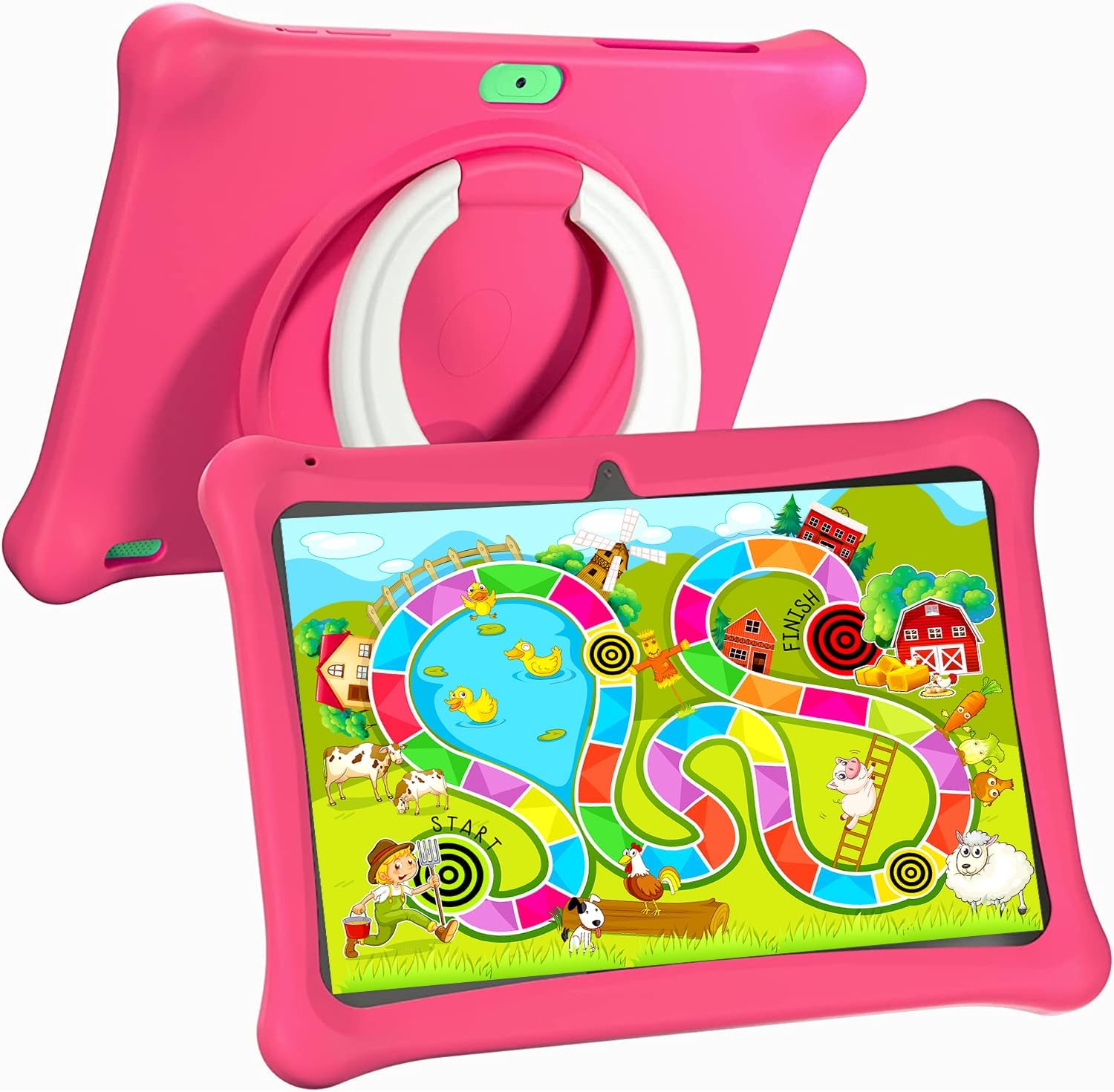
Image: The SGIN C10 tablet in its pink protective case, displaying a colorful educational game on its screen. The rear of the tablet shows the integrated stand.
2.3 പ്രധാന സവിശേഷതകൾ
- ഉയർന്ന പ്രകടനം: Equipped with a 1.6GHz quad-core processor, 2GB RAM, and 32GB ROM (expandable up to 32GB via TF card).
- Kid-Proof Case: Durable pink case designed to protect against dust, bumps, and drops, with heat dissipation features.
- Pre-installed iWawa Kid's Software: Offers a safe and entertaining environment with thousands of free educational games and apps.
- Parental Control System: Allows parents to manage screen time, content, and user accounts.
- നീണ്ട ബാറ്ററി ലൈഫ്: 5000mAh lithium battery provides 6-8 hours of usage.
- Eye Protection Screen: 1280*800 HD IPS touch screen for vibrant colors and comfortable viewing.
- ഇരട്ട ക്യാമറ: 2MP front camera and 5MP rear camera for photos and videos.

Image: Icons representing key features of the SGIN C10 tablet: Android 12, Quad-core processor, Dual Camera, 5000mAh battery, WiFi, HD Display, 2GB RAM + 32GB storage, 10 Inch screen, and Parental Control.

Image: Visual representation of the tablet's 2GB RAM and 32GB ROM (expandable via TF card), alongside a diagram of the 1.6 GHz Quad-core Processor.

Image: The 10-inch HD display showing vibrant content, and a close-up of the protective case's rotatable stand.

Image: A child using the tablet, highlighting the 5000mAh Lithium Battery, and a close-up of the tablet's dual camera system.
3. സജ്ജീകരണം
3.1 പ്രാരംഭ ചാർജിംഗ്
- Connect the USB cable to the tablet's USB port.
- നൽകിയിരിക്കുന്ന ചാർജറുമായി USB കേബിളിന്റെ മറ്റേ അറ്റം ബന്ധിപ്പിക്കുക.
- ഒരു പവർ ഔട്ട്ലെറ്റിൽ ചാർജർ പ്ലഗ് ചെയ്യുക.
- Allow the tablet to charge fully before first use. The battery indicator on the screen will show charging status.
3.2 പവർ ഓൺ/ഓഫ്
- പവർ ഓണാക്കാൻ: Press and hold the Power Button until the SGIN logo appears on the screen.
- പവർ ഓഫ് ചെയ്യാൻ: Press and hold the Power Button until a menu appears. Select "Power off" and confirm.
- ഉറങ്ങാൻ/ഉണരാൻ: Briefly press the Power Button to put the tablet to sleep or wake it up.
3.3 Wi-Fi-ലേക്ക് ബന്ധിപ്പിക്കുന്നു
- ഹോം സ്ക്രീനിൽ നിന്ന്, ക്വിക്ക് സെറ്റിംഗ്സ് പാനൽ തുറക്കാൻ മുകളിൽ നിന്ന് താഴേക്ക് സ്വൈപ്പ് ചെയ്യുക.
- വൈഫൈ ക്രമീകരണങ്ങൾ തുറക്കാൻ വൈഫൈ ഐക്കണിൽ ടാപ്പ് ചെയ്ത് പിടിക്കുക.
- Toggle Wi-Fi on if it's off.
- ലിസ്റ്റിൽ നിന്ന് നിങ്ങൾക്ക് ആവശ്യമുള്ള വൈഫൈ നെറ്റ്വർക്ക് തിരഞ്ഞെടുക്കുക.
- ആവശ്യപ്പെടുകയാണെങ്കിൽ നെറ്റ്വർക്ക് പാസ്വേഡ് നൽകുക, തുടർന്ന് "കണക്റ്റ് ചെയ്യുക" ടാപ്പ് ചെയ്യുക.
3.4 Initial iWawa Setup
The SGIN C10 tablet comes with iWawa Kid's software pre-installed. Follow the on-screen prompts to set up the child-friendly environment and parental controls during the first launch.
4. പ്രവർത്തന നിർദ്ദേശങ്ങൾ
4.1 അടിസ്ഥാന നാവിഗേഷൻ
- സ്പർശിക്കുക: ഒരു ഐക്കൺ അല്ലെങ്കിൽ ഓപ്ഷൻ തിരഞ്ഞെടുക്കാൻ അതിൽ ടാപ്പ് ചെയ്യുക.
- സ്വൈപ്പ്: പേജുകളിലൂടെയോ ലിസ്റ്റുകളിലൂടെയോ സ്ക്രോൾ ചെയ്യാൻ സ്ക്രീനിലുടനീളം നിങ്ങളുടെ വിരൽ വലിച്ചിടുക.
- പിഞ്ച്: ചിത്രങ്ങൾ സൂം ഇൻ ചെയ്യാനോ ഔട്ട് ചെയ്യാനോ രണ്ട് വിരലുകൾ ഉപയോഗിക്കുക അല്ലെങ്കിൽ web പേജുകൾ.
- ഹോം ബട്ടണ്: Returns you to the home screen.
- ബാക്ക് ബട്ടൺ: നിങ്ങളെ പഴയ സ്ക്രീനിലേക്ക് തിരികെ നൽകുന്നു.
- സമീപകാല ആപ്പ് ബട്ടൺ: അടുത്തിടെ ഉപയോഗിച്ച ആപ്ലിക്കേഷനുകൾ കാണിക്കുന്നു.
4.2 ക്യാമറ ഉപയോഗിക്കുന്നത്
- ഹോം സ്ക്രീനിൽ നിന്നോ ആപ്പ് ഡ്രോയറിൽ നിന്നോ ക്യാമറ ആപ്പ് തുറക്കുക.
- മുൻ ക്യാമറയും പിൻ ക്യാമറയും തമ്മിൽ മാറാൻ ക്യാമറ സ്വിച്ച് ഐക്കണിൽ ടാപ്പ് ചെയ്യുക.
- ഒരു ഫോട്ടോ എടുക്കാൻ ഷട്ടർ ബട്ടൺ ടാപ്പ് ചെയ്യുക.
- Tap the video icon to switch to video recording mode, then tap the record button to start/stop recording.
4.3 Installing/Uninstalling Apps
- ആപ്പുകൾ ഇൻസ്റ്റാൾ ചെയ്യുന്നു: Within the iWawa environment, access the Kids Store to download free games and educational applications. Parents can also approve apps from the Google Play Store via parental controls.
- ആപ്പുകൾ അൺഇൻസ്റ്റാൾ ചെയ്യുന്നു: From the parental control interface, select the app management option to uninstall unwanted applications.
4.4 ക്രമീകരണങ്ങൾ ക്രമീകരിക്കുന്നു
- വോളിയം: Use the physical Volume Buttons on the side of the tablet.
- തെളിച്ചം: Swipe down from the top of the screen to access Quick Settings and adjust the brightness slider. More detailed display settings are available in the main Settings app.
- മറ്റ് ക്രമീകരണങ്ങൾ: Access the main Settings app for Wi-Fi, Bluetooth, display, sound, storage, and other system configurations.
5. രക്ഷാകർതൃ നിയന്ത്രണം
The SGIN C10 tablet features a robust parental control system integrated with the iWawa Kid's software, allowing you to create a safe and customized environment for your child.
5.1 രക്ഷാകർതൃ നിയന്ത്രണങ്ങൾ ആക്സസ് ചെയ്യുന്നു
To access parental control settings, you will typically need to exit the iWawa Kid's interface and enter a password-protected parent mode. Follow the on-screen instructions within the iWawa app to set up and manage this access.
5.2 Key Parental Control Features
- പാസ്വേഡുകൾ സജ്ജമാക്കുക: Establish a secure password to prevent children from exiting the iWawa environment or altering settings.
- Screen Time Limits: Define daily usage limits and specific time periods when the tablet can be used.
- ഉള്ളടക്ക മാനേജ്മെന്റ്: Control access to apps, games, videos, and websites. You can whitelist appropriate websites and block unwanted content.
- App Approval: Manage which applications your child can access, including those downloaded from the Kids Store or Google Play Store.
- Multiple User Accounts: പ്രത്യേക പ്രൊഫഷണലിനെ സൃഷ്ടിക്കുകfiles for each child, allowing personalized settings and content for individual users.
- Ad Elimination: The system helps eliminate unwanted advertisements within the child's environment.
6. പരിപാലനം
6.1 ഉപകരണം വൃത്തിയാക്കുന്നു
- Always power off the tablet before cleaning.
- സ്ക്രീനും ബോഡിയും തുടയ്ക്കാൻ മൃദുവായ, ലിന്റ് രഹിത തുണി ഉപയോഗിക്കുക.
- കഠിനമായ പാടുകൾക്ക്, ചെറുതായി dampതുണിയിൽ വെള്ളം അല്ലെങ്കിൽ സ്ക്രീൻ-സേഫ് ക്ലീനർ ഉപയോഗിക്കുക. കഠിനമായ രാസവസ്തുക്കൾ ഒഴിവാക്കുക.
- തുറമുഖങ്ങളിലോ ദ്വാരങ്ങളിലോ ഈർപ്പം പ്രവേശിക്കുന്നില്ലെന്ന് ഉറപ്പാക്കുക.
6.2 ബാറ്ററി കെയർ
- ബാറ്ററി ഇടയ്ക്കിടെ പൂർണ്ണമായും ഡിസ്ചാർജ് ചെയ്യുന്നത് ഒഴിവാക്കുക.
- ടാബ്ലെറ്റ് കടുത്ത താപനിലയിൽ തുറന്നുകാട്ടരുത്.
- നൽകിയിരിക്കുന്ന ചാർജറും കേബിളും മാത്രം ഉപയോഗിക്കുക.
6.3 സോഫ്റ്റ്വെയർ അപ്ഡേറ്റുകൾ
Periodically check for system updates in the tablet's Settings menu under "System" or "About tablet." Keeping your software updated ensures optimal performance and security.
6.4 സ്റ്റോറേജ് മാനേജ്മെൻ്റ്
To manage storage, you can:
- Delete unused apps and files.
- Move photos and videos to a computer or cloud storage.
- Insert a TF (microSD) card into the designated slot to expand storage capacity up to 32GB.
7. പ്രശ്നപരിഹാരം
| പ്രശ്നം | സാധ്യമായ പരിഹാരം |
|---|---|
| ടാബ്ലെറ്റ് ഓണാക്കുന്നില്ല. | ബാറ്ററി ചാർജ്ജ് ചെയ്തിട്ടുണ്ടെന്ന് ഉറപ്പാക്കുക. ചാർജർ കണക്റ്റ് ചെയ്ത് വീണ്ടും പവർ ചെയ്യാൻ ശ്രമിക്കുന്നതിന് മുമ്പ് കുറച്ച് മിനിറ്റ് കാത്തിരിക്കുക. |
| സ്ക്രീൻ പ്രതികരിക്കുന്നില്ല. | Restart the tablet by holding the Power Button for about 10 seconds until it powers off, then power it on again. |
| Wi-Fi-ലേക്ക് കണക്റ്റ് ചെയ്യാൻ കഴിയില്ല. | Check if Wi-Fi is enabled. Ensure the password is correct. Restart your Wi-Fi router. |
| ആപ്പുകൾ ക്രാഷ് ചെയ്യുകയോ പതുക്കെ പ്രവർത്തിക്കുകയോ ചെയ്യുന്നു. | Close background apps. Clear app cache (Settings > Apps > [App Name] > Storage > Clear cache). Ensure sufficient storage space. |
| Parental controls are not working as expected. | Re-enter the parental control settings and verify all configurations (time limits, content filters, app approvals). Ensure the correct child profile സജീവമാണ്. |
8 സ്പെസിഫിക്കേഷനുകൾ
| ഫീച്ചർ | സ്പെസിഫിക്കേഷൻ |
|---|---|
| ബ്രാൻഡ് | SGIN |
| മോഡലിൻ്റെ പേര് | C10 |
| ഓപ്പറേറ്റിംഗ് സിസ്റ്റം | ആൻഡ്രോയിഡ് |
| സ്ക്രീൻ വലിപ്പം | 10 ഇഞ്ച് |
| പരമാവധി സ്ക്രീൻ റെസല്യൂഷൻ | 1280 പിക്സലുകൾ |
| പ്രോസസ്സർ | 1.6GHz Quad-core (Intel Processor Brand) |
| റാം | 2 ജിബി |
| ആന്തരിക സംഭരണം (ROM) | 32 ജിബി |
| വികസിപ്പിക്കാവുന്ന സംഭരണം | 32GB വരെയുള്ള TF കാർഡ് |
| മുൻ ക്യാമറ | 2എംപി |
| പിൻ ക്യാമറ | 5എംപി |
| ബാറ്ററി ശേഷി | 5000mAh |
| കണക്റ്റിവിറ്റി | വൈഫൈ, ബ്ലൂടൂത്ത് |
| ഇനത്തിൻ്റെ ഭാരം | 2.35 പൗണ്ട് |
| ഉൽപ്പന്ന അളവുകൾ | 1 x 1 x 1 ഇഞ്ച് |
9. വാറൻ്റിയും പിന്തുണയും
For warranty information and technical support, please refer to the documentation included with your purchase or visit the official SGIN website. If you encounter issues not covered in this manual, please contact SGIN customer service for assistance.


