1. ആമുഖം
The HIBREW H6 6-in-1 Pod Coffee Maker is a versatile appliance designed for brewing various coffee types. It features compatibility with K-Cup pods, Nespresso capsules, Dolce Gusto capsules, E.S.E. pods, and espresso powder. Key features include a smart LCD display, 19 Bar pressure extraction, spiral heating technology, energy-saving auto shut-off, and anti-dry protection.

Figure 1: HIBREW H6 6-in-1 Pod Coffee Maker with a cup of coffee.
2. പാക്കേജ് ഉള്ളടക്കം
Before initial use, please ensure all components are present and undamaged.
- H6 Coffee Maker (1 unit)
- NS Pod Adapter (for Nespresso capsules)
- DG Pod Adapter (for Dolce Gusto capsules)
- Ground Coffee Adapter
- K-Cup Pod Adapter
- E.S.E. Pod Basket
- വീണ്ടും ഉപയോഗിക്കാവുന്ന കോഫി ഫിൽറ്റർ
- സ്പൂൺ & ടിamper
- പവർ കേബിൾ
- ഉപയോക്തൃ മാനുവൽ

Figure 2: All components included in the HIBREW H6 package.
3. സജ്ജീകരണം
- പ്ലേസ്മെൻ്റ്: Place the coffee maker on a stable, flat surface. Ensure adequate clearance around the unit for ventilation and access.
- വാട്ടർ ടാങ്ക്: Remove the water tank from the back of the unit. Fill it with fresh, cold water up to the MAX fill line. Reinsert the water tank securely.
- പവർ കണക്ഷൻ: Connect the power cable to the coffee maker and then plug it into a grounded 110-120V, 60Hz electrical outlet.
- പ്രാരംഭ കഴുകൽ: Before first use, perform a rinse cycle without any coffee. Fill the water tank, place a cup under the dispenser, and run a brewing cycle to flush the system.

Figure 3: The removable water tank for easy filling and cleaning.
4. പ്രവർത്തന നിർദ്ദേശങ്ങൾ
4.1. പവർ ഓൺ/ഓഫ്
പവർ ബട്ടൺ അമർത്തുക (Ⓘ) to turn the machine on or off. The machine will automatically shut off after 15 minutes of inactivity to save energy.
4.2. ബ്രൂയിംഗ് കോഫി
The HIBREW H6 is compatible with multiple coffee formats. Select the appropriate adapter for your chosen coffee type:
- K-Cup Pods: Use the K-Cup Pod Adapter.
- Nespresso Capsules: Use the NS Pod Adapter.
- Dolce Gusto Capsules: Use the DG Pod Adapter.
- E.S.E. Pods: Use the E.S.E. Pod Basket.
- Espresso Powder (Ground Coffee): Use the Ground Coffee Adapter or Reusable Coffee Filter.
- വാട്ടർ ടാങ്ക് നിറഞ്ഞിട്ടുണ്ടെന്ന് ഉറപ്പാക്കുക.
- Lift the lever to open the brewing chamber.
- Insert the correct adapter for your coffee type.
- Place your chosen coffee (pod, capsule, or ground coffee) into the adapter.
- Close the lever firmly until it clicks into place.
- ഡ്രിപ്പ് ട്രേയിൽ ഒരു കപ്പ് വയ്ക്കുക.
- The smart LCD display will automatically detect the capsule type and show brewing options.
- Select your desired brew volume or temperature using the control buttons.
- Press the brew button to start.

Figure 4: The HIBREW H6 offers 6-in-1 compatibility for diverse coffee preferences.

Figure 5: Compatible coffee types include NS Original, DG Pod, Ground Coffee, K-Cup Pod, ESE Pod (44mm), and Reusable Filter. NS Vertuo and SF Pods are incompatible.
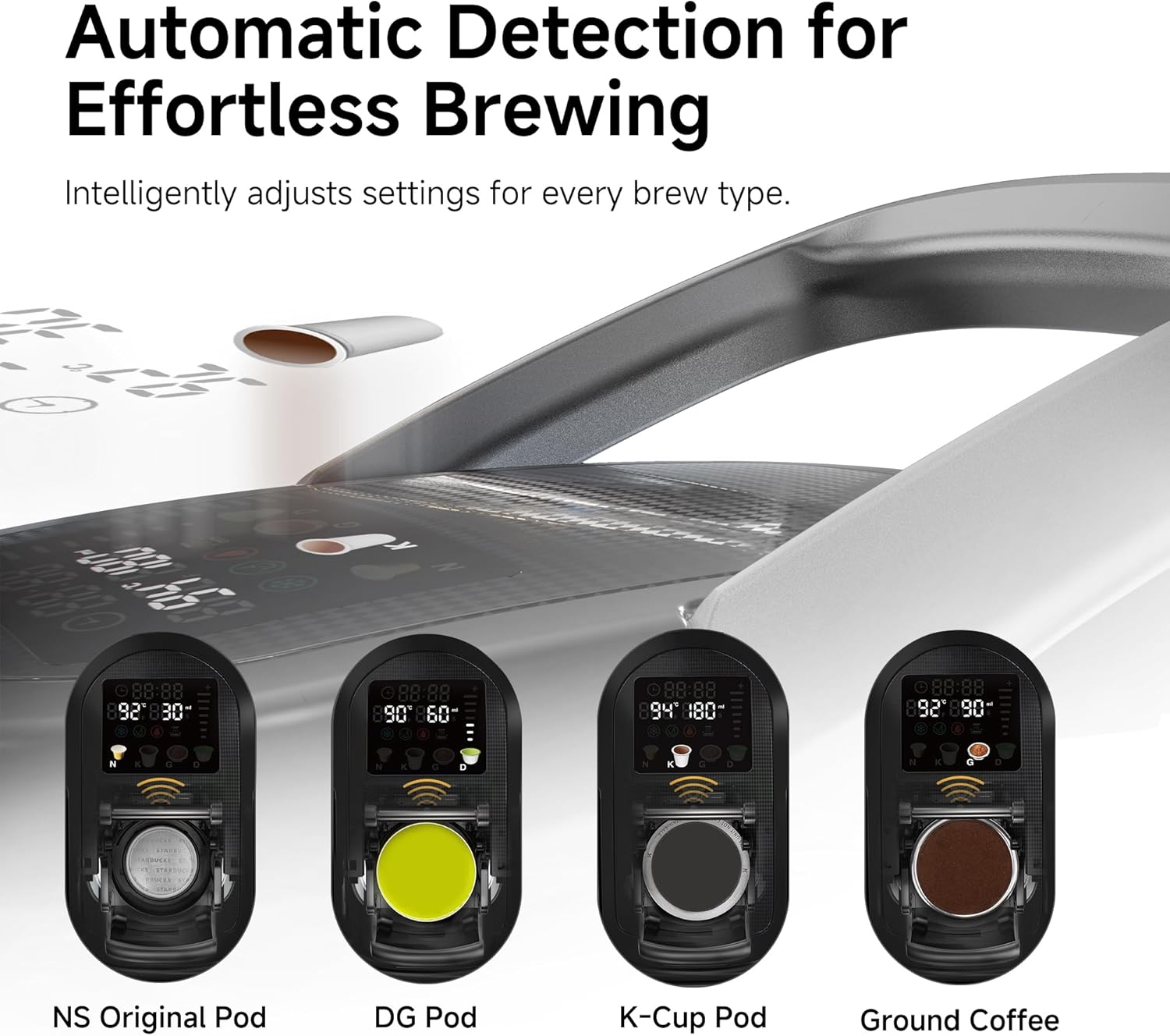
Figure 6: Automatic detection feature intelligently adjusts settings for each brew type.
4.3. Adjustable Settings
The LCD display provides real-time control over various brewing parameters:
- Extraction Temperature: Adjustable from 77°F (25°C) to 203°F (95°C).
- ബ്രൂ വോളിയം: Adjustable from 50mL to 360mL.
- Pre-infusion Time: Adjustable from 0 to 10 seconds. Press and hold the brew button for 3 seconds to set.
- താപനില യൂണിറ്റ് പരിവർത്തനം: °C നും °F നും ഇടയിൽ മാറുക.
- ഷെഡ്യൂളിംഗ്: Set a brewing schedule from 30 minutes to 24 hours.
- കോൾഡ് ബ്രൂ: Select the snowflake icon for cold brew preparation.
- Water Alert: An icon will indicate low water levels.

Figure 7: The LCD provides comprehensive control over brewing settings.

Figure 8: The adjustable drip tray allows for various cup sizes, up to 4.3 inches tall.
5. പരിപാലനം
5.1. വൃത്തിയാക്കൽ
- ഡ്രിപ്പ് ട്രേ: Regularly empty and clean the drip tray. It is designed to collect excess water during brewing.
- അഡാപ്റ്ററുകൾ: After each use, remove and rinse the coffee adapters and reusable filter under running water.
- പുറം: പരസ്യം ഉപയോഗിച്ച് മെഷീൻ്റെ പുറംഭാഗം തുടയ്ക്കുകamp തുണി. മെഷീൻ വെള്ളത്തിൽ മുക്കരുത്.
- വാട്ടർ ടാങ്ക്: Clean the water tank periodically with mild soap and water, then rinse thoroughly.

Figure 9: The removable drip tray for easy cleaning.
5.2. ഡെസ്കലിംഗ്
The machine features a descaling mode (indicated by a specific icon on the LCD). Regular descaling is recommended to maintain optimal performance and extend the lifespan of your coffee maker. Refer to the detailed descaling instructions in the full user manual for your specific model.

Figure 10: The LCD display indicating descaling mode.
6. പ്രശ്നപരിഹാരം
| പ്രശ്നം | സാധ്യമായ കാരണം | പരിഹാരം |
|---|---|---|
| Water leakage into drip tray or underneath unit. | Possible issue with adapter fit or internal seal. | Ensure adapters are correctly seated. Check for any visible damage to seals. If problem persists, contact customer support. |
| Difficulty inserting/removing capsule holder. | Adapter misalignment or mechanism stiffness. | Ensure the adapter is aligned correctly before applying pressure. Do not force the lever. If stiff, try gently wiggling the adapter into place. |
| Coffee not brewing or slow brewing. | Low water level, clogged needle, or incorrect adapter placement. | Check water tank level. Ensure the capsule/pod is correctly pierced. Clean the brewing needle if clogged. |
| മെഷീൻ ഓണാക്കുന്നില്ല. | No power, power cable not connected. | Check power outlet and ensure the power cable is securely connected. |

Figure 11: The water alert icon on the display indicates when the water tank needs refilling.
7 സ്പെസിഫിക്കേഷനുകൾ
- ബ്രാൻഡ്: HIBREW
- മോഡലിൻ്റെ പേര്: H6
- ഉൽപ്പന്ന അളവുകൾ: 7.8"D x 13"W x 11.8"H
- ഇനത്തിൻ്റെ ഭാരം: 9 പൗണ്ട്
- നിറം: Blue (Note: Color may vary based on specific product variant)
- വാല്യംtage: 120 വോൾട്ട്
- ഊർജ്ജ സ്രോതസ്സ്: എസി അഡാപ്റ്റർ
- കോഫി ഇൻപുട്ട് തരം: Capsule, Ground, Pod (K-Cup, Nespresso, Dolce Gusto, E.S.E.)
- പ്രത്യേക സവിശേഷതകൾ: Auto Shut-Off, Portable, Programmable, Removable Tank, Thermal
- പ്രവർത്തന രീതി: സെമി-ഓട്ടോമാറ്റിക്
- ഡിഷ്വാഷർ സുരക്ഷിതമാണോ: ഇല്ല

Figure 12: Dimensions of the HIBREW H6 coffee maker.
8. വാറൻ്റിയും പിന്തുണയും
For warranty information or technical support, please refer to the contact details provided in your product packaging or visit the official HIBREW website. If you have any questions or encounter issues, do not hesitate to contact customer service.


