1. ഉൽപ്പന്നം കഴിഞ്ഞുview
The MECHEN X55 is a versatile MP3 and MP4 player designed for both local and streaming media. Running on Android 10 OS, it features a 4-inch HD touchscreen, Bluetooth 4.1, and Wi-Fi connectivity. It supports a wide range of audio and video formats and comes with pre-installed popular streaming applications.

ചിത്രം 1.1: മുൻഭാഗം view of the MECHEN X55 MP3 Player.
പ്രധാന സവിശേഷതകൾ:
- ആൻഡ്രോയിഡ് 10 ഒഎസ്: Provides a familiar and intuitive user experience.
- 4 ഇഞ്ച് എച്ച്ഡി ടച്ച്സ്ക്രീൻ: For clear visuals and easy navigation.
- 96GB Storage: Includes 32GB internal ROM and a 64GB expansion card, expandable up to 1TB.
- ബ്ലൂടൂത്ത് 4.1: For wireless audio connections with headphones, speakers, and car systems.
- വൈഫൈ കണക്റ്റിവിറ്റി: Enables online streaming, app downloads, and internet access.
- ഹൈഫൈ നഷ്ടരഹിതമായ ശബ്ദം: Equipped with an intelligent noise reduction chip for high-fidelity audio.
- 2000mAh ബാറ്ററി: Offers extended music and video playback time.
വീഡിയോ 1.1: ഒരു ഓവർview of the MECHEN X55 MP3 Player's features, including its touchscreen, music and video playback, Bluetooth connectivity, parental controls, and storage expansion.
2. ആരംഭിക്കുന്നു
2.1 ബോക്സിൽ എന്താണുള്ളത്
പെട്ടി ശ്രദ്ധാപൂർവ്വം അൺപാക്ക് ചെയ്ത് എല്ലാ ഇനങ്ങളും ഉണ്ടെന്ന് ഉറപ്പാക്കുക:
- 1 x MECHEN X55 Music Player
- 1 x USB-C കേബിൾ
- 1 x ഇയർഫോണുകൾ
- 1 x Protective Film
- 1 x സംരക്ഷണ കേസ്
- 1 x ഉപയോക്തൃ മാനുവൽ
- 1 x 64GB TF Card (pre-installed or separate)

Image 2.1: Contents included with the MECHEN X55 MP3 Player.
2.2 ഉപകരണം ചാർജ് ചെയ്യുന്നു
Before first use, fully charge the MECHEN X55. Use the provided USB-C cable and a certified 5V 1A charger. Avoid fast chargers or wireless pads to prevent over-voltagഇ-പ്രൊട്ടക്ഷൻ പ്രശ്നങ്ങൾ.
- Connect the USB-C cable to the player's charging port.
- Connect the other end to a compatible USB power adapter.
- ചാർജിംഗ് ഇൻഡിക്കേറ്റർ പ്രകാശിക്കും. പൂർണ്ണമായി ചാർജ് ചെയ്യാൻ സാധാരണയായി ഏകദേശം 2.5 മണിക്കൂർ എടുക്കും.

Image 2.2: MECHEN X55 MP3 Player connected for charging.
2.3 പവർ ഓൺ/ഓഫ്
- പവർ ഓണാക്കാൻ: സ്ക്രീൻ പ്രകാശിക്കുന്നത് വരെ പവർ ബട്ടൺ (വശത്ത് സ്ഥിതിചെയ്യുന്നത്) അമർത്തിപ്പിടിക്കുക.
- പവർ ഓഫ് ചെയ്യാൻ: Press and hold the Power button until a power-off menu appears. Select 'Power off'.
- പുനരാരംഭിക്കാൻ: From the power-off menu, select 'Restart'.
3. അടിസ്ഥാന പ്രവർത്തനം
3.1 ടച്ച്സ്ക്രീൻ നാവിഗേഷൻ
The MECHEN X55 features a responsive 4-inch IPS full-touch HD screen. Navigate the interface using standard Android gestures:
- ടാപ്പ് ചെയ്യുക: ഒരു ഇനം തിരഞ്ഞെടുക്കാനോ ഒരു ആപ്പ് തുറക്കാനോ.
- സ്വൈപ്പ്: ലിസ്റ്റുകളിലൂടെ സ്ക്രോൾ ചെയ്യാനോ സ്ക്രീനുകൾക്കിടയിൽ മാറാനോ.
- പിഞ്ച്-ടു-സൂം: In supported applications like image galleries or web ബ്ര rowsers സറുകൾ.
3.2 Wi-Fi-ലേക്ക് ബന്ധിപ്പിക്കുന്നു
Wi-Fi connectivity allows for online streaming, app downloads, and internet browsing.
- പോകുക ക്രമീകരണങ്ങൾ > നെറ്റ്വർക്കും ഇൻ്റർനെറ്റും > വൈഫൈ.
- വൈഫൈ ടോഗിൾ ചെയ്യുക On.
- ലിസ്റ്റിൽ നിന്ന് നിങ്ങൾക്ക് ആവശ്യമുള്ള നെറ്റ്വർക്ക് തിരഞ്ഞെടുക്കുക.
- ആവശ്യപ്പെടുകയാണെങ്കിൽ പാസ്വേഡ് നൽകി ടാപ്പ് ചെയ്യുക ബന്ധിപ്പിക്കുക.
3.3 ബ്ലൂടൂത്ത് വഴി ബന്ധിപ്പിക്കുന്നു
The device supports Bluetooth 4.1 for connecting to wireless headphones, speakers, and other Bluetooth-enabled accessories.
- പോകുക ക്രമീകരണങ്ങൾ > ബന്ധിപ്പിച്ച ഉപകരണങ്ങൾ > ബ്ലൂടൂത്ത്.
- ബ്ലൂടൂത്ത് ടോഗിൾ ചെയ്യുക On.
- Ensure your Bluetooth accessory is in pairing mode.
- Select the accessory from the list of available devices to pair.

Image 3.1: Bluetooth connectivity options for the MECHEN X55 MP3 Player.
4. മീഡിയ പ്ലേബാക്ക്
4.1 മ്യൂസിക് പ്ലേബാക്ക്
The MECHEN X55 supports various audio formats and streaming services.
- പിന്തുണയ്ക്കുന്ന ഫോർമാറ്റുകൾ: FLAC, APE, WAV, MP3, AAC, WMA, OGG, DSD (DSF/DFF), MQA, AIFF.
- Streaming Applications: Pre-installed apps include Spotify, Amazon Music, Oto Music, Audible, VLC Music, and more. Additional apps can be downloaded from the Play Store.
- പ്രാദേശിക സംഗീതം: സംഗീതം കൈമാറുക files from your computer to the device's internal storage or the installed TF card. Use the pre-installed music player app to browse and play your library.

Image 4.1: Music library interface and equalizer on the MECHEN X55 MP3 Player.
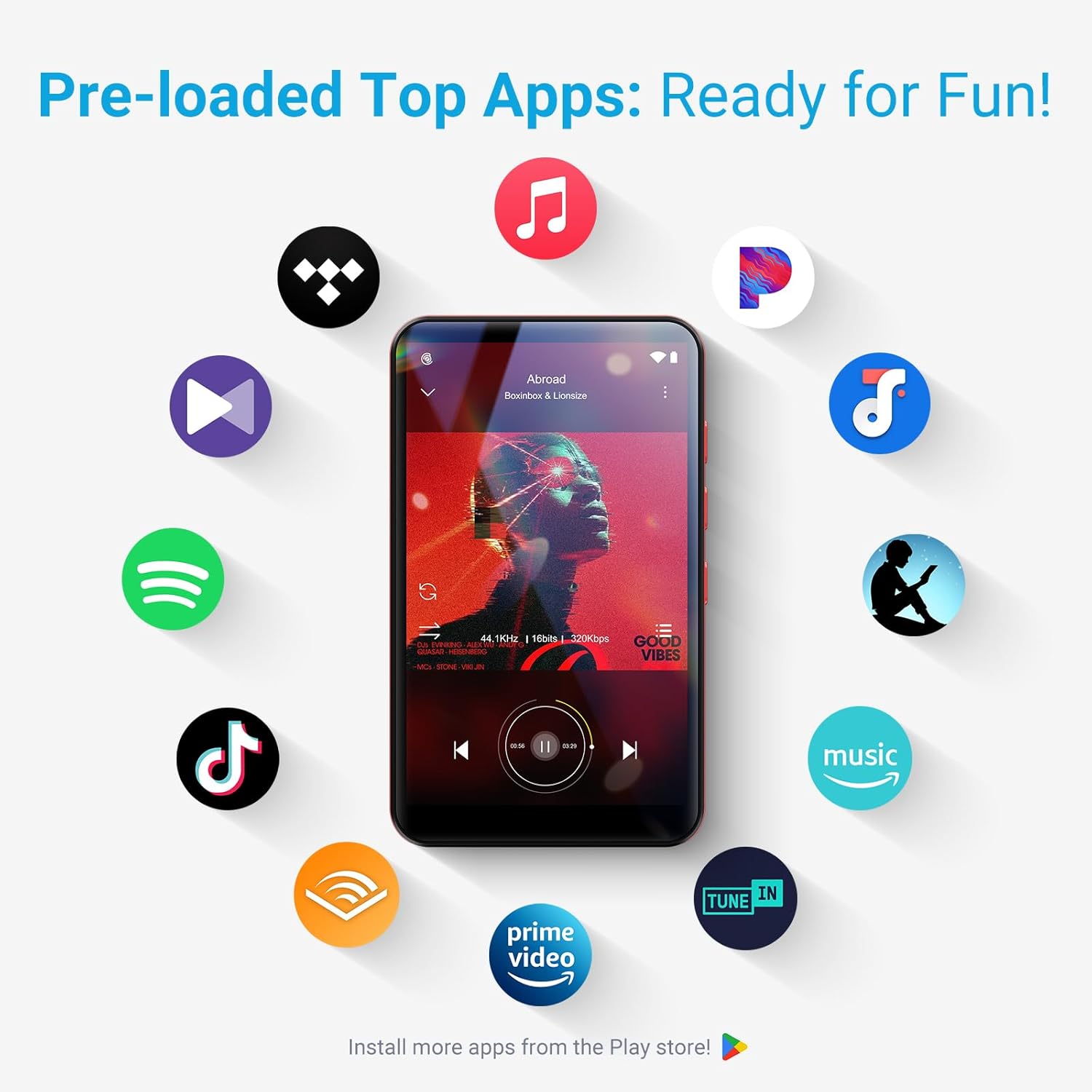
Image 4.2: Pre-loaded streaming applications on the MECHEN X55 MP3 Player.
4.2 വീഡിയോ പ്ലേബാക്ക്
The device supports high-definition video playback on its 4-inch screen.
- പിന്തുണയ്ക്കുന്ന ഫോർമാറ്റുകൾ: MP4, MKV, MOV, FLV, RMVB, DAT, MPG, TS, AVI, WMV, MPEG, WebM.
- Use the pre-installed video player app to enjoy your media.

Image 4.3: Video playback on the MECHEN X55 MP3 Player.
5. സ്റ്റോറേജ് മാനേജ്മെൻ്റ്
The MECHEN X55 comes with 32GB of internal storage and a 64GB TF card, totaling 96GB. Storage can be expanded further.
- ആന്തരിക സംഭരണം: 32GB ROM.
- Included Expansion: 64GB TF Card.
- പരമാവധി വികാസം: Supports Micro SD cards up to 1TB.

Image 5.1: Storage capacity and expansion options for the MECHEN X55 MP3 Player.
6. വിപുലമായ സവിശേഷതകൾ
6.1 FM Radio, Voice Recorder, E-Book
Beyond music and video, the MECHEN X55 includes several utility features:
- എഫ്എം റേഡിയോ: Tune into local radio stations.
- വോയ്സ് റെക്കോർഡർ: ബിൽറ്റ്-ഇൻ മൈക്രോഫോൺ ഉപയോഗിച്ച് ഓഡിയോ റെക്കോർഡ് ചെയ്യുക.
- E-Book Reader: Read digital books and documents.

Image 6.1: Additional features of the MECHEN X55 MP3 Player.
6.2 രക്ഷാകർതൃ നിയന്ത്രണങ്ങൾ
The device supports parental control features to manage usage and content access.
- Install the Family Link app on a parent device.
- Bind the MECHEN X55 device via a pairing code.
- Set daily usage limits and content filters as desired.

Image 6.2: Parental control interface for managing device usage.
7. പരിപാലനം
7.1 ചാർജിംഗ് മാർഗ്ഗനിർദ്ദേശങ്ങൾ
- Always use a certified 5V 1A charger.
- Avoid fast chargers and wireless charging pads, as they may trigger over-voltage protection and potentially damage the device.
7.2 ഫേംവെയർ അപ്ഗ്രേഡുകൾ
Periodically check for and install firmware upgrades to ensure optimal performance and access to new features.
- ഉപകരണം വൈഫൈയിലേക്ക് ബന്ധിപ്പിക്കുക.
- പോകുക ക്രമീകരണങ്ങൾ > സിസ്റ്റം > സിസ്റ്റം അപ്ഡേറ്റ്.
- ലഭ്യമായ എല്ലാ അപ്ഡേറ്റുകളും ഡൗൺലോഡ് ചെയ്ത് ഇൻസ്റ്റാൾ ചെയ്യാൻ ഓൺ-സ്ക്രീൻ നിർദ്ദേശങ്ങൾ പാലിക്കുക.

Image 7.1: Firmware upgrade process on the MECHEN X55 MP3 Player.
8. പ്രശ്നപരിഹാരം
നിങ്ങൾ നേരിട്ടേക്കാവുന്ന പൊതുവായ പ്രശ്നങ്ങളെ ഈ വിഭാഗം അഭിസംബോധന ചെയ്യുന്നു.
8.1 പൊതുവായ പ്രശ്നങ്ങളും പരിഹാരങ്ങളും
- ഉപകരണം ഓണാക്കുന്നില്ല: ബാറ്ററി ചാർജ് ചെയ്തിട്ടുണ്ടെന്ന് ഉറപ്പാക്കുക. കുറഞ്ഞത് 15 മിനിറ്റെങ്കിലും ചാർജറുമായി ബന്ധിപ്പിക്കുക.
- ആപ്പുകൾ ക്രാഷാകുകയോ മരവിക്കുകയോ ചെയ്യുന്നു: Close background applications. Restart the device. Clear app cache in Settings.
- വൈഫൈ/ബ്ലൂടൂത്ത് കണക്റ്റിവിറ്റി പ്രശ്നങ്ങൾ: Toggle Wi-Fi/Bluetooth off and on. Restart the device. Forget and re-connect to the network/device.
- മോശം ശബ്ദ നിലവാരം: Check headphone connection. Ensure volume is adequate. Try different audio files.
8.2 Google Account Precautions
If you plan to perform a factory reset, ensure you sign out of your Google account on the device and remove the device from your Google account settings online (google.com/devices). Failure to do so may result in a login loop after the reset.

Image 8.1: Troubleshooting tips for the MECHEN X55 MP3 Player.
9 സ്പെസിഫിക്കേഷനുകൾ
| ഫീച്ചർ | സ്പെസിഫിക്കേഷൻ |
|---|---|
| ഉൽപ്പന്ന അളവുകൾ | 4.06 x 0.39 x 2.4 ഇഞ്ച് |
| ഇനത്തിൻ്റെ ഭാരം | 7.8 ഔൺസ് |
| നിർമ്മാതാവ് | മെച്ചൻ |
| ഇനം മോഡൽ നമ്പർ | X55 |
| ബാറ്ററികൾ | 1 എ ബാറ്ററികൾ ആവശ്യമാണ് (ഉൾപ്പെടുന്നു) |
| ബ്രാൻഡ് | മെച്ചൻ |
| പ്രത്യേക ഫീച്ചർ | FM Radio, Touch Screen, Video Playback, Voice Recorder |
| കണക്റ്റിവിറ്റി ടെക്നോളജി | ബ്ലൂടൂത്ത്, വൈഫൈ |
| മെമ്മറി സ്റ്റോറേജ് കപ്പാസിറ്റി | 96 GB (32GB ROM + 64GB TF Card) |
| നിറം | ചാരനിറം |
| സ്ക്രീൻ വലിപ്പം | 4 ഇഞ്ച് |
| അനുയോജ്യമായ ഉപകരണങ്ങൾ | ഹെഡ്ഫോൺ |
| മീഡിയ തരം | മൈക്രോ എസ്.ഡി |
10. വാറൻ്റിയും പിന്തുണയും
For any product malfunctions or issues not covered in this manual, please contact MECHEN customer support. We are committed to providing assistance and resolving any problems you may encounter.

Image 10.1: MECHEN Aftersales Service information.


