1. ആമുഖം
This manual provides detailed instructions for the setup, operation, and maintenance of your LIORQUE BJ8555 Indoor Outdoor Weather Station. This device is designed to monitor temperature and humidity both indoors and in up to three remote outdoor locations, providing real-time data and environmental insights.
2. പാക്കേജ് ഉള്ളടക്കം
പാക്കേജിൽ ഇനിപ്പറയുന്ന ഇനങ്ങൾ ഉണ്ടോ എന്ന് പരിശോധിക്കുക:
- പ്രധാന ഡിസ്പ്ലേ യൂണിറ്റ് (1)
- Remote Outdoor Sensors (3)
- USB Power Cable (1)
- ഉപയോക്തൃ മാനുവൽ (1)
Note: Batteries are not included. The main unit requires 3x AAA batteries, and each remote sensor requires 2x AA batteries.

Image: Contents of the LIORQUE BJ8555 Weather Station package.
3. ഉൽപ്പന്നം കഴിഞ്ഞുview
The LIORQUE BJ8555 Weather Station consists of a main display unit and three wireless remote sensors. The main unit displays indoor temperature and humidity, along with data from the three remote sensors. It features a large LCD screen with adjustable backlight.
3.1 പ്രധാന ഡിസ്പ്ലേ യൂണിറ്റ്

Image: Main Display Unit features and button descriptions.
പ്രധാന യൂണിറ്റിൽ ഇവ ഉൾപ്പെടുന്നു:
- LCD ഡിസ്പ്ലേ: Shows indoor and outdoor temperature/humidity, comfort level, trend indicators, MAX/MIN records, and low battery warnings.
- ബാക്ക്ലൈറ്റ് ബട്ടൺ: Activates or adjusts the display backlight.
- Channel Selection Buttons (1, 2, 3): Manually select which remote sensor's data to view, or cycle through them.
- MEM ബട്ടൺ: Accesses MAX/MIN temperature and humidity records.
- സിഎച്ച് ബട്ടൺ: Cycles through remote sensor channels or initiates pairing.
- സി/എഫ് സ്വിച്ച്: സെൽഷ്യസ്, ഫാരൻഹീറ്റ് താപനില യൂണിറ്റുകൾക്കിടയിൽ ടോഗിൾ ചെയ്യുന്നു.
- ബാറ്ററി കമ്പാർട്ട്മെൻ്റ്: For 3x AAA batteries.
- യുഎസ്ബി-സി ഇൻപുട്ട്: For continuous power and backlight.
- Wall Mount Hole & Kickstand: For flexible placement.
3.2 Remote Outdoor Sensors
Image: Remote Outdoor Sensor features and button descriptions.
Each remote sensor includes:
- താപനിലയും ഈർപ്പം സെൻസറും: Measures environmental conditions.
- Channel Switch (1, 2, 3): Allows you to assign a unique channel to each sensor.
- സിഗ്നൽ ഇൻഡിക്കേറ്റർ ലൈറ്റ്: Flashes when transmitting data.
- ബാറ്ററി കമ്പാർട്ട്മെൻ്റ്: For 2x AA batteries.
- വാൾ മൗണ്ട് ഹോൾ: For easy installation.

Image: LIORQUE Weather Station main unit and three remote sensors.
4. സജ്ജീകരണം
4.1 ബാറ്ററി ഇൻസ്റ്റാളേഷൻ
- റിമോട്ട് സെൻസറുകൾ: Open the battery compartment cover on each remote sensor. Insert 2x AA batteries into each sensor, observing the correct polarity (+/-). Select a unique channel (1, 2, or 3) for each sensor using the internal switch. Close the battery compartment.
- പ്രധാന പ്രദർശന യൂണിറ്റ്: Open the battery compartment cover on the back of the main unit. Insert 3x AAA batteries, observing the correct polarity (+/-). Close the battery compartment. Alternatively, connect the provided USB cable to the USB-C input on the main unit and plug the other end into a 5V USB power adapter (not included) for continuous power.
4.2 പ്രാരംഭ ജോടിയാക്കൽ
Once batteries are installed in both the sensors and the main unit, the main unit will automatically begin searching for signals from the remote sensors. This process may take a few minutes. Ensure the sensors are within range of the main unit during initial setup.
- If a sensor does not connect, press and hold the 'CH' button on the main unit for 3 seconds to initiate a manual search.
- Ensure each remote sensor is set to a different channel (1, 2, or 3) to avoid interference.
5. പ്രവർത്തന നിർദ്ദേശങ്ങൾ
5.1 ഡിസ്പ്ലേ സവിശേഷതകൾ

ചിത്രം: വിശദമായത് view എൽസിഡി ഡിസ്പ്ലേയും അതിന്റെ സൂചകങ്ങളും.
The 4.4-inch LCD display provides the following information:
- ഇൻഡോർ താപനിലയും ഈർപ്പവും: Displayed at the top.
- പുറത്തെ താപനിലയും ഈർപ്പവും: Displayed for each connected remote sensor (Channels 1, 2, 3).
- കംഫർട്ട് ലെവൽ ഇൻഡിക്കേറ്റർ: An icon indicating the current comfort level (Humid, Comfortable, Dry).
- Temperature & Humidity Trend Indicators: Arrows showing if values are rising, falling, or stable.
- Frost Point Warning: An icon may appear if outdoor temperature approaches freezing.
- കുറഞ്ഞ ബാറ്ററി സൂചകം: Appears when batteries need replacement.
5.2 താപനില യൂണിറ്റ് തിരഞ്ഞെടുക്കൽ (℃/℉)

Image: Switching between Celsius and Fahrenheit temperature units.
To switch between Celsius (℃) and Fahrenheit (℉), press the 'C/F' button located on the side of the main unit.
5.3 പരമാവധി/മിനിറ്റ് റെക്കോർഡുകൾ

Image: MAX/MIN memory function display.
The device records the maximum and minimum temperature and humidity values over a 24-hour period. To view ഈ രേഖകൾ:
- Press the 'MEM' button once to display the maximum (MAX) values.
- Press the 'MEM' button a second time to display the minimum (MIN) values.
- Press the 'MEM' button a third time to return to current readings.
5.4 കംഫർട്ട് ലെവൽ ഇൻഡിക്കേറ്റർ
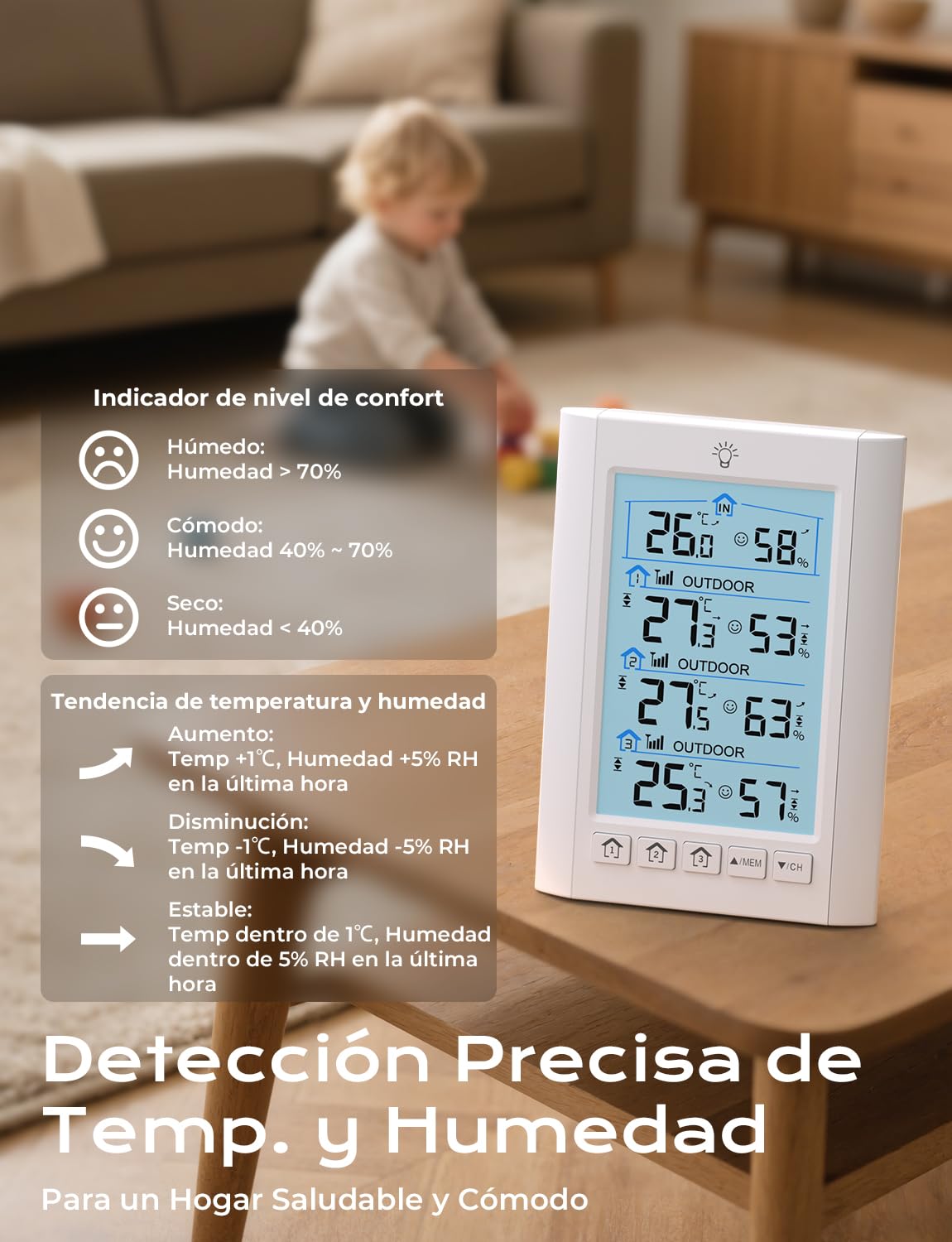
Image: Comfort level indicator icons and their corresponding humidity ranges.
The comfort level indicator provides a quick assessment of the environment based on humidity:
- ഈർപ്പമുള്ളത്: ഈർപ്പം > 70%
- സുഖപ്രദമായ: ഈർപ്പം 40% - 70%
- വരണ്ട: ഈർപ്പം < 40%
5.5 Trend Indicators

Image: Temperature and humidity trend indicators.
Arrows next to the temperature and humidity readings indicate the trend over the last hour:
- മുകളിലേക്കുള്ള അമ്പടയാളം (↑): ഇൻക്രിasing (Temp +1℃, Humidity +5% RH)
- താഴേക്കുള്ള അമ്പടയാളം (↓): വിധിക്കുകasing (Temp -1℃, Humidity -5% RH)
- തിരശ്ചീന അമ്പടയാളം (→): Stable (Temp within 1℃, Humidity within 5% RH)
5.6 അലാറം ക്രമീകരണങ്ങൾ
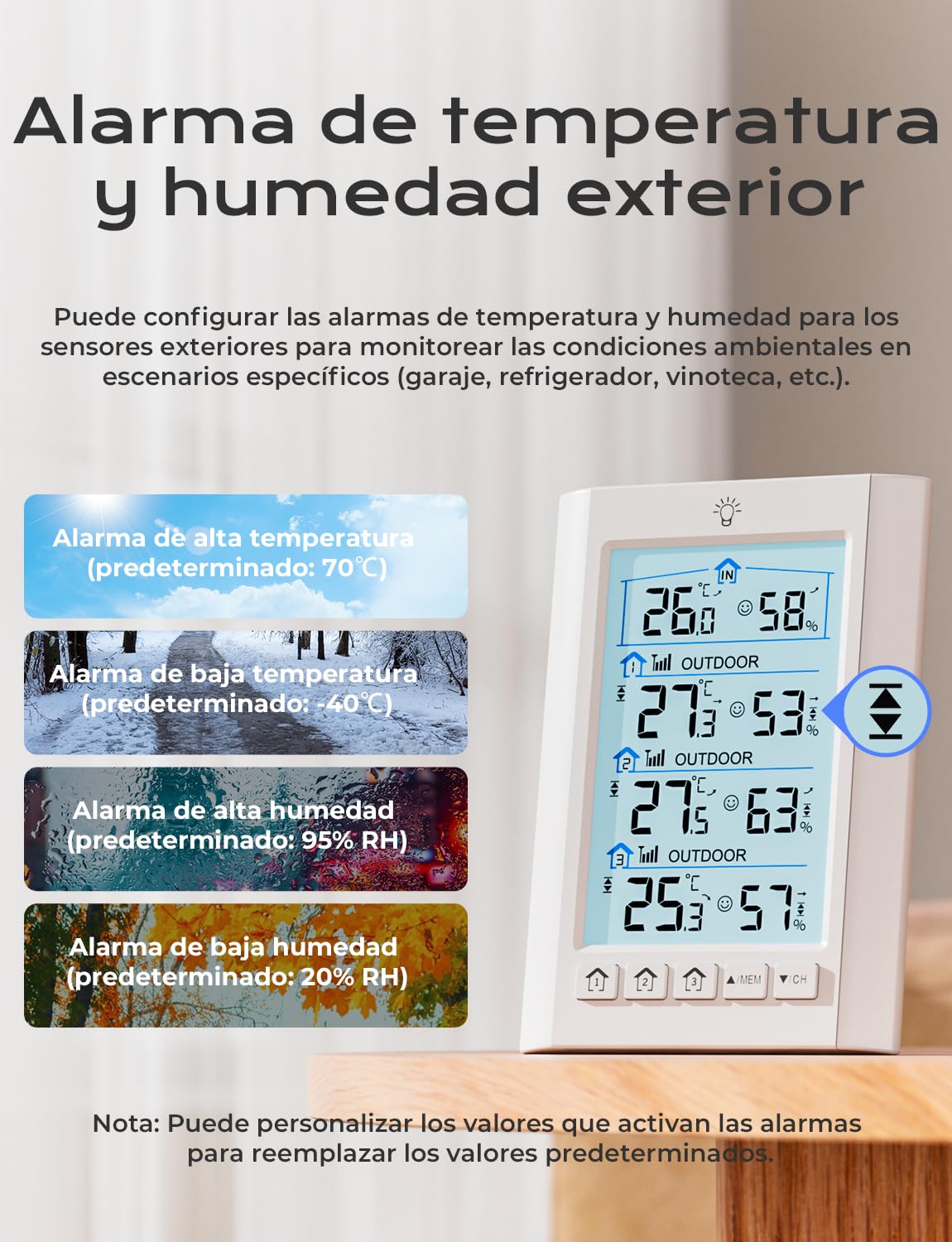
Image: Outdoor temperature and humidity alarm settings.
You can set customizable high and low temperature and humidity alarms for the outdoor sensors. When the measured values exceed these thresholds, an audible alarm will sound.
- Refer to the specific instructions in the included user manual for detailed steps on setting and adjusting alarm thresholds.
- Default alarm thresholds are: High Temp 70℃, Low Temp -40℃, High Humidity 95% RH, Low Humidity 20% RH. These can be customized.
5.7 ബാക്ക്ലൈറ്റ് അഡ്ജസ്റ്റ്മെൻ്റ്

Image: Adjustable screen brightness and power modes.
The display backlight can be adjusted:
- USB Power Mode: When powered by the USB cable, press the backlight button (light bulb icon) to cycle through three brightness levels: High, Low, and Off. The backlight will remain on continuously.
- ബാറ്ററി പവർ മോഡ്: When powered by batteries only, pressing the backlight button will illuminate the screen for 10 seconds before automatically turning off to conserve power.
6. Sensor Placement and Installation
Proper placement of the remote sensors is crucial for accurate readings and optimal wireless transmission.

ചിത്രം: ഉദാample of multi-sensor placement around a home.
- പരിധി: The sensors have a transmission range of up to 100 meters (328 feet) in open areas. Walls, metal structures, and other electronic devices can reduce this range.
- സംരക്ഷണം: To ensure accuracy and durability, protect the remote sensors from direct sunlight and rain.

Image: Guidelines for correct outdoor sensor installation.
- അനുയോജ്യമായ സ്ഥലങ്ങൾ: Place sensors under an overhang, porch, or in a shaded, well-ventilated area.
- മൗണ്ടിംഗ്: Use the integrated wall mount hole to secure the sensors to a vertical surface.
7. പരിപാലനം
- ബാറ്ററി മാറ്റിസ്ഥാപിക്കൽ: Replace batteries in the main unit and remote sensors when the low battery indicator appears on the display. Always replace all batteries in a unit at the same time.
- വൃത്തിയാക്കൽ: Clean the display unit and sensors with a soft, damp തുണി. ഉരച്ചിലുകളുള്ള ക്ലീനറുകളോ ലായകങ്ങളോ ഉപയോഗിക്കരുത്.
- സംഭരണം: ഉപകരണം ദീർഘനേരം സൂക്ഷിക്കുകയാണെങ്കിൽ, ചോർച്ച തടയാൻ എല്ലാ ബാറ്ററികളും നീക്കം ചെയ്യുക.
8. പ്രശ്നപരിഹാരം
| പ്രശ്നം | സാധ്യമായ കാരണം | പരിഹാരം |
|---|---|---|
| പ്രധാന യൂണിറ്റിൽ ഡിസ്പ്ലേ ഇല്ല. | Batteries are dead or incorrectly inserted; USB power not connected. | Check battery polarity and replace if necessary. Ensure USB cable is securely connected to a working power source. |
| Outdoor sensor data not displayed | Sensor out of range; low sensor battery; incorrect channel setting; interference. | Move sensor closer to the main unit. Replace sensor batteries. Ensure sensor channel matches the selected channel on the main unit. Press and hold 'CH' button on main unit to re-scan. Avoid placing near large metal objects or other electronics. |
| കൃത്യമല്ലാത്ത വായനകൾ | Sensor exposed to direct sunlight or rain; sensor placed near heat/cold sources. | Relocate sensor to a shaded, protected, and well-ventilated area away from extreme temperature sources. |
| Backlight not staying on | Main unit is running on battery power. | Connect the main unit to a USB power source for continuous backlight. |
9 സ്പെസിഫിക്കേഷനുകൾ
- മോഡൽ നമ്പർ: BJ8555
- ബ്രാൻഡ്: ലിയോർക്ക്
- പ്രധാന യൂണിറ്റ് പവർ: 3x AAA batteries (not included) or DC 5V via USB-C cable
- Remote Sensor Power: 2x AA batteries per sensor (not included)
- താപനില കൃത്യത: ± 1 ℃
- ഈർപ്പം കൃത്യത: ±5% RH
- ഡാറ്റ അപ്ഡേറ്റ് ആവൃത്തി: ഓരോ 30 സെക്കൻഡിലും
- വയർലെസ് ട്രാൻസ്മിഷൻ ശ്രേണി: തുറസ്സായ സ്ഥലങ്ങളിൽ 100 മീറ്റർ (328 അടി) വരെ
- ഡിസ്പ്ലേ വലുപ്പം: 4.4 ഇഞ്ച് എൽസിഡി
- പ്രത്യേക സവിശേഷതകൾ: 3 remote sensors, switchable ℃/℉, comfort level indicator, backlit LCD, MAX/MIN records, trend indicators, customizable alarms.
10. വാറൻ്റിയും പിന്തുണയും
വാറന്റി വിവരങ്ങൾക്കോ സാങ്കേതിക പിന്തുണയ്ക്കോ, നിങ്ങളുടെ വാങ്ങലിനൊപ്പം നൽകിയിരിക്കുന്ന കോൺടാക്റ്റ് വിശദാംശങ്ങൾ പരിശോധിക്കുകയോ ഔദ്യോഗിക LIORQUE സന്ദർശിക്കുകയോ ചെയ്യുക. webസൈറ്റ്. വാങ്ങിയതിന്റെ തെളിവായി നിങ്ങളുടെ വാങ്ങൽ രസീത് സൂക്ഷിക്കുക.