1. ആമുഖം
This manual provides detailed instructions for the setup, operation, and maintenance of your LETSUNG GoLite 11 Mini PC. The GoLite 11 is a compact and powerful desktop computer designed for various applications, including home, office, and educational use. It features an Intel Celeron N4000 processor, 8GB of RAM, and a 128GB NVMe PCIe SSD, offering efficient performance for daily computing tasks.
ശരിയായ പ്രവർത്തനക്ഷമത ഉറപ്പാക്കുന്നതിനും അതിന്റെ ആയുസ്സ് പരമാവധിയാക്കുന്നതിനും നിങ്ങളുടെ ഉപകരണം ഉപയോഗിക്കുന്നതിന് മുമ്പ് ദയവായി ഈ മാനുവൽ നന്നായി വായിക്കുക.
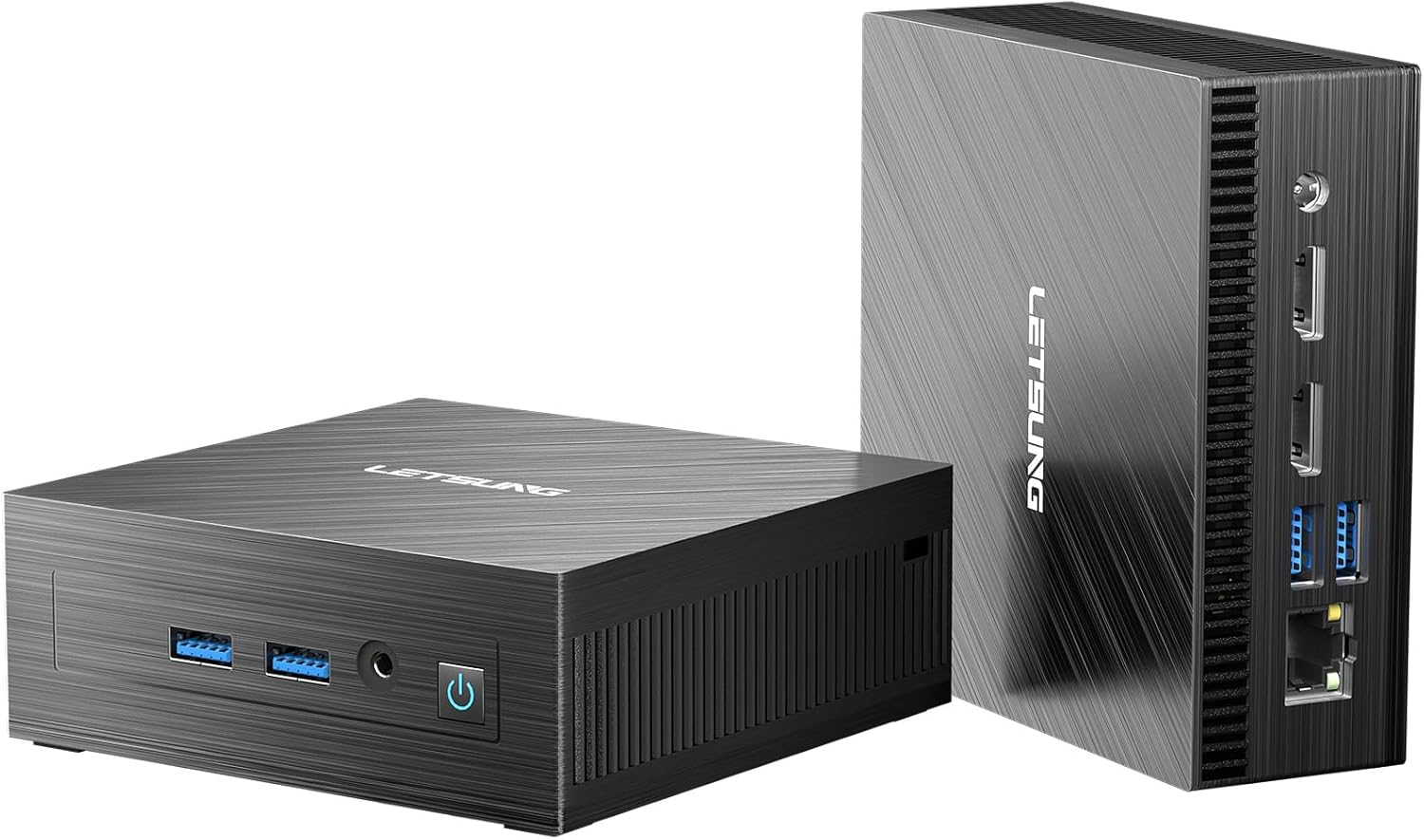
Image: The LETSUNG GoLite 11 Mini PC, showcasing its compact design and various ports from both front and rear perspectives.
2. ബോക്സിൽ എന്താണുള്ളത്?
പാക്കേജ് തുറക്കുമ്പോൾ, ഇനിപ്പറയുന്ന എല്ലാ ഇനങ്ങളും ഉൾപ്പെടുത്തിയിട്ടുണ്ടെന്ന് ദയവായി ഉറപ്പാക്കുക:
- 1 x Golite 11 Mini PC
- 1 x HDMI കേബിൾ
- 1 x VESA മൗണ്ട്
- 1 x പവർ അഡാപ്റ്റർ
- 1 x ഉപയോക്തൃ ഗൈഡ്
3. ഉൽപ്പന്നം കഴിഞ്ഞുview
3.1. Design and Dimensions
The GoLite 11 Mini PC is designed for ultra-portability, measuring approximately 4.5 × 4.4 × 1.6 inches and weighing under 10 ounces. Its compact form factor allows it to fit easily into bags or even pockets, making it ideal for users who require computing power on the go. A VESA mount is included for convenient installation behind a monitor, optimizing desktop space.

Image: The GoLite 11 Mini PC demonstrating its compact size next to a laptop and smartphone, with an illustration of its VESA mount installation on the back of a monitor.
3.2. പോർട്ടുകളും കണക്ഷനുകളും
The GoLite 11 Mini PC is equipped with a variety of ports to support diverse connectivity needs:
- ഫ്രണ്ട് പാനൽ: Power Button, 2x USB 3.2 Gen 1 ports, 3.5mm Audio Jack.
- പിൻ പാനൽ: RJ45 LAN port, 2x USB 3.2 Gen 1 ports, 2x HDMI 1.4 ports, DC-IN port.

ചിത്രം: വിശദമായത് view of the GoLite 11 Mini PC's front and rear panels, with labels indicating the Power Button, USB 3.2 Gen 1 ports, 3.5mm Audio Jack, RJ45 LAN, HDMI 1.4, and DC-IN ports.
4. സജ്ജീകരണ ഗൈഡ്
4.1. പ്രാരംഭ പവർ ഓൺ
- Connect the power adapter to the DC-IN port on the rear of the Mini PC and plug it into a power outlet.
- മുൻ പാനലിലുള്ള പവർ ബട്ടൺ അമർത്തുക. പവർ ഇൻഡിക്കേറ്റർ ലൈറ്റ് പ്രകാശിക്കും.
4.2. പെരിഫറലുകൾ ബന്ധിപ്പിക്കുന്നു
- നിരീക്ഷിക്കുക: Connect your monitor(s) to the HDMI ports on the rear of the Mini PC using the provided HDMI cable or other compatible cables.
- കീബോർഡും മൗസും: Connect your USB keyboard and mouse to any of the available USB 3.2 Gen 1 ports.
- ഓഡിയോ: For external speakers or headphones, connect them to the 3.5mm audio jack on the front panel.
4.3. നെറ്റ്വർക്ക് കണക്ഷൻ
- വയർഡ് കണക്ഷൻ: Connect an Ethernet cable from your router or modem to the RJ45 LAN port on the rear of the Mini PC.
- വയർലെസ് കണക്ഷൻ: The GoLite 11 supports WiFi 5. Once the system boots, you can connect to your wireless network through the Windows operating system settings.
4.4. Dual Display Setup
The GoLite 11 Mini PC supports dual displays via its two HDMI ports, allowing for extended desktop functionality at 1920x1080 resolution and 60Hz refresh rate. Connect two monitors to the HDMI ports and configure display settings within the Windows operating system.

Image: The GoLite 11 Mini PC positioned between two monitors, illustrating its capability to support a dual display setup for enhanced productivity.
5. പ്രവർത്തന നിർദ്ദേശങ്ങൾ
5.1 സിസ്റ്റം പ്രകടനം
The GoLite 11 is powered by an 11th Gen Intel Celeron N4000 processor (2 cores, 2 threads, 4MB cache, up to 2.6GHz), providing reliable performance for everyday computing tasks such as web browsing, document editing, and multimedia consumption. The integrated Intel UHD Graphics supports 4K resolution for clear visuals.

Image: A graphic illustrating the performance metrics of the Intel N4000 processor, highlighting its 4MB cache and 1.10GHz-2.60GHz CPU frequency, with comparative bars against other processors.
5.2. സംഭരണവും മെമ്മറിയും
The Mini PC comes with 8GB of dual-channel LPDDR4 memory and a 128GB M.2 SATA SSD. The SSD offers significantly faster performance compared to traditional hard drives. The storage is upgradeable to 512GB, providing flexibility for your data needs.

Image: The GoLite 11 Mini PC connected to a monitor displaying various application icons, symbolizing its ample memory and flexible storage expansion capabilities for productivity and creative software.
5.3. വയർലെസ് കണക്റ്റിവിറ്റി
The GoLite 11 supports WiFi 5 and Bluetooth 4.2, enabling seamless wireless connections for internet access and peripheral devices. This allows for a clutter-free workspace and easy integration into your existing wireless environment.

Image: The GoLite 11 Mini PC on a desk with a monitor, keyboard, and mouse, accompanied by symbols for WiFi 5 and Bluetooth 4.2, indicating its wireless office capabilities.
5.4. USB 3.2 പോർട്ടുകൾ
Equipped with four USB 3.2 Gen 1 ports, the GoLite 11 offers high-speed data transfer for external drives, flash drives, and other USB devices, significantly reducing file transfer times compared to older USB standards.

Image: The GoLite 11 Mini PC with USB flash drives inserted into its USB 3.2 ports, alongside a graph comparing the read and write speeds of USB 2.0, USB 3.0, and USB 3.2.
6. പരിപാലനം
6.1. തണുപ്പിക്കൽ സംവിധാനം
The GoLite 11 features a low-power and low-noise cooling system designed to maintain optimal operating temperatures and ensure stable performance. To ensure efficient cooling, keep the ventilation openings clear of obstructions and regularly clean any dust accumulation.

Image: An illustration of the GoLite 11 Mini PC's low-power and low-noise cooling system, showing airflow patterns for heat dissipation.
7. പ്രശ്നപരിഹാരം
This section provides solutions to common issues you might encounter with your GoLite 11 Mini PC.
- ശക്തിയില്ല: പവർ അഡാപ്റ്റർ മിനി പിസിയിലേക്കും പ്രവർത്തിക്കുന്ന ഒരു പവർ ഔട്ട്ലെറ്റിലേക്കും സുരക്ഷിതമായി ബന്ധിപ്പിച്ചിട്ടുണ്ടെന്ന് ഉറപ്പാക്കുക. ആവശ്യമെങ്കിൽ മറ്റൊരു ഔട്ട്ലെറ്റ് പരീക്ഷിക്കുക.
- ഡിസ്പ്ലേ ഇല്ല: Verify that the HDMI cable is firmly connected to both the Mini PC and the monitor. Ensure the monitor is powered on and set to the correct input source. Try a different HDMI port or cable.
- ഇൻ്റർനെറ്റ് കണക്ഷൻ ഇല്ല: For wired connections, check the Ethernet cable and router. For wireless, ensure Wi-Fi is enabled in Windows settings and you are connected to the correct network with the correct password.
- മന്ദഗതിയിലുള്ള പ്രകടനം: Close unnecessary applications. Check for background processes consuming high resources. Ensure sufficient free storage space on the SSD.
- പെരിഫറൽ കണ്ടെത്തിയില്ല: Ensure USB devices are properly inserted. Try a different USB port. Reinstall or update device drivers if necessary.
If issues persist, please refer to the warranty and support information for further assistance.
8 സ്പെസിഫിക്കേഷനുകൾ
Below are the detailed specifications for the LETSUNG GoLite 11 Mini PC:
| ഫീച്ചർ | സ്പെസിഫിക്കേഷൻ |
|---|---|
| ബ്രാൻഡ് | ലെറ്റ്സംഗ് |
| മോഡൽ നമ്പർ | Golite 11 |
| പ്രോസസ്സർ | ഇന്റൽ സെലറോൺ N4000 (1.1 GHz, 2.6 GHz വരെ) |
| CPU Cores/Threads | 2 കോറുകൾ, 2 ത്രെഡുകൾ |
| കാഷെ വലിപ്പം | 4 MB |
| റാം | 8 GB LPDDR4 (Dual Channel) |
| സംഭരണം | 128 GB M.2 SATA SSD (Upgradeable to 512GB) |
| ഗ്രാഫിക്സ് കോപ്രൊസസർ | ഇൻ്റൽ UHD ഗ്രാഫിക്സ് 600 |
| പരമാവധി സ്ക്രീൻ റെസല്യൂഷൻ | 1920x1080 Pixels @ 60Hz |
| ഡിസ്പ്ലേ ഔട്ട്പുട്ട് | 2x HDMI 1.4 (Dual Display Support) |
| USB പോർട്ടുകൾ | 4x USB 3.2 Gen 1 |
| വയർലെസ് തരം | വൈഫൈ 5, ബ്ലൂടൂത്ത് 4.2 |
| ലാൻ | RJ45 ഇഥർനെറ്റ് |
| ഓഡിയോ | 3.5 മില്ലീമീറ്റർ ഓഡിയോ ജാക്ക് |
| ഓപ്പറേറ്റിംഗ് സിസ്റ്റം | Windows (Instant-On System) |
| ഇനത്തിൻ്റെ ഭാരം | 1.9 പൗണ്ട് |
| പാക്കേജ് അളവുകൾ | 11 x 7.5 x 3.3 ഇഞ്ച് |
| നിറം | കറുപ്പ് |
9. വാറൻ്റിയും പിന്തുണയും
LETSUNG provides a 3-year warranty for the GoLite 11 Mini PC from the date of purchase. This warranty covers any failures caused by design or craftsmanship. Our dedicated customer service team is committed to meeting your needs and ensuring you enjoy using your Mini PC to the fullest.
For technical support, warranty claims, or any inquiries, please contact LETSUNG customer service through the official channels provided at the point of purchase or on the LETSUNG webസൈറ്റ്.


