1. ആമുഖം
The COLBOR CF3 Portable Fog Machine is a compact and versatile device designed to produce fog effects for various applications, including photography, events, and creative projects. This manual provides essential information for the safe and effective operation and maintenance of your device.
2 സുരക്ഷാ വിവരങ്ങൾ
- Tilt-Protection: The device features an advanced 60° tip-over protection system. If the machine is tilted beyond 60 degrees, fog generation will automatically pause to prevent dry burning and overheating. This function can be activated or deactivated based on user needs.
- സ്മാർട്ട് താപനില നിയന്ത്രണം: Constructed with heat-resistant materials, the CF3 includes a smart temperature control system. An overheating alarm will activate if the pump or heating coil reaches excessive temperatures. A thermal insulation cover is also included to ensure safe operation during frequent use.
- Fog Liquid: Use only residue-free, food-grade plant glycerin fog liquid. This ensures safety for various environments, including portrait and food photography.
- ചാർജിംഗ്: To prevent short-circuiting, always use a 5V 2A charging device to charge your fog machine.

Image: The COLBOR CF3 fog machine illustrating its 60-degree tilt-safe protection feature, which automatically stops operation if tilted excessively.
3. ബോക്സിൽ എന്താണുള്ളത്?
അൺബോക്സിംഗ് ചെയ്യുമ്പോൾ എല്ലാ ഘടകങ്ങളും ഉണ്ടെന്ന് ഉറപ്പാക്കുക:
- COLBOR CF3 Fog Machine
- സിലിക്കൺ പ്രൊട്ടക്റ്റീവ് കേസ്
- Fog Machine Liquid (60ml)
- Fog Chamber
- USB Flexible Fan
- സ്പോഞ്ച് ഫിൽട്ടർ
- ചാർജിംഗ് കേബിൾ
- Curved Tube (x2)
- ട്യൂബ് അഡാപ്റ്റർ
- റിമോട്ട് കൺട്രോൾ
- നോസൽ
- ഫ്ലെക്സിബിൾ ഹോസ്

ചിത്രം: പൊട്ടിത്തെറിച്ച ഒരു view detailing all components and accessories included with the COLBOR CF3 Portable Fog Machine.
4. സജ്ജീകരണം
- പ്രാഥമിക പരിശോധന: It is normal for a small amount of oil to be present in the nozzle upon receipt, as the device undergoes factory testing.
- ഫിൽ ഫോഗ് ലിക്വിഡ്: Carefully fill the fog chamber with approximately 12ml of COLBOR fog juice. Avoid overfilling. After filling, wait for 5 minutes to allow the liquid to saturate the heating element.
- Attach Flexible Fan: The detachable, rotatable fan can be plugged directly into the USB-A interface on the fog machine for quick installation.
- ചാർജ്ജ് ഉപകരണം: Connect the charging cable to the device and a 5V 2A power source. Ensure the device is fully charged before first use.

Image: Visual instructions for filling the fog juice tank, including the recommended 12ml volume and a 5-minute waiting period.

Image: A diagram illustrating how to connect the bendable fan to the USB-A port on the COLBOR CF3 fog machine.
5. പ്രവർത്തന നിർദ്ദേശങ്ങൾ
- പവർ ഓൺ/ഓഫ്: Use the designated power button on the device to turn it on or off.
- റിമോട്ട് കൺട്രോൾ: The included 10-meter wireless remote control allows for convenient operation. It can adjust fog density and fan speed, and can control multiple CF3 units simultaneously.
- Adjust Fog Density: The device offers five distinct fog levels, allowing precise control over the fog output to suit various creative requirements.
- ഫാൻ സ്പീഡ് അഡ്ജസ്റ്റ്മെന്റ്: Adjust the fan speed via the remote control to spread the fog evenly and quickly, providing full creative control over the effect.
- ആക്സസറികൾ ഉപയോഗിക്കുന്നത്: Utilize the straight tube, curved tubes, sponge filter, and flexible hose to create diverse fog effects such as dust, light beam, smoke, cloud, or dry ice effects.
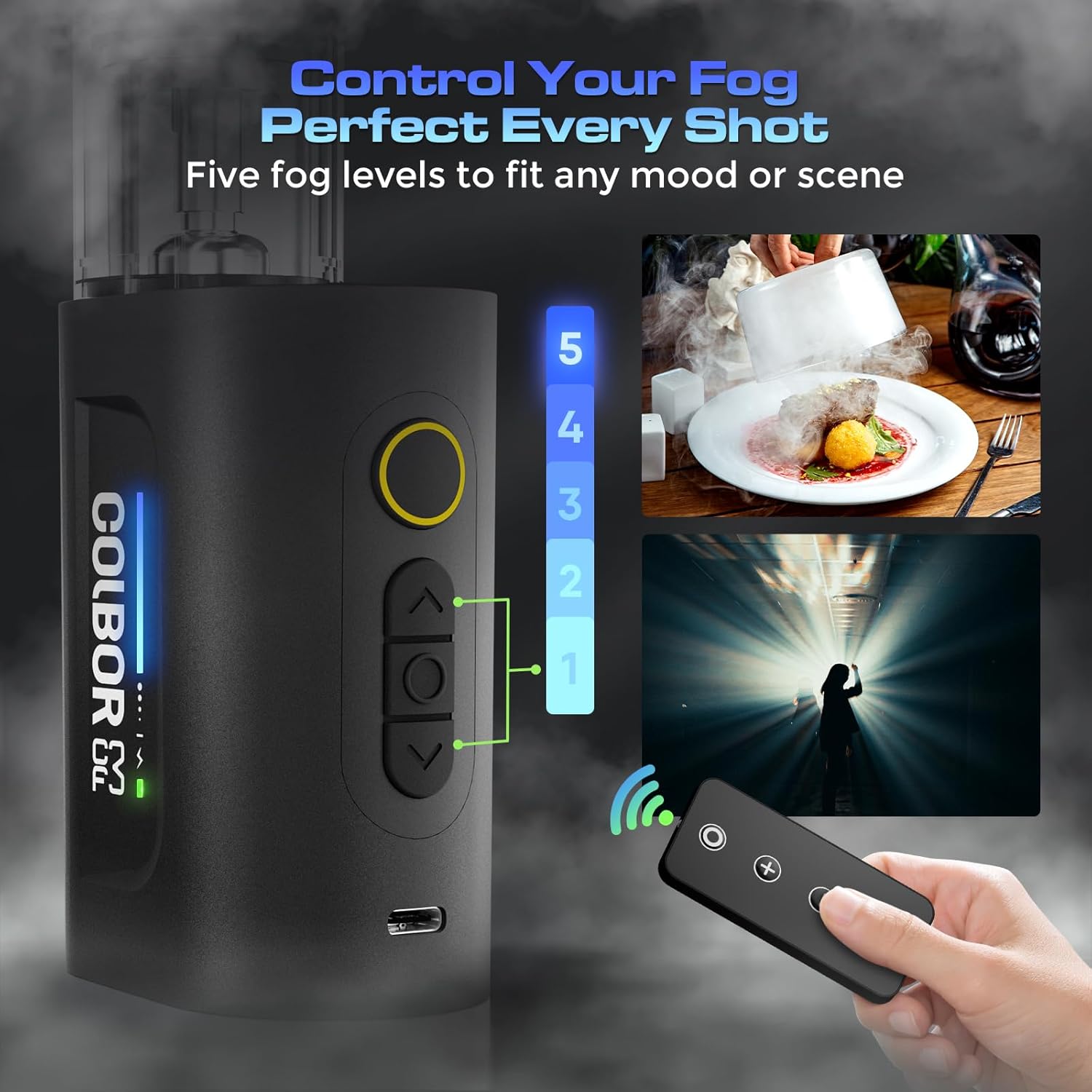
Image: The COLBOR CF3 fog machine's display indicating five adjustable fog levels, controlled wirelessly via the remote.

Image: Various fog effects achievable with the COLBOR CF3, including dust, light beam, smoke, cloud, and dry ice simulations.
6. പരിപാലനം
- Fog Tank Replacement: The fog tank is a consumable component. If you experience long-term overload, detect a burnt odor, or if the fluid volume consistently remains below 30%, it is recommended to replace the tank with an official COLBOR replacement tank.
- വൃത്തിയാക്കൽ: Regularly wipe the exterior of the device with a soft, dry cloth. Ensure no liquid enters the internal components.

Image: An informational graphic explaining that the fog tank is a consumable item and advising on conditions for replacement.
7. പ്രശ്നപരിഹാരം
If you encounter issues with your COLBOR CF3, refer to the following common problems and solutions:
- No Fog Output:
- Check if the fog liquid tank is sufficiently filled.
- ഉപകരണം പൂർണ്ണമായി ചാർജ്ജ് ചെയ്തിട്ടുണ്ടെന്ന് ഉറപ്പാക്കുക.
- Verify that the device is powered on and the heating element has reached operating temperature (allow 5 minutes after filling).
- Weak Fog Output:
- Increase the fog density level using the remote control.
- Ensure the fog liquid is not expired or contaminated.
- റിമോട്ട് കൺട്രോൾ പ്രതികരിക്കുന്നില്ല:
- Check the remote control's battery.
- Ensure there are no obstructions between the remote and the fog machine.
- Confirm the remote is paired correctly with the device.
- Overheating Alarm:
- Immediately power off the device and allow it to cool down.
- മെഷീന് ചുറ്റും ശരിയായ വെൻ്റിലേഷൻ ഉറപ്പാക്കുക.
- Check the fog liquid level; low levels can cause overheating.
8 സ്പെസിഫിക്കേഷനുകൾ
| ഫീച്ചർ | സ്പെസിഫിക്കേഷൻ |
|---|---|
| മോഡൽ | CF3 |
| ഇനത്തിൻ്റെ ഭാരം | 1.54 പൗണ്ട് |
| പാക്കേജ് അളവുകൾ | 8.82 x 5.71 x 2.72 ഇഞ്ച് |
| ബാറ്ററി തരം | 1 ലിഥിയം അയോൺ ബാറ്ററി (ഉൾപ്പെടുത്തിയിരിക്കുന്നു) |
| ഔട്ട്പുട്ട് പവർ | 30W |
| ഓയിൽ ടാങ്ക് കപ്പാസിറ്റി | 13 മില്ലി |
| ബാറ്ററി ലൈഫ് | 30 മിനിറ്റ് വരെ |
| ചാർജിംഗ് സമയം | ഏകദേശം 2.5 മണിക്കൂർ |
| Maximum Usage Time | 5 minutes (continuous) |
9. വാറൻ്റിയും പിന്തുണയും
For warranty information or technical support, please refer to the official COLBOR webസൈറ്റിൽ ബന്ധപ്പെടുകയോ അവരുടെ ഉപഭോക്തൃ സേവനവുമായി നേരിട്ട് ബന്ധപ്പെടുകയോ ചെയ്യുക. ഏതെങ്കിലും വാറന്റി ക്ലെയിമുകൾക്ക് വാങ്ങിയതിന്റെ തെളിവായി നിങ്ങളുടെ വാങ്ങൽ രസീത് സൂക്ഷിക്കുക.


