1. ഉൽപ്പന്നം കഴിഞ്ഞുview
The Hemudu Mobile TV Stand with Shelf (Model HW01B-001) is designed to provide a versatile and portable solution for displaying televisions ranging from 23 to 60 inches. It supports LCD, LED, and OLED flat or curved screens with VESA mounting patterns from 100x100mm to 400x400mm. This stand features a sturdy alloy steel construction, a height-adjustable pole, and a tilt function for optimal viewing angles. Integrated lockable casters allow for easy movement and secure positioning. A convenient shelf is included for media devices or accessories.
ചിത്രം 1.1: Hemudu Mobile TV Stand with Shelf, illustrating its design and integrated shelf.
2 സുരക്ഷാ വിവരങ്ങൾ
- അസംബ്ലിക്കും ഉപയോഗത്തിനും മുമ്പ് എല്ലാ നിർദ്ദേശങ്ങളും ശ്രദ്ധാപൂർവ്വം വായിക്കുക.
- പരമാവധി ഭാര ശേഷി 77 പൗണ്ട് (35 കിലോഗ്രാം) കവിയരുത്.
- Ensure the TV's VESA pattern is compatible (100x100mm to 400x400mm).
- Always lock the casters when the stand is in a stationary position to prevent accidental movement.
- Distribute weight evenly on the shelf and avoid placing heavy objects that could cause tipping.
- Keep children and pets away from the stand during assembly and when moving it.
- എല്ലാ സ്ക്രൂകളും കണക്ഷനുകളും സുരക്ഷിതമാണെന്ന് ഉറപ്പാക്കാൻ ഇടയ്ക്കിടെ പരിശോധിക്കുക.
- ഒരു തരത്തിലും സ്റ്റാൻഡ് പരിഷ്കരിക്കാൻ ശ്രമിക്കരുത്.
3. പാക്കേജ് ഉള്ളടക്കം
അസംബ്ലി ആരംഭിക്കുന്നതിന് മുമ്പ് എല്ലാ ഘടകങ്ങളും നിലവിലുണ്ടെന്ന് ഉറപ്പാക്കുക. ഏതെങ്കിലും ഭാഗങ്ങൾ നഷ്ടപ്പെട്ടാലോ കേടുപാടുകൾ സംഭവിച്ചാലോ, ഉപഭോക്തൃ പിന്തുണയുമായി ബന്ധപ്പെടുക.
- Base with Lockable Casters
- Vertical Support Poles (Multiple sections for height adjustment)
- ടിവി മൗണ്ടിംഗ് ബ്രാക്കറ്റ്
- മീഡിയ ഷെൽഫ്
- Hardware Kit (Screws, washers, spacers for TV mounting and stand assembly)
- കേബിൾ ടൈകൾ (3 കഷണങ്ങൾ)
- Assembly Tools (e.g., Allen wrench, spanner)

ചിത്രം 3.1: Illustration of stand components and key dimensions, including VESA compatibility and weight capacity.
4. സജ്ജീകരണ നിർദ്ദേശങ്ങൾ
Follow these steps to assemble your Hemudu Mobile TV Stand. No drilling is required for installation.
4.1 Assemble the Base
- Attach the vertical support pole(s) to the base. Ensure all screws are tightened securely.
- Verify that the lockable casters are properly installed and can be engaged/disengaged.

ചിത്രം 4.1: Detail of the stable base design with internal reinforcement and lockable casters.
4.2 Install Vertical Poles and Adjust Height
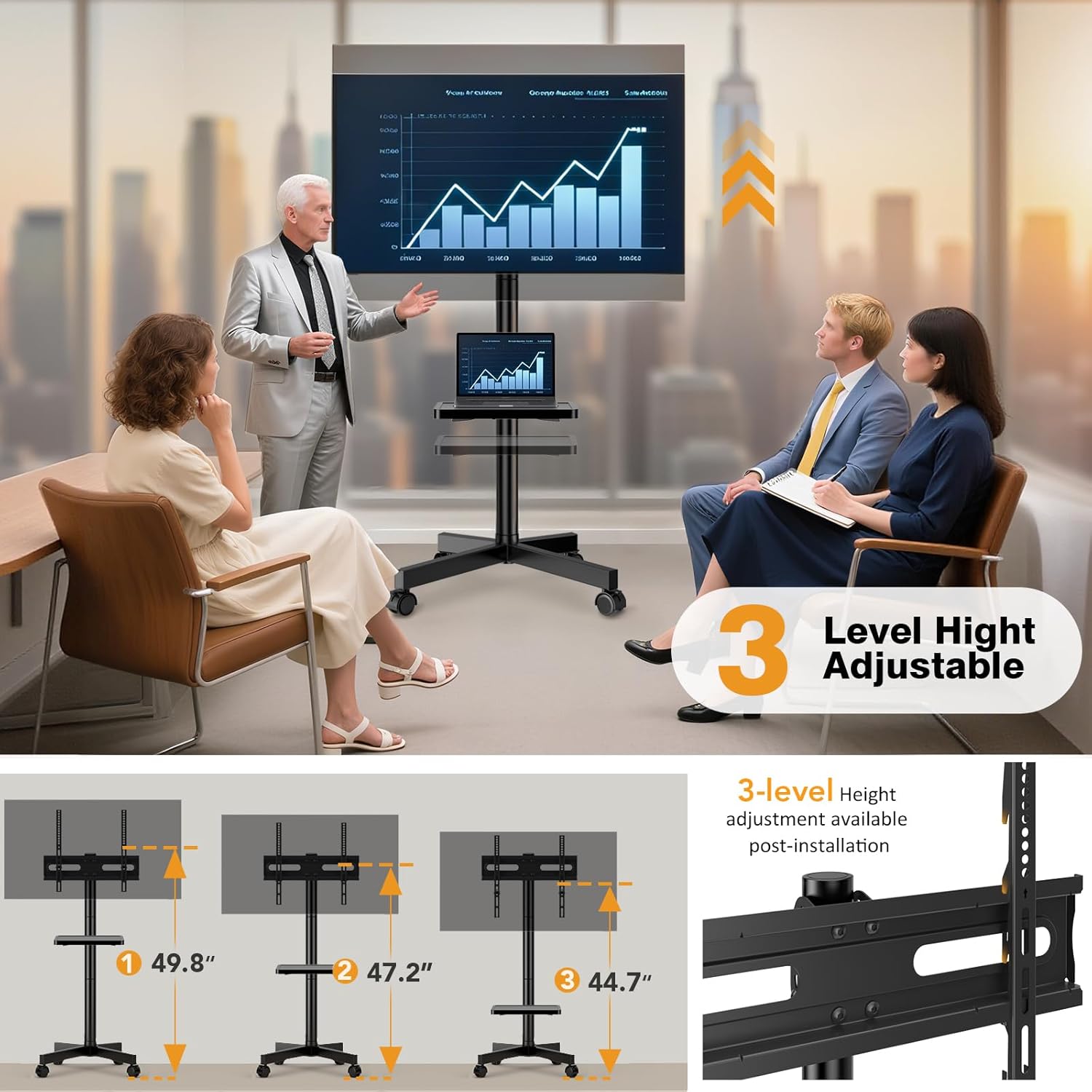
The stand's height can be adjusted by using one, two, or three pole sections. Select the desired height during assembly.
- Connect the desired number of vertical pole sections.
- Secure the connections with the provided hardware.

ചിത്രം 4.2: Visual representation of the three available height levels for the TV stand.
ചിത്രം 4.3: Diagram showing how to connect pole sections to achieve different heights (18", 32.7", 47.2").
4.3 Attach the TV Mounting Bracket
- Secure the TV mounting bracket to the top of the vertical pole assembly.
- Ensure the bracket is level and all fasteners are tight.
4.4 Mount the TV
- നിങ്ങളുടെ ടിവിയുടെ പിൻഭാഗത്തുള്ള VESA മൗണ്ടിംഗ് ദ്വാരങ്ങൾ തിരിച്ചറിയുക.
- Select the appropriate screws, washers, and spacers from the hardware kit that fit your TV.
- Attach the TV mounting arms to the back of your TV.
- Carefully lift the TV and hook the mounting arms onto the TV mounting bracket on the stand.
- Secure the TV to the bracket using the safety screws provided to prevent accidental dislodgement.

ചിത്രം 4.4: Example of VESA mounting holes on the back of a TV (W)100-400mm x (H)100-400mm.

ചിത്രം 4.5: Detail of the safety screw mechanism to secure the TV to the bracket.
4.5 Install the Media Shelf
The media shelf can be installed at your desired height on the vertical pole.
- Slide the shelf onto the vertical pole at the preferred height.
- Secure the shelf in place using the provided fasteners.

ചിത്രം 4.6: The media shelf can be freely adjusted up and down, and rotated. Also shows cable management with ties.
5. പ്രവർത്തന നിർദ്ദേശങ്ങൾ
5.1 Moving the TV Stand
- To move the stand, ensure the casters are unlocked.
- Gently push the stand to its desired location.
- Once in position, engage the locks on all casters to secure the stand and prevent accidental movement.

ചിത്രം 5.1: Illustration of how to lock and unlock the casters for mobility and stability.

ചിത്രം 5.2: The TV stand being smoothly rolled from one room to another.
5.2 Adjusting TV Tilt
The TV mounting bracket allows for a tilt adjustment of +10° upward and -8° downward to optimize viewആംഗിളുകൾ ക്രമീകരിക്കുകയും തിളക്കം കുറയ്ക്കുകയും ചെയ്യുക.
- Loosen the tilt adjustment knobs or bolts on the TV mounting bracket.
- ടിവി ശ്രദ്ധാപൂർവ്വം ആവശ്യമുള്ള കോണിലേക്ക് ചരിക്കുക.
- Tighten the knobs or bolts to secure the TV in the new position.

ചിത്രം 5.3: Visual demonstration of the TV's tilt capability, showing +10° up and -8° down.
5.3 Adjusting Media Shelf Height
The media shelf can be repositioned along the vertical pole to suit your needs.
- Loosen the fasteners securing the media shelf to the pole.
- Slide the shelf to the desired height.
- Tighten the fasteners to secure the shelf.
5.4 കേബിൾ മാനേജ്മെന്റ്
Use the included cable ties to organize and secure cables along the vertical pole, maintaining a tidy appearance and preventing tripping hazards.

ചിത്രം 5.4: Close-up of a cable tie securing cables to the stand's pole.
6. പരിപാലനം
- വൃത്തിയാക്കൽ: ഒരു സോഫ്റ്റ്, ഡി തുണി ഉപയോഗിച്ച് സ്റ്റാൻഡ് തുടയ്ക്കുക.amp തുണി. ഫിനിഷിന് കേടുവരുത്തുന്ന ഉരച്ചിലുകളുള്ള ക്ലീനറുകളോ ലായകങ്ങളോ ഒഴിവാക്കുക.
- പരിശോധന: Periodically check all bolts, screws, and connections to ensure they remain tight and secure. Retighten if necessary.
- കാസ്റ്ററുകൾ: സുഗമമായ റോളിംഗ് ഉറപ്പാക്കാൻ കാസ്റ്ററുകൾ അവശിഷ്ടങ്ങൾ ഇല്ലാതെ സൂക്ഷിക്കുക.
7. പ്രശ്നപരിഹാരം
- Problem: Stand is unstable or wobbles.
- പരിഹാരം: Ensure all assembly screws are fully tightened. Verify that the TV weight does not exceed the maximum capacity and is centered. Check if the floor surface is even.
- Problem: Casters do not roll smoothly or lock properly.
- പരിഹാരം: Check for debris (hair, lint) caught in the caster wheels and remove it. Ensure the locking mechanism is fully engaged or disengaged as intended.
- Problem: TV cannot be tilted.
- പരിഹാരം: Loosen the tilt adjustment knobs/bolts sufficiently before attempting to tilt. Ensure no cables are obstructing the movement.
- Problem: Missing parts during assembly.
- പരിഹാരം: Review the "Package Contents" section. If parts are genuinely missing, contact Hemudu customer support for assistance.
8 സ്പെസിഫിക്കേഷനുകൾ
| ബ്രാൻഡ് | ഹേമുഡു |
| മോഡൽ നമ്പർ | HW01B-001 |
| അനുയോജ്യമായ ടിവി വലുപ്പങ്ങൾ | 23 - 60 ഇഞ്ച് |
| VESA അനുയോജ്യത | 100x100mm മുതൽ 400x400mm വരെ |
| പരമാവധി ഭാരം ശേഷി | 77 പൗണ്ട് (35 കി.ഗ്രാം) |
| മെറ്റീരിയൽ | അലോയ് സ്റ്റീൽ |
| മൗണ്ടിംഗ് തരം | ഫ്ലോർ മൗണ്ട് |
| ചലന തരം | Swivel, Tilt, Mobile |
| ടിൽറ്റ് ആംഗിൾ | +10° / -8° |
| Product Dimensions (Max Height) | 40 x 20 x 120 സെ.മീ (ഏകദേശം 15.7 x 7.9 x 47.2 ഇഞ്ച്) |
| ഉൽപ്പന്ന ഭാരം | 5.02 കി.ഗ്രാം (ഏകദേശം. 11.07 പൗണ്ട്) |
9. വാറൻ്റിയും പിന്തുണയും
For warranty information or technical support, please refer to the product packaging or contact Hemudu customer service directly. Keep your purchase receipt for warranty claims.
ബന്ധപ്പെടാനുള്ള വിവരങ്ങൾ: Please visit the official Hemudu website or refer to the contact details provided with your product for support.


