1. ആമുഖം
Thank you for choosing the Oraimo OTW-324 SpaceBuds Lite True Wireless Earbuds. These earbuds are designed to provide an immersive audio experience with Sound360 Spatial Audio, extended playtime, and convenient features like a Smart Earbud Finder. This manual will guide you through the setup, operation, and maintenance of your new earbuds.
2. പാക്കേജ് ഉള്ളടക്കം
- Oraimo OTW-324 SpaceBuds Lite True Wireless Earbuds (Left and Right)
- ചാർജിംഗ് കേസ്
- യുഎസ്ബി ചാർജിംഗ് കേബിൾ (ടൈപ്പ്-സി)
- ചെവിയുടെ അഗ്രഭാഗങ്ങൾ (വിവിധ വലുപ്പങ്ങൾ)
- ഉപയോക്തൃ മാനുവൽ
- ആന്റി-ലോസ്റ്റ് ലാൻയാർഡ്
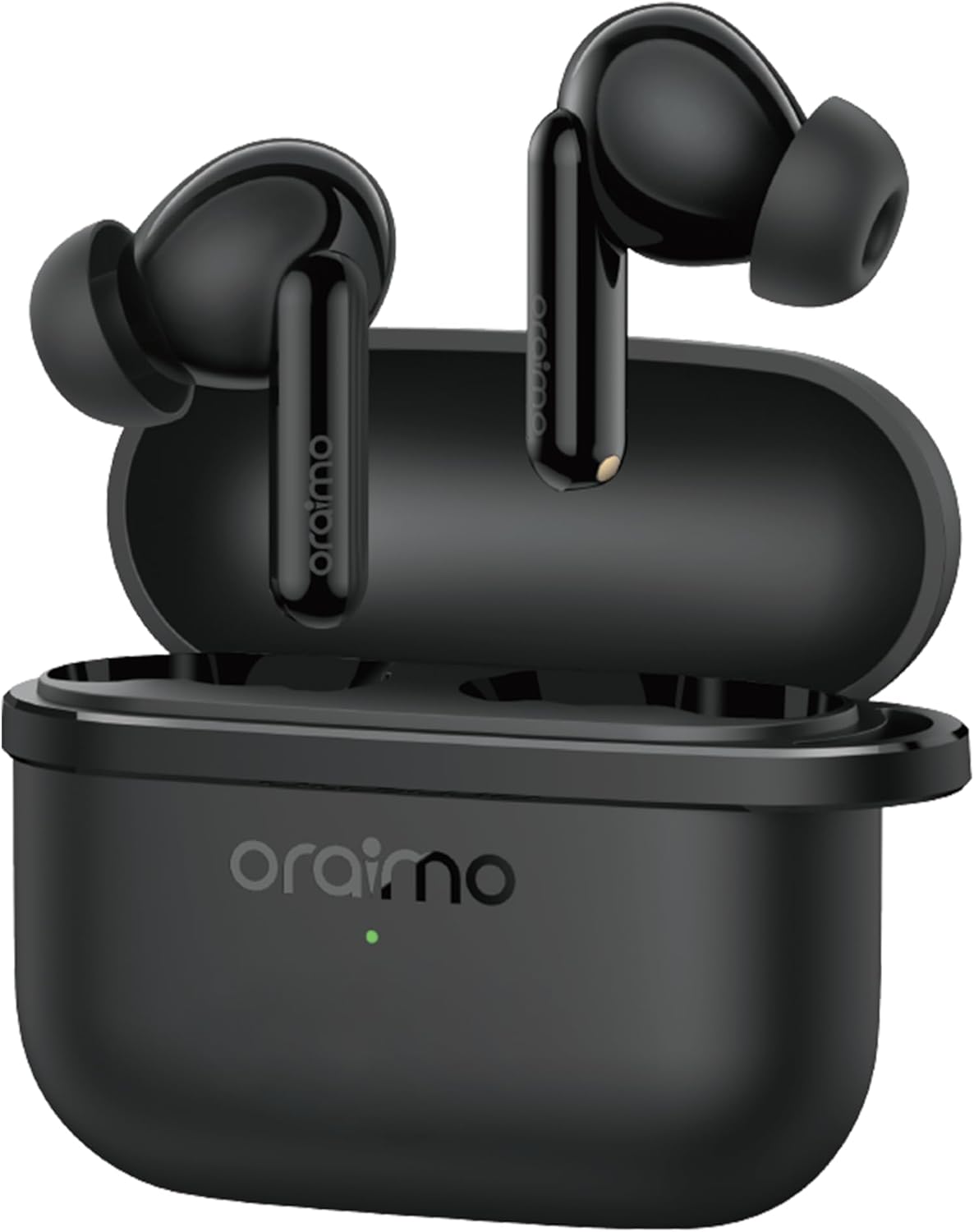
Image: Oraimo OTW-324 SpaceBuds Lite Earbuds in their charging case.
3. ഉൽപ്പന്നം കഴിഞ്ഞുview
The Oraimo SpaceBuds Lite feature an ergonomic design for comfortable wear and intuitive touch controls. The compact charging case provides extended battery life and protects your earbuds.
ഇയർബഡ് ഘടകങ്ങൾ:
- ടച്ച് കൺട്രോൾ ഏരിയ: For managing playback, calls, and activating features.
- മൈക്രോഫോൺ: കോളുകൾക്കും വോയ്സ് കമാൻഡുകൾക്കും.
- ചാർജിംഗ് കോൺടാക്റ്റുകൾ: ഇയർബഡ് സ്റ്റെമിന്റെ അടിയിൽ സ്ഥിതിചെയ്യുന്നു.
ചാർജിംഗ് കേസ് ഘടകങ്ങൾ:
- ഇയർബഡ് സ്ലോട്ടുകൾ: ഇയർബഡുകൾ സുരക്ഷിതമായി പിടിച്ച് ചാർജ് ചെയ്യുക.
- ചാർജിംഗ് ഇൻഡിക്കേറ്റർ ലൈറ്റ്: ചാർജിംഗ് നിലയും ബാറ്ററി നിലയും പ്രദർശിപ്പിക്കുന്നു.
- USB-C ചാർജിംഗ് പോർട്ട്: കേസെടുത്തതിന്.
4. സജ്ജീകരണം
4.1 ഇയർബഡുകളും കേസും ചാർജ് ചെയ്യുന്നു
ആദ്യമായി ഉപയോഗിക്കുന്നതിന് മുമ്പ്, ഇയർബഡുകളും ചാർജിംഗ് കേസും പൂർണ്ണമായും ചാർജ് ചെയ്യുക.
- ഇയർബഡുകൾ ചാർജിംഗ് കേസിൽ വയ്ക്കുക. അവ ശരിയായി സ്ഥാപിച്ചിട്ടുണ്ടെന്ന് ഉറപ്പാക്കുക.
- നൽകിയിരിക്കുന്ന USB-C കേബിൾ ഉപയോഗിച്ച് ഒരു പവർ സ്രോതസ്സിലേക്ക് ചാർജിംഗ് കേസ് ബന്ധിപ്പിക്കുക.
- The indicator light on the case will show the charging status. Once fully charged, the light will indicate completion (refer to specific light patterns in the full manual if available).
A full charge provides up to 7 hours of listening time, with the charging case extending total playtime to 40 hours.

Image: Oraimo SpaceBuds Lite earbuds and case, highlighting the 40-hour total playtime.
4.2 നിങ്ങളുടെ ഉപകരണവുമായി ജോടിയാക്കൽ
The earbuds use Bluetooth V5.4 for a stable and efficient connection.
- Open the charging case. The earbuds will automatically enter pairing mode (indicated by a flashing light on the earbuds).
- നിങ്ങളുടെ ഉപകരണത്തിൽ (സ്മാർട്ട്ഫോൺ, ടാബ്ലെറ്റ് മുതലായവ), ബ്ലൂടൂത്ത് ക്രമീകരണങ്ങളിലേക്ക് പോയി ബ്ലൂടൂത്ത് ഓണാക്കുക.
- ഇതിനായി തിരയുക available devices and select "Oraimo SpaceBuds Lite" from the list.
- Once connected, you will hear a confirmation tone, and the earbud indicator lights will turn off or show a steady light.
കുറിപ്പ്: ഉപകരണത്തിൽ ബ്ലൂടൂത്ത് പ്രവർത്തനക്ഷമമാക്കിയിട്ടുണ്ടെങ്കിൽ, കേസിൽ നിന്ന് പുറത്തെടുക്കുമ്പോൾ ഇയർബഡുകൾ അവസാനം ജോടിയാക്കിയ ഉപകരണവുമായി യാന്ത്രികമായി വീണ്ടും കണക്റ്റുചെയ്യും.
5. പ്രവർത്തന നിർദ്ദേശങ്ങൾ
5.1 അടിസ്ഥാന ടച്ച് നിയന്ത്രണങ്ങൾ
The earbuds feature intuitive touch controls on their stems. Specific functions may vary or be customizable via the Oraimo Sound app.
- പ്ലേ/താൽക്കാലികമായി നിർത്തുക: ഇയർബഡുകളിൽ ഏതെങ്കിലുമൊന്നിൽ ഒറ്റ ടാപ്പ് ചെയ്യുക.
- അടുത്ത ട്രാക്ക്: വലതുവശത്തെ ഇയർബഡിൽ രണ്ടുതവണ ടാപ്പ് ചെയ്യുക.
- മുമ്പത്തെ ട്രാക്ക്: ഇടതുവശത്തെ ഇയർബഡിൽ രണ്ടുതവണ ടാപ്പ് ചെയ്യുക.
- ഉത്തരം/അവസാന കോൾ: ഇയർബഡുകളിൽ ഏതെങ്കിലുമൊന്നിൽ ഒറ്റ ടാപ്പ് ചെയ്യുക.
- കോൾ നിരസിക്കുക: ഇയർബഡുകളിൽ ഏതെങ്കിലുമൊന്ന് അമർത്തിപ്പിടിക്കുക.
- വോയ്സ് അസിസ്റ്റന്റിനെ സജീവമാക്കുക: ഇയർബഡുകളിലൊന്നിൽ മൂന്ന് തവണ ടാപ്പ് ചെയ്യുക (ഇഷ്ടാനുസൃതമാക്കാവുന്നത്).
5.2 Sound360 Spatial Audio
Experience immersive sound with Sound360 Spatial Audio, which creates a 3D-like surround sound environment for music, movies, and gaming. This feature can be activated and customized through the Oraimo Sound app.
5.3 Immersive Game Mode
For a more responsive gaming experience, activate the Immersive Game Mode. This mode reduces audio latency, ensuring that sound effects are synchronized with on-screen actions. This feature is accessible via the Oraimo Sound app.

Image: A smartphone displaying the Oraimo Sound app interface with the "Immersive Game Mode" feature, alongside the SpaceBuds Lite earbuds.
5.4 Oraimo Sound App Control
Enhance your experience by downloading the Oraimo Sound app. The app allows for:
- ടച്ച് നിയന്ത്രണങ്ങൾ ഇഷ്ടാനുസൃതമാക്കുന്നു.
- Adjusting equalizer settings.
- Activating Sound360 Spatial Audio and Game Mode.
- Using the Smart Earbud Finder.
- Personalizing the Bluetooth name of your earbuds.

Image: Screenshot of the Oraimo Sound app interface, showing various control options, along with QR codes for downloading the app from App Store and Google Play.
5.5 Smart Earbud Finder
If you misplace your earbuds, the Smart Earbud Finder feature in the Oraimo Sound app can help locate them by playing a sound.
- Open the Oraimo Sound app and navigate to the "Find Device" section.
- Tap "Start Finding" to play a sound from your earbuds.
Warning: Do not wear the earbuds while activating this feature to avoid potential hearing damage. This feature may not work if the earbuds are powered off or disconnected.

Image: A smartphone screen displaying the "Find Device" interface within the Oraimo Sound app, showing how to locate misplaced earbuds using sound cues.
5.6 Personalized Bluetooth Name
Customize the Bluetooth name of your Oraimo SpaceBuds Lite through the Oraimo Sound app to make them uniquely yours.

Image: A smartphone screen showing the option to change the Bluetooth name of the Oraimo SpaceBuds Lite within the app settings.
6. പരിപാലനം
6.1 വൃത്തിയാക്കൽ
- ഇയർബഡുകളും ചാർജിംഗ് കെയ്സും മൃദുവായതും ഉണങ്ങിയതും ലിന്റ് രഹിതവുമായ തുണി ഉപയോഗിച്ച് പതിവായി വൃത്തിയാക്കുക.
- ചെവിയുടെ അറ്റം നീക്കം ചെയ്ത് നേരിയ സോപ്പും വെള്ളവും ഉപയോഗിച്ച് വൃത്തിയാക്കുക, തുടർന്ന് വീണ്ടും ഘടിപ്പിക്കുന്നതിന് മുമ്പ് നന്നായി ഉണക്കുക.
- ഇയർബഡുകളിലെയും കെയ്സിലെയും ചാർജിംഗ് കോൺടാക്റ്റുകൾ പൊടിയിൽ നിന്നും അവശിഷ്ടങ്ങളിൽ നിന്നും മുക്തമാണെന്ന് ഉറപ്പാക്കുക.
6.2 ജല പ്രതിരോധം (IPX5)
The Oraimo SpaceBuds Lite are IPX5 water-resistant, meaning they can withstand sweat and splashes. They are not designed for submersion in water. Avoid exposing them to heavy rain or showering.

Image: Oraimo SpaceBuds Lite earbuds shown with water splashes, indicating water resistance. Note: The product is rated IPX5, while this image may show IPX4.
6.3 സംഭരണം
ഉപയോഗത്തിലില്ലാത്തപ്പോൾ, ഇയർബഡുകൾ സംരക്ഷിക്കുന്നതിനും ചാർജ്ജ് ചെയ്ത നിലയിൽ നിലനിർത്തുന്നതിനും അവ ചാർജിംഗ് കേസിൽ സൂക്ഷിക്കുക.
7. പ്രശ്നപരിഹാരം
| പ്രശ്നം | പരിഹാരം |
|---|---|
| ഇയർബഡുകൾ ജോടിയാക്കുന്നില്ല |
|
| ഒരു ഇയർബഡ് മാത്രം ശബ്ദം പ്ലേ ചെയ്യുന്നു |
|
| കുറഞ്ഞ ശബ്ദം അല്ലെങ്കിൽ മോശം ശബ്ദ നിലവാരം |
|
| ഇയർബഡുകൾ ചാർജ് ചെയ്യുന്നില്ല |
|
8 സ്പെസിഫിക്കേഷനുകൾ
| ഫീച്ചർ | വിശദാംശങ്ങൾ |
|---|---|
| മോഡലിൻ്റെ പേര് | Oraimo OTW-324 |
| ബ്രാൻഡ് നാമം | ഒറൈമോ |
| കണക്റ്റിവിറ്റി ടെക്നോളജി | വയർലെസ്സ് (ബ്ലൂടൂത്ത് V5.4) |
| ഹെഡ്ഫോണുകൾ ഫോം ഫാക്ടർ | ചെവിയിൽ |
| ഹെഡ്ഫോണുകൾ ഇയർ പ്ലേസ്മെൻ്റ് | ചെവിയിൽ |
| ശബ്ദ നിയന്ത്രണം | നിഷ്ക്രിയ ശബ്ദം റദ്ദാക്കൽ |
| പ്രതിരോധം | 1 ഓം |
| നിറം | Speed Black |
| മൊത്തം കളിസമയം | Up to 40 hours (7 hours per charge, 33 hours with case) |
| ജല പ്രതിരോധം | IPX5 |
| പാക്കേജ് അളവുകൾ | 11.7 x 10 x 3.2 സെ.മീ |
| ഭാരം | 200 ഗ്രാം |
9. വാറൻ്റിയും പിന്തുണയും
Oraimo products are designed with quality and reliability in mind. For warranty information, technical support, or customer service inquiries, please refer to the official Oraimo webസൈറ്റിൽ ബന്ധപ്പെടുക അല്ലെങ്കിൽ അവരുടെ ഉപഭോക്തൃ പിന്തുണ ചാനലുകളുമായി ബന്ധപ്പെടുക. വാറന്റി ക്ലെയിമുകൾക്കായി നിങ്ങളുടെ വാങ്ങൽ രസീത് സൂക്ഷിക്കുക.


