ആമുഖം
This manual provides detailed instructions for the setup, operation, maintenance, and troubleshooting of your acer Wireless Gaming Mouse OMR279. Please read this manual thoroughly before using the product to ensure optimal performance and longevity.
പാക്കേജ് ഉള്ളടക്കം
- acer Wireless Gaming Mouse OMR279
- USB-A Receiver (stored inside the mouse)
- യുഎസ്ബി ചാർജിംഗ് കേബിൾ
- ഉപയോക്തൃ മാനുവൽ (ഈ പ്രമാണം)
ഉൽപ്പന്നം കഴിഞ്ഞുview
The acer Wireless Gaming Mouse OMR279 is designed for precision and versatility, offering both wired and 2.4GHz wireless connectivity. It features a high-performance optical sensor, 8 programmable buttons, and dynamic RGB lighting.
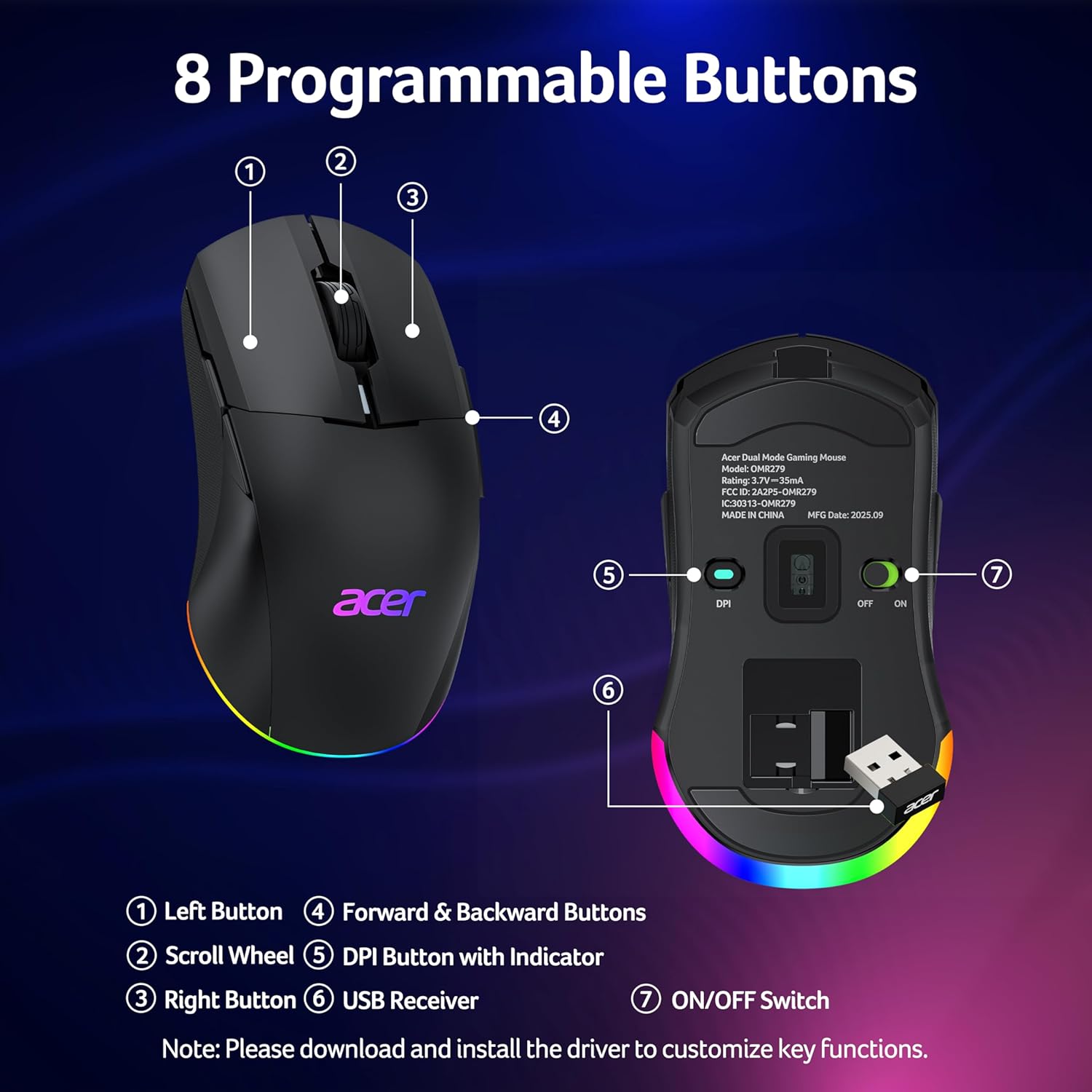
ചിത്രം 1: മുകളിൽ view of the mouse highlighting the Left Button, Scroll Wheel, DPI Button with Indicator, Right Button, and Forward & Backward Buttons.

ചിത്രം 2: താഴെ view and side profile of the mouse, detailing the USB receiver storage, ON/OFF switch, and dimensions.
പ്രധാന സവിശേഷതകൾ:
- 24,000 DPI ഒപ്റ്റിക്കൽ സെൻസർ: High-performance sensor with 1000Hz polling rate and 35G acceleration for precise tracking.
- ഡ്യുവൽ-മോഡ് കണക്റ്റിവിറ്റി: Seamlessly switch between high-speed wired and lag-free 2.4GHz wireless modes.
- 8 പ്രോഗ്രാം ചെയ്യാവുന്ന ബട്ടണുകൾ: Customize functions and macros via driver software.
- അംബിഡെക്സ്ട്രസ് ഡിസൈൻ: Symmetrical shape for comfortable use by both left and right-handed users.
- ഡൈനാമിക് RGB ലൈറ്റിംഗ്: 9 customizable RGB modes with 16.8 million colors.
- നീണ്ട ബാറ്ററി ലൈഫ്: 650mAh rechargeable battery provides up to 40 hours of use per charge.
- സ്മാർട്ട് പവർ മാനേജ്മെൻ്റ്: Features light sleep (30s idle) and deep sleep (180s idle) modes to conserve battery.
സജ്ജമാക്കുക
1. Wireless Connection (2.4GHz)
- Locate the USB-A receiver stored under the back cover of the mouse.
- നിങ്ങളുടെ കമ്പ്യൂട്ടറിൽ ലഭ്യമായ ഒരു USB പോർട്ടിലേക്ക് USB-A റിസീവർ പ്ലഗ് ചെയ്യുക.
- മൗസിന്റെ അടിയിലുള്ള ഓൺ/ഓഫ് സ്വിച്ച് ഉപയോഗിച്ച് മൗസ് ഓണാക്കുക.
- മൗസ് നിങ്ങളുടെ കമ്പ്യൂട്ടറിലേക്ക് യാന്ത്രികമായി കണക്റ്റുചെയ്യണം.

Figure 3: Dual-mode connectivity, showing wireless setup with a laptop and wired setup with a desktop.
2. വയർഡ് കണക്ഷൻ
- Connect the provided USB charging cable to the front port of the mouse.
- നിങ്ങളുടെ കമ്പ്യൂട്ടറിൽ ലഭ്യമായ USB പോർട്ടിലേക്ക് USB കേബിളിൻ്റെ മറ്റേ അറ്റം പ്ലഗ് ചെയ്യുക.
- ഈ മൗസ് ഒരു വയർഡ് മൗസ് പോലെ പ്രവർത്തിക്കുകയും അതിന്റെ ആന്തരിക ബാറ്ററി ചാർജ് ചെയ്യുകയും ചെയ്യും.
3. ഡ്രൈവർ ഇൻസ്റ്റാളേഷൻ
To unlock full customization options for DPI, programmable buttons, and RGB lighting, it is recommended to install the official driver software. Please visit the official acer support website for your region to download the latest driver for the OMR279 model. Follow the on-screen instructions for installation.

Figure 4: Driver software interface for customizing mouse settings.
കുറിപ്പ്: Some users have reported difficulties accessing the driver download page. If you encounter issues, please refer to the Troubleshooting section or contact acer support.
പ്രവർത്തന നിർദ്ദേശങ്ങൾ
1. ഡിപിഐ ക്രമീകരണം
The mouse features 6 default DPI levels, which can be cycled through using the DPI button located on the bottom of the mouse. The default DPI values are 1200, 1600, 2400, 5000, 12000, and 24000. Each level is indicated by a specific LED color.

Figure 5: DPI levels and their corresponding LED indicators and polling rates.
Custom DPI values (max 24000, min 1200) and their associated LED colors can be configured using the driver software.
2. പ്രോഗ്രാം ചെയ്യാവുന്ന ബട്ടണുകൾ
The mouse is equipped with 8 programmable buttons. These buttons can be remapped, and multi-step macros can be assigned using the driver software. After making changes in the driver, ensure you click "Apply" for the settings to take effect.
3. RGB ലൈറ്റിംഗ് നിയന്ത്രണം
The mouse features dynamic RGB lighting with 9 modes and 16.8 million colors. You can adjust brightness, speed, and effects through the driver software. To cycle through RGB modes without the driver, hold the front side button and scroll the mouse wheel. The RGB auto-off feature can also be toggled in the driver.

Figure 6: Dynamic RGB lighting effects.
4. ചാർജിംഗും ബാറ്ററി മാനേജ്മെന്റും
The mouse has a built-in 650mAh rechargeable battery, providing up to 40 hours of use on a single charge. It fully charges in approximately 2 hours. The mouse can be used while charging via the USB cable.

Figure 7: Charging indicator and battery capacity.
To conserve power, the mouse enters a light sleep mode after 30 seconds of inactivity (wakes with movement) and a deep sleep mode after 180 seconds of inactivity (wakes with a click). This feature can be disabled in the driver software.

Figure 8: Adaptive sleep for power saving.
മെയിൻ്റനൻസ്
- വൃത്തിയാക്കൽ: മൗസ് വൃത്തിയാക്കാൻ മൃദുവായതും ഉണങ്ങിയതുമായ ഒരു തുണി ഉപയോഗിക്കുക. കഠിനമായ അഴുക്കിന്, അല്പം ഡി.amp എലിയുടെ ഉള്ളിലേക്ക് ദ്രാവകം കടക്കാതിരിക്കാൻ തുണി ഉപയോഗിക്കാം.
- സംഭരണം: When not in use for extended periods, turn off the mouse to conserve battery. Store the USB receiver inside the mouse's dedicated compartment to prevent loss.
- ബാറ്ററി കെയർ: Avoid fully discharging the battery frequently. Charge the mouse regularly to maintain battery health.
ട്രബിൾഷൂട്ടിംഗ്
| പ്രശ്നം | സാധ്യമായ കാരണം | പരിഹാരം |
|---|---|---|
| Mouse not responding (wireless) | Low battery, receiver not connected, mouse turned off, out of range. | Charge the mouse. Ensure USB receiver is securely plugged in. Turn on the mouse. Move mouse closer to the receiver (within 10m). |
| Mouse not responding (wired) | USB cable not connected properly, faulty USB port. | Ensure USB cable is securely connected to both mouse and computer. Try a different USB port. |
| DPI ക്രമീകരണങ്ങൾ മാറുന്നില്ല | Driver not installed or settings not applied. | Install the official driver software. After changing settings in the driver, click "Apply". |
| RGB ലൈറ്റിംഗ് പ്രവർത്തിക്കുന്നില്ല അല്ലെങ്കിൽ തടസ്സപ്പെട്ടു | RGB auto-off enabled, incorrect mode selection, driver issue. | Check RGB auto-off setting in the driver. Cycle through modes by holding the front side button and scrolling the wheel. Reinstall driver if necessary. |
| Difficulty installing driver software | തെറ്റാണ് website, temporary server issue, firewall blocking. | Ensure you are visiting the official acer support website for your region. Try accessing the site from a different browser or device. Temporarily disable firewall/antivirus if necessary. Contact acer support if issues persist. |
| Unclear battery status indication | Limited visual indicator on the mouse. | The mouse's LED provides basic charging status (flashing while charging, off when full). For more detailed battery percentage, check the driver software if available and installed. |
സ്പെസിഫിക്കേഷനുകൾ
| ഫീച്ചർ | വിശദാംശങ്ങൾ |
|---|---|
| മോഡൽ നമ്പർ | ഒഎംആർ279 |
| കണക്റ്റിവിറ്റി | 2.4GHz Wireless, Wired (USB) |
| ഡിപിഐ ശ്രേണി | 1200 - 24,000 DPI (ക്രമീകരിക്കാവുന്നത്) |
| പോളിംഗ് നിരക്ക് | 1000Hz |
| ത്വരണം | 35G |
| ബട്ടണുകൾ | 8 പ്രോഗ്രാം ചെയ്യാവുന്ന ബട്ടണുകൾ |
| ലൈറ്റിംഗ് | Dynamic RGB (9 modes, 16.8M colors) |
| ബാറ്ററി | 650mAh Rechargeable (Nonstandard Battery) |
| ബാറ്ററി ലൈഫ് | 40 മണിക്കൂർ വരെ |
| ചാർജിംഗ് സമയം | ഏകദേശം 2 മണിക്കൂർ |
| അളവുകൾ | 4.9 x 2.7 x 0.1 ഇഞ്ച് (124mm x 67.5mm x 39.5mm) |
| ഭാരം | 0.704 ഔൺസ് (ഏകദേശം 20 ഗ്രാം) |
| മൂവ്മെന്റ് ഡിറ്റക്ഷൻ ടെക്നോളജി | ഒപ്റ്റിക്കൽ |
| പ്രത്യേക സവിശേഷതകൾ | Ambidextrous Design, LED Lights, Programmable Buttons, Rechargeable |
സുരക്ഷാ വിവരങ്ങൾ
- മൗസിനെ തീവ്രമായ താപനിലയിലോ ഈർപ്പത്തിലോ തുറന്നുകാട്ടരുത്.
- ശക്തമായ ആഘാതങ്ങൾക്ക് മൗസ് വീഴ്ത്തുകയോ വിധേയമാക്കുകയോ ചെയ്യരുത്.
- മൗസ് ഡിസ്അസംബ്ലിംഗ് ചെയ്യാനോ പരിഷ്ക്കരിക്കാനോ ശ്രമിക്കരുത്, കാരണം ഇത് വാറന്റി അസാധുവാക്കുകയും കേടുപാടുകൾ വരുത്തുകയും ചെയ്തേക്കാം.
- കുട്ടികൾക്ക് ലഭ്യമാകാതെ സൂക്ഷിക്കുക.
- പ്രാദേശിക ചട്ടങ്ങൾ അനുസരിച്ച് ബാറ്ററി കളയുക.
വാറൻ്റിയും പിന്തുണയും
Your acer Wireless Gaming Mouse OMR279 is covered by a limited warranty. For detailed warranty terms and conditions, please refer to the warranty card included with your product or visit the official acer support website. For technical assistance or customer service, please contact acer support through their official channels.


