1. ആമുഖം
This manual provides detailed instructions for the setup, operation, and maintenance of your EasySMX X05Pro Wireless PC Controller. Please read this manual thoroughly before using the product to ensure optimal performance and longevity.
2. ഉൽപ്പന്നം കഴിഞ്ഞുview
The EasySMX X05Pro is a versatile wireless gaming controller designed for use with PC, Nintendo Switch, Android, and iOS devices. It features advanced components for enhanced gaming experiences.

Figure 1: EasySMX X05Pro Wireless PC Controller and 2.4G USB dongle.
പ്രധാന സവിശേഷതകൾ:
- Quiet-Press Buttons: Redesigned with silicone dampers for reduced noise during operation.
- ഇരട്ട-എസ്tage Impulse Triggers: Adjustable trigger travel (3mm for quick shooting, 9mm for precise racing) with 2+2 built-in rumble motors for tactile feedback.
- പ്രോഗ്രാം ചെയ്യാവുന്ന ബട്ടണുകൾ: Two customizable buttons (M1, M2) located on the top of the controller to prevent accidental activation.
- ഹാൾ ഇഫക്റ്റ് ജോയ്സ്റ്റിക്കുകൾ: High-precision, drift-free 11-bit sensors for accurate control and durability.
- 1000Hz പോളിംഗ് നിരക്ക്: Available in wired and 2.4G wireless modes for ultra-fast response. Bluetooth mode operates at 125Hz.
- Ergonomic Skin-Like Grip: Soft-touch silicone coating provides a sweat-resistant, non-slip hold.
- Upgraded 8-Way D-Pad: Features dome switches and a recessed pivot for smooth diagonal input and precise 8-directional control.
- നീണ്ട ബാറ്ററി ലൈഫ്: ഇന്റഗ്രേറ്റഡ് 1000mAh റീചാർജ് ചെയ്യാവുന്ന ബാറ്ററി.
- മൾട്ടി-പ്ലാറ്റ്ഫോം അനുയോജ്യത: Supports Windows PC, Nintendo Switch, Android, and iOS. Not compatible with Xbox or PlayStation consoles.
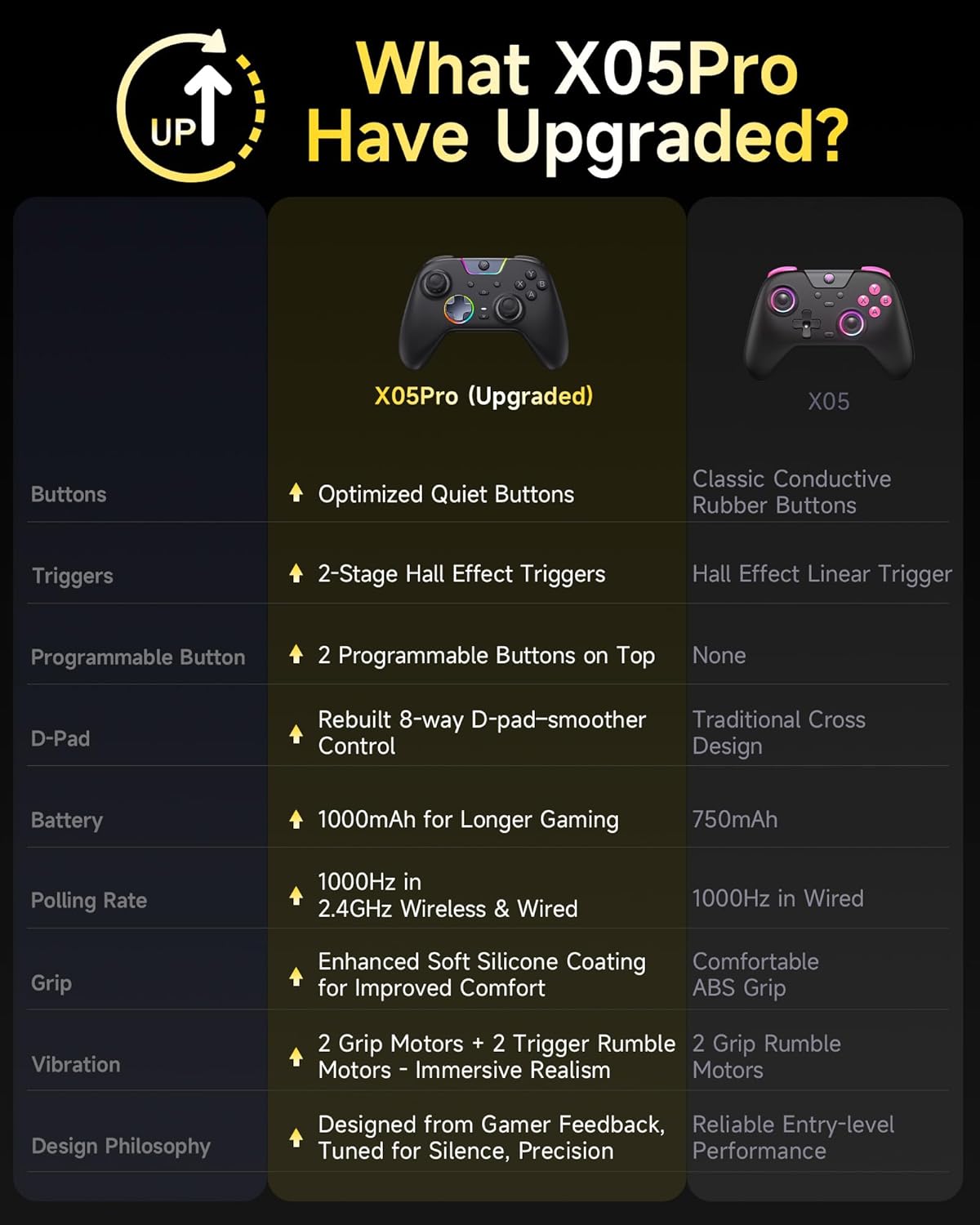
Figure 2: Feature comparison between X05Pro and X05 models.
3. സജ്ജീകരണവും കണക്ഷനും
3.1 കൺട്രോളർ ചാർജ് ചെയ്യുന്നു
Before first use, fully charge the controller using the provided USB-C cable. Connect the cable to the controller's USB-C port and a power source (e.g., PC USB port, USB wall adapter). The LED indicators will show charging status. The controller has a built-in 1000mAh rechargeable battery.
3.2 കണക്ഷൻ മോഡുകൾ
The EasySMX X05Pro supports multiple connection methods. Ensure the mode switch on the back of the controller is set correctly for your desired connection type.

Figure 3: Supported connection modes and platforms.
3.2.1 Wired Connection (PC)
- USB-C കേബിൾ കൺട്രോളറിലേക്കും മറ്റേ അറ്റം നിങ്ങളുടെ PC-യിലെ ഒരു USB പോർട്ടിലേക്കും ബന്ധിപ്പിക്കുക.
- The controller will be automatically recognized by your PC.
- This mode supports a 1000Hz polling rate.
3.2.2 2.4G Wireless Connection (PC)
- Insert the 2.4G USB dongle into an available USB port on your PC.
- Turn on the controller. It should automatically pair with the dongle.
- This mode supports a 1000Hz polling rate.
3.2.3 Bluetooth Connection (PC, Android, iOS)
- കൺട്രോളർ ഓണാക്കിയിട്ടുണ്ടെന്ന് ഉറപ്പാക്കുക.
- On your device (PC, Android, iOS), go to Bluetooth settings and search for new devices.
- Select "EasySMX X05Pro" from the list of available devices to pair.
- This mode operates at a 125Hz polling rate, suitable for mobile or casual gaming.
3.2.4 Nintendo Switch Connection
- On your Nintendo Switch, go to System Settings > Controllers and Sensors > Pro Controller Wired Communication (ensure it's ON).
- Connect the controller to the Switch dock via USB-C cable.
- Alternatively, for wireless pairing, follow the Bluetooth connection steps, ensuring the controller is in Switch mode (if applicable via a switch on the back or button combination).
പ്രധാന കുറിപ്പ്: The EasySMX X05Pro is not compatible with Xbox or PlayStation consoles.
4. പ്രവർത്തന നിർദ്ദേശങ്ങൾ
4.1 ബട്ടൺ ലേഔട്ടും പ്രവർത്തനങ്ങളും
The controller features standard gaming buttons, joysticks, and an 8-way D-pad.

ചിത്രം 4: വിശദമായി view of controller components.
- A/B/X/Y ബട്ടണുകൾ: സ്റ്റാൻഡേർഡ് ആക്ഷൻ ബട്ടണുകൾ.
- ഇടത്/വലത് ജോയ്സ്റ്റിക്കുകൾ: ചലനത്തിനും ക്യാമറ നിയന്ത്രണത്തിനും.
- ഡി-പാഡ്: 8-directional input for precise control.
- LB/RB (തോളിൽ ബട്ടണുകൾ): മുകളിൽ ഘടിപ്പിച്ച ബട്ടണുകൾ.
- LT/RT (ട്രിഗറുകൾ): Pressure-sensitive triggers with dual-stage functionality.
- എം ബട്ടൺ: Mode/Menu button.
- Programmable Buttons (M1, M2): Located on the top of the controller, near the shoulder buttons.
4.2 Programmable Buttons (M1, M2)
The M1 and M2 buttons can be programmed to replicate other button inputs.

Figure 5: Location and programming options for M1 and M2 buttons.
- അമർത്തിപ്പിടിക്കുക M button, then press either M1 or M2.
- Press the button(s) you wish to map to M1/M2 (e.g., A, B, X, Y, LB, RB, LT, RT, L3, R3).
- അമർത്തുക M button again to save the mapping.
4.3 Dual-Stage Impulse Triggers
The LT and RT triggers offer adjustable travel distance for different gaming needs.

Figure 6: Dual-stage trigger functionality for varied gameplay.
- Shorter Distance (3mm): Ideal for quick actions like shooting in FPS games.
- Longer Distance (9mm): Suitable for precise control, such as acceleration in racing games.
The triggers also provide impulse vibration feedback, enhancing immersion in supported games.

Figure 7: Impulse trigger vibration modes.
4.4 RGB ലൈറ്റിംഗ് ഇഫക്റ്റുകൾ
The controller features customizable RGB lighting around the joysticks and central area.

Figure 8: RGB lighting effects on the controller.
Refer to the full product manual (if available from manufacturer's website) for specific instructions on changing colors and lighting modes (Brightness, Breathing, Colorful, Fade-Off).
4.5 ടർബോ ഫംഗ്ഷൻ
The controller includes a Turbo function for rapid, repeated button presses. Consult the full manual for activation and assignment details.
5. പരിപാലനം
- Keep the controller clean by wiping it with a dry, soft cloth.
- കൺട്രോളറെ തീവ്രമായ താപനില, ഈർപ്പം അല്ലെങ്കിൽ നേരിട്ടുള്ള സൂര്യപ്രകാശം എന്നിവയിൽ തുറന്നുകാട്ടുന്നത് ഒഴിവാക്കുക.
- Do not attempt to disassemble the controller, as this may void the warranty and cause damage.
- Store the controller in a safe place when not in use to prevent physical damage.
6. പ്രശ്നപരിഹാരം
6.1 കണക്ഷൻ പ്രശ്നങ്ങൾ
- Controller not connecting via USB: Ensure the USB-C cable is securely connected to both the controller and the PC. Try a different USB port or cable.
- 2.4G Wireless connection unstable: Ensure the USB dongle is fully inserted and within range. Avoid obstructions between the controller and the dongle.
- ബ്ലൂടൂത്ത് ജോടിയാക്കൽ പരാജയം: Make sure the controller is in pairing mode. On your device, try forgetting the device and re-pairing. Ensure no other Bluetooth devices are causing interference.
- Switch connection issues: Verify "Pro Controller Wired Communication" is enabled in Switch settings. For wireless, ensure the controller is in the correct mode for Switch.
6.2 Input Lag or Unresponsiveness
- Wireless lag: For optimal performance, especially in competitive gaming, use wired or 2.4G wireless mode (1000Hz polling rate). Bluetooth mode (125Hz) may have higher latency.
- ഡ്രിഫ്റ്റ്: The Hall Effect joysticks are designed to prevent drift. If you experience drift, ensure the controller's firmware is up to date (check EasySMX official webസൈറ്റ്).
6.3 ബാറ്ററി ലൈഫ്
- If battery life seems shorter than expected, ensure the controller is fully charged before use.
- Reduce RGB lighting brightness or turn it off to conserve battery.
- ആവർത്തിച്ചുള്ള ചാർജിംഗ് സൈക്കിളുകൾ കാലക്രമേണ ബാറ്ററി പ്രകടനം മോശമാകാൻ കാരണമാകും.
7 സ്പെസിഫിക്കേഷനുകൾ
| ഫീച്ചർ | വിശദാംശങ്ങൾ |
|---|---|
| മോഡൽ നമ്പർ | X05Pro |
| കണക്റ്റിവിറ്റി | Wired (USB-C), 2.4G Wireless (USB Dongle), Bluetooth |
| പോളിംഗ് നിരക്ക് | 1000Hz (വയേർഡ് & 2.4G), 125Hz (ബ്ലൂടൂത്ത്) |
| ബാറ്ററി ശേഷി | 1000mAh (റീചാർജ് ചെയ്യാവുന്നത്) |
| ജോയിസ്റ്റിക്കുകൾ | Hall Effect, 11-bit precision |
| ട്രിഗറുകൾ | ഇരട്ട-എസ്tage Impulse Triggers |
| പ്രോഗ്രാം ചെയ്യാവുന്ന ബട്ടണുകൾ | 2 (M1, M2) |
| ഡി-പാഡ് | Upgraded 8-Way with recessed pivot |
| വൈബ്രേഷൻ | 4-Zone (2 grip motors + 2 trigger rumble motors) |
| അനുയോജ്യത | Windows PC, Nintendo Switch, Android, iOS |
| പൊരുത്തക്കേട് | Xbox, PlayStation consoles |
| അളവുകൾ | 7.05 x 5.75 x 2.91 ഇഞ്ച് |
| ഭാരം | 13.7 ഔൺസ് |
8. വാറൻ്റിയും പിന്തുണയും
For warranty information and technical support, please refer to the official EasySMX webസൈറ്റ് അല്ലെങ്കിൽ അവരുടെ ഉപഭോക്തൃ സേവനവുമായി നേരിട്ട് ബന്ധപ്പെടുക.
നിർമ്മാതാവ്: EasySMX
Webസൈറ്റ്: www.easysmx.com (കുറിപ്പ്: ഇതൊരു പ്ലെയ്സ്ഹോൾഡറാണ് URL. Please refer to your product packaging or official documentation for the correct support webസൈറ്റ്.)


