ആമുഖം
Thank you for choosing the CAMECHO 7 Inch Double Din Car Stereo. This multimedia MP5 player is designed to enhance your driving experience with its 7-inch touchscreen, Bluetooth connectivity, mirror link functionality, FM radio, and various input options. This manual provides detailed instructions for installation, operation, and maintenance to ensure optimal performance and longevity of your device.

ചിത്രം: മുൻഭാഗം view of the CAMECHO 7 Inch Double Din Car Stereo installed in a vehicle dashboard.
ബോക്സിൽ എന്താണുള്ളത്
അൺബോക്സിംഗ് ചെയ്യുമ്പോൾ എല്ലാ ഇനങ്ങളും ഉണ്ടെന്ന് ഉറപ്പാക്കാൻ പാക്കേജ് ഉള്ളടക്കങ്ങൾ പരിശോധിക്കുക:
- 1 x Double Din Radio
- 1 x പവർ കേബിൾ
- 1 x ഹോൺ കേബിൾ
- 1 x മൗണ്ടിംഗ് ബ്രാക്കറ്റുകൾ
- 1 x ഉപയോക്തൃ മാനുവൽ

Image: Visual representation of the package contents, including the head unit, cables, brackets, and user manual.
സ്പെസിഫിക്കേഷനുകൾ
Key technical specifications for the CAMECHO 7 Inch Double Din Car Stereo:
| ഉൽപ്പന്ന അളവുകൾ | 3.1 x 7 x 4 inches (7.0"L x 4.0"H x 3.1"D) |
| ഇനത്തിൻ്റെ ഭാരം | 1.54 പൗണ്ട് |
| മോഡൽ നമ്പർ | B0FN3HHW99 |
| കണക്റ്റിവിറ്റി ടെക്നോളജി | ബ്ലൂടൂത്ത് |
| കൺട്രോളർ തരം | സ്റ്റിയറിംഗ് വീൽ നിയന്ത്രണം |
| പ്രത്യേക സവിശേഷതകൾ | Built-In Bluetooth, Equalizer, FM Tuner, Multi Color Illumination, Touchscreen |
| അനുയോജ്യമായ ഉപകരണങ്ങൾ | സ്മാർട്ട്ഫോൺ |
| കണക്റ്റർ തരം | യുഎസ്ബി ടൈപ്പ്-സി |
| ഓഡിയോ put ട്ട്പുട്ട് മോഡ് | സ്റ്റീരിയോ |
| വീഡിയോ എൻകോഡിംഗ് പിന്തുണ | ആവി, 3GP, MP4, എംഒവിചലച്ചിത്രപ്ലെയര്, MPG, MKV, VOB, RMVB, ആർ.എം. |
സജ്ജീകരണവും ഇൻസ്റ്റാളേഷനും
Proper installation is crucial for the functionality and safety of your car stereo. It is recommended to have this unit installed by a professional if you are unfamiliar with car audio wiring.
1. വയറിംഗ് കണക്ഷനുകൾ
Refer to the wiring diagrams below for correct connections. Ensure all connections are secure to prevent malfunctions.

Image: Detailed wiring diagrams for the main power harness and speaker connections, along with rear panel port introductions.
- പവർ കേബിൾ: Connect the yellow wire to the constant 12V power supply, the red wire to the accessory 12V supply (switched with ignition), and the black wire to ground.
- സ്പീക്കർ കേബിളുകൾ: Connect the speaker wires according to the color codes for front left, front right, rear left, and rear right speakers.
- Steering Wheel Control (KEY): Connect the steering wheel control wire(s) to your vehicle's steering wheel control interface (if applicable).
- Reverse Camera (REVERSE): Connect the reverse camera trigger wire to the vehicle's reverse light circuit.
- Antenna (ANT): നിങ്ങളുടെ കാറിന്റെ റേഡിയോ ആന്റിന ബന്ധിപ്പിക്കുക.
2. പിൻഭാഗംview Camera Connection (Optional)
If you are installing an optional rearview camera, connect it as shown in the diagram. The unit will automatically display the rearview image when the vehicle is in reverse gear.

Image: Diagram showing how to connect an optional rearview camera, including power and video signal connections.
പ്രവർത്തന നിർദ്ദേശങ്ങൾ
1. അടിസ്ഥാന പ്രവർത്തനം
- പവർ ഓൺ/ഓഫ്: Short press the volume knob to mute, long press to power off.
- വോളിയം നിയന്ത്രണം: Rotate the volume knob to adjust the sound level.
- ടച്ച് സ്ക്രീൻ: Navigate menus and control functions by touching the 7-inch display.
2. Bluetooth Hands-Free
Connect your mobile phone via Bluetooth for hands-free calling and audio streaming.

Image: The car stereo screen displaying a phone call interface, with a smartphone shown next to it, indicating Bluetooth connectivity.
- നിങ്ങളുടെ മൊബൈൽ ഫോണിൽ ബ്ലൂടൂത്ത് പ്രവർത്തനക്ഷമമാക്കുക.
- On the car stereo, go to the Bluetooth menu and search for available devices.
- Select the car stereo's Bluetooth name (e.g., "CAMECHO BT") from your phone's list and pair.
- ഒരിക്കൽ പെയർ ചെയ്താൽ, നിങ്ങൾക്ക് വയർലെസ് ആയി കോളുകൾ വിളിക്കാനും സ്വീകരിക്കാനും സംഗീതം പ്ലേ ചെയ്യാനും കഴിയും.
3. FM Radio & Equalizer
Access FM radio stations and customize your audio experience with the built-in equalizer.

Image: The car stereo screen displaying the FM radio tuner at 90.00 MHz and separate screens for equalizer settings, including standard presets and custom adjustments.
- എഫ്എം റേഡിയോ: Select the FM function to scan for stations or manually tune to a frequency. Save your favorite stations as presets.
- ഇക്വലൈസർ (EQ): Access the EQ settings to choose from preset sound modes (e.g., Pop, Classic, Rock) or customize the audio frequencies to your preference.
4. മിറർ ലിങ്ക് ഫംഗ്ഷൻ
Mirror your smartphone screen onto the car stereo display for navigation, video playback, and other applications.

Image: The car stereo screen displaying a mirrored smartphone screen, with icons indicating support for wired Android and iOS mirror link.
- Connect your Android or iOS phone to the stereo using a USB cable.
- Follow the on-screen prompts to enable mirror link. This may require installing a specific app on your phone.
- Once connected, your phone's screen will be displayed on the stereo, allowing for control via the stereo's touchscreen.
5. സ്റ്റിയറിംഗ് വീൽ നിയന്ത്രണം
Utilize your vehicle's existing steering wheel buttons to control the stereo for a safer driving experience.

Image: The car stereo screen displaying the steering wheel control learning interface, with a steering wheel shown. Also depicted are various input ports: TF Card, AUX, USB, Type-C Charging, and USB Charging.
- Access the steering wheel control settings in the system menu.
- Follow the instructions to program your steering wheel buttons to control functions like volume, track skip, and mode selection.
6. മൾട്ടിമീഡിയ പ്ലേബാക്ക്
The unit supports various media inputs for audio and video playback.
- യുഎസ്ബി/ടൈപ്പ്-സി: Insert a USB drive or connect a device via the Type-C port for media playback or phone charging.
- SD കാർഡ്: മീഡിയ പ്ലേബാക്കിനായി പ്രത്യേക സ്ലോട്ടിൽ ഒരു SD കാർഡ് ചേർക്കുക.
- AUX ഇൻപുട്ട്: ഒരു 3.5mm AUX കേബിൾ ഉപയോഗിച്ച് ബാഹ്യ ഓഡിയോ ഉപകരണങ്ങൾ ബന്ധിപ്പിക്കുക.
7. Color Key Light Setting
Customize the backlight color of the physical buttons on the unit.
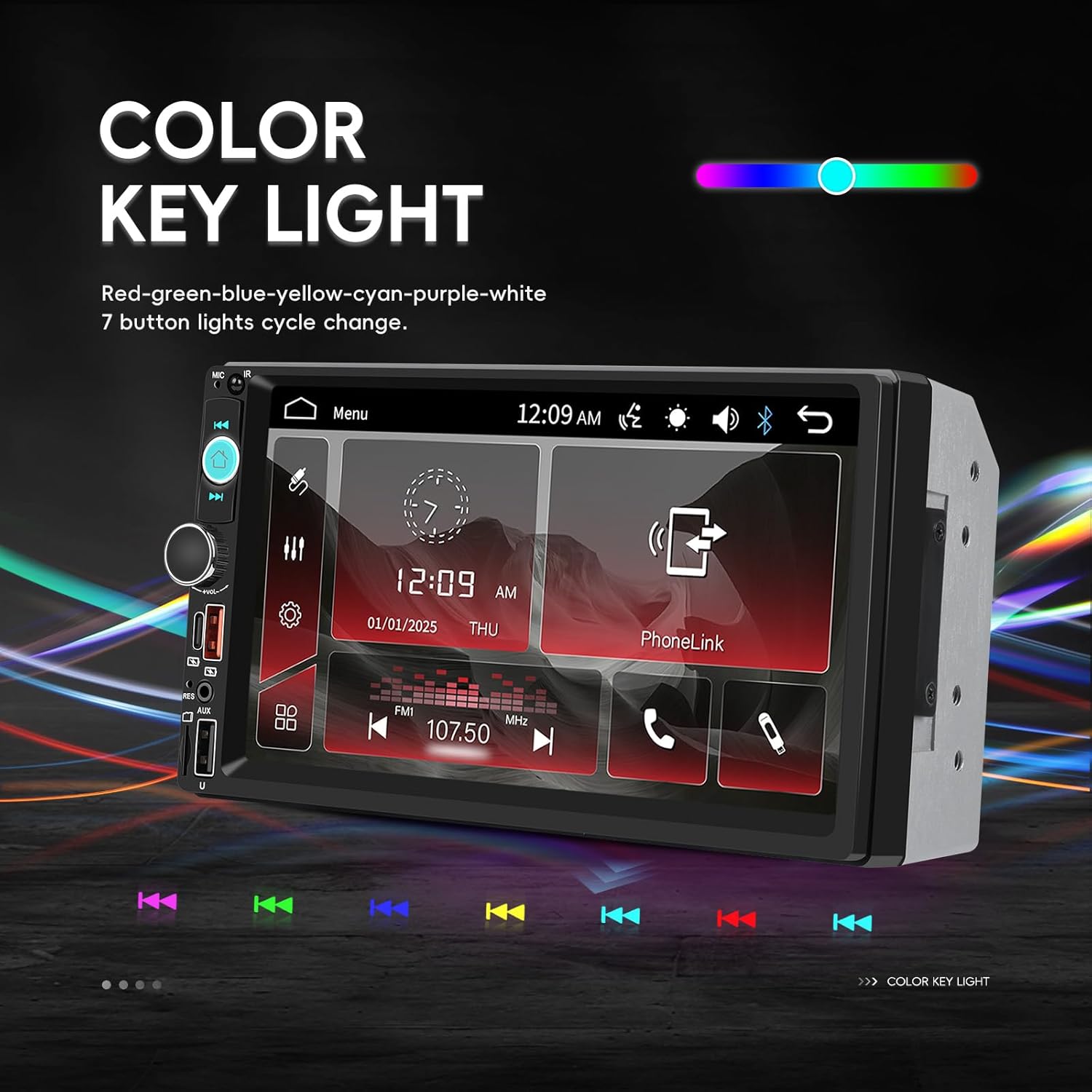
Image: The car stereo screen displaying options for changing the color of the key lights, showing a spectrum of colors and individual color selections.
- സിസ്റ്റം ക്രമീകരണ മെനുവിലേക്ക് നാവിഗേറ്റ് ചെയ്യുക.
- Find the 'Color Key Light' or 'Illumination' option.
- Choose from various colors (Red, Green, Blue, Yellow, Cyan, Purple, White) or set it to cycle through colors automatically.
മെയിൻ്റനൻസ്
To ensure the longevity and optimal performance of your CAMECHO car stereo, follow these maintenance guidelines:
- സ്ക്രീൻ വൃത്തിയാക്കൽ: ടച്ച്സ്ക്രീൻ മൃദുവായി തുടയ്ക്കാൻ മൃദുവായ, ലിന്റ് രഹിത തുണി ഉപയോഗിക്കുക. കഠിനമായ പാടുകൾക്ക്, ചെറുതായി dampതുണിയിൽ വെള്ളം അല്ലെങ്കിൽ സ്ക്രീൻ-സേഫ് ക്ലീനർ ഉപയോഗിക്കുക. കഠിനമായ രാസവസ്തുക്കളോ ഉരച്ചിലുകളോ ഉള്ള വസ്തുക്കൾ ഒഴിവാക്കുക.
- പൊതുവായ ശുചീകരണം: യൂണിറ്റ് പൊടിയിൽ നിന്നും അവശിഷ്ടങ്ങളിൽ നിന്നും മുക്തമായി സൂക്ഷിക്കുക. ബട്ടണുകൾക്കും പോർട്ടുകൾക്കും ചുറ്റും വൃത്തിയാക്കാൻ മൃദുവായ ബ്രഷ് അല്ലെങ്കിൽ കംപ്രസ് ചെയ്ത വായു ഉപയോഗിക്കുക.
- തീവ്രമായ താപനില ഒഴിവാക്കുക: Do not expose the unit to extreme heat or cold for extended periods, as this can affect electronic components.
- കണക്ഷനുകൾ പരിശോധിക്കുക: എല്ലാ വയറിംഗ് കണക്ഷനുകളും സുരക്ഷിതമാണെന്നും തുരുമ്പെടുക്കലിൽ നിന്ന് മുക്തമാണെന്നും ഉറപ്പാക്കാൻ ഇടയ്ക്കിടെ പരിശോധിക്കുക.
ട്രബിൾഷൂട്ടിംഗ്
നിങ്ങളുടെ കാർ സ്റ്റീരിയോയിൽ പ്രശ്നങ്ങൾ നേരിടുകയാണെങ്കിൽ, ഇനിപ്പറയുന്ന പൊതുവായ പ്രശ്നങ്ങളും പരിഹാരങ്ങളും പരിശോധിക്കുക:
| പ്രശ്നം | സാധ്യമായ കാരണം | പരിഹാരം |
|---|---|---|
| ഒരു പവറും/യൂണിറ്റും ഓണാകുന്നില്ല. | തെറ്റായ വയറിംഗ്, പൊട്ടിത്തെറിച്ച ഫ്യൂസ്, വാഹന ബാറ്ററി പ്രശ്നം. | Check power cable connections (yellow, red, black). Verify vehicle fuses and the stereo's fuse. Ensure vehicle battery is charged. |
| ശബ്ദ ഔട്ട്പുട്ട് ഇല്ല | Speaker wires incorrectly connected, volume too low, mute function active, faulty speakers. | Check all speaker wire connections. Increase volume. Ensure unit is not muted. Test with different audio sources. |
| Touchscreen unresponsive or inaccurate | Screen calibration needed, software glitch, physical damage. | Try restarting the unit. Check for a screen calibration option in settings. If issue persists, contact support. |
| ബ്ലൂടൂത്ത് കണക്റ്റ് ചെയ്യുന്നില്ല | Bluetooth not enabled, incorrect pairing process, interference. | രണ്ട് ഉപകരണങ്ങളിലും ബ്ലൂടൂത്ത് പ്രവർത്തനക്ഷമമാക്കിയിട്ടുണ്ടെന്ന് ഉറപ്പാക്കുക. മുമ്പത്തെ ജോടിയാക്കലുകൾ ഇല്ലാതാക്കി വീണ്ടും ജോടിയാക്കുക. യൂണിറ്റിന് അടുത്തേക്ക് നീക്കുക. |
| മിറർ ലിങ്ക് പ്രവർത്തിക്കുന്നില്ല | Incorrect USB cable, required app not installed, phone settings. | Use a high-quality USB data cable. Ensure the necessary mirror link app is installed and permissions are granted on your phone. |
If these solutions do not resolve the issue, please contact customer support for further assistance.
വാറൻ്റിയും പിന്തുണയും
Your CAMECHO 7 Inch Double Din Car Stereo is covered by a 30-day return/replacement policy from the date of purchase. For specific warranty details beyond this period, please refer to the terms provided by your retailer.
ഉപഭോക്തൃ പിന്തുണ
For any technical assistance, troubleshooting, or inquiries regarding your product, please contact our customer support team:
ഇമെയിൽ: CAMECHOVIP@126.com

Image: A customer service representative ready to assist with product inquiries.


