1. ആമുഖം
This manual provides essential information for setting up, operating, and maintaining your ACEMAGICIAN Vista Mini V1 PC. The Vista Mini V1 is a compact and efficient mini computer designed for home and office use, powered by the 12th Gen Intel N97 processor and pre-installed with Windows 11 Pro.
2. പാക്കേജ് ഉള്ളടക്കം
താഴെ ലിസ്റ്റ് ചെയ്തിരിക്കുന്ന എല്ലാ ഇനങ്ങളും നിങ്ങളുടെ പാക്കേജിൽ ഉൾപ്പെടുത്തിയിട്ടുണ്ടെന്ന് ഉറപ്പാക്കുക:
- ACEMAGICIAN Vista Mini V1 PC
- പവർ അഡാപ്റ്റർ
- HDMI കേബിൾ
- VESA Mount Plate with Screws
- ഉപയോക്തൃ മാനുവൽ

Figure 2.1: Included items in the ACEMAGICIAN Vista Mini V1 PC package.
3. ഫിസിക്കൽ ഓവർview
Familiarize yourself with the ports and features of your Vista Mini V1 PC:
- ഫ്രണ്ട് പാനൽ: Power Button, Power Light, 2x USB 3.2 ports, 3.5mm Audio Jack.
- പിൻ പാനൽ: LAN Port (1000Mbps Ethernet), HDMI 2.0 port, DP 1.4 port, 2x USB 2.0 ports, Power Interface.
- വശങ്ങൾ: Ventilation grilles for optimized airflow.

Figure 3.1: Front and rear port layout of the Vista Mini V1 PC.
4. സജ്ജീകരണം
Follow these steps to set up your ACEMAGICIAN Vista Mini V1 PC:
- ഡിസ്പ്ലേ ബന്ധിപ്പിക്കുക: Connect your monitor(s) to the PC using the HDMI 2.0 or DP 1.4 ports. The PC supports dual 4K displays.
- പെരിഫറലുകൾ ബന്ധിപ്പിക്കുക: Plug in your USB keyboard and mouse into the available USB 3.2 or USB 2.0 ports.
- പവർ ബന്ധിപ്പിക്കുക: Connect the power adapter to the PC's power interface and then plug it into a power outlet.
- പവർ ഓൺ: Press the power button on the front panel. The power light will illuminate, and the PC will begin to boot.
5. Operating System Initial Configuration
Upon first boot, the pre-installed Windows 11 Pro will guide you through the initial setup process:
- ഭാഷയും പ്രദേശവും: നിങ്ങൾ ഇഷ്ടപ്പെടുന്ന ഭാഷയും പ്രദേശവും തിരഞ്ഞെടുക്കുക.
- നെറ്റ്വർക്ക് കണക്ഷൻ: Connect to your network via Wi-Fi or by plugging an Ethernet cable into the LAN port. It is recommended to connect to the internet for updates during setup.
- അപ്ഡേറ്റുകൾ: The system may check for and install updates. This process may require a reboot.
- ലൈസൻസ് കരാർ: Review and accept the Windows 11 Pro license agreement.
- ഉപയോക്തൃ അക്കൗണ്ട്: Create a user account and set up your preferences.
6 സ്പെസിഫിക്കേഷനുകൾ
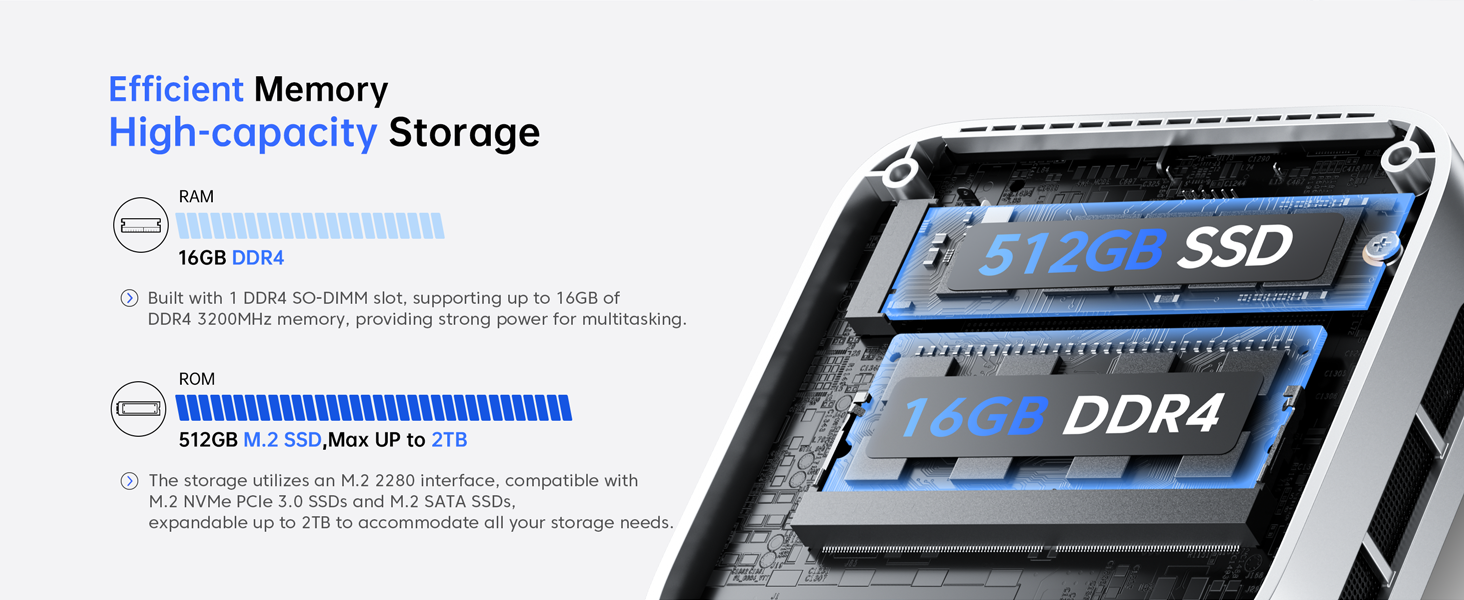
Figure 6.1: Key features of the Vista Mini V1 PC.
| ഫീച്ചർ | വിവരണം |
|---|---|
| പ്രോസസ്സർ | 12th Gen Intel Alder Lake N97 (4 cores/4 threads, up to 3.6GHz, 6MB cache) |
| റാം | 16GB DDR4 |
| സംഭരണം | 512GB M.2 2280 SSD (Expandable up to 2TB M.2 NVMe/SATA SSD) |
| ഗ്രാഫിക്സ് | Intel UHD Graphics (24 EUs, 1.20GHz max frequency) |
| ഡിസ്പ്ലേ ഔട്ട്പുട്ട് | HDMI 2.0, DP 1.4 (Supports Dual 4K Displays) |
| ഓപ്പറേറ്റിംഗ് സിസ്റ്റം | Windows 11 Pro (Pre-installed) |
| കണക്റ്റിവിറ്റി | 1000Mbps Ethernet, Wi-Fi, Bluetooth |
| തുറമുഖങ്ങൾ | 2x USB 3.2, 2x USB 2.0, 3.5mm Audio Jack |
| അളവുകൾ | 3.9 x 3.9 x 1.3 ഇഞ്ച് |
| ഭാരം | 1.3 പൗണ്ട് |
| തണുപ്പിക്കൽ സംവിധാനം | 2300rpm Silent Fan + Optimized Airflow |
7. പരിപാലനം
To ensure optimal performance and longevity of your Mini PC, consider the following maintenance tips:
- വെന്റുകൾ വൃത്തിയായി സൂക്ഷിക്കുക: Ensure that the ventilation grilles on the sides of the PC are not obstructed to allow for proper airflow and prevent overheating.
- സോഫ്റ്റ്വെയർ അപ്ഡേറ്റുകൾ: Regularly check for and install operating system and driver updates to maintain system stability and security.
- വൃത്തിയാക്കൽ: Use a soft, dry cloth to clean the exterior of the PC. Avoid using liquid cleaners directly on the device.
- സ്റ്റോറേജ് മാനേജ്മെന്റ്: ആനുകാലികമായി റീview and manage your storage to free up space and improve performance. Consider upgrading the SSD if more space is needed.
8. പ്രശ്നപരിഹാരം
If you encounter issues with your Vista Mini V1 PC, refer to the following common problems and solutions:
- ഡിസ്പ്ലേ ഇല്ല:
- Ensure the monitor is powered on and the video cables (HDMI/DP) are securely connected to both the PC and the monitor.
- ലഭ്യമെങ്കിൽ മറ്റൊരു വീഡിയോ കേബിളോ മോണിറ്ററോ പരീക്ഷിച്ചുനോക്കൂ.
- പിസി പവർ ഓൺ ആകുന്നില്ല:
- Verify that the power adapter is correctly connected to the PC and a working power outlet.
- മറ്റൊരു ഉപകരണം പ്ലഗ് ഇൻ ചെയ്ത് പവർ ഔട്ട്ലെറ്റ് പ്രവർത്തനക്ഷമമാണോ എന്ന് പരിശോധിക്കുക.
- മന്ദഗതിയിലുള്ള പ്രകടനം:
- പശ്ചാത്തലത്തിൽ പ്രവർത്തിക്കുന്ന അനാവശ്യ ആപ്ലിക്കേഷനുകൾ അടയ്ക്കുക.
- ഉയർന്ന CPU, മെമ്മറി അല്ലെങ്കിൽ ഡിസ്ക് ഉപയോഗത്തിനായി ടാസ്ക് മാനേജർ (Ctrl+Shift+Esc) പരിശോധിക്കുക.
- SSD-യിൽ മതിയായ ഇടമുണ്ടെന്ന് ഉറപ്പാക്കുക.
- നെറ്റ്വർക്ക് കണക്റ്റിവിറ്റി പ്രശ്നങ്ങൾ:
- For Wi-Fi, ensure the Wi-Fi adapter is enabled and you are connected to the correct network with the right password.
- For Ethernet, check the cable connection and ensure your router/modem is working correctly.
- നിങ്ങളുടെ റൂട്ടർ/മോഡം, മിനി പിസി എന്നിവ പുനരാരംഭിക്കുക.
9. വാറൻ്റിയും പിന്തുണയും
Your ACEMAGICIAN Vista Mini V1 PC comes with a 1-year warranty and 2-year quality assurance. For any technical assistance or support, please contact ACEMAGICIAN customer service. 24-hour support is available to address your queries and concerns.
For further assistance, please refer to the contact information provided in the included User Manual or visit the official ACEMAGICIAN webസൈറ്റ്.


