1. ആമുഖം
Welcome to your new Baseus BC1 Open Ear Earbuds. This manual provides detailed instructions for setup, operation, and maintenance to ensure you get the best experience from your device. The Baseus BC1 earbuds feature a comfortable open-ear design, secure tri-curve clip, rich sound with powerful bass, clear calls with 4-mic AI noise reduction, IP55 water resistance, and precise button control.
2. പാക്കേജ് ഉള്ളടക്കം
എല്ലാ ഇനങ്ങളും ഉണ്ടെന്ന് ഉറപ്പാക്കാൻ പാക്കേജ് ഉള്ളടക്കങ്ങൾ പരിശോധിക്കുക:
- Baseus BC1 Open Ear Earbuds (Left & Right)
- ചാർജിംഗ് കേസ്
- ഉപയോക്തൃ മാനുവൽ
- ടൈപ്പ്-സി ചാർജിംഗ് കേബിൾ

3. ഉൽപ്പന്നം കഴിഞ്ഞുview
The Baseus BC1 Open Ear Earbuds are designed for comfort and high-quality audio, allowing you to stay aware of your surroundings. The compact charging case provides extended battery life and convenient storage.

4. സജ്ജീകരണം
4.1. ചാർജിംഗ്
ആദ്യമായി ഉപയോഗിക്കുന്നതിന് മുമ്പ്, ഇയർബഡുകളും ചാർജിംഗ് കേസും പൂർണ്ണമായും ചാർജ് ചെയ്യുക.
- നൽകിയിരിക്കുന്ന ടൈപ്പ്-സി ചാർജിംഗ് കേബിൾ കേസിലെ ചാർജിംഗ് പോർട്ടിലേക്കും ഒരു പവർ സ്രോതസ്സിലേക്കും ബന്ധിപ്പിക്കുക.
- കേസ് മുഴുവൻ ചാർജ് ചെയ്യാൻ ഏകദേശം 1.5 മണിക്കൂർ എടുക്കും.
- The earbuds offer up to 7.5 hours of listening on a single charge, and up to 38 hours total with the fully charged case.

4.2. പവർ ഓൺ/ഓഫ്
- പവർ ഓൺ: ചാർജിംഗ് കെയ്സ് തുറക്കുക, ഇയർബഡുകൾ സ്വയമേവ ഓണാകും.
- പവർ ഓഫ്: Place the earbuds back into the charging case and close the lid; they will power off automatically.
4.3. ബ്ലൂടൂത്ത് ജോടിയാക്കൽ
- ചാർജിംഗ് കേസ് തുറക്കുക. ഇയർബഡുകൾ സ്വയമേവ ജോടിയാക്കൽ മോഡിലേക്ക് പ്രവേശിക്കും, ഇത് ഒരു മിന്നുന്ന LED ലൈറ്റ് വഴി സൂചിപ്പിക്കും.
- നിങ്ങളുടെ ഉപകരണത്തിൽ (സ്മാർട്ട്ഫോൺ, ടാബ്ലെറ്റ് മുതലായവ), ബ്ലൂടൂത്ത് ക്രമീകരണങ്ങളിലേക്ക് പോയി ബ്ലൂടൂത്ത് പ്രവർത്തനക്ഷമമാക്കുക.
- ഇതിനായി തിരയുക "Baseus BC1" in the list of available devices and select it to connect.
- Once connected, you will hear a confirmation tone, and the LED indicator on the earbuds will turn off.
4.4. ഇയർബഡുകൾ ധരിക്കുന്നു
For optimal comfort and sound quality, follow these steps to wear your earbuds:
- Gently clip each earbud onto your ear, ensuring the main body rests comfortably behind your earlobe.
- Adjust the earbud to find the most comfortable and secure position. The tri-curve ergonomic clip is designed to adapt to various ear shapes.
- Ensure the sound outlet is aligned with your ear canal to experience the best sound quality.


5. പ്രവർത്തന നിർദ്ദേശങ്ങൾ
5.1. ബട്ടൺ നിയന്ത്രണങ്ങൾ
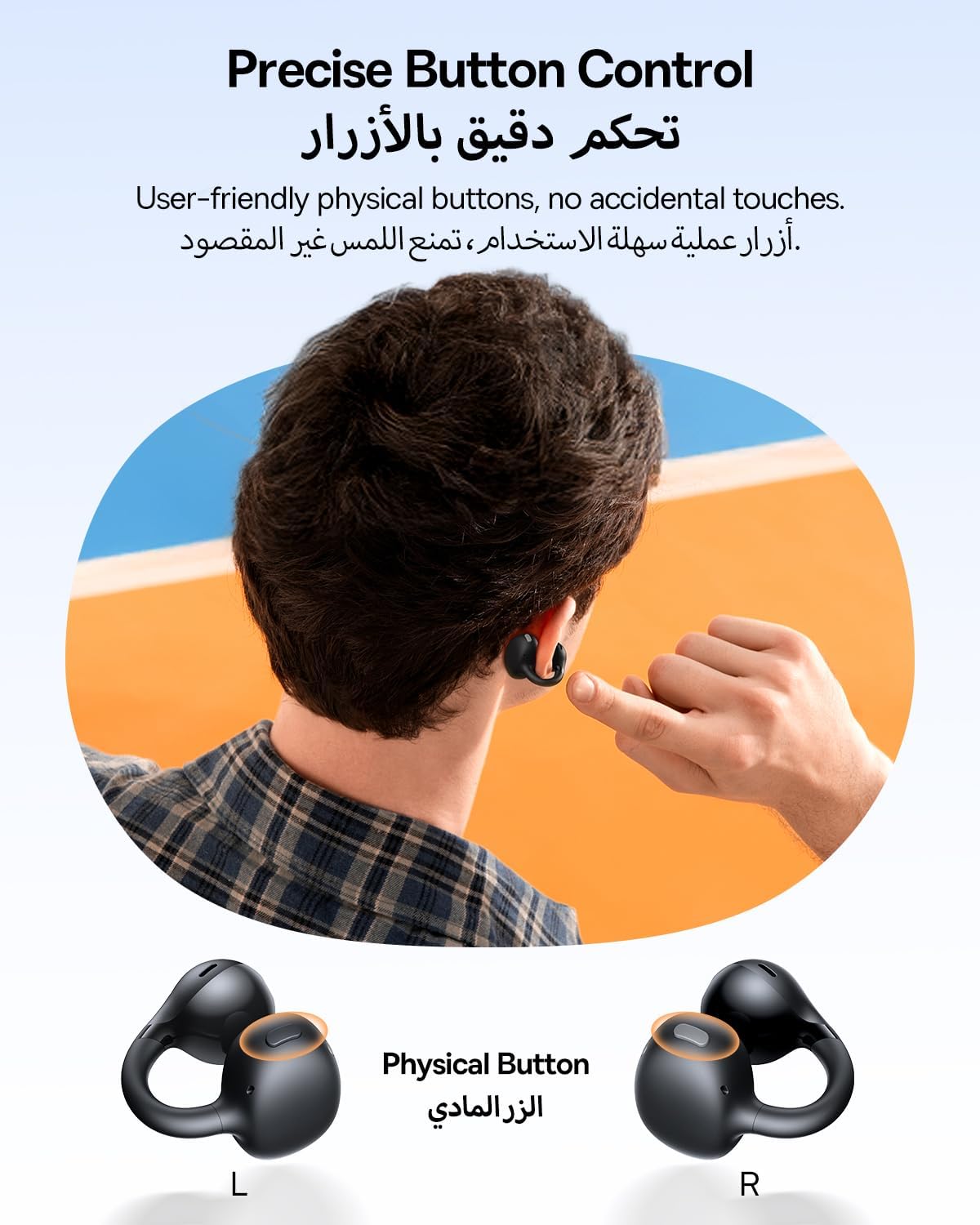
The Baseus BC1 earbuds feature physical buttons for precise control, minimizing accidental touches. The functions are as follows:
- പ്ലേ/താൽക്കാലികമായി നിർത്തുക: Single press the button on either earbud.
- വോളിയം കൂട്ടുക: Single press the button on the right earbud.
- വോളിയം താഴേക്ക്: Single press the button on the left earbud.
- അടുത്ത ട്രാക്ക്: Long press the button on the right earbud for 1.5 seconds.
- മുമ്പത്തെ ട്രാക്ക്: Long press the button on the left earbud for 1.5 seconds.
- ഉത്തരം/അവസാന കോൾ: Double press the button on either earbud.
- കോൾ നിരസിക്കുക: Long press the button on either earbud for 1.5 seconds during an incoming call.
- വോയ്സ് അസിസ്റ്റന്റ്: Triple press the button on the right earbud.
- Cycle Modes (Game/Movie/Normal): Triple press the button on the left earbud.
5.2. App Customization
Download the official Baseus app from your device's app store to unlock advanced features and personalize your listening experience:
- ഇഷ്ടാനുസൃതമാക്കാവുന്ന EQ: Adjust the equalizer settings to fine-tune the audio to your preference.
- സൗണ്ട് പ്രോfiles: Choose from various preset sound profiles for different music genres or listening scenarios.
- Touch Control Personalization: Reassign touch control functions to suit your needs.

5.3. മൾട്ടി-പോയിന്റ് കണക്ഷൻ
The Baseus BC1 earbuds support simultaneous connection to two devices, allowing seamless switching between them:
- Pair the earbuds with your first device (e.g., smartphone).
- Disconnect the earbuds from the first device's Bluetooth settings. The earbuds will re-enter pairing mode.
- Pair the earbuds with your second device (e.g., tablet or laptop).
- Manually reconnect the earbuds to the first device from its Bluetooth settings.
- The earbuds will now be connected to both devices simultaneously, allowing you to switch audio sources without re-pairing.

6. പരിപാലനം
6.1. വൃത്തിയാക്കൽ
To ensure optimal performance and longevity of your earbuds:
- Regularly clean the earbuds and the charging contacts inside the case using a clean, dry cotton swab.
- ആവശ്യമെങ്കിൽ, ലഘുവായി ഡിampen the cotton swab with alcohol for disinfection.
- Avoid issues such as the earbuds being unable to charge or power on due to prolonged lack of cleaning.
6.2. സംഭരണം
- ഉപയോഗത്തിലില്ലാത്തപ്പോൾ, പൊടിയിൽ നിന്നും കേടുപാടുകളിൽ നിന്നും സംരക്ഷിക്കുന്നതിന് ഇയർബഡുകൾ എല്ലായ്പ്പോഴും അവയുടെ ചാർജിംഗ് കേസിൽ സൂക്ഷിക്കുക.
- If the earbuds will not be used for an extended period, charge the case at least once every three months to maintain battery health.
7. പ്രശ്നപരിഹാരം
If you encounter any issues with your Baseus BC1 earbuds, please refer to the following common problems and solutions:
- ഇയർബഡുകൾ ജോടിയാക്കുന്നില്ല: Ensure Bluetooth is enabled on your device and the earbuds are in pairing mode. Try forgetting previous pairings on your device and re-pairing.
- ഒരു ഇയർബഡ് മാത്രമേ പ്രവർത്തിക്കുന്നുള്ളൂ: Place both earbuds back in the charging case, close the lid for 10 seconds, then open it again. If the issue persists, perform a factory reset.
- മോശം ശബ്ദ നിലവാരം: Ensure the earbuds are worn correctly and the sound outlet is aligned with your ear canal. Check the EQ settings in the Baseus app.
- ഇയർബഡുകൾ ചാർജ് ചെയ്യുന്നില്ല: Clean the charging contacts on both the earbuds and the case. Ensure the charging cable is properly connected to a working power source.
7.1. ഫാക്ടറി റീസെറ്റ്
If the earbuds are not functioning correctly, a factory reset may resolve the issue:
- Remove the pairing information of the earbuds from your device's Bluetooth settings (e.g., "Forget This Device").
- Place both earbuds into the charging case, ensuring they are securely in place.
- Close the charging case for 3 seconds, then reopen it.
- With the charging case open, long press the button on the charging case for 10 seconds until the indicator light flashes white twice. This indicates that the reset is complete.
- After the factory reset, use the initial Bluetooth pairing method (Section 4.3) to reconnect and resume normal use.
8 സ്പെസിഫിക്കേഷനുകൾ
| ഫീച്ചർ | വിശദാംശങ്ങൾ |
|---|---|
| മോഡലിൻ്റെ പേര് | BC1 |
| ഇനം മോഡൽ നമ്പർ | PM153 |
| ബ്രാൻഡ് | ബേസിയസ് |
| നിറം | കറുപ്പ് |
| ചെവി പ്ലേസ്മെൻ്റ് | തുറന്ന ചെവി |
| ഹെഡ്ഫോണുകൾ ഫോം ഫാക്ടർ | തുറന്ന ചെവി |
| കണക്റ്റിവിറ്റി ടെക്നോളജി | വയർലെസ് |
| വയർലെസ് കമ്മ്യൂണിക്കേഷൻ ടെക്നോളജി | ബ്ലൂടൂത്ത് |
| പ്രതിരോധം | 16 ഓം |
| ശബ്ദ നിയന്ത്രണം | ഒന്നുമില്ല |
| ഹെഡ്ഫോൺ ജാക്ക് | ജാക്ക് ഇല്ല |
| നിയന്ത്രണ രീതി | പുഷ് ബട്ടൺ |
| ജല പ്രതിരോധ നില | വാട്ടർ റെസിസ്റ്റൻ്റ് (IP55) |
| ചാർജിംഗ് സമയം | 1.5 മണിക്കൂർ |
| ഇനത്തിൻ്റെ ഭാരം | 111 ഗ്രാം |
| പാക്കേജ് അളവുകൾ | 13.4 x 8.5 x 4.2 സെ.മീ |
| ഉൾപ്പെടുത്തിയ ഘടകങ്ങൾ | ഉപയോക്തൃ മാനുവൽ |
| മെറ്റീരിയൽ | പ്ലാസ്റ്റിക് |
| അനുയോജ്യമായ ഉപകരണങ്ങൾ | Phones, tablets, desktop computers, laptops, mobile phones, smart speakers, TVs, digital video game players |
9 സുരക്ഷാ വിവരങ്ങൾ
- Avoid prolonged listening at high volume levels to prevent potential hearing damage.
- ആംബിയന്റ് ശബ്ദങ്ങൾ കേൾക്കാൻ കഴിയാത്തത് അപകടകരമായേക്കാവുന്ന സാഹചര്യങ്ങളിൽ (ഉദാ: ഡ്രൈവിംഗ്, സൈക്ലിംഗ്, ഗതാഗതത്തിൽ നടക്കുക) ഇയർബഡുകൾ ഉപയോഗിക്കരുത്.
- Keep the earbuds and charging case away from extreme temperatures, direct sunlight, and moisture.
- Do not attempt to disassemble, repair, or modify the product. This may void the warranty and cause damage.
- Keep out of reach of children and pets to prevent accidental ingestion or misuse.
- പ്രാദേശിക നിയന്ത്രണങ്ങൾ അനുസരിച്ച് ഉൽപ്പന്നവും അതിന്റെ ബാറ്ററിയും ഉത്തരവാദിത്തത്തോടെ നിർമാർജനം ചെയ്യുക.
10. വാറണ്ടിയും പിന്തുണയും
For warranty information, technical support, or any product-related inquiries, please refer to the official Baseus webസൈറ്റ് അല്ലെങ്കിൽ നിങ്ങളുടെ പ്രാദേശിക വിതരണക്കാരനെ ബന്ധപ്പെടുക.
You can also visit the official Baseus Store for more information: ബേസിയസ് സ്റ്റോർ


