1. ആമുഖം
The ATK Blazing Sky X1 Ultimate is an ultra-lightweight wireless gaming mouse designed for esports performance. It features a lightweight construction, advanced sensor technology, and versatile connectivity options to provide precise control and comfort for competitive play. This manual provides essential information for setting up, operating, and maintaining your ATK Blazing Sky X1 Ultimate mouse.

Figure 1: ATK Blazing Sky X1 Ultimate Wireless Gaming Mouse.
2. പാക്കേജ് ഉള്ളടക്കം
പാക്കേജിൽ എല്ലാ ഇനങ്ങളും ഉണ്ടെന്ന് ഉറപ്പാക്കുക:
- ATK Blazing Sky X1 Ultimate Wireless Gaming Mouse
- USB-C ചാർജിംഗ് കേബിൾ
- ATK 8K Dongle (for 8K wireless polling)
- ഉപയോക്തൃ മാനുവൽ
3. സജ്ജീകരണം
3.1 മൗസ് ചാർജ് ചെയ്യുന്നു
Connect the supplied USB-C cable to the mouse's charging port and the other end to a USB-A port on your computer or a compatible USB charger. The mouse will indicate charging status (e.g., LED indicator).
3.2 മൗസ് ബന്ധിപ്പിക്കൽ
The ATK Blazing Sky X1 Ultimate supports quad-mode connectivity:
- 2.4G വയർലെസ് മോഡ്: Insert the ATK 8K dongle into an available USB port on your computer. Turn on the mouse and select the 2.4G mode using the switch on the bottom of the mouse. The mouse should automatically connect.
- ബ്ലൂടൂത്ത് മോഡ്: Turn on the mouse and select Bluetooth mode using the switch on the bottom. On your computer, go to Bluetooth settings and pair with the "ATK Blazing Sky X1" device.
- വയർഡ് മോഡ്: Connect the mouse directly to your computer using the supplied USB-C cable. The mouse will function as a wired device and charge simultaneously.
3.3 സോഫ്റ്റ്വെയർ ഇൻസ്റ്റലേഷൻ
For full customization of DPI, polling rate, button assignments, and macros, download and install the ATK HUB/Web Driver software from the official ATK website. This software allows you to personalize your mouse settings to match your preferences.

Figure 2: ATK HUB/Web Driver software interface and Nordic 52840 MCU.
4. പ്രവർത്തന നിർദ്ദേശങ്ങൾ
4.1 ഡിപിഐ അഡ്ജസ്റ്റ്മെന്റ്
The ATK Blazing Sky X1 Ultimate features a PixArt PAW3950 Ultra sensor, offering up to 36,000 DPI (Dots Per Inch) via software. You can cycle through preset DPI stages using the dedicated DPI button on the mouse, or customize and fine-tune your DPI settings using the ATK HUB/Web Driver software.

Figure 3: PixArt PAW3950 Ultra Sensor specifications.
4.2 പോളിംഗ് നിരക്ക്
The mouse supports adjustable polling rates from 125 Hz to 8000 Hz. For optimal performance and ultra-low latency, utilize the 8K wireless polling rate with the included ATK 8K dongle. Polling rate settings can be configured via the ATK HUB/Web Driver software.
4.3 പ്രോഗ്രാം ചെയ്യാവുന്ന ബട്ടണുകൾ
The X1 Ultimate is equipped with durable optical switches rated for 70 million clicks, providing crisp and reliable actuation. All buttons are programmable via the ATK HUB/Web Driver software, allowing you to assign macros, keybinds, or multimedia functions.
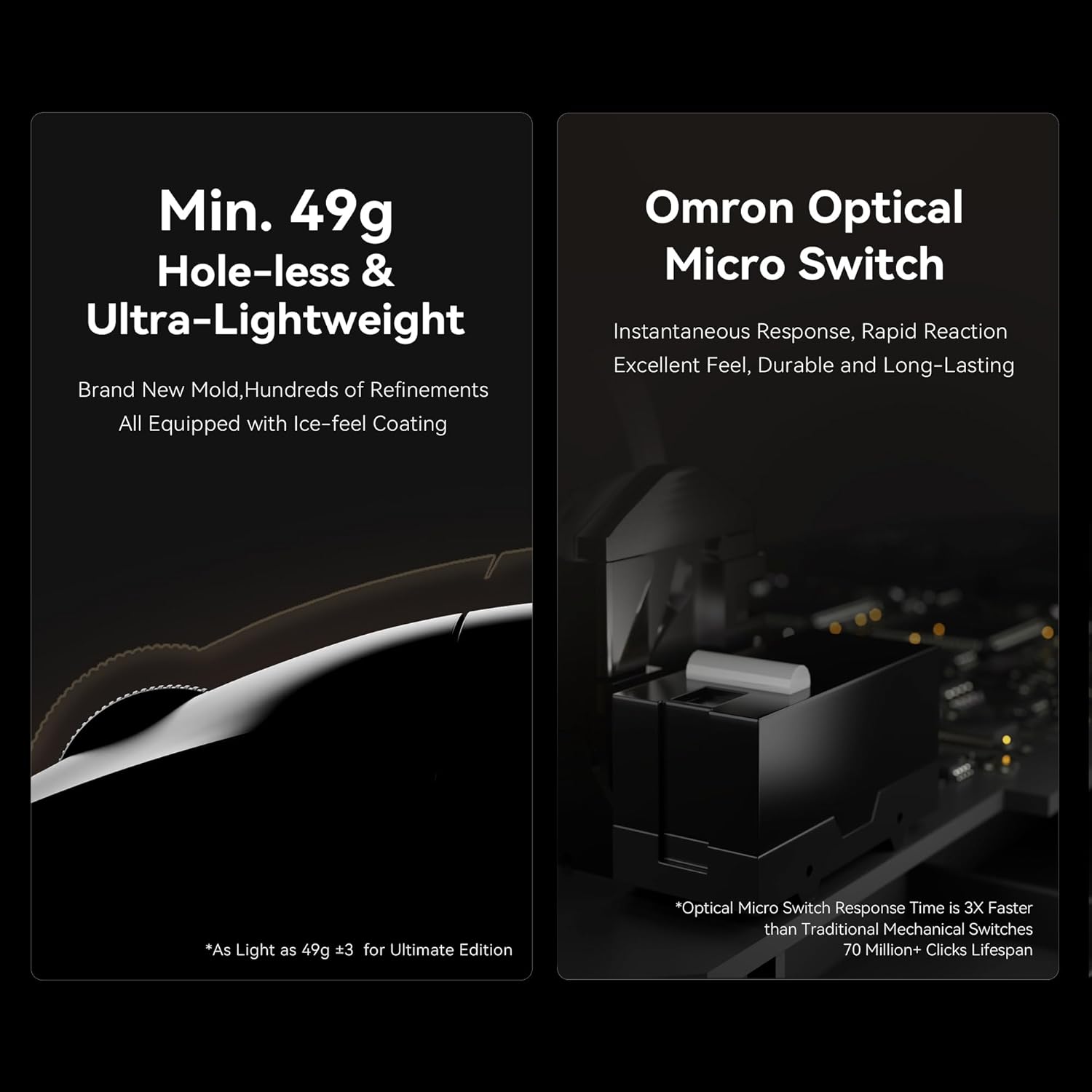
Figure 4: Ultra-lightweight design and Omron Optical Micro Switches.
4.4 ബാറ്ററി ലൈഫ്
The X1 Ultimate edition features a 500 mAh battery, providing approximately 75–150 hours of usage depending on the polling rate and usage intensity. Monitor battery status through the ATK HUB/Web Driver software or the mouse's LED indicator.
5. പരിപാലനം
To ensure the longevity and optimal performance of your ATK Blazing Sky X1 Ultimate mouse, follow these maintenance guidelines:
- വൃത്തിയാക്കൽ: Use a soft, dry cloth to wipe the surface of the mouse. For stubborn dirt, lightly dampതുണിയിൽ വെള്ളം അല്ലെങ്കിൽ നേരിയ ക്ലീനിംഗ് ലായനി ഉപയോഗിക്കുക. കഠിനമായ രാസവസ്തുക്കളോ ഉരച്ചിലുകളോ ഉള്ള വസ്തുക്കൾ ഒഴിവാക്കുക.
- സെൻസർ പരിചരണം: Keep the optical sensor on the bottom of the mouse clean and free from dust or debris. Use a cotton swab lightly dampened with isopropyl alcohol if necessary.
- സംഭരണം: Store the mouse in a cool, dry place away from direct sunlight and extreme temperatures when not in use.
6. പ്രശ്നപരിഹാരം
If you encounter issues with your ATK Blazing Sky X1 Ultimate mouse, refer to the following common solutions:
- മൗസ് പ്രതികരിക്കുന്നില്ല: Ensure the mouse is charged and powered on. Check the connectivity mode (2.4G, Bluetooth, or wired) and ensure it matches your computer's connection. Re-insert the USB dongle or re-pair via Bluetooth.
- ട്രാക്കിംഗ് പ്രശ്നങ്ങൾ: Clean the optical sensor on the bottom of the mouse. Ensure you are using the mouse on a suitable surface (a mouse pad is recommended). Update the mouse firmware via the ATK HUB/Web Driver software.
- ബാറ്ററി ചാർജ്ജുചെയ്യുന്നില്ല: Verify the USB-C cable is securely connected to both the mouse and the power source. Try a different USB port or charging cable.
- മൗസ് കണ്ടെത്താത്ത സോഫ്റ്റ്വെയർ: Ensure the mouse is connected to your computer. Reinstall the ATK HUB/Web Driver software.
7 സ്പെസിഫിക്കേഷനുകൾ
| ഫീച്ചർ | വിശദാംശങ്ങൾ |
|---|---|
| മോഡൽ നമ്പർ | ATK Blazing Sky X1 Ultimate |
| ഇനത്തിൻ്റെ ഭാരം | 1.8 ounces (approx. 51g for X1 Ultimate) |
| ബ്രാൻഡ് | എ.ടി.കെ |
| നിറം | വെള്ള |
| കണക്റ്റിവിറ്റി ടെക്നോളജി | NearLink, 2.4G Wireless, Bluetooth, Wired USB-C |
| പ്രത്യേക ഫീച്ചർ | Ultra-Lightweight, Programmable Buttons, Rechargeable |
| മൂവ്മെന്റ് ഡിറ്റക്ഷൻ ടെക്നോളജി | ഒപ്റ്റിക്കൽ |
| സെൻസർ | PixArt PAW3950 Ultra (up to 36,000 DPI via software) |
| സ്വിച്ചുകൾ | Optical Switches (70M clicks) |
| എം.സി.യു | Nordic 52840 with Smartspeed 2.0 |
| പോളിംഗ് നിരക്ക് | 125 Hz - 8000 Hz (8K with ATK 8K Dongle) |
| ബാറ്ററി | 500 mAh (75-150 hours depending on usage) |
| അളവുകൾ | 127 × 64 × 40 മി.മീ |
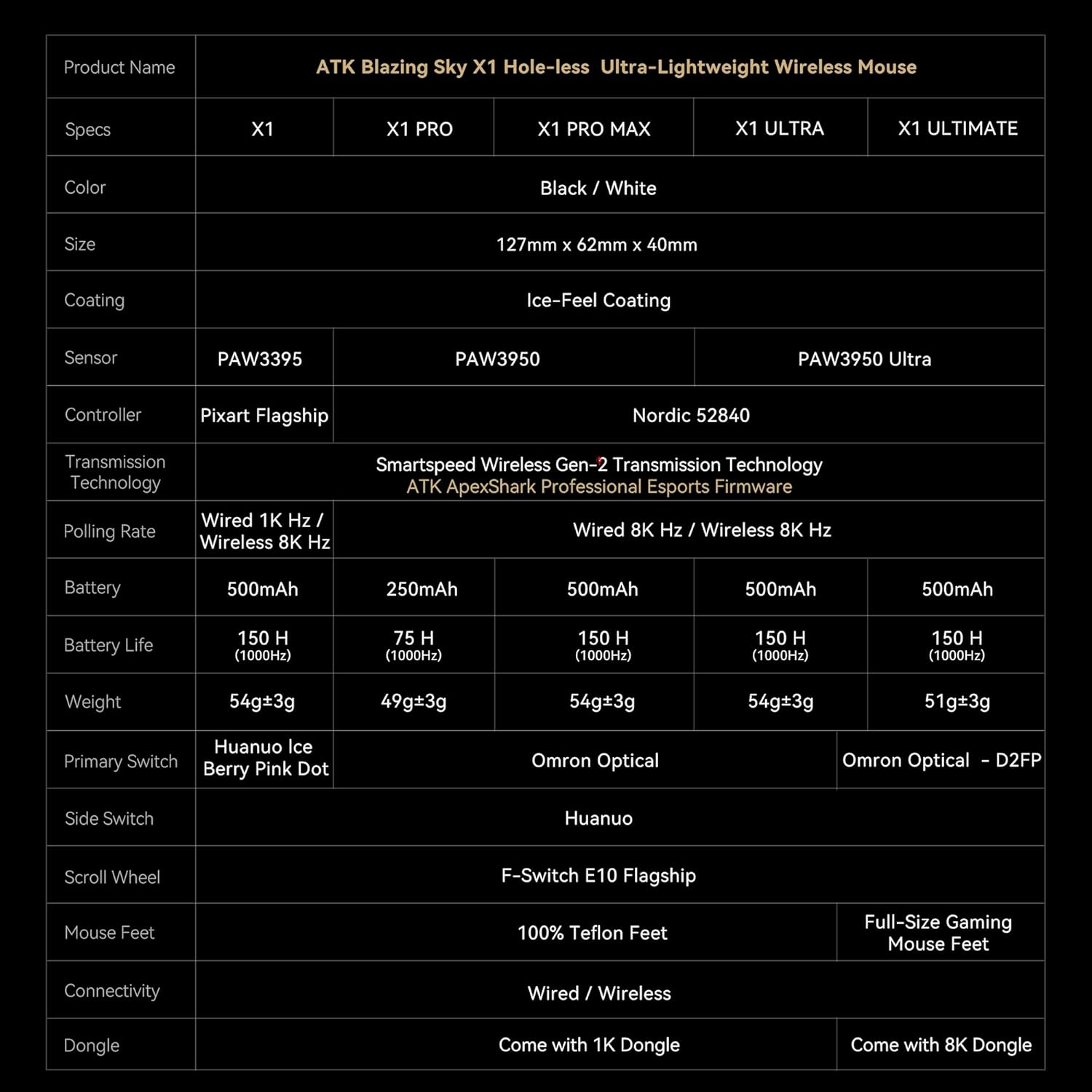
Figure 5: ATK Blazing Sky X1 Series Specification Table.
8. വാറണ്ടിയും പിന്തുണയും
For detailed warranty information, product registration, and technical support, please visit the official ATK website or contact ATK customer service. Keep your proof of purchase for warranty claims.
- ഓൺലൈൻ പിന്തുണ: സന്ദർശിക്കുക ATK Store on Amazon പതിവുചോദ്യങ്ങൾക്കും ഉൽപ്പന്ന വിവരങ്ങൾക്കും.
- ബന്ധപ്പെടുക: Refer to your product packaging or the ATK webനേരിട്ടുള്ള ഉപഭോക്തൃ സേവന കോൺടാക്റ്റ് വിശദാംശങ്ങൾക്കായി സൈറ്റ്.


