ആമുഖം
Thank you for choosing the XO X39 TWS Bluetooth Earphones. This manual provides essential information for setting up, operating, and maintaining your new wireless earbuds. Please read it carefully to ensure optimal performance and longevity of your device.
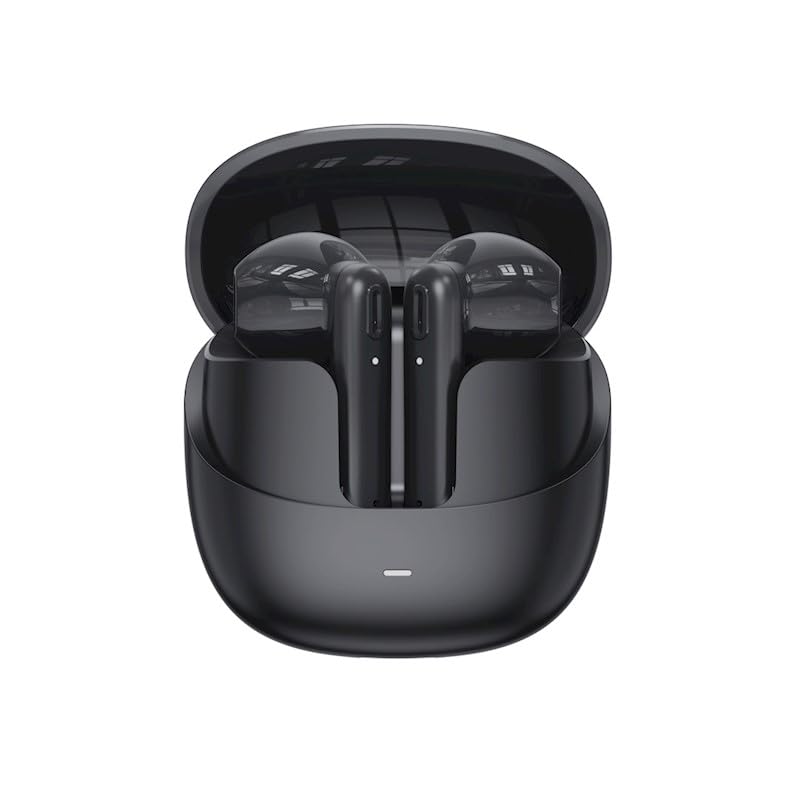
Image: XO X39 TWS Bluetooth Earphones in their charging case. The earbuds are black and rest securely within the open case, ready for use or charging.
പാക്കേജ് ഉള്ളടക്കം
പാക്കേജിൽ ഇനിപ്പറയുന്ന ഇനങ്ങൾ ഉണ്ടോ എന്ന് പരിശോധിക്കുക:
- XO X39 TWS Bluetooth Earphones (Left and Right)
- ചാർജിംഗ് കേസ്
- യുഎസ്ബി ചാർജിംഗ് കേബിൾ
- ഇയർ കുഷ്യനുകൾ (വിവിധ വലുപ്പങ്ങൾ)
- ഉപയോക്തൃ മാനുവൽ (ഈ പ്രമാണം)
സജ്ജമാക്കുക
1. ഇയർഫോണുകളും കേസും ചാർജ് ചെയ്യുന്നു
ആദ്യ ഉപയോഗത്തിന് മുമ്പ്, ഇയർഫോണുകളും ചാർജിംഗ് കേസും പൂർണ്ണമായും ചാർജ് ചെയ്യുക.
- ഇയർഫോണുകൾ ചാർജിംഗ് കേസിൽ വയ്ക്കുക. അവ ശരിയായി സ്ഥാപിച്ചിട്ടുണ്ടെന്ന് ഉറപ്പാക്കുക.
- USB ചാർജിംഗ് കേബിൾ കേസിലെ ചാർജിംഗ് പോർട്ടിലേക്കും അനുയോജ്യമായ ഒരു USB പവർ സ്രോതസ്സിലേക്കും (ഉദാ: കമ്പ്യൂട്ടർ, വാൾ അഡാപ്റ്റർ) ബന്ധിപ്പിക്കുക.
- The indicator light on the case will show charging status. Once fully charged, the indicator light will change or turn off.
- A full charge typically takes approximately 1.5 to 2 hours for the case and earphones.

Image: XO X39 TWS Bluetooth Earphones and their charging case placed next to a laptop. This illustrates the typical environment for charging and use.
2. ബ്ലൂടൂത്ത് ഉപകരണവുമായി ജോടിയാക്കുന്നു
The XO X39 earphones use Bluetooth 5.3 for a stable and efficient connection.
- പ്രാരംഭ ജോടിയാക്കൽ:
- ചാർജിംഗ് കേസ് തുറക്കുക. ഇയർഫോണുകൾ സ്വയമേവ ഓണാകുകയും ജോടിയാക്കൽ മോഡിലേക്ക് പ്രവേശിക്കുകയും ചെയ്യും.
- നിങ്ങളുടെ ഉപകരണത്തിൽ (സ്മാർട്ട്ഫോൺ, ടാബ്ലെറ്റ് മുതലായവ), ബ്ലൂടൂത്ത് പ്രവർത്തനക്ഷമമാക്കുക.
- ഇതിനായി തിരയുക available Bluetooth devices and select "XO X39" from the list.
- Once connected, you will hear a confirmation tone, and the indicator light on the earphones will change.
- യാന്ത്രിക പുനഃസംയോജനം:
- പ്രാരംഭ ജോടിയാക്കലിന് ശേഷം, കേസിൽ നിന്ന് പുറത്തെടുക്കുമ്പോൾ ഇയർഫോണുകൾ അവസാനം ജോടിയാക്കിയ ഉപകരണത്തിലേക്ക് യാന്ത്രികമായി കണക്റ്റുചെയ്യും, ഉപകരണത്തിൽ ബ്ലൂടൂത്ത് പ്രവർത്തനക്ഷമമാക്കിയിട്ടുണ്ടെങ്കിൽ.
- സിംഗിൾ ഇയർബഡ് ഉപയോഗം:
- Either earbud can be used independently. Simply take one earbud out of the case, and it will connect to your device.
പ്രവർത്തന നിർദ്ദേശങ്ങൾ
ഇയർഫോണുകൾ ധരിക്കുന്നു
Choose the ear cushions that provide the best fit for comfort and sound quality. Gently insert the earphones into your ears and rotate them slightly until they feel secure.
ടച്ച് നിയന്ത്രണങ്ങൾ
The XO X39 earphones feature touch-sensitive controls on each earbud.
| ഫംഗ്ഷൻ | ആക്ഷൻ |
|---|---|
| സംഗീതം പ്ലേ ചെയ്യുക/താൽക്കാലികമായി നിർത്തുക | ഇയർബഡുകളിൽ ഏതെങ്കിലുമൊന്നിൽ ഒറ്റ ടാപ്പ് ചെയ്യുക. |
| അടുത്ത ട്രാക്ക് | വലതുവശത്തെ ഇയർബഡിൽ രണ്ടുതവണ ടാപ്പ് ചെയ്യുക. |
| മുമ്പത്തെ ട്രാക്ക് | ഇടതുവശത്തെ ഇയർബഡിൽ രണ്ടുതവണ ടാപ്പ് ചെയ്യുക. |
| ഉത്തരം / കോൾ അവസാനിപ്പിക്കുക | ഇൻകമിംഗ് കോൾ വരുമ്പോൾ ഏത് ഇയർബഡിലും ഒറ്റ ടാപ്പ് ചെയ്യുക. |
| കോൾ നിരസിക്കുക | ഇൻകമിംഗ് കോൾ വരുമ്പോൾ ഇയർബഡുകളിൽ ഏതെങ്കിലുമൊന്ന് 2 സെക്കൻഡ് അമർത്തിപ്പിടിക്കുക. |
| വോയ്സ് അസിസ്റ്റൻ്റ് സജീവമാക്കുക | ഇയർബഡുകളിൽ ഏതെങ്കിലുമൊന്നിൽ മൂന്ന് തവണ ടാപ്പ് ചെയ്യുക. |
മെയിൻ്റനൻസ്
ശരിയായ അറ്റകുറ്റപ്പണി നിങ്ങളുടെ ഇയർഫോണുകളുടെ ദീർഘായുസ്സും പ്രകടനവും ഉറപ്പാക്കുന്നു.
- വൃത്തിയാക്കൽ: ഇയർബഡുകളും ചാർജിംഗ് കെയ്സും മൃദുവായതും ഉണങ്ങിയതും ലിന്റ് രഹിതവുമായ തുണി ഉപയോഗിച്ച് പതിവായി വൃത്തിയാക്കുക. കഠിനമായ രാസവസ്തുക്കളോ ഉരച്ചിലുകളോ ഉള്ള വസ്തുക്കൾ ഉപയോഗിക്കരുത്.
- ചെവി തലയണകൾ: Remove ear cushions periodically and clean them with a damp തുണി. വീണ്ടും ഘടിപ്പിക്കുന്നതിന് മുമ്പ് അവ പൂർണ്ണമായും ഉണങ്ങിയെന്ന് ഉറപ്പാക്കുക.
- ചാർജിംഗ് പോർട്ടുകൾ: Keep the charging contacts on the earbuds and inside the case clean and free of debris.
- സംഭരണം: ഉപയോഗത്തിലില്ലാത്തപ്പോൾ, ഇയർഫോണുകൾ സംരക്ഷിക്കുന്നതിനും ചാർജ് ചെയ്ത നിലയിൽ നിലനിർത്തുന്നതിനും ചാർജിംഗ് കേസിൽ സൂക്ഷിക്കുക.
- ജല പ്രതിരോധം: The earphones are sweatproof. Avoid submerging them in water or exposing them to heavy rain.
ട്രബിൾഷൂട്ടിംഗ്
നിങ്ങൾക്ക് പ്രശ്നങ്ങൾ നേരിടുകയാണെങ്കിൽ, ഇനിപ്പറയുന്ന പരിഹാരങ്ങൾ പരീക്ഷിക്കുക:
- ഇയർഫോണുകൾ ജോടിയാക്കുന്നില്ല:
- രണ്ട് ഇയർഫോണുകളും ചാർജ് ചെയ്തിട്ടുണ്ടെന്ന് ഉറപ്പാക്കുക.
- നിങ്ങളുടെ ഉപകരണത്തിലെ ബ്ലൂടൂത്ത് ഓഫാക്കി വീണ്ടും ഓണാക്കുക.
- Forget "XO X39" from your device's Bluetooth list and try pairing again.
- Place both earphones back in the case, close the lid, wait a few seconds, then open to re-initiate pairing mode.
- ഒരു ഇയർബഡിൽ നിന്ന് ശബ്ദമില്ല:
- രണ്ട് ഇയർബഡുകളും ചാർജ്ജ് ചെയ്തിട്ടുണ്ടെന്ന് ഉറപ്പാക്കുക.
- രണ്ട് ഇയർബഡുകളും തിരികെ കെയ്സിൽ വച്ച ശേഷം വീണ്ടും പുറത്തെടുക്കാൻ ശ്രമിക്കുക.
- നിങ്ങളുടെ ഉപകരണത്തിന്റെ ഓഡിയോ ബാലൻസ് ക്രമീകരണം പരിശോധിക്കുക.
- ചാർജിംഗ് പ്രശ്നങ്ങൾ:
- ചാർജിംഗ് കേബിൾ കേസിലേക്കും പവർ സ്രോതസ്സിലേക്കും സുരക്ഷിതമായി ബന്ധിപ്പിച്ചിട്ടുണ്ടെന്ന് ഉറപ്പാക്കുക.
- ഇയർബഡുകളിലെയും കേസിനുള്ളിലെയും ചാർജിംഗ് കോൺടാക്റ്റുകൾ വൃത്തിയുള്ളതാണോയെന്ന് പരിശോധിക്കുക.
- മറ്റൊരു USB കേബിളോ പവർ അഡാപ്റ്ററോ പരീക്ഷിക്കുക.
- മോശം ശബ്ദ നിലവാരം:
- Ensure the earphones are properly seated in your ears and you are using the correct size ear cushions.
- Move closer to your Bluetooth device to avoid interference.
- ഇയർബഡ് നോസിലുകളിൽ നിന്ന് അവശിഷ്ടങ്ങൾ വൃത്തിയാക്കുക.
സ്പെസിഫിക്കേഷനുകൾ
| ഫീച്ചർ | വിശദാംശങ്ങൾ |
|---|---|
| മോഡലിൻ്റെ പേര് | XO X39 |
| കണക്റ്റിവിറ്റി ടെക്നോളജി | വയർലെസ്സ് (ബ്ലൂടൂത്ത് 5.3) |
| ശബ്ദ നിയന്ത്രണം | സജീവ നോയ്സ് റദ്ദാക്കൽ |
| പ്രത്യേക ഫീച്ചർ | വിയർപ്പ് പ്രൂഫ് |
| സംഗീത പ്ലേബാക്ക് സമയം | 3.5 മണിക്കൂർ വരെ (ഒറ്റ ചാർജ്) |
| സംസാര സമയം | 2.5 മണിക്കൂർ വരെ (ഒറ്റ ചാർജ്) |
| ചെവി പ്ലേസ്മെൻ്റ് | ചെവിയിൽ |
| ഫോം ഫാക്ടർ | ചെവിയിൽ |
| ഇനത്തിൻ്റെ ഭാരം | 130 g (including packaging) |
| ഉൽപ്പന്ന അളവുകൾ | 5.2 x 2 x 3.5 സെ.മീ |
വാറൻ്റിയും പിന്തുണയും
XO products are designed for reliability and performance. This product comes with a standard manufacturer's warranty against defects in materials and workmanship. For specific warranty terms, duration, and to register your product, please refer to the warranty card included in your package or visit the official XO webസൈറ്റ്.
For technical support, troubleshooting assistance, or service inquiries, please contact XO customer support through the contact information provided on the official webസൈറ്റ് അല്ലെങ്കിൽ നിങ്ങളുടെ വാങ്ങൽ ഡോക്യുമെന്റേഷൻ.