1. ആമുഖം
This manual provides essential information for setting up, operating, maintaining, and troubleshooting your PELADN WO4 Gaming Mini PC. Please read this manual thoroughly before using the product to ensure optimal performance and longevity.
2. ബോക്സിൽ എന്താണുള്ളത്?
- WO-4 7640HS Mini PC 32GB+1TB
- സ്ക്രൂകളുള്ള VESA മൗണ്ട്
- പവർ അഡാപ്റ്റർ
- HDMI കേബിൾ
- ഉപയോക്തൃ മാനുവൽ

Image: Retail Boxed Packaging showing the Mini PC, VESA mount, power adapter, HDMI cable, and user manual.
3. ഉൽപ്പന്ന സവിശേഷതകൾ
- പ്രോസസ്സർ: Ultra-Compact AMD Ryzen 5 7640HS with ZEN 4 architecture and TSMC’s 4nm FinFET, offering high data throughput and AI performance.
- ഗ്രാഫിക്സ്: Integrated AMD Radeon 760M (RDNA3) with 4GB adjustable VRAM, supporting 4K video editing and 3D modeling.
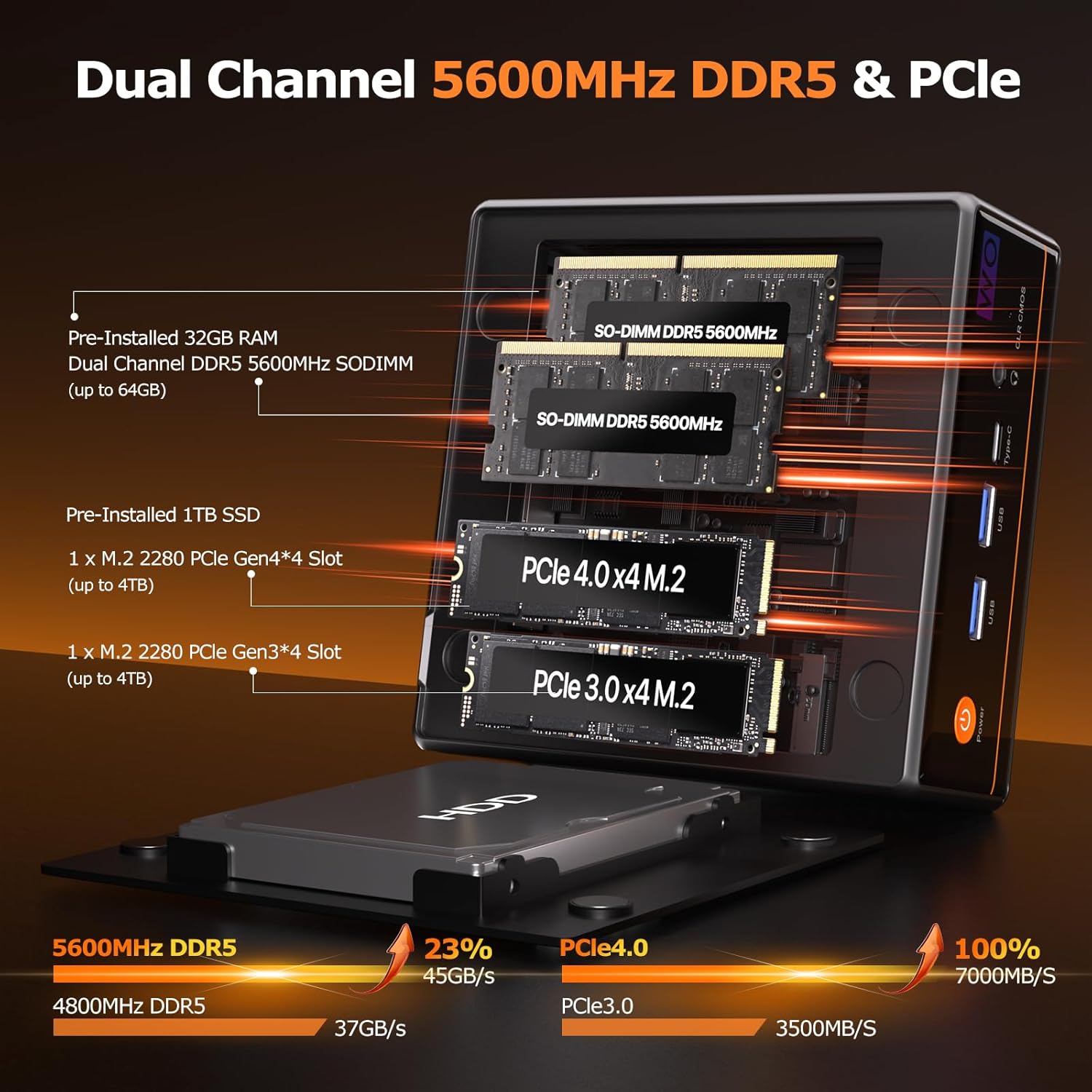
- മെമ്മറി: Dual-channel 32GB (16GB*2) DDR5 5600MHz SO-DIMM, expandable up to 64GB.
- സംഭരണം: Pre-installed 1TB PCIe 3.0 M.2 2280 NVMe SSD, with additional M.2 2280 PCIe4.0 slot for expansion up to 8TB.
- പ്രദർശന പിന്തുണ: 4K Quad-Display via HDMI 2.0 (max 4K 60Hz), Type-C (USB4.0), USB3.2 Type-C (supports DP1.2 output), and DP 1.4 (max 4K 60Hz).
- നെറ്റ്വർക്ക്: Dual RJ45 LAN (1000Mbps and 2.5Gbps), WiFi6 (dual-band 5.0GHz/2.4GHz with MU-MIMO), and Bluetooth 5.2.
- തണുപ്പിക്കൽ: Smart Cooling Fan with dual-turbo copper tube design for effective heat reduction and low noise.

ചിത്രം: വിശദമായത് view of the 4NM Ultra-Compact 7640HS Processor, highlighting its ZEN 4 architecture, 4nm process, 45W TDP, 5GHz burst speed, 16MB L3 cache, 6 cores, and 12 threads. Performance benchmarks for Geekbench 6 (Single Core and Multi Core) are also shown, comparing it against other AMD Ryzen and Intel Core i9 processors.

ചിത്രം: ആന്തരികം view of the Mini PC showcasing dual-channel DDR5 5600MHz SO-DIMM RAM (pre-installed 32GB, expandable to 64GB) and dual M.2 2280 SSD slots (PCIe 4.0 x4 and PCIe 3.0 x4, pre-installed 1TB, expandable to 8TB). Performance comparisons for DDR5 and PCIe generations are also displayed.
Video: Official PELADN product video highlighting the key features of the PELADN Gaming Mini PC 7640HS, including its processor, memory, storage, and connectivity options.
4. പോർട്ടുകളും കണക്ഷനുകളും
ഫ്രണ്ട് പാനൽ പോർട്ടുകൾ:
- 1 x പവർ ബട്ടൺ
- 2 x USB 3.2 (10Gbps/S)
- 1 x Type-C (USB4.0, supports DP1.4 output and PD power input, 40Gbps)
- 1 x 3.5mm Audio Jack (2-in-1 headphone/microphone)
- 1 x CLR CMOS Button
പിൻ പാനൽ പോർട്ടുകൾ:
- 1 x DC 19V Power Input
- 1 x USB4 Type-C (40Gbps)
- 1 x 2.5Gbps LAN Port
- 1 x 1000Mbps LAN Port
- 1 x ഡിസ്പ്ലേ പോർട്ട് 1.4
- 1 x HDMI 2.0
- 2 x USB 2.0
ചിത്രം: വിശദമായ ഒരു ചിത്രം view of the front and rear ports of the PELADN WO4 Mini PC. The front includes a power button, two USB 3.2 ports, one Type-C port, a 3.5mm audio jack, and a CLR CMOS button. The rear features a DC 19V input, USB4 Type-C, 2.5G LAN, 1G LAN, DisplayPort, HDMI, and two USB 2.0 ports.

Image: A diagram illustrating the various ports available on the PELADN WO4 Mini PC, including USB4, Power, DC Power, Audio, Type-C, RJ45 LAN, USB 2.0, HD (HDMI), and DP 1.4.
5. സജ്ജീകരണ നിർദ്ദേശങ്ങൾ
- പെരിഫറലുകൾ ബന്ധിപ്പിക്കുക: Connect your monitor(s) using HDMI, DisplayPort, or Type-C cables. Connect your keyboard and mouse to the available USB ports.
- നെറ്റ്വർക്ക് കണക്ഷൻ: For initial setup, it is recommended to use a wired LAN connection for faster and more stable updates. Connect an Ethernet cable to one of the RJ45 LAN ports. Alternatively, you can connect via WiFi6.
- പവർ ഓൺ: Connect the power adapter to the DC 19V input port and then plug it into a power outlet. Press the power button on the front panel to turn on the Mini PC.
- Initial OS Setup: Follow the on-screen instructions to complete the Windows 11 Pro setup. This includes selecting your region, keyboard layout, and creating a user account.
- ഓൺലൈൻ സജീവമാക്കൽ: If prompted for online activation, ensure you have an active internet connection.
Video: A step-by-step guide on the online activation process for PELADN Mini PCs, including connecting to a network, reviewing the license agreement, and setting up a Microsoft account.
6. പ്രവർത്തന നിർദ്ദേശങ്ങൾ
- ഓപ്പറേറ്റിംഗ് സിസ്റ്റം: The Mini PC is compatible with Windows (11 Pro, 10 Pro, 10), Ubuntu, Linux, and Firewall Server.
- മൾട്ടി-ഡിസ്പ്ലേ സജ്ജീകരണം: Connect up to four displays simultaneously using the available HDMI, DisplayPort, and dual Type-C ports for enhanced productivity or entertainment.
- വയർലെസ് കണക്റ്റിവിറ്റി: Utilize WiFi6 for high-speed wireless internet access and Bluetooth 5.2 for connecting wireless peripherals like keyboards, mice, and headphones.
- വിപുലമായ സവിശേഷതകൾ: Supports LAN wake-up, PXE boot, RTC wake-up, and auto power-on, making it suitable for various applications including use as a mini server.

Image: A visual representation of the PELADN WO4 Mini PC connected to four screens, demonstrating its 4K Quad-Screens Display capability via HDMI 2.0, Dual Type-C, and DP1.4 ports, suitable for design, gaming, office, and entertainment.
7. പരിപാലനം
- തണുപ്പിക്കൽ സംവിധാനം: The PELADN WO4 features a smart cooling fan with a dual-turbo copper tube design. Ensure proper ventilation around the device to maintain optimal performance and prevent overheating.
- പൊടി നീക്കം: Periodically clean dust from the ventilation grilles to ensure efficient airflow.
- സോഫ്റ്റ്വെയർ അപ്ഡേറ്റുകൾ: Keep your operating system and drivers updated to ensure system stability and security.

ചിത്രം: പൊട്ടിത്തെറിച്ച ഒരു view illustrating the PELADN IceBlast 1.5 Cooling Technology, highlighting its triple copper heat pipes, multiple fan blades, and top heat conductor for efficient thermal management.
8. പ്രശ്നപരിഹാരം
- ശക്തിയില്ല: പവർ അഡാപ്റ്റർ മിനി പിസിയിലേക്കും പ്രവർത്തിക്കുന്ന ഒരു പവർ ഔട്ട്ലെറ്റിലേക്കും സുരക്ഷിതമായി ബന്ധിപ്പിച്ചിട്ടുണ്ടെന്ന് ഉറപ്പാക്കുക.
- ഡിസ്പ്ലേ ഇല്ല: Verify that your monitor cables (HDMI, DP, Type-C) are correctly connected and that the monitor is set to the correct input source.
- BIOS ക്രമീകരണങ്ങൾ: To enter BIOS setup, press the "Del" key during startup. To enter the boot options menu, press "F7" during startup. Be cautious when changing BIOS settings, as unauthorized alterations may prevent the computer from booting.
- Random Shutdowns: If the device experiences unexpected shutdowns, ensure it is not overheating. Check for proper ventilation and consider updating drivers or the BIOS.
- നെറ്റ്വർക്ക് പ്രശ്നങ്ങൾ: If experiencing network connectivity problems, ensure LAN cables are properly connected or check your WiFi settings. For initial setup, a wired connection is recommended to avoid delays from prolonged updates.
9 സ്പെസിഫിക്കേഷനുകൾ
| ഫീച്ചർ | വിശദാംശങ്ങൾ |
|---|---|
| പ്രോസസ്സർ | AMD Ryzen 5 7640HS (4.3 GHz, 6 Cores) |
| റാം | 32 ജിബി DDR5 (5600 MHz) |
| ഹാർഡ് ഡ്രൈവ് | 1 ടിബി എസ്എസ്ഡി (പിസിഐഇ x 16) |
| ഗ്രാഫിക്സ് കോപ്രൊസസർ | AMD Radeon™ 760M (4 GB) |
| ഓപ്പറേറ്റിംഗ് സിസ്റ്റം | OS (Windows 11 Pro, 10 Pro, 10) |
| പരമാവധി സ്ക്രീൻ റെസല്യൂഷൻ | 4096x2160 പിക്സലുകൾ |
| വയർലെസ് തരം | WiFi6 (2.4 GHz, 5 GHz), Bluetooth 5.2 |
| ലാൻ പോർട്ടുകൾ | 1 x 1000Mbps, 1 x 2.5Gbps |
| USB പോർട്ടുകൾ | 2 x യുഎസ്ബി 3.0, 2 x യുഎസ്ബി 2.0 |
| ടൈപ്പ്-സി പോർട്ടുകൾ | 2 (1x USB4.0, 1x USB3.2 with DP1.2) |
| ഇനത്തിൻ്റെ ഭാരം | 2.2 പൗണ്ട് |
| നിറം | കറുപ്പ് |
10. വാറൻ്റിയും പിന്തുണയും
PELADN provides a one-year limited warranty for each Mini PC, starting from the purchase date. This warranty covers defects in design and workmanship. For any issues or support inquiries, please contact the dedicated after-sales team. Refer to the contact information provided with your purchase documentation.


