1. ആമുഖം
The VEWIOR ClearAir-A12 Air Purifier is designed to improve indoor air quality by effectively removing airborne contaminants. Featuring a 3-stage filtration system, real-time air quality monitoring, and multiple operating modes, this device provides a cleaner and more comfortable living environment. This manual provides essential information for the safe and efficient use of your air purifier.

Image: The VEWIOR ClearAir-A12 Air Purifier in a modern home environment, illustrating its sleek design and integration.
2 സുരക്ഷാ വിവരങ്ങൾ
Please read all safety instructions before using this appliance to prevent injury or damage. Keep this manual for future reference.
- നീക്കുന്നതിനോ വൃത്തിയാക്കുന്നതിനോ അറ്റകുറ്റപ്പണികൾ നടത്തുന്നതിനോ മുമ്പ് എല്ലായ്പ്പോഴും എയർ പ്യൂരിഫയർ അൺപ്ലഗ് ചെയ്യുക.
- കേടായ ചരടോ പ്ലഗോ ഉപയോഗിച്ച് ഉപകരണം പ്രവർത്തിപ്പിക്കരുത്.
- എയർ ഇൻലെറ്റും ഔട്ട്ലെറ്റും തടസ്സങ്ങളില്ലാതെ സൂക്ഷിക്കുക.
- വെറ്റ് അല്ലെങ്കിൽ ഡിയിൽ ഉപകരണം ഉപയോഗിക്കരുത്amp പരിസരങ്ങൾ.
- ഈ ഉപകരണം, അവരുടെ സുരക്ഷയ്ക്ക് ഉത്തരവാദിയായ ഒരു വ്യക്തി ഉപകരണത്തിൻ്റെ ഉപയോഗത്തെ സംബന്ധിച്ച മേൽനോട്ടമോ നിർദ്ദേശമോ നൽകിയിട്ടില്ലെങ്കിൽ, ശാരീരികമോ ഇന്ദ്രിയപരമോ മാനസികമോ ആയ കഴിവുകൾ കുറഞ്ഞതോ അനുഭവത്തിൻ്റെയും അറിവിൻ്റെയും അഭാവം ഉള്ള വ്യക്തികൾക്ക് (കുട്ടികൾ ഉൾപ്പെടെ) ഉപയോഗിക്കാൻ ഉദ്ദേശിച്ചുള്ളതല്ല.
- ഡയറ്ററി സപ്ലിമെൻ്റുകളെക്കുറിച്ചുള്ള പ്രസ്താവനകൾ FDA വിലയിരുത്തിയിട്ടില്ല, അവ ഏതെങ്കിലും രോഗമോ ആരോഗ്യസ്ഥിതിയോ നിർണ്ണയിക്കാനോ ചികിത്സിക്കാനോ സുഖപ്പെടുത്താനോ തടയാനോ ഉദ്ദേശിച്ചുള്ളതല്ല.
3. പാക്കേജ് ഉള്ളടക്കം
പാക്കേജിൽ എല്ലാ ഇനങ്ങളും ഉണ്ടെന്ന് ഉറപ്പാക്കുക:
- VEWIOR ClearAir-A12 Air Purifier Unit (x2)
- H13 HEPA Washable Filter (pre-installed in each unit)
- പവർ അഡാപ്റ്റർ (x2)
- Aromatherapy Pads (pre-installed in each unit, with extras)
- ഉപയോക്തൃ മാനുവൽ
4. ഉൽപ്പന്നം കഴിഞ്ഞുview
Familiarize yourself with the components and control panel of your VEWIOR ClearAir-A12 Air Purifier.
4.1. പ്രധാന യൂണിറ്റ്
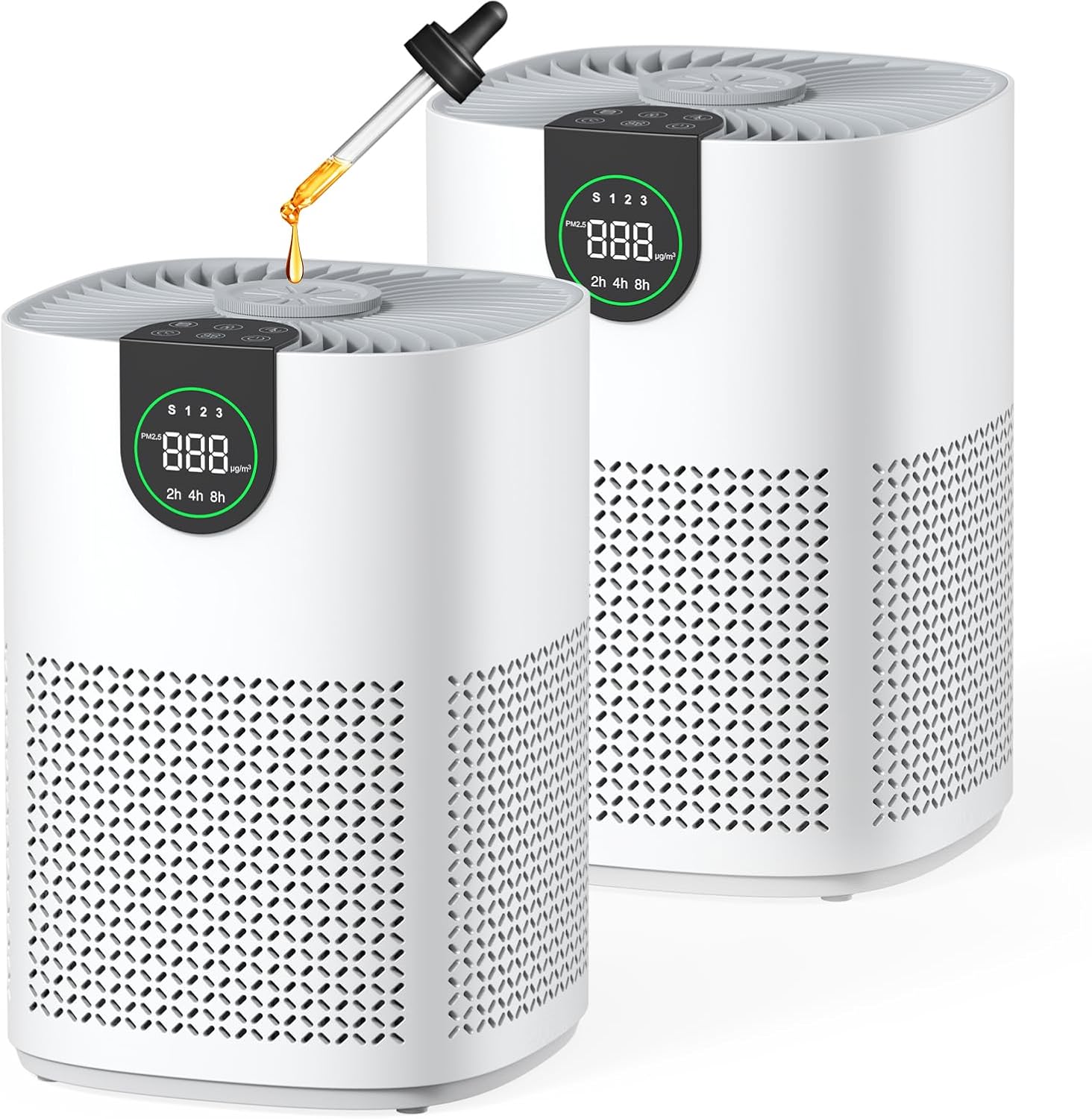
Image: Two VEWIOR ClearAir-A12 Air Purifiers, showcasing their compact design and the aromatherapy feature.
4.2. Control Panel & Display

ചിത്രം: വിശദമായ ഒരു ചിത്രം view of the air purifier's top control panel, featuring touch buttons and a digital PM2.5 display.
- പവർ ബട്ടൺ: യൂണിറ്റ് ഓൺ/ഓഫ് ചെയ്യുന്നു.
- ഫാൻ സ്പീഡ് ബട്ടൺ: Cycles through Sleep, Level 1, Level 2, and Level 3 fan speeds.
- ഓട്ടോ മോഡ് ബട്ടൺ: Activates automatic fan speed adjustment based on air quality.
- ടൈമർ ബട്ടൺ: Sets the operating time for 2, 4, or 8 hours.
- ചൈൽഡ് ലോക്ക് ബട്ടൺ: Locks the control panel to prevent accidental changes.
- ഫിൽട്ടർ റീസെറ്റ് ഇൻഡിക്കേറ്റർ: Lights up when filter maintenance is required.
- PM2.5 Display: Shows real-time particulate matter levels and air quality indicator (Green: Good, Blue: Moderate, Red: Poor).
5. സജ്ജീകരണം
നിങ്ങളുടെ എയർ പ്യൂരിഫയറിന്റെ പ്രാരംഭ സജ്ജീകരണത്തിനായി ഈ ഘട്ടങ്ങൾ പാലിക്കുക:
- യൂണിറ്റ് അൺപാക്ക് ചെയ്യുക: എയർ പ്യൂരിഫയർ അതിന്റെ പാക്കേജിംഗിൽ നിന്ന് ശ്രദ്ധാപൂർവ്വം നീക്കം ചെയ്യുക.
- ഫിൽട്ടർ പാക്കേജിംഗ് നീക്കം ചെയ്യുക: Unscrew the bottom cover of the air purifier by turning it counter-clockwise. Remove the H13 HEPA filter and discard its plastic packaging.
- ഫിൽറ്റർ വീണ്ടും ഇൻസ്റ്റാൾ ചെയ്യുക: Place the unwrapped filter back into the unit.
- Secure Bottom Cover: Replace the bottom cover and turn it clockwise to secure it.
- പവർ ബന്ധിപ്പിക്കുക: Plug the power adapter into the air purifier and then into a suitable electrical outlet.

Image: Visual guide for replacing the HEPA 13 filter, including unscrewing the base, removing the old filter, inserting the new one, and securing the base.
വീഡിയോ സജ്ജമാക്കുക
Video: A short demonstration of the air purifier's setup and display features, highlighting its automatic air quality monitoring.
6. പ്രവർത്തന നിർദ്ദേശങ്ങൾ
Learn how to use the various functions of your air purifier.
6.1. പവർ ഓൺ/ഓഫ്
അമർത്തുക പവർ ബട്ടൺ once to turn the unit on. Press it again to turn it off.
6.2. ഫാൻ വേഗത ക്രമീകരിക്കൽ
അമർത്തുക ഫാൻ സ്പീഡ് ബട്ടൺ to cycle through different fan speeds:
- Sleep Mode (S): Operates at the lowest speed with minimal noise (as low as 15 dB) and the display darkens.
- Level 1, 2, 3: Progressively higher fan speeds for increased purification.

Image: Illustration of the four fan speed modes, including a quiet sleep mode and three progressively stronger purification levels.
6.3. ഓട്ടോ മോഡ്
അമർത്തുക ഓട്ടോ മോഡ് ബട്ടൺ to activate. The air purifier will automatically adjust its fan speed based on real-time air quality detected by its built-in sensor. The PM2.5 display and indicator light will reflect the current air quality (Green: Good, Blue: Moderate, Red: Poor).

Image: A visual representation of the Auto Mode, showing how the fan speed changes in response to decreasinഗ്രാം അല്ലെങ്കിൽ ഇൻക്രിasing air quality.
6.4. ടൈമർ ഫംഗ്ഷൻ
അമർത്തുക ടൈമർ ബട്ടൺ to set the operating time for 2, 4, or 8 hours. The unit will automatically turn off after the selected duration.
6.5. ചൈൽഡ് ലോക്ക്
അമർത്തിപ്പിടിക്കുക ചൈൽഡ് ലോക്ക് ബട്ടൺ for 3 seconds to activate or deactivate the child lock. When active, the control panel buttons will be unresponsive to prevent accidental changes.

Image: The Child Lock feature is depicted, ensuring customized purification settings remain uninterrupted, ideal for homes with children and pets.
6.6. Aromatherapy
Add a few drops of your favorite essential oil to the aromatherapy pad located on top of the air purifier. The fan will diffuse the scent throughout the room along with purified air.

Image: An essential oil dropper adding oil to the aromatherapy pad on the air purifier, illustrating the scent diffusion feature.
7. പരിപാലനം
പതിവ് അറ്റകുറ്റപ്പണികൾ മികച്ച പ്രകടനം ഉറപ്പാക്കുകയും നിങ്ങളുടെ എയർ പ്യൂരിഫയറിന്റെ ആയുസ്സ് വർദ്ധിപ്പിക്കുകയും ചെയ്യുന്നു.
7.1. Filter Structure

Image: A diagram illustrating the 3-stage filtration system: Pre-filter (captures dust, lint, pet fur), Efficient HEPA Filter (filters mold, pollen, pet dander), and Activated Carbon Filter (neutralizes smoke, fumes, odors).
7.2. Cleaning the Washable Pre-Filter
The pre-filter is washable and can be cleaned to maintain efficiency and extend filter life. When the filter indicator lights up, it's time for maintenance.
- Unscrew the bottom cover and remove the filter.
- Gently vacuum the pre-filter to remove loose debris.
- Alternatively, rinse the pre-filter with soapy water. Ensure it is completely dry before reinstallation.
- Reinstall the filter and secure the bottom cover.
- Press and hold the Filter Reset button for 3-5 seconds to reset the filter reminder.

Image: A user demonstrating how to clean the washable pre-filter under running water, emphasizing its reusability and cost-saving benefit.
8. പ്രശ്നപരിഹാരം
If you encounter any issues with your air purifier, refer to the following common problems and solutions:
- യൂണിറ്റ് ഓണാക്കുന്നില്ല: Ensure the power adapter is securely plugged into both the unit and a working electrical outlet. Check if the filter's plastic packaging has been removed.
- Reduced airflow or purification: The filter may be dirty. Clean or replace the filter as described in the Maintenance section. Ensure air inlets and outlets are not blocked.
- അസാധാരണമായ ശബ്ദം: Check if the filter is correctly installed and the bottom cover is securely fastened. Ensure no foreign objects are inside the unit.
- Odor persists: The activated carbon layer of the filter may be saturated. Replace the filter.
പ്രശ്നം നിലനിൽക്കുകയാണെങ്കിൽ, ദയവായി ഉപഭോക്തൃ പിന്തുണയുമായി ബന്ധപ്പെടുക.
9 സ്പെസിഫിക്കേഷനുകൾ
| ബ്രാൻഡ് | വെവിയർ |
| മോഡൽ നമ്പർ | ക്ലിയർ എയർ-എ12 |
| ഉൽപ്പന്ന അളവുകൾ | 6.89"D x 8.66"W x 13.77"H |
| ഇനത്തിൻ്റെ ഭാരം | 5.5 പൗണ്ട് |
| പവർ ഉറവിടം | എസി/ഡിസി |
| നിറം | വെള്ള |
| നിർമ്മാതാവ് | വെവിയർ |
10. വാറണ്ടിയും പിന്തുണയും
For warranty information or technical support, please refer to the contact details provided with your purchase documentation or visit the official VEWIOR webസൈറ്റ്. വാങ്ങിയതിന്റെ തെളിവായി നിങ്ങളുടെ വാങ്ങൽ രസീത് സൂക്ഷിക്കുക.


