Trevi RDA 70 BR

Trevi RDA 70 BR Portable Multiband Radio User Manual

Model: RDA 70 BR | Brand: Trevi

ആമുഖം

The Trevi RDA 70 BR is a compact and versatile portable wireless radio designed to provide a complete audio experience. It combines traditional radio reception with modern digital functions, making it ideal for listening to music or news anywhere. This radio supports FM, AM, and SW bands, offering access to a wide variety of local and international stations. Additionally, it features a wireless audio connection for streaming from smartphones or tablets, and an integrated MP3 player for direct playback from USB drives or Micro SD cards. Powered by a rechargeable lithium battery with convenient USB Type-C charging, the Trevi RDA 70 BR ensures maximum portability and continuous use.

പ്രധാനപ്പെട്ട സുരക്ഷാ വിവരങ്ങൾ

പാക്കേജ് ഉള്ളടക്കം

എല്ലാ ഇനങ്ങളും നിലവിലുണ്ടോ എന്നും നല്ല നിലയിലാണെന്നും ദയവായി പരിശോധിക്കുക:

ഉൽപ്പന്നം കഴിഞ്ഞുview

ഫ്രണ്ട് പാനൽ
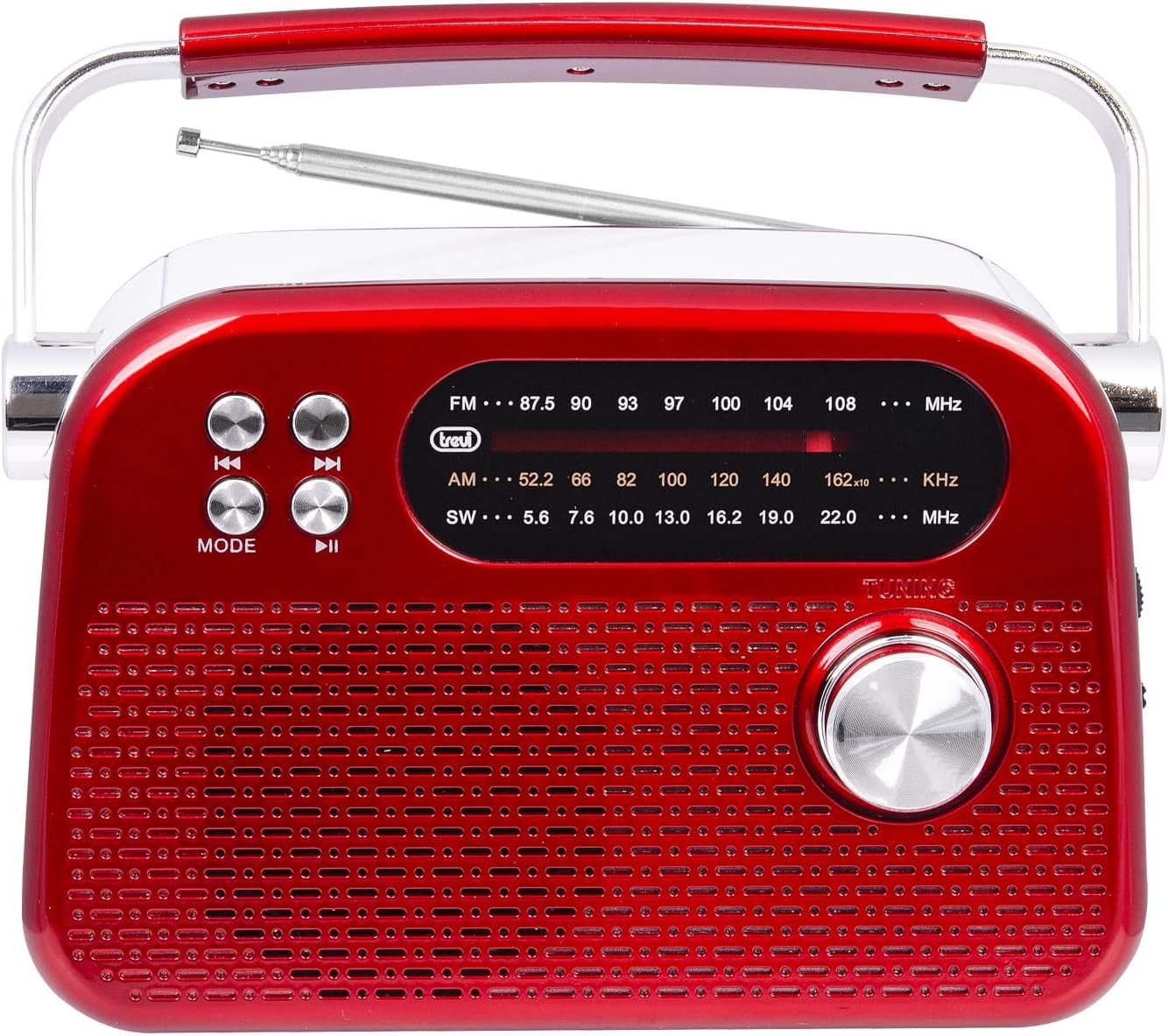
ഫ്രണ്ട് view of the Trevi RDA 70 BR radio, showing the speaker grille, tuning dial, mode buttons, and frequency display.

ചിത്രം 1: ഫ്രണ്ട് view of the Trevi RDA 70 BR radio. This image displays the main speaker grille, the frequency display for FM, AM, and SW bands, the tuning knob on the right, and control buttons (Mode, Play/Pause, Skip) on the left.

Side Panel and Ports

വശം view of the Trevi RDA 70 BR radio, showing the volume knob, power switch, USB port, Micro SD card slot, and USB Type-C charging port.

ചിത്രം 2: വശം view of the Trevi RDA 70 BR radio. This image highlights the side panel where the volume control, power switch, USB port, Micro SD card slot, and the USB Type-C charging port are located.

പിൻ പാനൽ

പിൻഭാഗം view of the Trevi RDA 70 BR radio, showing the battery compartment, telescopic antenna, and product label.

ചിത്രം 3: പിൻഭാഗം view of the Trevi RDA 70 BR radio. This image shows the telescopic antenna, the battery compartment with an "OPEN" indicator, and the product information label.

സജ്ജമാക്കുക

1 ബാറ്ററി ചാർജ് ചെയ്യുന്നു

  1. Locate the USB Type-C charging port on the side of the radio (refer to Image 2).
  2. Connect one end of the provided USB Type-C cable to the radio's charging port.
  3. USB കേബിളിന്റെ മറ്റേ അറ്റം ഒരു സ്റ്റാൻഡേർഡ് USB പവർ അഡാപ്റ്ററുമായി (ഉൾപ്പെടുത്തിയിട്ടില്ല) അല്ലെങ്കിൽ ഒരു കമ്പ്യൂട്ടറിന്റെ USB പോർട്ടുമായി ബന്ധിപ്പിക്കുക.
  4. The charging indicator light (if present) will illuminate to show that the battery is charging.
  5. Allow the radio to charge fully before first use. A full charge typically takes a few hours.

2. ആന്റിന ക്രമീകരണം

For optimal radio reception, especially for FM and SW bands, fully extend the telescopic antenna located on the rear panel of the radio (refer to Image 3). You may adjust its angle and direction to improve signal strength.

പ്രവർത്തന നിർദ്ദേശങ്ങൾ

1. പവർ ഓൺ/ഓഫ്

To turn the radio ON, slide the Power switch (located on the side panel, refer to Image 2) to the "ON" position. To turn it OFF, slide the switch to "OFF".

2. വോളിയം ക്രമീകരിക്കുന്നു

Rotate the Volume knob (located on the side panel, refer to Image 2) clockwise to increase the volume and counter-clockwise to decrease it.

3. Radio Tuning (FM/AM/SW)

  1. റേഡിയോ പവർ ഓണാണെന്ന് ഉറപ്പാക്കുക.
  2. അമർത്തുക മോഡ് button (on the front panel) repeatedly until the desired radio band (FM, AM, or SW) is selected. The selected band will be indicated on the frequency display.
  3. മികച്ച സ്വീകരണത്തിനായി ടെലിസ്കോപ്പിക് ആന്റിന നീട്ടുക.
  4. തിരിക്കുക ട്യൂണിംഗ് knob (on the front panel) to search for radio stations. The frequency will change on the display.
  5. Stop tuning when you find a clear signal for your desired station.

4. MP3 Playback (USB/Micro SD)

  1. Insert a USB flash drive into the USB port or a Micro SD card into the TF slot on the side panel (refer to Image 2).
  2. അമർത്തുക മോഡ് button (on the front panel) repeatedly until the MP3 playback mode is activated. The radio will automatically detect and begin playing MP3 fileചേർത്ത മീഡിയയിൽ നിന്നുള്ള s.
  3. Use the playback control buttons (Previous, Play/Pause, Next) on the front panel to manage your music.
  4. To remove the USB drive or Micro SD card, first switch to a different mode or power off the radio, then gently pull out the media.

5. Wireless Audio Connection

The Trevi RDA 70 BR features a wireless audio connection, allowing you to stream audio from compatible devices like smartphones or tablets. While in MP3 mode, the radio may automatically enter a pairing state or you may need to press the MODE button to switch to the wireless audio input. Refer to your external device's manual for pairing instructions. Once connected, the radio acts as a wireless speaker for your device.

മെയിൻ്റനൻസ്

ട്രബിൾഷൂട്ടിംഗ്

പ്രശ്നംസാധ്യമായ കാരണംപരിഹാരം
റേഡിയോ ഓൺ ചെയ്യുന്നില്ല.ബാറ്ററി ഡിസ്ചാർജ് ചെയ്തു.Connect the radio to a power source using the USB Type-C cable and allow it to charge.
മോശം റേഡിയോ സ്വീകരണം.ആന്റിന വികസിതമല്ല അല്ലെങ്കിൽ മോശം സിഗ്നൽ ഏരിയ.ടെലിസ്കോപ്പിക് ആന്റിന പൂർണ്ണമായും നീട്ടി അതിന്റെ സ്ഥാനം ക്രമീകരിക്കുക. റേഡിയോ മറ്റൊരു സ്ഥലത്തേക്ക് മാറ്റാൻ ശ്രമിക്കുക.
No sound from USB drive or Micro SD card.തെറ്റായ മോഡ് തിരഞ്ഞെടുത്തു അല്ലെങ്കിൽ പിന്തുണയ്ക്കുന്നില്ല. file ഫോർമാറ്റ്.Ensure the radio is in MP3 playback mode. Verify that the audio files are in MP3 format. Check if the USB drive/Micro SD card is properly inserted.
Wireless audio connection issues.Device not paired or out of range.Ensure the radio is in wireless audio mode. Check your external device's Bluetooth settings and re-pair if necessary. Keep devices within close range.

സ്പെസിഫിക്കേഷനുകൾ

വാറൻ്റിയും പിന്തുണയും

For warranty information and technical support, please refer to the warranty card included with your product or visit the official Trevi webസൈറ്റ്. ഏതെങ്കിലും വാറന്റി ക്ലെയിമുകൾക്ക് വാങ്ങിയതിന്റെ തെളിവായി നിങ്ങളുടെ വാങ്ങൽ രസീത് സൂക്ഷിക്കുക.

നിർമ്മാതാവ്: ട്രെവി

അനുബന്ധ രേഖകൾ - ആർഡിഎ 70 ബിആർ

പ്രീview ട്രെവി MB 749 W പോർട്ടബിൾ മൾട്ടിബാൻഡ് റേഡിയോ യൂസർ മാനുവൽ | USB, ബ്ലൂടൂത്ത്, MP3
ട്രെവി എംബി 749 W പോർട്ടബിൾ മൾട്ടിബാൻഡ് റേഡിയോയ്ക്കുള്ള സമഗ്രമായ ഉപയോക്തൃ ഗൈഡ്. അതിന്റെ യുഎസ്ബി, മൈക്രോ എസ്ഡി, എംപി3, ബ്ലൂടൂത്ത് സവിശേഷതകൾ എങ്ങനെ ഉപയോഗിക്കാമെന്നും എഫ്എം/എഎം/എസ്ഡബ്ല്യു ബാൻഡുകളിലേക്ക് ട്യൂൺ ചെയ്യാമെന്നും സുരക്ഷാ മുൻകരുതലുകളും സാങ്കേതിക സവിശേഷതകളും മനസ്സിലാക്കാമെന്നും മനസ്സിലാക്കുക.
പ്രീview ട്രെവി എക്സ്എഫ് 370 കെബി പോർട്ടബിൾ ബ്ലൂടൂത്ത് സ്പീക്കർ യൂസർ മാനുവൽ
ട്രെവി എക്സ്എഫ് 370 കെബി പോർട്ടബിൾ സ്പീക്കറിനായുള്ള സമഗ്രമായ ഉപയോക്തൃ മാനുവൽ, സജ്ജീകരണം, പ്രവർത്തനങ്ങൾ, ബ്ലൂടൂത്ത് കണക്റ്റിവിറ്റി, ടിഡബ്ല്യുഎസ് പെയറിംഗ്, യുഎസ്ബി/എസ്ഡി പ്ലേബാക്ക്, ഓക്സ് ഇൻപുട്ട്, ഡിസ്കോ ലൈറ്റ് ഇഫക്റ്റുകൾ, മൈക്രോഫോൺ ഉപയോഗം, റെക്കോർഡിംഗ്, സാങ്കേതിക സവിശേഷതകൾ, ഡിസ്പോസൽ വിവരങ്ങൾ എന്നിവ ഉൾക്കൊള്ളുന്നു.
പ്രീview Trevi RDA 70 BR: Guida d'uso Radio Multibanda Wireless e MP3
Esplora la Trevi RDA 70 BR, una radio portatile multibanda con connettività wireless, lettore MP3 USB/microSD e ricezione FM/AM/SW. Perfetta per l'uso domestico e in movimento.
പ്രീview Trevi CMP 498 Portable CD/MP3 Player User Manual
Comprehensive user manual for the Trevi CMP 498 portable CD and CD-MP3 player, covering operation, features, playback controls, special functions, guarantee, and disposal information.
പ്രീview Trevi DJ 12E45 BT Bluetooth Headphones User Manual
Comprehensive user guide for the Trevi DJ 12E45 BT Bluetooth headphones, covering safety precautions, operation, features like music playback, call handling, technical specifications, and disposal information.
പ്രീview ട്രെവി എക്സ്എഫ് 600 കെബി പോർട്ടബിൾ സ്പീക്കർ യൂസർ മാനുവൽ
വയർലെസ് ഓഡിയോ, MP3 പ്ലേബാക്ക്, USB/മൈക്രോ-SD പിന്തുണ, ഡിസ്കോ ലൈറ്റുകൾ, 80W മാക്സ് പവർ തുടങ്ങിയ സവിശേഷതകൾ വിശദീകരിക്കുന്ന ട്രെവി XF 600 KB പോർട്ടബിൾ സ്പീക്കറിനായുള്ള ഉപയോക്തൃ മാനുവൽ. സജ്ജീകരണം, പ്രവർത്തനം, പരിപാലനം, സുരക്ഷാ വിവരങ്ങൾ എന്നിവ ഇതിൽ ഉൾപ്പെടുന്നു.