1. ആമുഖം
The CINMOORE 2.5K Pet/Dog Camera is an advanced indoor security and monitoring solution designed to keep you connected to your home, pets, and loved ones. This camera features 2.5K Ultra HD video, Pan-Tilt-Zoom (PTZ) functionality, and AI-powered detection for persons, pets, and baby crying, all without monthly subscription fees. It also includes full-duplex two-way audio, color night vision, and flexible storage options to ensure comprehensive coverage and peace of mind.

Image: The CINMOORE 2.5K Pet/Dog Camera, showcasing its sleek design alongside a smartphone displaying live footagഒരു കുഞ്ഞിന്റെയും നായയുടെയും.
2. ബോക്സിൽ എന്താണുള്ളത്?
Upon unboxing your CINMOORE 2.5K Pet/Dog Camera, please verify that all the following components are included:
- CINMOORE 2.5K Pet/Dog Camera (x1)
- മൗണ്ടിംഗ് സ്ക്രൂകൾ (x1 സെറ്റ്)
- ക്വിക്ക് ഗൈഡ് (x1)
- പവർ കേബിൾ (x1)

Image: All components included in the CINMOORE 2.5K Pet/Dog Camera package, neatly arranged on a wooden surface.
3. സജ്ജീകരണം
Follow these steps to set up your CINMOORE 2.5K Pet/Dog Camera:
- പവർ ഓൺ: Connect the camera to a power source using the provided power cable and adapter. The camera will power on automatically.
- ആപ്പ് ഡൗൺലോഡ് ചെയ്യുക: Download the 'Cinmoore' app from your smartphone's app store (Google Play or Apple App Store).
- ഉപകരണം ചേർക്കുക: Open the app, create an account if you don't have one, and click the '+' icon to add a new device.
- QR കോഡ് സ്കാൻ ചെയ്യുക: Scan the QR code located on the bottom of your camera using the app.
- Reset Camera (if needed): If prompted, reset the camera by pressing the reset button (located under the lens when tilted upwards) for 5 seconds until you hear a prompt, then press it twice.
- വൈഫൈയിലേക്ക് കണക്റ്റുചെയ്യുക: Follow the in-app instructions to connect the camera to your 2.4GHz Wi-Fi network. (Note: 5GHz Wi-Fi is not supported).
- നിങ്ങളുടെ ക്യാമറയ്ക്ക് പേര് നൽകുക: Assign a memorable name to your camera within the app.
- മൗണ്ടിംഗ് ഓപ്ഷനുകൾ: The camera can be placed on a tabletop, mounted on a wall, or ceiling. Use the included mounting screws and base if wall or ceiling mounting is desired.
Video: A quick start guide demonstrating the unboxing, power-on, and app connection process for the CINMOORE C2U Indoor Camera, highlighting the 1-minute setup.
4. സവിശേഷതകൾ കഴിഞ്ഞുview
The CINMOORE 2.5K Pet/Dog Camera is equipped with a range of features to enhance your home monitoring experience:
- 2.5K അൾട്രാ എച്ച്ഡി വീഡിയോ: വ്യക്തവും വിശദവുമായ വീഡിയോ ഫൂ നൽകുന്നുtage, ensuring you don't miss any important moments.
- PTZ പ്രവർത്തനം: Offers 360° horizontal and 109° vertical rotation, allowing you to remotely adjust the camera's view ആപ്പ് വഴി.
- AI Detection (No Monthly Fee): Advanced AI for local detection of persons, pets, and baby crying, providing smart alerts without subscription costs.
- Full Duplex 2-Way Audio: Enables real-time, simultaneous two-way communication, allowing you to speak and listen through the camera.
- Color Night Vision 2.0: Ensures clear visibility in low-light conditions without disturbing sleeping babies or pets.
- 2.4GHz WiFi + Bluetooth Connectivity: Offers faster and more stable connection for seamless streaming.
- ഫ്ലെക്സിബിൾ സ്റ്റോറേജ്: Supports local storage via SD card (up to 256GB, not included) with advanced encryption, and optional AWS cloud storage.
- സ്വകാര്യത മോഡ്: Allows you to physically conceal the camera lens for enhanced privacy when needed.
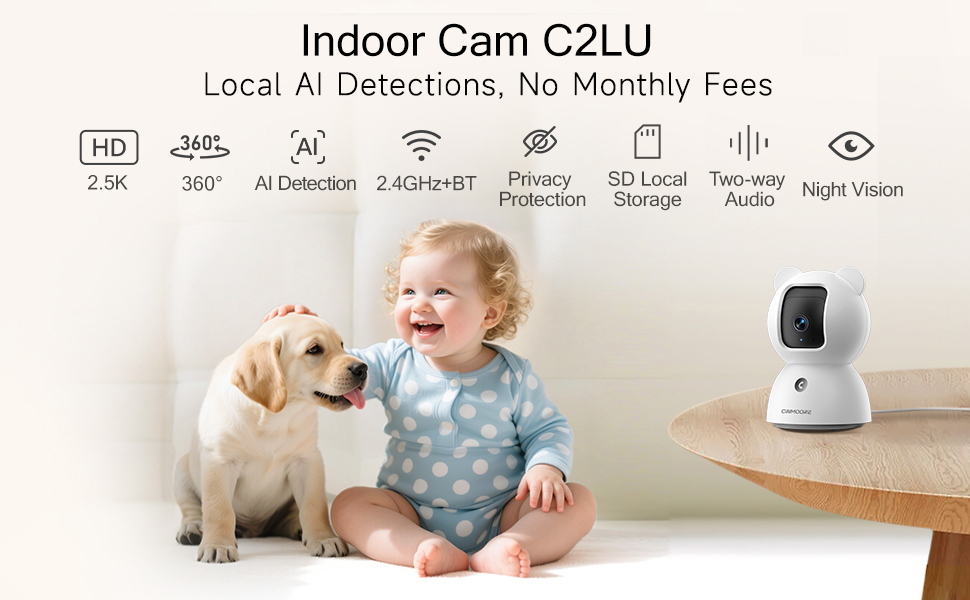
Image: A visual summary of the camera's key features, including its 2.5K resolution, pan-tilt capabilities, and various AI detection modes.
Video: A promotional video highlighting the simplicity and affordability of the CINMOORE camera, emphasizing its features for home monitoring.
5. പ്രവർത്തന നിർദ്ദേശങ്ങൾ
Utilize the 'Cinmoore' app to control and manage your camera:
- തത്സമയം View: Tap the camera image in the app to access the live video feed.
- പാൻ & ടിൽറ്റ്: Use the directional arrows within the live view interface to remotely adjust the camera's horizontal (pan) and vertical (tilt) angles.
- ദ്വിമുഖ സംസാരം: Press and hold the microphone icon to speak through the camera. Release to listen. The camera also features a one-click call button for quick family alerts.
- റെക്കോർഡിംഗ്: Initiate manual recording or set up continuous 24/7 recording to an SD card. Access recorded footage via the 'Record' tab.
- സ്മാർട്ട് ഡിറ്റക്ഷനും അലേർട്ടുകളും: Configure Person, Pet, and Baby Cry Detection settings. Customize detection zones and sensitivity levels to receive relevant alerts.
- സ്വകാര്യത മോഡ്: Activate privacy mode through the app to physically close the camera lens, ensuring your privacy.
- സൗണ്ട് അലാറം: Utilize the siren feature or customize sound alarms for deterrence.

Image: Demonstrates the full duplex two-way talk feature, allowing seamless communication with pets.
6. പരിപാലനം
To ensure optimal performance and longevity of your CINMOORE 2.5K Pet/Dog Camera, follow these maintenance guidelines:
- വൃത്തിയാക്കൽ: മൃദുവായതും ഉണങ്ങിയതുമായ തുണി ഉപയോഗിച്ച് ക്യാമറ ലെൻസും ബോഡിയും സൌമ്യമായി തുടയ്ക്കുക. പ്രതലത്തിനോ ലെൻസിനോ കേടുവരുത്തുന്ന കഠിനമായ രാസവസ്തുക്കളോ ഉരച്ചിലുകളോ ഉപയോഗിക്കുന്നത് ഒഴിവാക്കുക.
- സോഫ്റ്റ്വെയർ അപ്ഡേറ്റുകൾ: Regularly check the 'Cinmoore' app for available firmware updates. Keeping your camera's software up-to-date ensures access to the latest features, security enhancements, and bug fixes.
- പ്ലേസ്മെൻ്റ്: നേരിട്ടുള്ള സൂര്യപ്രകാശം, തീവ്രമായ താപനില, ഉയർന്ന ഈർപ്പം എന്നിവയിൽ നിന്ന് അകന്ന്, സ്ഥിരമായ ഒരു സ്ഥലത്താണ് ക്യാമറ സ്ഥാപിച്ചിരിക്കുന്നതെന്ന് ഉറപ്പാക്കുക.
- വൈദ്യുതി വിതരണം: കേടുപാടുകൾ ഒഴിവാക്കാൻ ക്യാമറയ്ക്കൊപ്പം നൽകിയിരിക്കുന്ന യഥാർത്ഥ പവർ അഡാപ്റ്ററും കേബിളും മാത്രം ഉപയോഗിക്കുക.
7. പ്രശ്നപരിഹാരം
If you encounter issues with your CINMOORE 2.5K Pet/Dog Camera, refer to the following common troubleshooting tips:
- ക്യാമറ ഓഫ്ലൈൻ:
- Check your Wi-Fi connection and ensure it is 2.4GHz.
- Verify the camera is powered on and the power cable is securely connected.
- ക്യാമറ അൺപ്ലഗ് ചെയ്ത് വീണ്ടും പ്ലഗ് ചെയ്തുകൊണ്ട് അത് പുനരാരംഭിക്കുക.
- മോശം വീഡിയോ നിലവാരം:
- Ensure your Wi-Fi signal is strong where the camera is located.
- മൃദുവായ തുണി ഉപയോഗിച്ച് ക്യാമറ ലെൻസ് വൃത്തിയാക്കുക.
- Check app settings for video resolution and adjust if necessary.
- അലേർട്ടുകളൊന്നുമില്ല:
- Verify that detection settings (Person, Pet, Cry) are enabled in the app.
- Check app notification settings on your phone to ensure they are not blocked.
- Adjust detection sensitivity and zones.
- ടു-വേ ഓഡിയോ പ്രശ്നങ്ങൾ:
- Ensure your phone's microphone and speaker are enabled for the app.
- Check the camera's volume settings in the app.
8 സ്പെസിഫിക്കേഷനുകൾ
| ഫീച്ചർ | വിശദാംശങ്ങൾ |
|---|---|
| മോഡൽ നമ്പർ | CM-C2LU |
| വീഡിയോ ക്യാപ്ചർ റെസല്യൂഷൻ | 2.5K |
| ഇൻഡോർ/ഔട്ട്ഡോർ ഉപയോഗം | ഇൻഡോർ |
| കണക്റ്റിവിറ്റി പ്രോട്ടോക്കോൾ | വൈഫൈ (2.4GHz മാത്രം) |
| പവർ ഉറവിടം | കോർഡഡ് ഇലക്ട്രിക് |
| മൗണ്ടിംഗ് തരം | Ceiling Mount / Tabletop Mount / Wall Mount |
| അലേർട്ട് തരം | Person Detection, Pet Detection, Cry Detection |
| ഫ്ലാഷ് മെമ്മറി പിന്തുണയ്ക്കുന്ന പരമാവധി വലുപ്പം | 256 GB (SD card not included) |
| ഓഡിയോ വിഷ്വൽ റെക്കോർഡിംഗ് ശേഷികൾ | ഓഡിയോ, വീഡിയോ |
| ഉൽപ്പന്ന അളവുകൾ | 3 x 3 x 4.5 ഇഞ്ച് |
| ഇനത്തിൻ്റെ ഭാരം | 11.7 ഔൺസ് |
9. വാറൻ്റിയും പിന്തുണയും
The CINMOORE 2.5K Pet/Dog Camera comes with a manufacturer's warranty. For specific warranty details, including coverage period and terms, please refer to the warranty card included in your product packaging or contact CINMOORE customer support directly. For technical assistance, troubleshooting, or any other inquiries, please visit the official CINMOORE webസൈറ്റ് അല്ലെങ്കിൽ അവരുടെ ഉപഭോക്തൃ സേവന ടീമിനെ ബന്ധപ്പെടുക.


