ആമുഖം
Welcome to the user manual for your new Lenovo Legion 5 16IAX10 Gaming Laptop. This guide provides essential information for setting up, operating, maintaining, and troubleshooting your device. The Lenovo Legion 5 16IAX10 is designed for high-performance gaming and demanding tasks, featuring an Intel Core Ultra 9 275HX processor, NVIDIA GeForce RTX 5060 graphics, a 16-inch WQXGA 240Hz display, and Windows 11 Home.
ബോക്സിൽ എന്താണുള്ളത്
Carefully unpack your new laptop and ensure all items are present:
- Lenovo Legion 5 16IAX10 Gaming Laptop
- 245W എസി അഡാപ്റ്റർ
- 32GB യുഎസ്ബി ഡ്രൈവ്
ഏതെങ്കിലും ഇനങ്ങൾ നഷ്ടപ്പെട്ടാലോ കേടുപാടുകൾ സംഭവിച്ചാലോ, ദയവായി നിങ്ങളുടെ റീട്ടെയിലറെയോ ലെനോവോ പിന്തുണയെയോ ഉടൻ ബന്ധപ്പെടുക.
സജ്ജമാക്കുക
1. പ്രാരംഭ പവർ-ഓണും ചാർജിംഗും
Before first use, connect the laptop to a power outlet using the provided 245W AC adapter. The battery will begin charging. Press the power button to turn on the laptop.
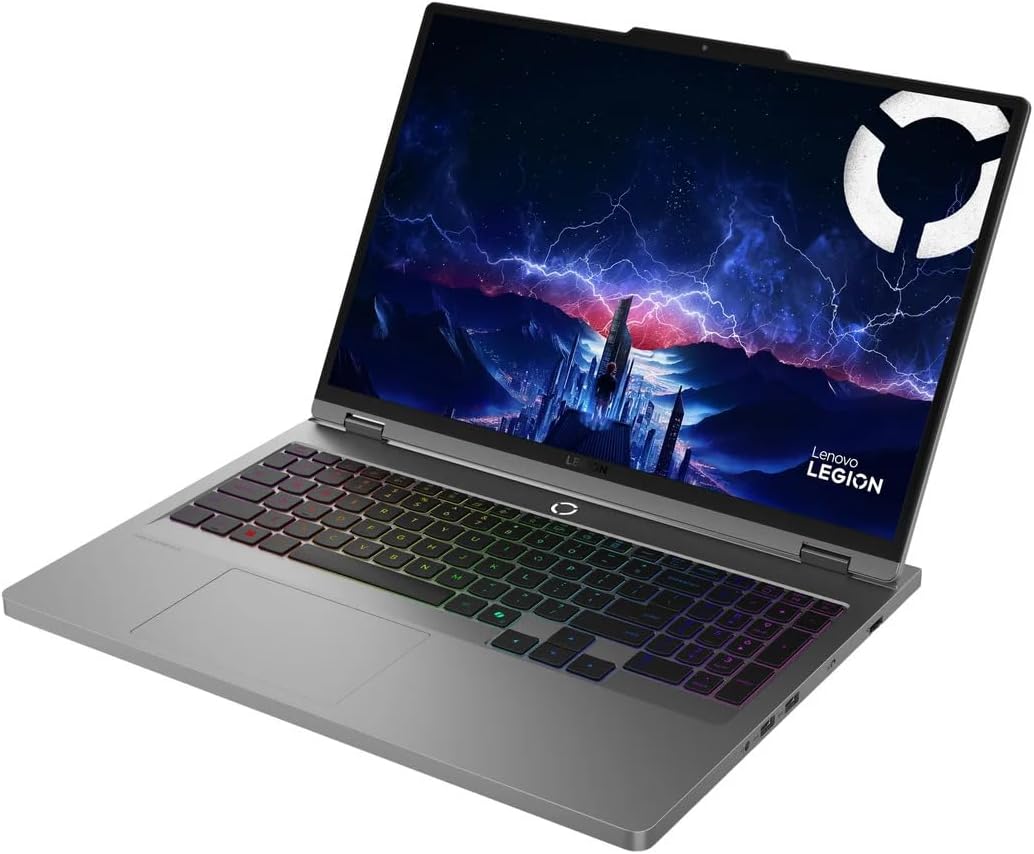
Image: The Lenovo Legion 5 16IAX10 Gaming Laptop in an open, angled view, കാണിക്കുകasinഡിസ്പ്ലേയും കീബോർഡും g അമർത്തുക.
2. വിൻഡോസ് 11 ഹോം സെറ്റപ്പ്
Follow the on-screen instructions to complete the initial setup of Windows 11 Home. This includes selecting your region, connecting to a Wi-Fi network, creating a user account, and accepting the license agreement.
3. പെരിഫറലുകൾ ബന്ധിപ്പിക്കുന്നു
You can connect external devices such as a mouse, keyboard, or external monitor using the available ports. Refer to the 'Operating Instructions' section for a detailed overview of the ports.
പ്രവർത്തന നിർദ്ദേശങ്ങൾ
കീബോർഡും ടച്ച്പാഡും
The laptop features a full-size 24-Zone RGB backlit keyboard with a Numpad for enhanced productivity and gaming. The touchpad supports multi-touch gestures for navigation.

ചിത്രം: മുകളിൽ നിന്ന് താഴേക്ക് view of the Lenovo Legion 5 16IAX10 keyboard, highlighting the RGB backlighting and Numpad.
പ്രദർശിപ്പിക്കുക
Your laptop is equipped with a 16-inch WQXGA (2560 x 1600) IPS display with a 240Hz refresh rate, 500 nits brightness, 100% DCI-P3 color gamut, Dolby Vision, DisplayHDR, and G-SYNC technology. Adjust display settings through Windows settings or the NVIDIA Control Panel for optimal visual experience.
കണക്റ്റിവിറ്റി
The laptop supports MediaTek Wi-Fi 7 (2x2) for high-speed wireless internet access and Bluetooth 5.4 for connecting wireless peripherals.
തുറമുഖങ്ങൾ കഴിഞ്ഞുview
The Lenovo Legion 5 16IAX10 offers a variety of ports for connectivity:
- 1x USB-C Thunderbolt 4 / USB4 40Gbps: Supports Power Delivery and DisplayPort 1.4.
- 1x USB-C 3.2 Gen 2: Supports Power Delivery, DisplayPort 1.4, and 10Gbps data transfer.
- 1x USB 3.2 Gen 2: Always On, 10Gbps data transfer.
- 2x USB 3.2 Gen 1: 5Gbps data transfer.
- 1x HDMI v2.1: ബാഹ്യ ഡിസ്പ്ലേകൾ ബന്ധിപ്പിക്കുന്നതിന്.
- 1x RJ-45: വയർഡ് ഇതർനെറ്റ് കണക്ഷന്.
- 1x ഹെഡ്ഫോൺ/മൈക്രോഫോൺ കോംബോ ജാക്ക്: ഓഡിയോ ഇൻപുട്ട്/ഔട്ട്പുട്ടിനായി.
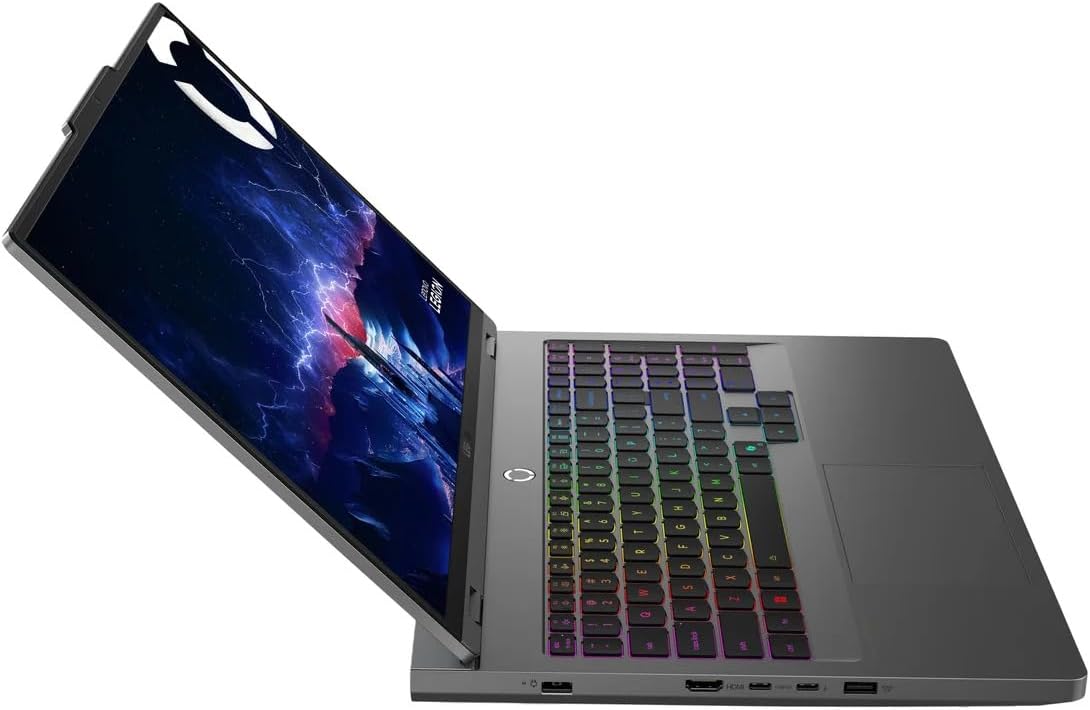
ചിത്രം: ഒരു വശം view of the Lenovo Legion 5 16IAX10, illustrating the various input/output ports available.
മെയിൻ്റനൻസ്
നിങ്ങളുടെ ലാപ്ടോപ്പ് വൃത്തിയാക്കൽ
To maintain optimal performance and appearance, regularly clean your laptop. Use a soft, lint-free cloth dampened with water or a specialized screen cleaner for the display. For the keyboard and chassis, use a soft cloth. Avoid harsh chemicals or abrasive materials.
ബാറ്ററി കെയർ
The laptop is equipped with an 80Wh Lithium-Ion battery. To prolong battery life, avoid fully discharging the battery frequently. For extended storage, charge the battery to approximately 50-60% and store the laptop in a cool, dry place.
സോഫ്റ്റ്വെയർ അപ്ഡേറ്റുകൾ
Regularly update your Windows operating system, drivers (especially graphics drivers), and Lenovo software to ensure system stability, security, and performance. These updates often include performance enhancements and bug fixes.
വെൻ്റിലേഷൻ
Ensure the laptop's ventilation openings are clear and unobstructed to prevent overheating. Operating the laptop on soft surfaces like beds or carpets can block airflow. Periodically clean dust from the vents using compressed air.

ചിത്രം: അടിഭാഗം view of the Lenovo Legion 5 16IAX10, showing the extensive ventilation grilles designed for efficient cooling.
ട്രബിൾഷൂട്ടിംഗ്
This section addresses common issues you might encounter with your Lenovo Legion 5 16IAX10.
പവർ ഇല്ല / ലാപ്ടോപ്പ് ഓണാകുന്നില്ല
- ലാപ്ടോപ്പിലേക്കും പ്രവർത്തിക്കുന്ന പവർ ഔട്ട്ലെറ്റിലേക്കും എസി അഡാപ്റ്റർ സുരക്ഷിതമായി ബന്ധിപ്പിച്ചിട്ടുണ്ടെന്ന് ഉറപ്പാക്കുക.
- മറ്റൊരു ഉപകരണം പ്ലഗ് ഇൻ ചെയ്ത് പവർ ഔട്ട്ലെറ്റ് പ്രവർത്തനക്ഷമമാണെന്ന് ഉറപ്പാക്കുക.
- ഹാർഡ് റീസെറ്റ് നടത്താൻ പവർ ബട്ടൺ 10-15 സെക്കൻഡ് അമർത്തിപ്പിടിക്കാൻ ശ്രമിക്കുക.
ഡിസ്പ്ലേ പ്രശ്നങ്ങൾ
- If the screen is blank, ensure the laptop is powered on.
- Connect an external monitor to check if the issue is with the laptop's display or the graphics output.
- നിങ്ങളുടെ ഗ്രാഫിക്സ് ഡ്രൈവറുകൾ അപ്ഡേറ്റ് ചെയ്യുക.
പ്രകടന മാന്ദ്യം
- പശ്ചാത്തലത്തിൽ പ്രവർത്തിക്കുന്ന അനാവശ്യ ആപ്ലിക്കേഷനുകൾ അടയ്ക്കുക.
- ശേഷിക്കുന്ന ഏതെങ്കിലും വിൻഡോസ് അല്ലെങ്കിൽ ഡ്രൈവർ അപ്ഡേറ്റുകൾ പരിശോധിച്ച് ഇൻസ്റ്റാൾ ചെയ്യുക.
- Ensure the laptop's vents are not blocked and it is not overheating.
- ഒരു മാൽവെയർ സ്കാൻ പ്രവർത്തിപ്പിക്കുക.
Wi-Fi or Bluetooth Connectivity Problems
- വിൻഡോസ് ക്രമീകരണങ്ങളിൽ വൈഫൈയും ബ്ലൂടൂത്തും പ്രവർത്തനക്ഷമമാക്കിയിട്ടുണ്ടെന്ന് ഉറപ്പാക്കുക.
- വൈഫൈ പ്രശ്നങ്ങൾക്കായി നിങ്ങളുടെ റൂട്ടർ/മോഡം പുനരാരംഭിക്കുക.
- Update your wireless and Bluetooth drivers.
- Try forgetting and re-connecting to the network or device.
കൂടുതൽ സങ്കീർണ്ണമായ പ്രശ്നങ്ങൾക്ക്, ലെനോവോ പിന്തുണ പരിശോധിക്കുക. webസൈറ്റ് അല്ലെങ്കിൽ ഉപഭോക്തൃ സേവനവുമായി ബന്ധപ്പെടുക.
സ്പെസിഫിക്കേഷനുകൾ
Detailed technical specifications for the Lenovo Legion 5 16IAX10 Gaming Laptop (Model 83NX0000US):
| ഘടകം | സ്പെസിഫിക്കേഷൻ |
| മോഡലിൻ്റെ പേര് | ലെജിയൻ 5 16IAX10 |
| ഇനം മോഡൽ നമ്പർ | 83NX0000US |
| പ്രോസസ്സർ | Intel Core Ultra 9 275HX (Up to 5.4GHz, 24 Cores: 8P+12E, 24 Threads, 36 MB Intel Smart cache) |
| ഗ്രാഫിക്സ് | എൻവിഡിയ ജിഫോഴ്സ് ആർടിഎക്സ് 5060 8 ജിബി ജിഡിഡിആർ7 |
| പ്രദർശിപ്പിക്കുക | 16" WQXGA (2560 x 1600) IPS 240Hz, 500 nits, Anti-glare, 100% DCI-P3, Dolby Vision, DisplayHDR, G-SYNC |
| റാം | 32GB DDR5 SDRAM 5600 MHz |
| സംഭരണം | 1TB NVMe M.2 SSD |
| ഓപ്പറേറ്റിംഗ് സിസ്റ്റം | വിൻഡോസ് 11 ഹോം |
| കീബോർഡ് | 24-Zone RGB Backlit Keyboard with Numpad |
| വയർലെസ് കണക്റ്റിവിറ്റി | മീഡിയടെക് വൈ-ഫൈ 7 (2x2), ബ്ലൂടൂത്ത് 5.4 |
| തുറമുഖങ്ങൾ | 1x USB-C Thunderbolt 4, 1x USB-C 3.2 Gen 2, 1x USB 3.2 Gen 2 (Always On), 2x USB 3.2 Gen 1, 1x HDMI v2.1, 1x RJ-45, 1x Headphone/Mic Combo Jack |
| Webക്യാമറ | 5.0എംപി ക്യാമറ |
| ബാറ്ററി | 80Wh ലിഥിയം-അയൺ (ശരാശരി 6 മണിക്കൂർ വരെ ബാറ്ററി ആയുസ്സ്) |
| പവർ അഡാപ്റ്റർ | 245W എസി അഡാപ്റ്റർ |
| അളവുകൾ (LxWxH) | 14.37 x 10.58 x 1.03 ഇഞ്ച് |
| ഭാരം | 8.18 പൗണ്ട് |
| നിറം | ചാരനിറത്തിലുള്ള കൊടുങ്കാറ്റ് |
വാറൻ്റി വിവരങ്ങൾ
Your Lenovo Legion 5 16IAX10 Gaming Laptop comes with a 12-month warranty. This warranty covers manufacturing defects and hardware malfunctions under normal use. For specific terms, conditions, and to register your product, please visit the official Lenovo support webസൈറ്റ്. വാറന്റി ക്ലെയിമുകൾക്കായി നിങ്ങളുടെ വാങ്ങലിന്റെ തെളിവ് സൂക്ഷിക്കുക.
പിന്തുണ
For further assistance, technical support, driver downloads, or service requests, please visit the official Lenovo Support website. You can also find FAQs and community forums there to help resolve common issues.
ലെനോവോ പിന്തുണ Webസൈറ്റ്: support.lenovo.com


