1. ആമുഖം
Thank you for choosing the HUAYU KL RM-L1710 Universal LCD LED TV Remote Control. This remote is designed to provide seamless control over various LCD and LED televisions, featuring dedicated buttons for popular streaming services. This manual will guide you through the setup, operation, and maintenance of your new remote control.
2. പ്രധാന സുരക്ഷാ നിർദ്ദേശങ്ങൾ
- പഴയതും പുതിയതുമായ ബാറ്ററികൾ മിക്സ് ചെയ്യരുത്.
- ആൽക്കലൈൻ, സ്റ്റാൻഡേർഡ് (കാർബൺ-സിങ്ക്), അല്ലെങ്കിൽ റീചാർജ് ചെയ്യാവുന്ന (നിക്കൽ-കാഡ്മിയം) ബാറ്ററികൾ മിക്സ് ചെയ്യരുത്.
- Always remove exhausted batteries promptly to prevent leakage and damage.
- ഉപയോഗിച്ച ബാറ്ററികൾ പ്രാദേശിക ചട്ടങ്ങൾക്കനുസൃതമായി നീക്കം ചെയ്യുക.
- Keep the remote control away from direct sunlight, heat sources, and moisture.
- റിമോട്ട് കൺട്രോൾ ഡിസ്അസംബ്ലിംഗ് ചെയ്യാനോ പരിഷ്ക്കരിക്കാനോ ശ്രമിക്കരുത്.
3. പാക്കേജ് ഉള്ളടക്കം
- 1 x HUAYU KL RM-L1710 Universal LCD LED TV Remote Control
- 1 x ഉപയോക്തൃ മാനുവൽ (ഈ പ്രമാണം)
4. Remote Control Button Layout
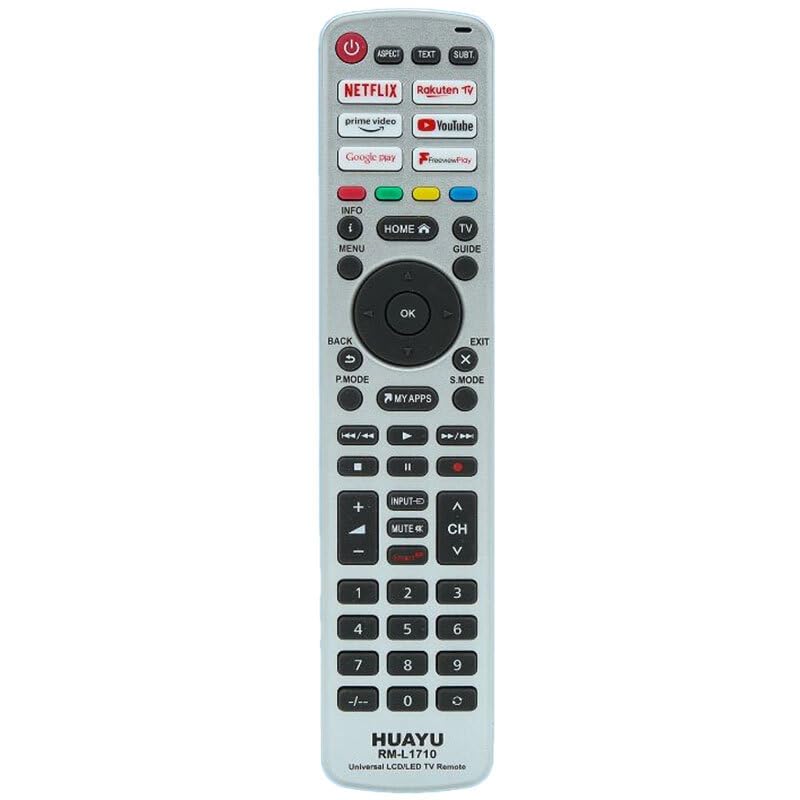
This image displays the full layout of the HUAYU RM-L1710 remote control. It is a silver-colored remote with black buttons. At the top are the power button, aspect ratio, text, and subtitle buttons. Below these are dedicated app buttons for Netflix, Rakuten TV, Prime Video, YouTube, Google Play, and FreeviewPlay. The central navigation cluster includes Home, Info, Menu, TV Guide, and a directional pad with an OK button. Below this are Back, Exit, P.Mode, S.Mode, and My Apps buttons. Media playback controls (rewind, play, fast forward, stop, pause, record) are located next. Further down are volume and channel controls, input, and mute buttons. The bottom section features a numeric keypad from 0-9, along with a dash button. The brand 'HUAYU' and model 'RM-L1710 Universal LCD/LED TV Remote' are printed at the very bottom.
ബട്ടൺ പ്രവർത്തനങ്ങൾ:
- പവർ (ചുവപ്പ് ബട്ടൺ): ടിവി ഓണാക്കുകയോ ഓഫാക്കുകയോ ചെയ്യുന്നു.
- ലക്ഷ്യം: സ്ക്രീൻ വീക്ഷണാനുപാതം മാറ്റുന്നു.
- വാചകം: Activates or deactivates teletext.
- സബ്ടി: സബ്ടൈറ്റിലുകൾ ഓൺ അല്ലെങ്കിൽ ഓഫ് ടോഗിൾ ചെയ്യുന്നു.
- NETFLIX, Rakuten TV, prime video, YouTube, Google play, Freeviewകളിക്കുക: Direct access buttons for respective streaming applications.
- INFO (i): ഓൺ-സ്ക്രീൻ വിവരങ്ങൾ പ്രദർശിപ്പിക്കുന്നു.
- HOME (House icon): Returns to the TV's main home screen or smart hub.
- ടിവി ഗൈഡ്: ഇലക്ട്രോണിക് പ്രോഗ്രാം ഗൈഡ് തുറക്കുന്നു.
- മെനു: ടിവിയുടെ പ്രധാന മെനു ആക്സസ് ചെയ്യുന്നു.
- ദിശാസൂചന പാഡ് (മുകളിലേക്ക്, താഴേക്ക്, ഇടത്തേക്ക്, വലത്തേക്ക്): മെനുകളിലൂടെയും ഓപ്ഷനുകളിലൂടെയും നാവിഗേറ്റ് ചെയ്യുന്നു.
- ശരി: തിരഞ്ഞെടുക്കലുകൾ സ്ഥിരീകരിക്കുന്നു.
- BACK (U-turn arrow): മുമ്പത്തെ സ്ക്രീനിലേക്കോ മെനുവിലേക്കോ മടങ്ങുന്നു.
- EXIT (X): നിലവിലുള്ള മെനുവിൽ നിന്നോ ആപ്ലിക്കേഷനിൽ നിന്നോ പുറത്തുകടക്കുന്നു.
- പി. മോഡ്: Changes picture modes.
- എസ്. മോഡ്: Changes sound modes.
- MY APPS: Accesses the TV's applications list.
- Media Playback Controls (Rewind, Play, Fast Forward, Stop, Pause, Record): മീഡിയ പ്ലേബാക്ക് നിയന്ത്രിക്കുന്നു.
- INPUT (Arrow into box): ഇൻപുട്ട് ഉറവിടങ്ങൾ (HDMI, AV, മുതലായവ) തിരഞ്ഞെടുക്കുന്നു.
- MUTE (Speaker with cross): ടിവി ശബ്ദം മ്യൂട്ട് ചെയ്യുകയോ അൺമ്യൂട്ട് ചെയ്യുകയോ ചെയ്യുന്നു.
- VOL (+/-): വോളിയം ലെവൽ ക്രമീകരിക്കുന്നു.
- CH (Up/Down arrows): ടിവി ചാനലുകൾ മാറ്റുന്നു.
- Numeric Keypad (0-9, -/--): Enters channel numbers or other numerical data.
5. പ്രാരംഭ സജ്ജീകരണം
5.1 ബാറ്ററികൾ ഇൻസ്റ്റാൾ ചെയ്യുന്നു
- വിദൂര നിയന്ത്രണത്തിന്റെ പിൻഭാഗത്ത് ബാറ്ററി കമ്പാർട്ട്മെന്റ് കവർ തുറക്കുക.
- Insert two AAA batteries (not included), ensuring the positive (+) and negative (-) terminals match the markings inside the compartment.
- ബാറ്ററി കമ്പാർട്ട്മെൻ്റ് കവർ സുരക്ഷിതമായി അടയ്ക്കുക.
5.2 റിമോട്ട് കൺട്രോൾ പ്രോഗ്രാമിംഗ്
As a universal remote, the RM-L1710 may require programming to operate your specific TV model. There are typically two methods for programming universal remotes:
Method 1: Auto Search
- നിങ്ങളുടെ ടിവി ഓണാണെന്ന് ഉറപ്പാക്കുക.
- Press and hold the 'SET' button (if available, or a combination like 'POWER' + 'SET' for 3 seconds) until the indicator light stays on.
- Point the remote at your TV and repeatedly press the 'POWER' button (or 'CH+' button) until your TV turns off or changes channel.
- Once the TV responds, immediately press the 'SET' or 'OK' button to save the code. The indicator light should turn off.
- Test all functions of the remote. If some functions do not work, repeat the auto-search process to find a more compatible code.
Method 2: Code Entry
- Locate the brand code for your TV from the code list provided with the remote (if applicable). Note: A code list is not provided with this manual. Please refer to the packaging or manufacturer's website for specific codes.
- നിങ്ങളുടെ ടിവി ഓണാക്കുക.
- Press and hold the 'SET' button (or a similar programming button) until the indicator light stays on.
- Enter the 3 or 4-digit code for your TV brand using the numeric keypad.
- If the code is valid, the indicator light will turn off.
- റിമോട്ടിന്റെ പ്രവർത്തനങ്ങൾ പരിശോധിക്കുക. അത് പ്രവർത്തിക്കുന്നില്ലെങ്കിൽ, നിങ്ങളുടെ ടിവി ബ്രാൻഡിനായി മറ്റൊരു കോഡ് പരീക്ഷിച്ചുനോക്കൂ.
6. നിങ്ങളുടെ റിമോട്ട് കൺട്രോൾ പ്രവർത്തിപ്പിക്കൽ
6.1 അടിസ്ഥാന ടിവി പ്രവർത്തനങ്ങൾ
- അമർത്തുക പവർ to turn your TV on or off.
- ഉപയോഗിക്കുക വോൾ +/- ശബ്ദ വോളിയം ക്രമീകരിക്കാൻ.
- ഉപയോഗിക്കുക CH Up/Down to change channels sequentially.
- അമർത്തുക നിശബ്ദമാക്കുക to temporarily silence the TV.
- അമർത്തുക ഇൻപുട്ട് to cycle through available input sources (e.g., HDMI 1, AV, Component).
6.2 Smart TV and App Functions
The remote features dedicated buttons for quick access to popular streaming services:
- അമർത്തുക നെറ്റ്ഫ്ലിക്സ് to launch the Netflix application.
- അമർത്തുക പ്രധാന വീഡിയോ to launch the Amazon Prime Video application.
- അമർത്തുക YouTube to launch the YouTube application.
- അമർത്തുക രാകുട്ടൻ ടിവി to launch the Rakuten TV application.
- അമർത്തുക ഗൂഗിൾ പ്ലേ to launch the Google Play Store or Google Play Movies & TV.
- അമർത്തുക സൗജന്യംviewകളിക്കുക to access the Freeview Play platform (if supported by your TV).
- അമർത്തുക എൻ്റെ ആപ്പുകൾ വരെ view all installed applications on your TV.
6.3 നാവിഗേഷനും മെനു നിയന്ത്രണങ്ങളും
- ഉപയോഗിക്കുക ദിശാസൂചന പാഡ് (Up, Down, Left, Right arrows) to move the cursor or highlight items in menus.
- അമർത്തുക OK to confirm a selection or open a highlighted item.
- അമർത്തുക മെനു to open the TV's main settings menu.
- അമർത്തുക വീട് to return to the TV's main home screen or smart hub.
- അമർത്തുക തിരികെ to go back to the previous screen or menu.
- അമർത്തുക പുറത്ത് to close the current menu or application.
- അമർത്തുക വിവരം to display information about the current program or input.
- അമർത്തുക ടിവി ഗൈഡ് to access the electronic program guide.
6.4 മീഡിയ പ്ലേബാക്ക് നിയന്ത്രണങ്ങൾ
These buttons control media playback in compatible applications or when viewing content from connected devices:
- കളിക്കുക: പ്ലേബാക്ക് ആരംഭിക്കുന്നു.
- താൽക്കാലികമായി നിർത്തുക: പ്ലേബാക്ക് താൽക്കാലികമായി നിർത്തുന്നു.
- നിർത്തുക: പ്ലേബാക്ക് നിർത്തുന്നു.
- Rewind (Double left arrow): മീഡിയ റിവൈൻഡ് ചെയ്യുന്നു.
- Fast Forward (Double right arrow): ഫാസ്റ്റ് ഫോർവേഡ് മീഡിയ.
- Skip Back (Double left arrow with line): Skips to the previous track/chapter.
- Skip Forward (Double right arrow with line): Skips to the next track/chapter.
- Record (Red dot): Initiates recording (if supported by your TV and connected storage).
6.5 സംഖ്യാ കീപാഡ്
- Use numbers 0-9 ചാനൽ നമ്പറുകൾ നേരിട്ട് നൽകാൻ.
- ദി -/-- button is used for entering two-digit channel numbers or other specific functions.
7. പരിചരണവും പരിപാലനവും
- Clean the remote control with a soft, dry cloth. Do not use liquid or aerosol cleaners.
- റിമോട്ട് കൺട്രോൾ താഴെയിടുകയോ ശക്തമായ ആഘാതങ്ങൾക്ക് വിധേയമാക്കുകയോ ചെയ്യുന്നത് ഒഴിവാക്കുക.
- റിമോട്ട് കൺട്രോൾ ദീർഘനേരം ഉപയോഗിക്കുന്നില്ലെങ്കിൽ, ചോർച്ച തടയാൻ ബാറ്ററികൾ നീക്കം ചെയ്യുക.
- Store the remote in a cool, dry place.
8. ട്രബിൾഷൂട്ടിംഗ് ഗൈഡ്
| പ്രശ്നം | സാധ്യമായ കാരണം | പരിഹാരം |
|---|---|---|
| റിമോട്ട് പ്രവർത്തിക്കുന്നില്ല. | ബാറ്ററികൾ തീർന്നിരിക്കുന്നു അല്ലെങ്കിൽ തെറ്റായി ചേർത്തിരിക്കുന്നു. | ബാറ്ററികൾ പുതിയവ ഉപയോഗിച്ച് മാറ്റിസ്ഥാപിക്കുക, ശരിയായ ധ്രുവത ഉറപ്പാക്കുക. |
| റിമോട്ട് പ്രവർത്തിക്കുന്നില്ല. | Remote is not programmed to the TV. | Refer to Section 5.2 "Programming the Remote Control" and try programming again. |
| റിമോട്ടിന് ഹ്രസ്വ ദൂരമോ ഇടവിട്ടുള്ള പ്രതികരണമോ ഉണ്ട്. | Weak batteries. Obstruction between remote and TV. | Replace batteries. Ensure a clear line of sight to the TV's IR receiver. |
| ചില ബട്ടണുകൾ പ്രവർത്തിക്കുന്നില്ല. | Incorrect TV code programmed. | Try reprogramming the remote with a different code for your TV brand (if available). |
| App buttons (Netflix, YouTube, etc.) do not work. | TV does not support the app or is not connected to the internet. | Ensure your Smart TV is connected to the internet and the apps are installed and up-to-date. Some older TVs may not support these direct access buttons. |
9. ഉൽപ്പന്ന സവിശേഷതകൾ
- മോഡൽ: ആർഎം-എൽ1710
- ബ്രാൻഡ്: ഹുവായു
- അനുയോജ്യത: Universal for most LCD/LED TVs
- ഊർജ്ജ സ്രോതസ്സ്: 2 x AAA ബാറ്ററികൾ (ഉൾപ്പെടുത്തിയിട്ടില്ല)
- പകർച്ച: ഇൻഫ്രാറെഡ് (IR)
10. വാറന്റി വിവരങ്ങളും ഉപഭോക്തൃ പിന്തുണയും
This product is covered by a standard manufacturer's warranty. Please refer to the warranty card included with your purchase or contact your retailer for specific warranty terms and conditions. For technical support or further assistance, please contact the point of purchase or visit the HUAYU official webബന്ധപ്പെടാനുള്ള വിവരങ്ങൾക്കുള്ള സൈറ്റ്.


