1. ആമുഖം
The AUTO-VOX T11 is a state-of-the-art mirror dash cam designed to enhance driving safety and convenience. It features a high-resolution display, advanced Sony IMX662 sensors with STARVIS2 ultra-night vision for clear recording day and night, and integrated CarPlay/Android Auto functionality. This manual provides essential information for proper installation, operation, and maintenance of your device.

Image: AUTO-VOX T11 Mirror Dash Cam showcasing its main unit and separate cameras.
2. പാക്കേജ് ഉള്ളടക്കം
താഴെ ലിസ്റ്റ് ചെയ്തിരിക്കുന്ന എല്ലാ ഇനങ്ങളും നിങ്ങളുടെ പാക്കേജിൽ ഉൾപ്പെടുത്തിയിട്ടുണ്ടെന്ന് ദയവായി പരിശോധിക്കുക:
- AUTO-VOX T11 Mirror Dash Cam Unit
- മുൻ ക്യാമറ
- പിൻ ക്യാമറ
- ജിപിഎസ് മൊഡ്യൂൾ
- Parking Surveillance Power Cable
- Video Data Cable
- Mounting Adapters (various types)
- Installation Tools (e.g., screwdriver, pry tool)
- ഉപയോക്തൃ മാനുവൽ (ഈ പ്രമാണം)

Image: All components included in the AUTO-VOX T11 package.
3. സജ്ജീകരണവും ഇൻസ്റ്റാളേഷനും
Proper installation is crucial for optimal performance. Please follow these steps carefully. It is recommended to perform a functional test before final installation.
3.1 പ്രീ-ഇൻസ്റ്റലേഷൻ ചെക്ക്ലിസ്റ്റ്
- Verify compatibility of the mirror mount with your vehicle.
- Connect the device to power and confirm all functions are operational before permanent installation.
- Ensure the mirror's angle and fixed state are stable.
- Plan the cable routing path in advance for a neat installation.
- Confirm all accessories are present.
3.2 Mirror Mount and Front Camera Installation
The AUTO-VOX T11 is designed as a genuine mirror replacement. Remove your original rearview mirror and attach the T11 unit using the appropriate mounting adapter for your vehicle. The separate front camera can be affixed to the windshield using adhesive tape, ensuring it does not obstruct your view or vehicle sensors.

Image: Attaching the AUTO-VOX T11 to the vehicle's mirror mount.

Image: The separate front camera being installed on the windshield.
3.3 Wiring Routing
Carefully route all cables (power, rear camera, GPS) along the vehicle's interior trim and weather stripping to conceal them and prevent interference with driving. Ensure cables are securely fixed and do not impede airbags or other safety features.
3.4 പിൻ ക്യാമറ ഇൻസ്റ്റലേഷൻ
Mount the rear camera on the rear window or license plate area. Connect the rear camera cable to the main unit. If connecting the reverse signal trigger wire, ensure it is properly connected to your vehicle's reverse light power source for automatic display of the rear view റിവേഴ്സ് ചെയ്യുമ്പോൾ.
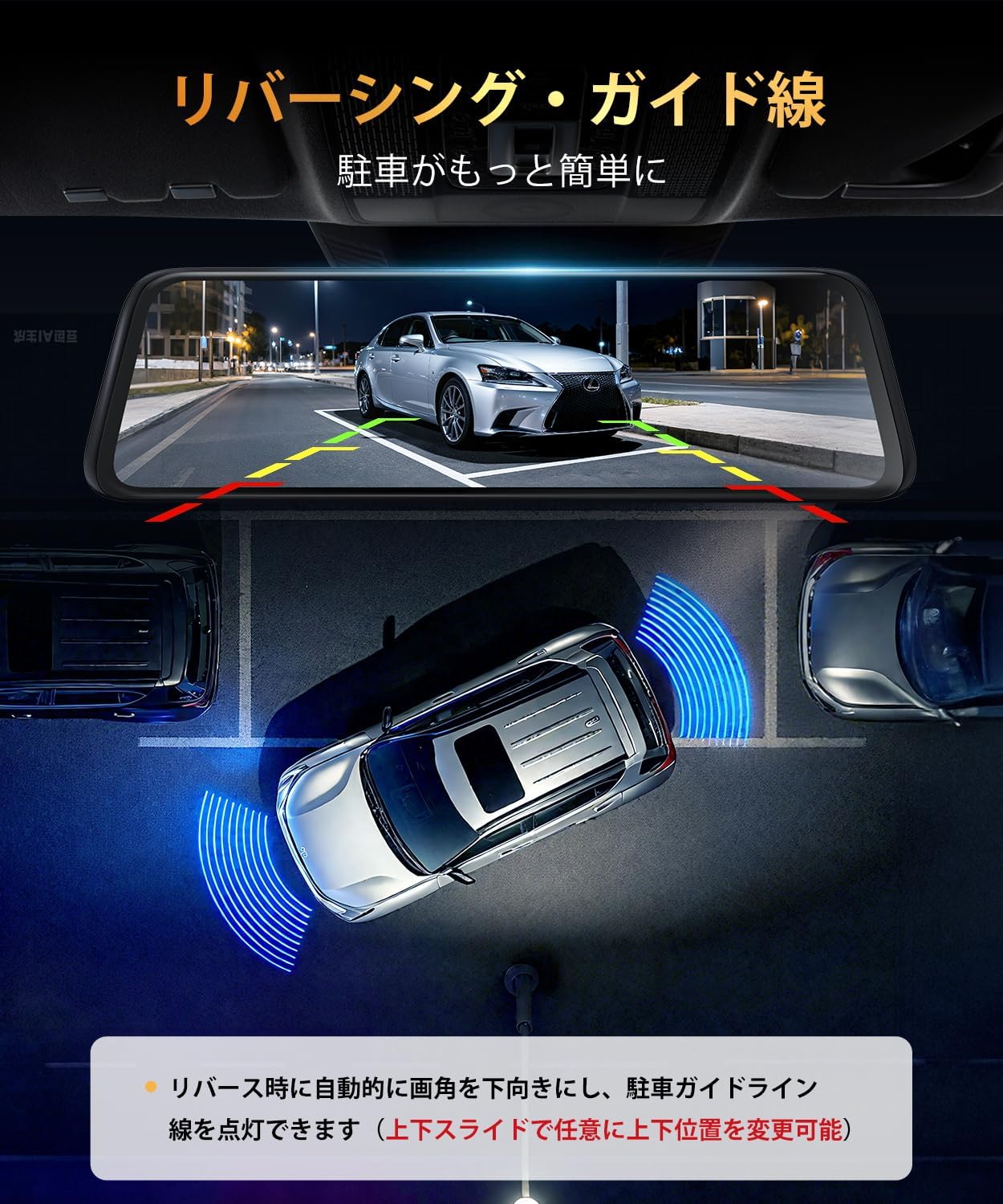
Image: Rear camera view with adjustable guide lines for parking assistance.
3.5 പവർ കണക്ഷൻ
Connect the power cable to your vehicle's fuse box. The yellow wire (BAT+) should be connected to a constant power source (always on), and the red wire (ACC) to an accessory power source (on when the engine is running). The black wire (GND) should be connected to a metal part of the vehicle chassis for grounding. Fuse taps are provided for various vehicle types.
Video: Detailed installation guide for the AUTO-VOX T11, covering mirror mount, camera placement, wiring, and power connections.
4. പ്രവർത്തന നിർദ്ദേശങ്ങൾ
4.1 അടിസ്ഥാന പ്രവർത്തനങ്ങൾ
The T11 features a 10-inch touch screen for intuitive control. Swipe gestures allow switching between front, rear, and split-screen views. Icons on the screen provide quick access to recording, settings, and other features.
4.2 CarPlay and Android Auto Connection
The T11 supports both wireless CarPlay and Android Auto. To connect:
- Tap the CarPlay or Android Auto icon on the T11 display to open the connection screen.
- നിങ്ങളുടെ സ്മാർട്ട്ഫോണിൽ, വൈ-ഫൈയും ബ്ലൂടൂത്തും പ്രവർത്തനക്ഷമമാക്കുക.
- ഇതിനായി തിരയുക the device name displayed on the T11 screen in your phone's Bluetooth settings and pair.
- Confirm the pairing request on both devices.
- Once connected, CarPlay or Android Auto will automatically launch on the T11 display.
Video: Demonstration of connecting an iOS device for CarPlay functionality.
Video: Demonstration of connecting an Android device for Android Auto functionality.
4.3 Automatic Brightness Adjustment
The T11 is equipped with an ambient light sensor that automatically adjusts screen brightness based on surrounding light conditions. This ensures optimal visibility during the day and reduces glare at night, minimizing eye strain during long drives.

Image: The automatic brightness adjustment feature adapting to different light environments.
4.4 Parking Surveillance and G-Sensor
With the engine off, the T11 provides 24-hour parking surveillance. It automatically detects vibrations or impacts and initiates recording, securing evidence in case of hit-and-runs or other incidents. The G-sensor function automatically locks and saves video footage during sudden impacts or collisions while driving, preventing it from being overwritten.

Image: Illustration of the 24-hour parking surveillance feature protecting the vehicle.
5. പരിപാലനം
To ensure the longevity and optimal performance of your AUTO-VOX T11, follow these maintenance guidelines:
- വൃത്തിയാക്കൽ: Use a soft, dry cloth to clean the screen and camera lenses. Avoid abrasive materials or chemical cleaners that could damage the surfaces.
- കേബിൾ മാനേജുമെന്റ്: എല്ലാ കേബിളുകളും സുരക്ഷിതമായി റൂട്ട് ചെയ്തിട്ടുണ്ടെന്നും പിഞ്ച് ചെയ്തിട്ടില്ലെന്നും കേടുപാടുകൾ സംഭവിച്ചിട്ടില്ലെന്നും ഇടയ്ക്കിടെ പരിശോധിക്കുക.
- ഫേംവെയർ അപ്ഡേറ്റുകൾ: Check the AUTO-VOX website or app for available firmware updates to ensure your device has the latest features and bug fixes.
- സംഭരണം: ഉപകരണം ദീർഘനേരം സൂക്ഷിക്കുകയാണെങ്കിൽ, നേരിട്ട് സൂര്യപ്രകാശം ഏൽക്കാത്ത തണുത്തതും വരണ്ടതുമായ സ്ഥലത്ത് സൂക്ഷിക്കുക.
6. പ്രശ്നപരിഹാരം
If you encounter issues with your AUTO-VOX T11, please refer to the following common solutions:
- ഉപകരണം പവർ ചെയ്യുന്നില്ല: Check all power connections, including the fuse box connections (BAT+, ACC, GND). Ensure the vehicle's ignition is on if connecting to ACC power.
- കാർപ്ലേ/ആൻഡ്രോയിഡ് ഓട്ടോ കണക്റ്റ് ചെയ്യുന്നില്ല: Ensure Wi-Fi and Bluetooth are enabled on your smartphone and the correct device is selected for pairing. Restart both the T11 and your smartphone.
- മോശം വീഡിയോ നിലവാരം: Clean camera lenses. Ensure the protective film has been removed from the lenses. Check the resolution settings in the device menu.
- പിൻ ക്യാമറ പ്രദർശിപ്പിക്കുന്നില്ല: Verify the rear camera cable is securely connected. If using the reverse signal trigger, ensure it is correctly wired to the reverse light.
- ജിപിഎസ് സിഗ്നൽ പ്രശ്നങ്ങൾ: Ensure the GPS module is installed in a location with a clear view തടസ്സങ്ങളില്ലാത്ത ആകാശത്തിന്റെ.
- Screen Flickering/Lag: Ensure the device firmware is up to date. If using CarPlay/Android Auto, some older phone models or specific app combinations might cause minor performance variations.
പ്രശ്നം നിലനിൽക്കുകയാണെങ്കിൽ, കൂടുതൽ സഹായത്തിനായി ദയവായി AUTO-VOX ഉപഭോക്തൃ പിന്തുണയുമായി ബന്ധപ്പെടുക.
7 സ്പെസിഫിക്കേഷനുകൾ
| ഫീച്ചർ | സ്പെസിഫിക്കേഷൻ |
|---|---|
| മോഡലിൻ്റെ പേര് | T11 |
| ബ്രാൻഡ് | ഓട്ടോ-വോക്സ് |
| സ്ക്രീൻ വലിപ്പം | 10 ഇഞ്ച് |
| ഡിസ്പ്ലേ തരം | എൽസിഡി |
| വീഡിയോ ക്യാപ്ചർ റെസല്യൂഷൻ | 2560P |
| ഇമേജ് സെൻസർ | Sony IMX662 (Front & Rear) |
| നൈറ്റ് വിഷൻ ടെക്നോളജി | STARVIS2 |
| കണക്റ്റിവിറ്റി | CarPlay, Android Auto, GPS |
| മൗണ്ടിംഗ് തരം | Front Glass Mount (Genuine Mirror Replacement) |
| നിയന്ത്രണ രീതി | ടച്ച് സ്ക്രീൻ |
| പ്രത്യേക സവിശേഷതകൾ | Automatic Brightness Adjustment, 24-hour Parking Surveillance, G-Sensor |
| ഉൽപ്പന്ന അളവുകൾ | 1.3 x 25.5 x 7.5 സെ.മീ |
| ഉൽപ്പന്ന ഭാരം | 1.32 കി.ഗ്രാം |
8. വാറൻ്റിയും പിന്തുണയും
The AUTO-VOX T11 comes with an 18-month manufacturer's warranty, ensuring peace of mind regarding product quality and performance.
For technical support, troubleshooting assistance, or warranty claims, please contact AUTO-VOX customer service. You can find more information and contact details on the official AUTO-VOX brand store: AUTO-VOX Brand Store.


