1. ആമുഖം
This manual provides essential instructions for the setup, operation, and maintenance of your CHIQ L43QST 43-inch Full HD QLED Google Smart TV. Please read this manual thoroughly before using your television and retain it for future reference. Following these instructions will ensure proper use and extend the lifespan of your device.
2 സുരക്ഷാ വിവരങ്ങൾ
വൈദ്യുതാഘാതം, തീപിടുത്തം അല്ലെങ്കിൽ പരിക്ക് എന്നിവയുടെ അപകടസാധ്യത കുറയ്ക്കുന്നതിന്, എല്ലായ്പ്പോഴും ഇനിപ്പറയുന്ന സുരക്ഷാ മുൻകരുതലുകൾ പാലിക്കുക:
- മഴയോ ഈർപ്പമോ ടിവിയെ തുറന്നുകാട്ടരുത്.
- ടിവി തുറക്കരുത് casing; എല്ലാ സേവനങ്ങളും യോഗ്യതയുള്ള ഉദ്യോഗസ്ഥർക്ക് റഫർ ചെയ്യുക.
- ടിവിക്ക് ചുറ്റും ശരിയായ വായുസഞ്ചാരം ഉറപ്പാക്കുക. വെന്റിലേഷൻ ദ്വാരങ്ങൾ അടയ്ക്കരുത്.
- ടിവി വീഴാതിരിക്കാൻ സ്ഥിരതയുള്ളതും നിരപ്പായതുമായ ഒരു പ്രതലത്തിൽ വയ്ക്കുക.
- Unplug the TV from the power outlet during lightning storms or when unused for long periods.
- ചെറിയ ഭാഗങ്ങളും ബാറ്ററികളും കുട്ടികൾക്ക് ലഭ്യമാകാതെ സൂക്ഷിക്കുക.
3. പാക്കേജ് ഉള്ളടക്കം
പാക്കേജിംഗിൽ എല്ലാ ഇനങ്ങളും ഉണ്ടെന്ന് ഉറപ്പാക്കുക:
- CHIQ L43QST 43-inch Smart TV
- Remote Control (requires 2 AAA batteries, not always included)
- TV Stand (assembly required)
- Wall Mount Components (for optional wall mounting)
- പവർ കേബിൾ
- ഉപയോക്തൃ മാനുവൽ (ഈ പ്രമാണം)

ഒരു മുന്നണി view of the CHIQ L43QST 43-inch Smart TV, showcasing അതിന്റെ സ്ലിം ബെസൽ ഡിസൈൻ.
4. സജ്ജീകരണം
4.1. Stand Assembly or Wall Mounting
സ്റ്റാൻഡ് അസംബ്ലി: Carefully place the TV screen-down on a soft, clean surface. Attach the provided stand components to the designated slots on the bottom of the TV using the screws included. Ensure the stand is securely fastened.
മതിൽ മൗണ്ടിംഗ്: If you intend to wall mount the TV, refer to the instructions provided with your wall mount kit. Ensure the wall mount is compatible with the TV's VESA mounting pattern and that the wall can support the TV's weight. Professional installation is recommended for wall mounting.
4.2. ഉപകരണങ്ങൾ ബന്ധിപ്പിക്കുന്നു
Your CHIQ L43QST TV offers various connectivity options:
- HDMI പോർട്ടുകൾ: ബ്ലൂ-റേ പ്ലെയറുകൾ, ഗെയിം കൺസോളുകൾ അല്ലെങ്കിൽ സെറ്റ്-ടോപ്പ് ബോക്സുകൾ പോലുള്ള ബാഹ്യ ഉപകരണങ്ങൾ ബന്ധിപ്പിക്കുക.
- USB പോർട്ടുകൾ: Insert USB drives for media playback (photos, videos, music).
- ഇഥർനെറ്റ് പോർട്ട്: സ്ഥിരമായ ഒരു വയർഡ് ഇന്റർനെറ്റ് കണക്ഷന് വേണ്ടി.
- വൈഫൈ: ഇന്റർനെറ്റ് ആക്സസിനായി നിങ്ങളുടെ വീട്ടിലെ വയർലെസ് നെറ്റ്വർക്കിലേക്ക് കണക്റ്റുചെയ്യുക.
- ബ്ലൂടൂത്ത്: Pair wireless headphones, soundbars, or other compatible accessories.
4.3. പ്രാരംഭ പവർ ഓണും ഗൂഗിൾ ടിവി സജ്ജീകരണവും
After connecting the power cable and any desired devices, press the power button on the TV or remote control. Follow the on-screen instructions to complete the initial setup, including language selection, network connection, and Google account sign-in for Google TV features.
5. പ്രവർത്തന നിർദ്ദേശങ്ങൾ
5.1. ഗൂഗിൾ ടിവി ഇന്റർഫേസ്
Navigate the Google TV interface using your remote control. The home screen provides access to streaming apps, live TV, and personalized content recommendations. Use the directional pad and 'OK' button to select items.
5.2 പ്രധാന സവിശേഷതകൾ
- QLED സാങ്കേതികവിദ്യ: Experience vibrant and accurate colors due to the Quantum Dot film, enhancing the purity of the backlight.
- Full HD Resolution (1920 x 1080): Enjoy clear and sharp images with a resolution higher than standard HD.
- HDR10 പിന്തുണ: Benefit from improved contrast and finer details in both bright and dark scenes, providing a more realistic viewഅനുഭവം.
- ഡോൾബി ഓഡിയോ: The integrated professional audio decoding technology enhances stereo and surround sound, delivering clear, powerful, and rich audio.
- Chromecast ബിൽറ്റ്-ഇൻ: Easily cast movies, shows, photos, and more from your phone or tablet directly to your TV.
- Smart Voice Recognition: Use voice commands through the remote control for convenient navigation and content search.
- രക്ഷാകർതൃ നിയന്ത്രണം: Manage and restrict access to certain content or applications for younger viewers.
- DLNA: Share media content from compatible devices on your home network directly to your TV.
6. പരിപാലനം
നിങ്ങളുടെ ടിവിയുടെ പ്രകടനവും രൂപവും നിലനിർത്താൻ:
- സ്ക്രീൻ വൃത്തിയാക്കൽ: മൃദുവായ, ലിന്റ് രഹിത തുണി ഉപയോഗിച്ച് സ്ക്രീൻ സൌമ്യമായി തുടയ്ക്കുക. കഠിനമായ പാടുകൾക്ക്, ചെറുതായി dampതുണിയിൽ വെള്ളം അല്ലെങ്കിൽ ഒരു പ്രത്യേക സ്ക്രീൻ ക്ലീനർ ഉപയോഗിക്കുക. സ്ക്രീനിലേക്ക് നേരിട്ട് ദ്രാവകം സ്പ്രേ ചെയ്യരുത്.
- സി വൃത്തിയാക്കൽasing: ടിവി തുടയ്ക്കാൻ മൃദുവായതും ഉണങ്ങിയതുമായ തുണി ഉപയോഗിക്കുക casing. അബ്രാസീവ് ക്ലീനറുകളോ ലായകങ്ങളോ ഒഴിവാക്കുക.
- വെൻ്റിലേഷൻ: Ensure the ventilation openings on the back of the TV are not blocked by dust or objects.
- പവർ ഓഫ്: Always turn off and unplug the TV before cleaning or performing any maintenance.
7. പ്രശ്നപരിഹാരം
നിങ്ങളുടെ ടിവിയിൽ പ്രശ്നങ്ങൾ നേരിടുകയാണെങ്കിൽ, ഇനിപ്പറയുന്ന പൊതുവായ പരിഹാരങ്ങൾ പരിശോധിക്കുക:
| പ്രശ്നം | സാധ്യമായ പരിഹാരം |
|---|---|
| പവർ ഇല്ല | Check if the power cable is securely plugged into the TV and the wall outlet. Try a different outlet. |
| ചിത്രം/ശബ്ദം ഇല്ല | ശരിയായ ഇൻപുട്ട് ഉറവിടം തിരഞ്ഞെടുത്തിട്ടുണ്ടെന്ന് ഉറപ്പാക്കുക. ബാഹ്യ ഉപകരണങ്ങളിലേക്കുള്ള കേബിൾ കണക്ഷനുകൾ പരിശോധിക്കുക. |
| റിമോട്ട് കൺട്രോൾ പ്രവർത്തിക്കുന്നില്ല | Replace the batteries (2 AAA). Ensure there are no obstructions between the remote and the TV's IR sensor. |
| നെറ്റ്വർക്ക് കണക്ഷൻ പ്രശ്നങ്ങൾ | നിങ്ങളുടെ റൂട്ടറും മോഡവും പുനരാരംഭിക്കുക. വൈഫൈ പാസ്വേഡ് പരിശോധിക്കുക. വയർഡ് കണക്ഷനുകൾക്ക്, ഇതർനെറ്റ് കേബിൾ ശരിയായി ബന്ധിപ്പിച്ചിട്ടുണ്ടെന്ന് ഉറപ്പാക്കുക. |
| ചിത്ര ഗുണനിലവാര പ്രശ്നങ്ങൾ | ചിത്ര ക്രമീകരണങ്ങൾ (തെളിച്ചം, ദൃശ്യതീവ്രത, നിറം) ക്രമീകരിക്കുക. ഉള്ളടക്ക ഉറവിടം ഉയർന്ന നിലവാരമുള്ളതാണെന്ന് ഉറപ്പാക്കുക. |
8 സ്പെസിഫിക്കേഷനുകൾ
| ഫീച്ചർ | വിശദാംശങ്ങൾ |
|---|---|
| ബ്രാൻഡ് | ചിക്യൂ |
| മോഡൽ നമ്പർ | L43QST |
| സ്ക്രീൻ വലിപ്പം | 43 ഇഞ്ച് (108 സെ.മീ) |
| ഡിസ്പ്ലേ ടെക്നോളജി | ക്യുഎൽഇഡി, എൽഇഡി |
| റെസലൂഷൻ | പൂർണ്ണ എച്ച്ഡി (1920 x 1080p) |
| പുതുക്കിയ നിരക്ക് | 60 Hz |
| ഓപ്പറേറ്റിംഗ് സിസ്റ്റം | Android, Google TV |
| കണക്റ്റിവിറ്റി | ബ്ലൂടൂത്ത്, ഇതർനെറ്റ്, HDMI, USB, വൈ-ഫൈ |
| പ്രത്യേക സവിശേഷതകൾ | Chromecast, Parental Control, DLNA, Smart Voice Recognition |
| ഓഡിയോ ടെക്നോളജി | ഡോൾബി ഓഡിയോ |
| HDR പിന്തുണ | HDR10 |
| എനർജി എഫിഷ്യൻസി ക്ലാസ് | E |
| വൈദ്യുതി ഉപഭോഗം (SDR) | 42 kWh/1000h |
| വൈദ്യുതി ഉപഭോഗം (HDR) | 42 kWh/1000h |
| ഉൽപ്പന്ന അളവുകൾ (DxWxH) | 20പൗണ്ട് x 95lx 58.3H സെ.മീ |
| വീക്ഷണാനുപാതം | 16:9 |
| റിമോട്ട് കൺട്രോൾ ബാറ്ററികൾ | 2 AAA (not always included) |
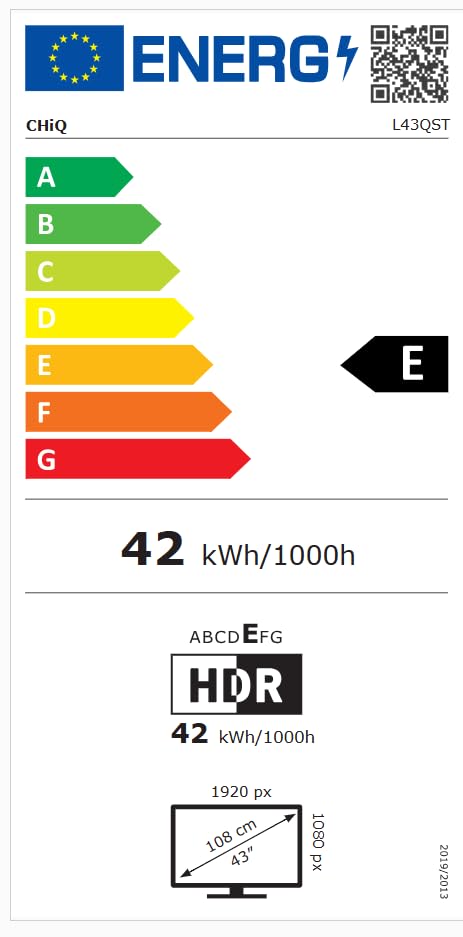
The EU energy efficiency label for the CHIQ L43QST television, indicating an energy class E and a consumption of 42 kWh per 1000 hours for both standard and HDR modes. It also shows the screen resolution as 1920x1080 pixels and a diagonal size of 43 inches (108 cm). For more details, visit the EPREL ഡാറ്റാബേസ്.
9. വാറൻ്റിയും പിന്തുണയും
For detailed warranty information, please refer to the warranty card included with your product or visit the official CHiQ website. For technical support or service inquiries, please contact CHiQ customer service through their official channels.


