1. ആമുഖം
This manual provides detailed instructions for the installation, operation, and maintenance of the SONOFF iFAN04 WiFi Ceiling Fan Light Controller. This device allows you to convert your existing ceiling fan with lights into a smart device, controllable via a mobile application, a 433MHz RF remote, or voice commands through compatible smart assistants.
2. ഉൽപ്പന്നം കഴിഞ്ഞുview
The SONOFF iFAN04 is designed to integrate seamlessly with your ceiling fan and light fixtures, offering enhanced control and automation. Key features include:
- നേരിട്ടുള്ള മാറ്റിസ്ഥാപിക്കൽ: Replaces existing ordinary ceiling fan controllers.
- APP & 433MHz RF Remote Control: Manage your fan and light via the eWeLink app (iOS & Android) or the included RM433 remote controller.
- 3 ഫാൻ വേഗത: Adjust fan speed to Low, Medium, or High for optimal comfort.
- ടൈമറും ഷെഡ്യൂളും: Automate on/off times for your fan and light with single, repeating, or countdown timers.
- ഹാൻഡ്സ് ഫ്രീ വോയ്സ് കൺട്രോൾ: Compatible with Amazon Alexa and Google Home for convenient voice commands.
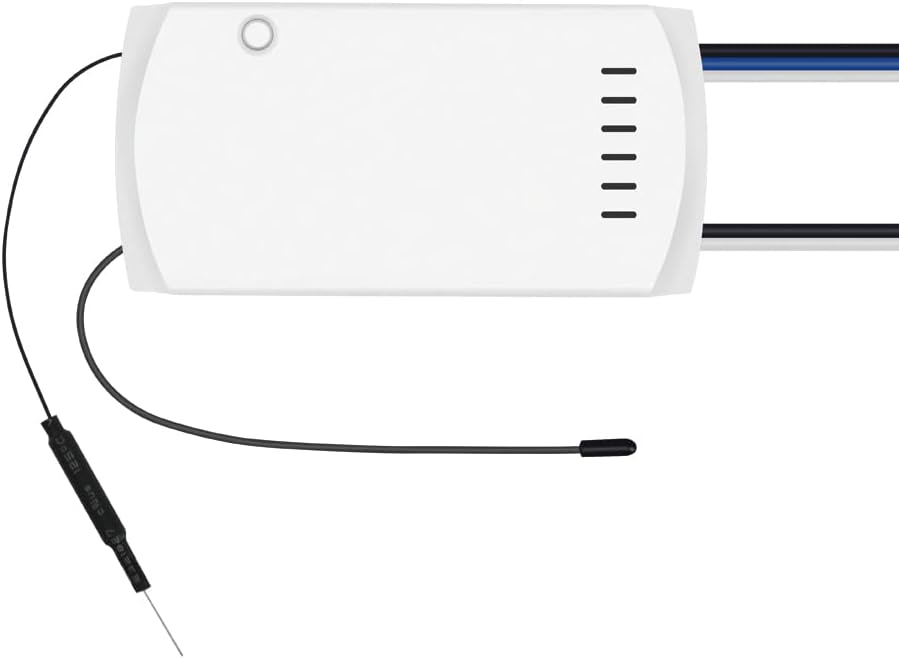
ചിത്രം: മുൻഭാഗം view of the SONOFF iFAN04 WiFi Ceiling Fan Light Controller, showing its compact white design with wires extending from both ends.
3 സുരക്ഷാ വിവരങ്ങൾ
WARNING: Risk of Electric Shock. Installation must be performed by a qualified electrician or service personnel.
- Ensure power is OFF at the circuit breaker before installation or maintenance.
- നനഞ്ഞ കൈകൾ കൊണ്ടോ നനഞ്ഞ പ്രതലങ്ങളിൽ നിൽക്കുമ്പോഴോ ഇൻസ്റ്റാൾ ചെയ്യരുത്.
- വോളിയം എന്ന് പരിശോധിക്കുകtage and current ratings of your fan and light are compatible with the iFAN04 controller (100-240V AC, Light: 3A Max, Fan: 2A Max).
- ഉപകരണം ഇൻഡോർ ഉപയോഗത്തിനായി മാത്രം രൂപകൽപ്പന ചെയ്തിട്ടുള്ളതാണ്.
- എല്ലാ വയർ കണക്ഷനുകളും സുരക്ഷിതമാണെന്നും ശരിയായി ഇൻസുലേറ്റ് ചെയ്തിട്ടുണ്ടെന്നും ഉറപ്പാക്കുക.
4. പാക്കേജ് ഉള്ളടക്കം
പാക്കേജ് തുറക്കുമ്പോൾ, എല്ലാ ഇനങ്ങളും നിലവിലുണ്ടെന്നും നല്ല നിലയിലാണെന്നും ദയവായി പരിശോധിക്കുക:
- SONOFF iFAN04-L WiFi Ceiling Fan Light Controller
- RM433 റിമോട്ട് കൺട്രോളർ
- ഉപയോക്തൃ മാനുവൽ (ഈ പ്രമാണം)
- Mounting accessories (screws, wire connectors)
5. സജ്ജീകരണം
5.1. ഇൻസ്റ്റലേഷനും വയറിംഗും
- പവർ ഓഫ്: Before starting, turn off the power to your ceiling fan at the circuit breaker to prevent electric shock.
- വയറിംഗ് ആക്സസ് ചെയ്യുക: Remove the canopy or housing of your ceiling fan to access the existing wiring.
- Disconnect Old Controller (if any): Carefully disconnect any existing fan or light controllers.
- Wire the iFAN04-L: Connect the iFAN04-L controller according to the wiring diagram below. Ensure correct connections for Live (L), Neutral (N), Fan, and Light wires. The iFAN04-L has dedicated outputs for fan and light.
- കൺട്രോളർ മൌണ്ട് ചെയ്യുക: Place the iFAN04-L controller within the fan's canopy. Note that the controller's size (4.57 x 2.17 x 1.02 inches) may require careful placement in some fan housings. Ensure it is securely positioned and does not interfere with fan operation.
- പവർ പുന ore സ്ഥാപിക്കുക: Once all connections are secure and the controller is mounted, restore power at the circuit breaker.

Image: Wiring diagram for the SONOFF iFAN04-L controller. It shows connections for Live (L), Neutral (N), Fan (Black), Light (Blue), and Common (White) wires, indicating how to integrate the controller into a ceiling fan's electrical system.
5.2. App Pairing (eWeLink App)
To control your iFAN04-L via your smartphone, you need to pair it with the eWeLink app. The iFAN04-L supports 2.4GHz Wi-Fi networks.
- eWeLink ആപ്പ് ഡൗൺലോഡ് ചെയ്യുക: ആപ്പ് സ്റ്റോറിൽ (iOS) നിന്നോ ഗൂഗിൾ പ്ലേ സ്റ്റോറിൽ (ആൻഡ്രോയിഡ്) നിന്നോ eWeLink ആപ്പ് ഡൗൺലോഡ് ചെയ്യുക.
- രജിസ്റ്റർ ചെയ്യുക/ലോഗിൻ ചെയ്യുക: ഒരു അക്കൗണ്ട് സൃഷ്ടിക്കുക അല്ലെങ്കിൽ നിങ്ങളുടെ നിലവിലുള്ള eWeLink അക്കൗണ്ടിലേക്ക് ലോഗിൻ ചെയ്യുക.
- ജോടിയാക്കൽ മോഡ് നൽകുക:
- Upon first power-up, the iFAN04-L will emit a series of beeps (two short, one long, repeating for 3 minutes) indicating it's in pairing mode.
- If not in pairing mode, or if pairing fails, power cycle the iFAN04-L five times (turn off and on quickly from the wall switch or circuit breaker). Leave it on after the fifth cycle. It should then emit continuous short beeps, indicating "Compatible Pairing Mode".
- ആപ്പിൽ ഉപകരണം ചേർക്കുക: In the eWeLink app, tap the "+" icon to add a device. Select "Compatible Pairing Mode" if you used the power cycle method.
- വൈഫൈയിലേക്ക് കണക്റ്റുചെയ്യുക: Follow the on-screen instructions to connect the device to your 2.4GHz Wi-Fi network.
- ഉപകരണത്തിന്റെ പേര്: Once paired, you can name your iFAN04-L for easy identification.
6. പ്രവർത്തന നിർദ്ദേശങ്ങൾ
6.1. eWeLink ആപ്പ് നിയന്ത്രണം
After successful pairing, you can control your fan and light from anywhere using the eWeLink app:
- ഓൺ/ഓഫ് ചെയ്യുക: Tap the respective icons to turn the fan or light on/off.
- ഫാൻ വേഗത ക്രമീകരിക്കുക: Select from Low, Medium, or High fan speeds.
- Set Timers/Schedules: Configure single, repeating, or countdown timers for automated operation.
- പവർ-ഓൺ സ്റ്റേറ്റ്: Customize the device's behavior after a power outage (e.g., remain off, resume last state).
6.2. RM433 Remote Control
The included RM433 remote controller provides convenient local control. Familiarize yourself with its buttons:

Image: The white RM433 remote controller for the SONOFF iFAN04-L, featuring multiple buttons for fan speed, light control, and other functions.
- ലൈറ്റ് ഓൺ/ഓഫ്: Dedicated button for controlling the light.
- ഫാൻ ഓൺ/ഓഫ്: Dedicated button for controlling the fan.
- ഫാൻ വേഗത: Buttons to cycle through or directly select Low, Medium, High speeds.
- The remote can be mounted on a wall or used as a handheld device.
6.3. ശബ്ദ നിയന്ത്രണം
Integrate your iFAN04-L with Amazon Alexa or Google Home for hands-free control:
- Link eWeLink Account: In your Alexa or Google Home app, search for the "eWeLink Smart Home" skill/service and link your eWeLink account.
- ഉപകരണങ്ങൾ കണ്ടെത്തുക: Ask your voice assistant to "Discover devices" or manually initiate discovery in the app.
- വോയ്സ് കമാൻഡുകൾ: ഇനിപ്പറയുന്നതുപോലുള്ള കമാൻഡുകൾ ഉപയോഗിക്കുക:
- "Alexa, turn on the [Fan Name] light."
- "Hey Google, set [Fan Name] speed to high."
- "Alexa, turn off the [Fan Name] fan."
7. പരിപാലനം
- വൃത്തിയാക്കൽ: Ensure the device is powered off before cleaning. Wipe the exterior with a soft, dry cloth. Do not use liquid cleaners or aerosols.
- റിമോട്ട് ബാറ്ററി: The RM433 remote controller requires 1 Lithium Metal battery (included). Replace the battery when the remote's indicator light no longer illuminates or its range decreases.
- ഫേംവെയർ അപ്ഡേറ്റുകൾ: ഒപ്റ്റിമൽ പ്രകടനവും സുരക്ഷയും ഉറപ്പാക്കാൻ ലഭ്യമായ ഫേംവെയർ അപ്ഡേറ്റുകൾക്കായി ഇടയ്ക്കിടെ eWeLink ആപ്പ് പരിശോധിക്കുക.
8. പ്രശ്നപരിഹാരം
| പ്രശ്നം | സാധ്യമായ കാരണം | പരിഹാരം |
|---|---|---|
| Device cannot connect to Wi-Fi. | Incorrect Wi-Fi password, 5GHz network, device too far from router, or incorrect pairing mode. |
|
| റിമോട്ട് കൺട്രോൾ പ്രതികരിക്കുന്നില്ല. | Low battery, remote not paired, or interference. |
|
| Controller does not fit in fan canopy. | Limited space in the fan's housing. | Carefully arrange wires and the controller within the available space. Ensure no wires are pinched. If space is extremely limited, professional installation may be required. |
| Fan or light does not respond after installation. | Incorrect wiring, loose connections, or no power. |
|
9 സ്പെസിഫിക്കേഷനുകൾ
| ഫീച്ചർ | വിശദാംശങ്ങൾ |
|---|---|
| മോഡൽ | iFAN04-L |
| ബ്രാൻഡ് | സോനോഫ് |
| ഓപ്പറേറ്റിംഗ് വോളിയംtage | 120 വോൾട്ട് എസി |
| Current Rating (Fan) | 2 Ampപരമാവധി |
| Current Rating (Light) | 3 Ampപരമാവധി |
| വാട്ട്tage | 360 watts Max |
| കണക്റ്റിവിറ്റി പ്രോട്ടോക്കോൾ | വൈഫൈ (2.4GHz) |
| നിയന്ത്രണ രീതി | ആപ്പ്, റിമോട്ട്, വോയ്സ് |
| അളവുകൾ (L x W x H) | 4.57 x 2.17 x 1.02 ഇഞ്ച് |
| ഇനത്തിൻ്റെ ഭാരം | 5.3 ഔൺസ് |
| അന്താരാഷ്ട്ര സംരക്ഷണ റേറ്റിംഗ് | IP74 |
| അനുയോജ്യമായ ഉപകരണങ്ങൾ | ലൈറ്റുകളുള്ള സീലിംഗ് ഫാനുകൾ |
10. വാറൻ്റിയും പിന്തുണയും
SONOFF products are designed and manufactured to the highest quality standards. This product is covered by a limited warranty from the date of purchase. For detailed warranty terms and conditions, please refer to the official SONOFF webസൈറ്റ് അല്ലെങ്കിൽ അവരുടെ ഉപഭോക്തൃ പിന്തുണയുമായി ബന്ധപ്പെടുക.
For technical support, troubleshooting assistance, or further inquiries, please visit the official SONOFF support page or contact their customer service team through the eWeLink app or their webസൈറ്റ്.
ഓൺലൈൻ ഉറവിടങ്ങൾ:
- ഔദ്യോഗിക സോണോഫ് Webസൈറ്റ്: www.sonoff.com
- eWeLink App Support: Available within the eWeLink application.


