ആമുഖം
This manual provides detailed instructions for the Redragon Darkflame G820 Gamer Controller. Please read this guide thoroughly before using the product to ensure proper operation and to maximize your gaming experience. Keep this manual for future reference.
ഉൽപ്പന്നം കഴിഞ്ഞുview
The Redragon Darkflame G820 is a high-performance gamer controller designed for precision and durability. Key features include:
- Hall Effect Analog Sticks: Enhanced durability and precision for analog inputs.
- ടർബോ ഫംഗ്ഷൻ: Configurable repeat function for rapid button presses.
- മാക്രോ ബട്ടണുകൾ: Additional programmable buttons located on the back for custom commands.
- LED ലൈറ്റിംഗ്: Integrated lighting on buttons for visual appeal.
- Adjustable Triggers: Independently adjustable press triggers for personalized control.
- കണക്റ്റിവിറ്റി: USB Type-C and Bluetooth 5.3 for versatile connection options.
- ഹെഡ്ഫോൺ ജാക്ക്: 3.5mm audio jack for headset connection.
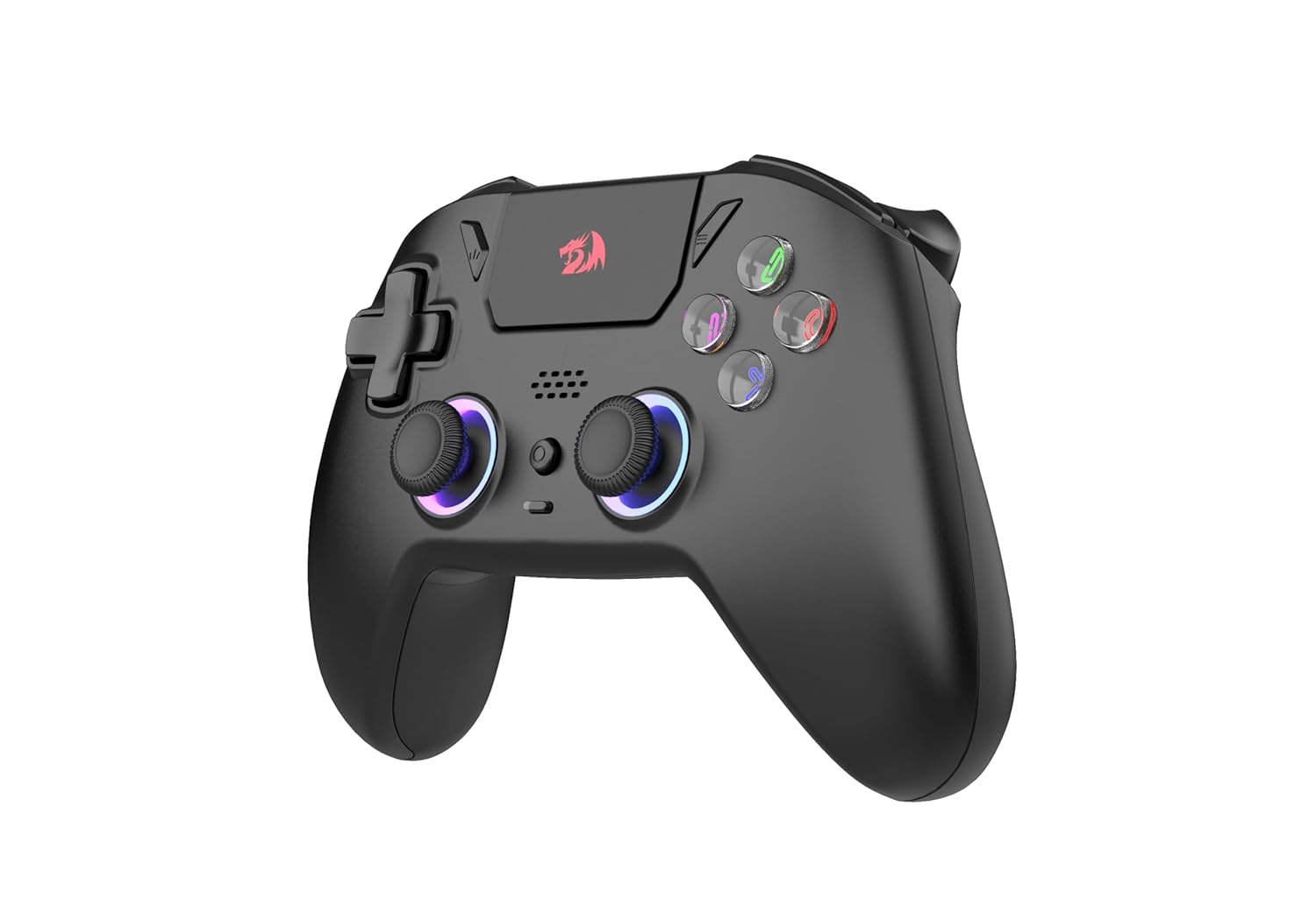
ചിത്രം 1: ഫ്രണ്ട് view of the Redragon Darkflame G820 Controller, showing the analog sticks, D-pad, action buttons with LED lighting, and central function buttons.

ചിത്രം 2: വശം view of the Redragon Darkflame G820 Controller, highlighting the ergonomic grip and shoulder buttons.

ചിത്രം 3: തിരികെ view of the Redragon Darkflame G820 Controller, showing the additional macro buttons (MR, ML) and textured grip.

ചിത്രം 4: മുകളിൽ view of the Redragon Darkflame G820 Controller, displaying the shoulder buttons (L1, R1) and triggers (L2, R2).

ചിത്രം 5: താഴെ view of the Redragon Darkflame G820 Controller, showing the USB-C charging port and 3.5mm headphone jack.
സജ്ജമാക്കുക
കൺട്രോളർ ചാർജ് ചെയ്യുന്നു
Before first use, fully charge the controller. Connect the provided USB Type-C cable to the controller's charging port and the other end to a USB power source (e.g., PC, wall adapter). The LED indicator will show charging status and turn off or change color when fully charged.
Connecting via USB Type-C (Wired Mode)
- Connect one end of the USB Type-C cable to the controller.
- Connect the other end to an available USB port on your PC or gaming console.
- The controller should be automatically recognized by your system.
Connecting via Bluetooth (Wireless Mode)
- Ensure your device (PC, console, mobile) has Bluetooth enabled.
- On the Redragon Darkflame G820, press and hold the ജോടിയാക്കൽ ബട്ടൺ (refer to product diagram for location, typically a small button on the top or back) until the LED indicator starts flashing rapidly. This indicates pairing mode.
- On your device, search for new Bluetooth devices and select "Redragon G820" (or similar name) from the list.
- Once paired, the LED indicator on the controller will stop flashing and remain solid.
പ്രവർത്തന നിർദ്ദേശങ്ങൾ
അടിസ്ഥാന നിയന്ത്രണങ്ങൾ
- അനലോഗ് സ്റ്റിക്കുകൾ: Use for movement and camera control.
- ഡി-പാഡ്: For directional input, menu navigation.
- ആക്ഷൻ ബട്ടണുകൾ (A, B, X, Y): ഗെയിമിനുള്ളിലെ പ്രവർത്തനങ്ങൾക്ക്.
- ഷോൾഡർ ബട്ടണുകൾ (L1, R1): For various in-game functions.
- ട്രിഗറുകൾ (L2, R2): Pressure-sensitive inputs for actions like acceleration or shooting.
ടർബോ പ്രവർത്തനം
To activate Turbo mode for a button:
- അമർത്തിപ്പിടിക്കുക ടർബോ ബട്ടൺ (usually a dedicated button or a combination with another button).
- ടർബോ അമർത്തിപ്പിടിച്ചുകൊണ്ട്, ആവശ്യമുള്ള പ്രവർത്തന ബട്ടൺ അമർത്തുക (ഉദാ: A, B, X, Y, L1, R1, L2, R2).
- Release both buttons. The selected action button will now repeat its input as long as it's held down.
To deactivate Turbo mode for a button, repeat the same steps.
Macro Buttons (MR, ML)
The MR and ML buttons on the back of the controller can be programmed to perform a sequence of button presses. Refer to the specific software or advanced settings for detailed macro programming instructions, as this can vary by platform and controller firmware.
Adjusting Triggers
The L2 and R2 triggers feature independent adjustment. This typically involves a physical switch or dial near the triggers that allows you to change their travel distance or sensitivity. Adjust to your preference for different game types (e.g., shorter travel for faster shooting, longer travel for precise acceleration).
ഹെഡ്ഫോൺ കണക്ഷൻ
Plug your 3.5mm compatible headset into the headphone jack located on the bottom of the controller for audio and microphone functionality (if supported by your system and game).
മെയിൻ്റനൻസ്
- വൃത്തിയാക്കൽ: കൺട്രോളർ തുടയ്ക്കാൻ മൃദുവായതും ഉണങ്ങിയതുമായ തുണി ഉപയോഗിക്കുക. കഠിനമായ അഴുക്കിന്, ചെറുതായി dampതുണിയിൽ വെള്ളം ഒഴിക്കുക. കഠിനമായ രാസവസ്തുക്കളോ ഉരച്ചിലുകളുള്ള ക്ലീനറുകളോ ഒഴിവാക്കുക.
- സംഭരണം: കൺട്രോളർ നേരിട്ട് സൂര്യപ്രകാശം ഏൽക്കാത്തതും തീവ്രമായ താപനില ഏൽക്കാത്തതുമായ ഒരു തണുത്ത വരണ്ട സ്ഥലത്ത് സൂക്ഷിക്കുക.
- ബാറ്ററി കെയർ: ബാറ്ററി ലൈഫ് വർദ്ധിപ്പിക്കാൻ, കൺട്രോളർ ഇടയ്ക്കിടെ പൂർണ്ണമായും ഡിസ്ചാർജ് ചെയ്യുന്നത് ഒഴിവാക്കുക. തുടർച്ചയായ ഉപയോഗത്തിലല്ലെങ്കിൽ പോലും പതിവായി ചാർജ് ചെയ്യുക.
- കേബിൾ മാനേജുമെന്റ്: USB-C കേബിളിന് കേടുപാടുകൾ സംഭവിക്കാതിരിക്കാൻ അതിൽ മൂർച്ചയുള്ള വളവുകളോ വളവുകളോ ഒഴിവാക്കുക.
ട്രബിൾഷൂട്ടിംഗ്
കൺട്രോളർ പ്രതികരിക്കുന്നില്ല
- ബാറ്ററി പരിശോധിക്കുക: Ensure the controller is charged. Connect it via USB-C to see if it powers on.
- വയർഡ് കണക്ഷൻ: Try connecting the controller directly via USB-C cable. Ensure the cable is securely plugged into both the controller and the device.
- ബ്ലൂടൂത്ത് കണക്ഷൻ: If using Bluetooth, ensure the controller is paired correctly. Try unpairing and re-pairing the device. Ensure your device's Bluetooth is enabled and working.
- ഉപകരണം പുനരാരംഭിക്കുക: നിങ്ങളുടെ പിസി അല്ലെങ്കിൽ കൺസോൾ പുനരാരംഭിക്കുക.
Input Lag or Disconnections
- ഇടപെടൽ: Move closer to your device if using Bluetooth. Reduce potential wireless interference from other devices.
- ബാറ്ററി നില: Low battery can affect wireless performance. Charge the controller.
- ഫേംവെയർ അപ്ഡേറ്റ്: റെഡ്രാഗൺ ഉദ്യോഗസ്ഥനെ പരിശോധിക്കുക webG820 കൺട്രോളറിനായി ലഭ്യമായ ഏതെങ്കിലും ഫേംവെയർ അപ്ഡേറ്റുകൾക്കായുള്ള സൈറ്റ്.
Buttons or Analog Sticks Not Working Correctly
- കാലിബ്രേഷൻ: Some operating systems or games allow for controller calibration. Check your system settings.
- വൃത്തിയാക്കൽ: Ensure no debris is lodged around buttons or analog sticks.
- സോഫ്റ്റ്വെയർ വൈരുദ്ധ്യം: Close any background applications that might interfere with controller input.
സ്പെസിഫിക്കേഷനുകൾ
| ഫീച്ചർ | വിശദാംശങ്ങൾ |
|---|---|
| മോഡൽ | Redragon Darkflame G820 |
| കണക്റ്റിവിറ്റി | USB Type-C, Bluetooth 5.3 |
| ബാറ്ററി ശേഷി | 1000mAh |
| ബട്ടണുകളുടെ എണ്ണം | 16 |
| Analog Technology | ഹാൾ പ്രഭാവം |
| ഹെഡ്ഫോൺ കണക്ഷൻ | 1x 3.5mm ജാക്ക് |
| ഏകദേശ ഉൽപ്പന്ന അളവുകൾ | 156 x 107 x 60 മിമി |
| ഉൽപ്പന്നത്തിന്റെ ഏകദേശ ഭാരം | 280 ഗ്രാം (നെറ്റ്), 415 ഗ്രാം (മൊത്തം) |
വാറൻ്റിയും പിന്തുണയും
വാറന്റി വിവരങ്ങൾക്കും സാങ്കേതിക പിന്തുണയ്ക്കും, ദയവായി നിങ്ങളുടെ ഉൽപ്പന്നത്തിനൊപ്പം ഉൾപ്പെടുത്തിയിരിക്കുന്ന വാറന്റി കാർഡ് പരിശോധിക്കുകയോ ഔദ്യോഗിക Redragon സന്ദർശിക്കുകയോ ചെയ്യുക. website. You can also contact Redragon customer service directly for assistance with product issues or inquiries.
റെഡ്രാഗൺ ഒഫീഷ്യൽ Webസൈറ്റ്: www.redragonzone.com
ഔദ്യോഗിക ഉൽപ്പന്ന വീഡിയോകൾ
ഈ മോഡലിനായി വിൽപ്പനക്കാരനിൽ നിന്നുള്ള ഔദ്യോഗിക ഉൽപ്പന്ന വീഡിയോകളൊന്നും ഇപ്പോൾ കണ്ടെത്തിയില്ല.


