1. ആമുഖം
The Radtel RT-950 Pro is a high-performance handheld ham radio designed for reliable communication. It features 10W output power, multi-band reception, GPS/APRS tracking, and Bluetooth wireless programming. This manual provides essential information for the proper setup, operation, and maintenance of your device.
2. പാക്കേജ് ഉള്ളടക്കം
പാക്കേജിൽ എല്ലാ ഇനങ്ങളും ഉണ്ടെന്ന് ഉറപ്പാക്കുക:
- 1x RT-950 Pro Main Unit
- 1x 2600mAh ലി-അയൺ ബാറ്ററി
- 1x ഡ്യുവൽ ബാൻഡ് ആന്റിന
- 1x ബെൽറ്റ് ക്ലിപ്പ്
- 1x ടൈപ്പ്-സി ചാർജിംഗ് കേബിൾ
- 1x Power Supply with USB Port
- 1x ഇംഗ്ലീഷ് ഉപയോക്തൃ മാനുവൽ
- 1x 27MHz Antenna
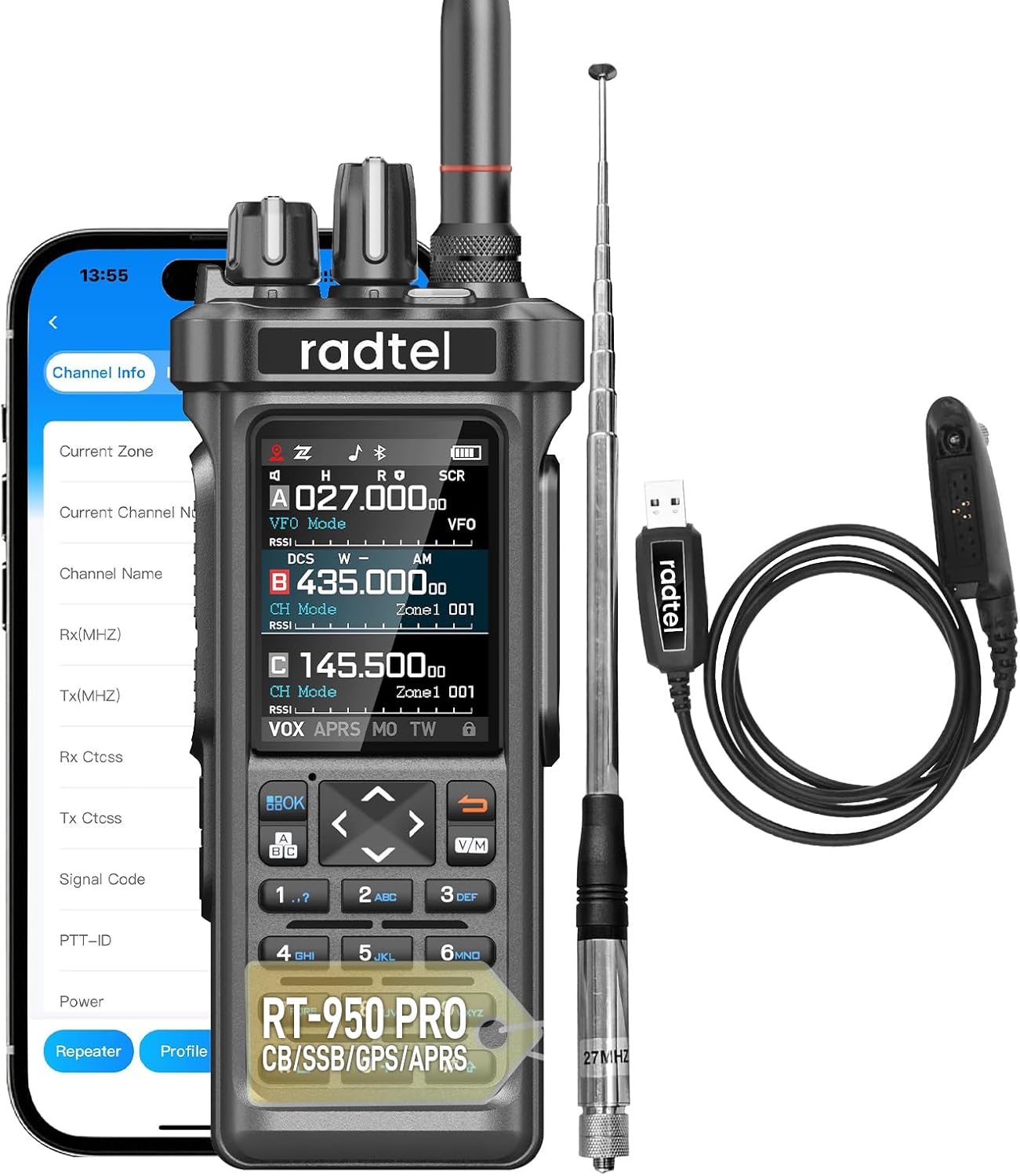
Image 2.1: Radtel RT-950 Pro main unit, 27MHz antenna, charging cable, and other accessories.
3. ഉൽപ്പന്നം കഴിഞ്ഞുview
The RT-950 Pro features a robust design with a full-color display and a comprehensive keypad for easy operation.
3.1. Keypad and Controls
The keypad allows for direct frequency input, menu navigation, and function activation. Specific keys can be customized for quick access to various features.

ചിത്രം 3.1: വിശദമായത് view of the RT-950 Pro keypad, highlighting customizable buttons.
4. സജ്ജീകരണം
4.1. ബാറ്ററി ഇൻസ്റ്റാളേഷൻ
- റേഡിയോ ഓഫാക്കിയിട്ടുണ്ടെന്ന് ഉറപ്പാക്കുക.
- 2600mAh ലി-അയൺ ബാറ്ററി റേഡിയോയുടെ പിൻഭാഗത്തുള്ള ബാറ്ററി കമ്പാർട്ടുമെന്റുമായി വിന്യസിക്കുക.
- ബാറ്ററി സുരക്ഷിതമായി ക്ലിക്കുചെയ്യുന്നത് വരെ സ്ലൈഡ് ചെയ്യുക.
4.2. ആന്റിന അറ്റാച്ച്മെന്റ്
- Screw the appropriate antenna (dual-band or 27MHz) clockwise onto the antenna connector at the top of the radio until finger-tight. Do not overtighten.
4.3 ബാറ്ററി ചാർജ് ചെയ്യുന്നു
The RT-950 Pro supports USB Type-C charging and can also be charged via a desktop docking option (if included or purchased separately).
- ടൈപ്പ്-സി ചാർജിംഗ് കേബിൾ റേഡിയോയുടെ ചാർജിംഗ് പോർട്ടുമായി ബന്ധിപ്പിക്കുക.
- Connect the other end of the cable to the provided power supply or a compatible USB power source.
- റേഡിയോയിലെ ചാർജിംഗ് ഇൻഡിക്കേറ്റർ ചാർജിംഗ് സ്റ്റാറ്റസ് കാണിക്കും.
5. പ്രവർത്തന നിർദ്ദേശങ്ങൾ
5.1. പവർ ഓൺ/ഓഫ്, വോളിയം
റേഡിയോ ഓൺ ചെയ്യുന്നതിനും വോളിയം ക്രമീകരിക്കുന്നതിനും മുകളിൽ ഇടത് നോബ് ഘടികാരദിശയിൽ തിരിക്കുക. പവർ ഓഫ് ചെയ്യുന്നതിന് അത് ക്ലിക്ക് ചെയ്യുന്നതുവരെ എതിർ ഘടികാരദിശയിൽ തിരിക്കുക.
5.2. Quick Frequency Copy (Clone Function)
The RT-950 Pro allows for quick copying of frequencies and CTCSS/DCS tones from another radio.

Image 5.1: Illustration of the quick frequency copy feature between two radios.
5.3. Adjusting Output Power
The radio supports three output power levels: 10W, 5W, and 1W. Adjusting the power level can conserve battery life or extend communication range.

Image 5.2: Visual representation of the three-level output power switching (1W, 5W, 10W).
5.4. ബട്ടണുകൾ ഇഷ്ടാനുസൃതമാക്കൽ
The function keys on the RT-950 Pro can be customized to provide quick access to features such as Radio, Monitor, Scan, Search, SOS, Spectrum, Beacon TX, or PTT-C.
5.5. Activating Super Mode
To activate Super Mode for extended full-band transmit and receive capabilities:
- First, power on the radio.
- Press and hold the PTT (Push-To-Talk) button.
- While holding PTT, press and hold the '8' key on the keypad.
- Release both buttons. The radio will enter Super Mode.

Image 5.3: Visual guide for entering Super Mode by simultaneously pressing PTT and the '8' key.
6. GPS/APRS പ്രവർത്തനം
The integrated GPS/APRS feature provides real-time positioning, which is crucial for safe navigation and coordinating with groups, especially in outdoor or emergency scenarios.
7. Multi-band Reception
The RT-950 Pro offers versatile communication and entertainment channels with its multi-band reception capabilities, including:
- എഎം/എഫ്എം/എസ്എസ്ബി
- CB (27MHz TX/RX in FM modulation only, 3-4W power)
- SW (ഷോർട്ട്വേവ്)
- MW (Mediumwave)
- LW (Longwave)
- എൽഎസ്ബി (ലോവർ സൈഡ്ബാൻഡ്)
- യുഎസ്ബി (അപ്പർ സൈഡ്ബാൻഡ്)
- CW (തുടർച്ചയായ തരംഗം)
- NOAA Weather Channel Reception
8. Bluetooth Programming
Configure and synchronize radio settings wirelessly through your smartphone using the Bluetooth programming feature. Refer to the Radtel programming software documentation for detailed instructions.
9. പരിപാലനം
- വൃത്തിയാക്കൽ: ഒരു സോഫ്റ്റ് ഉപയോഗിക്കുക, ഡിamp cloth to clean the radio's exterior. Avoid harsh chemicals or abrasive materials.
- ബാറ്ററി കെയർ: ഉപയോഗത്തിലില്ലാത്തപ്പോൾ ബാറ്ററി തണുത്തതും വരണ്ടതുമായ സ്ഥലത്ത് സൂക്ഷിക്കുക. ദീർഘനേരം ബാറ്ററി പൂർണ്ണമായും ഡിസ്ചാർജ് ചെയ്യുന്നത് ഒഴിവാക്കുക.
- ആന്റിന കെയർ: ആന്റിന സുരക്ഷിതമായി ഘടിപ്പിച്ചിട്ടുണ്ടെന്നും എന്നാൽ അമിതമായി മുറുക്കിയിട്ടില്ലെന്നും ഉറപ്പാക്കുക. ആന്റിന വളയ്ക്കുന്നതോ സമ്മർദ്ദം ചെലുത്തുന്നതോ ഒഴിവാക്കുക.
- ജല പ്രതിരോധം: This device is not water-resistant. Avoid exposure to water or high humidity.
10. പ്രശ്നപരിഹാരം
- ശക്തിയില്ല: ബാറ്ററി ശരിയായി ഇൻസ്റ്റാൾ ചെയ്തിട്ടുണ്ടോ എന്നും ചാർജ്ജ് ചെയ്തിട്ടുണ്ടോ എന്നും പരിശോധിക്കുക. പവർ/വോളിയം നോബ് ഓണാക്കിയിട്ടുണ്ടെന്ന് ഉറപ്പാക്കുക.
- മോശം സ്വീകരണം/പ്രസരണ സംവിധാനം: Verify the antenna is correctly attached. Check the selected frequency and power output settings. Ensure you are within range of other radios or repeaters.
- പ്രോഗ്രാമിംഗ് പ്രശ്നങ്ങൾ: Ensure Bluetooth is enabled on your smartphone and the radio. Refer to the Bluetooth programming guide for specific steps.
11 സ്പെസിഫിക്കേഷനുകൾ
| ഫീച്ചർ | സ്പെസിഫിക്കേഷൻ |
|---|---|
| മോഡൽ നമ്പർ | RT-950 Pro |
| ഔട്ട്പുട്ട് പവർ | Up to 10W (3-4W on 27MHz FM) |
| ഫ്രീക്വൻസി റേഞ്ച് | 144-148MHz / 420-450MHz (and multi-band reception) |
| ചാനലുകളുടെ എണ്ണം | 960 |
| ബാറ്ററി | 1x 2600mAh Li-ion (included) |
| ചാർജിംഗ് | യുഎസ്ബി ടൈപ്പ്-സി |
| പ്രത്യേക സവിശേഷതകൾ | GPS/APRS, Bluetooth Programming, Multi-band RX (AM/FM/SSB, CB, SW, MW, LW, LSB, USB, CW, NOAA) |
| പരമാവധി സംസാര പരിധി | 10 Kilometers (dependent on conditions) |
| ഇനത്തിൻ്റെ ഭാരം | 1.45 പൗണ്ട് |
| പാക്കേജ് അളവുകൾ | 10.63 x 8.46 x 2.56 ഇഞ്ച് |
| ജല പ്രതിരോധ നില | വാട്ടർ റെസിസ്റ്റൻ്റ് അല്ല |
12. വാറൻ്റിയും പിന്തുണയും
The Radtel RT-950 Pro comes with a 1-year warranty from the date of purchase. For technical support or warranty claims, please contact Radtel customer service. Refer to the official Radtel webബന്ധപ്പെടാനുള്ള വിവരങ്ങൾക്ക് സൈറ്റ് അല്ലെങ്കിൽ നിങ്ങളുടെ വാങ്ങൽ ഡോക്യുമെന്റേഷൻ.


