
1. ആമുഖം
This manual provides essential instructions for setting up, operating, and maintaining your OUKITEL BT20 Military Smart Watch. Designed for durability and comprehensive health and fitness tracking, the BT20 offers Bluetooth calling, extensive sports modes, and robust construction for various environments.

Image 1.1: OUKITEL BT20 Military Smart Watch with various display screens.
2. ബോക്സിൽ എന്താണുള്ളത്?
നിങ്ങളുടെ പാക്കേജിൽ എല്ലാ ഇനങ്ങളും ഉണ്ടെന്ന് ദയവായി പരിശോധിക്കുക:
- 1 × OUKITEL BT20 Smart Watch
- 1 × ഉപയോക്തൃ മാനുവൽ
- 1 × മാഗ്നറ്റിക് ചാർജിംഗ് കേബിൾ
- 1 × Retail Box
3. ഉൽപ്പന്നം കഴിഞ്ഞുview
The OUKITEL BT20 features a 1.96-inch AMOLED HD large screen with 410*502 resolution, offering clear visuals and eye protection. Its robust design includes aerospace-grade metal casing and Corning Gorilla Glass for enhanced durability.
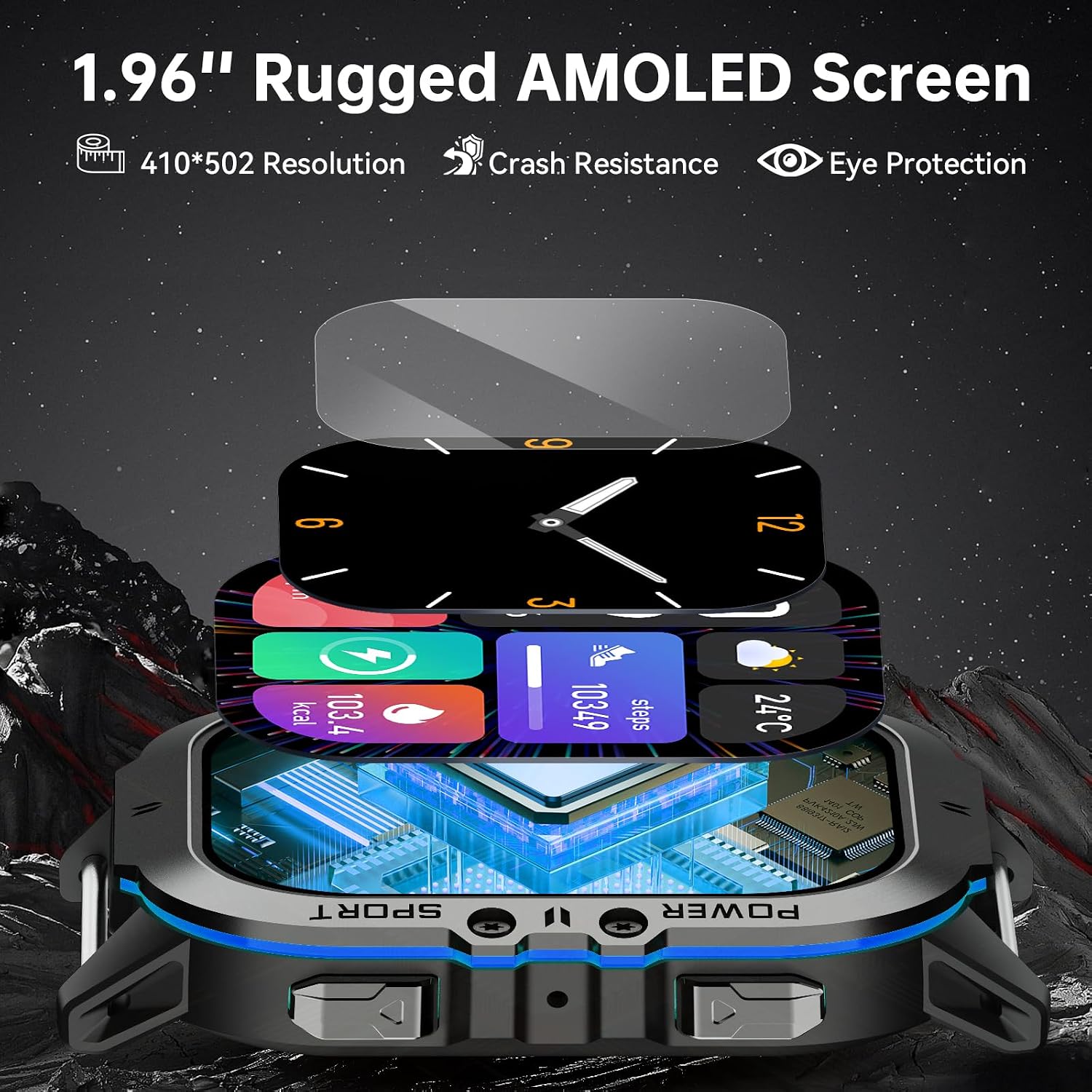
ചിത്രം 3.1: വിശദമായത് view of the 1.96-inch rugged AMOLED screen and watch construction.
4. സജ്ജീകരണം
4.1 ഉപകരണം ചാർജ് ചെയ്യുന്നു
Before first use, fully charge your OUKITEL BT20 Smart Watch. Connect the magnetic charging cable to the charging points on the back of the watch and to a USB power source. The watch features a 350 mAh battery, providing up to 15 days of standby time, 10 days of daily use, or 7 days of heavy use on a single charge.

Image 4.1: Illustration of the watch's long battery life and magnetic charging.
4.2. ആപ്പ് ഡൗൺലോഡും ജോടിയാക്കലും
To unlock the full functionality of your smart watch, download and install the "Mobile APP" (FitCloudPro) on your smartphone. The app is compatible with both Android and iPhone devices.
- Scan the QR code provided in the manual or on the watch screen, or visit http://fitcloud.hetangsmart.com/qrcode/ to download the FitCloudPro app.
- FitCloudPro ആപ്പ് തുറന്ന് സ്ക്രീനിലെ നിർദ്ദേശങ്ങൾ പാലിച്ച് ഒരു അക്കൗണ്ട് സൃഷ്ടിക്കുകയോ ലോഗിൻ ചെയ്യുകയോ ചെയ്യുക.
- Navigate to the 'Device' section within the app and select 'Add Peripheral Now' or 'Discover new device'.
- Ensure Bluetooth is enabled on your smartphone. The app will search for available devices. Select 'BT20' to connect.
- നിങ്ങളുടെ സ്മാർട്ട്ഫോണിലും വാച്ചിലും പെയറിംഗ് അഭ്യർത്ഥന സ്ഥിരീകരിക്കുക.
- Once paired, enable 'Call audio' on the watch to use the Bluetooth calling feature.

Image 4.2: Visual guide for pairing the OUKITEL BT20 Smart Watch with a smartphone.
5. പ്രവർത്തന നിർദ്ദേശങ്ങൾ
5.1. അടിസ്ഥാന നാവിഗേഷൻ
The OUKITEL BT20 features a responsive touchscreen and physical buttons for navigation. Swipe left, right, up, or down to access different functions and menus. Press the side buttons for specific actions like returning to the home screen or accessing sports modes.
5.2. Bluetooth Calls and AI Voice Assistant
With Bluetooth 5.2 technology, the BT20 allows you to make and receive calls directly from your wrist. It also supports synchronizing phone contacts and call logs. Activate the AI Voice Assistant to control your watch using voice commands.

Image 5.1: Demonstrates Bluetooth calling and AI Voice Assistant functionality.
5.3. ആരോഗ്യ നിരീക്ഷണം
The watch includes an optical tracking sensor for 24-hour health monitoring:
- ഹൃദയമിടിപ്പ്: നിങ്ങളുടെ ഹൃദയമിടിപ്പ് തുടർച്ചയായി നിരീക്ഷിക്കുന്നു.
- രക്തസമ്മർദ്ദം: രക്തസമ്മർദ്ദ വായനകൾ നൽകുന്നു.
- രക്ത ഓക്സിജൻ (SpO2): രക്തത്തിലെ ഓക്സിജന്റെ അളവ് അളക്കുന്നു.
- ഉറക്ക ട്രാക്കിംഗ്: Monitors sleep status at night, recording total sleep time and quality.
Synchronize watch data with the "Mobile APP" to view detailed health reports and analyze your health status over time.

Image 5.2: Displays the 24-hour heart rate, blood pressure, and blood oxygen monitoring features.

Image 5.3: Illustrates the sleep monitoring function, showing sleep duration and quality analysis.
5.4. സ്പോർട്സ് മോഡുകൾ
The fitness watch supports over 100 sports modes, including treadmill, jogging, cycling, walking, outdoor training, skiing, swimming, and more. Access these modes through the watch interface and view complete training data in the "Mobile APP". Connect to your mobile phone's GPS to track routes, distances, and fitness metrics during outdoor activities.

Image 5.4: Shows various sports modes supported by the watch, including cycling, running, climbing, walking, fitness, and lift weights.
5.5. Notifications and Other Functions
The BT20 provides various practical functions for a smarter experience:
- സന്ദേശ അറിയിപ്പുകൾ: Receive alerts from SMS, WhatsApp, Instagram, Facebook, and other apps.
- ഇൻകമിംഗ് കോൾ അറിയിപ്പുകൾ: Be alerted to incoming calls.
- സംഗീത നിയന്ത്രണം: നിങ്ങളുടെ സ്മാർട്ട്ഫോണിൽ സംഗീത പ്ലേബാക്ക് നിയന്ത്രിക്കുക.
- ക്യാമറ നിയന്ത്രണം: Remotely trigger your smartphone's camera.
- കാലാവസ്ഥാ പ്രവചനങ്ങൾ: തത്സമയ കാലാവസ്ഥാ അപ്ഡേറ്റുകൾ നേടുക.
- Alarms and Reminders: Set alarms and receive sedentary reminders.
5.6. Custom Watch Faces
Personalize your watch with over 200 rich user interfaces and custom watch face designs available through the app.

Image 5.5: Illustrates the variety of custom watch face designs and user interfaces available.
6. പരിപാലനവും ഈടും
The OUKITEL BT20 is engineered for extreme conditions, making it a reliable companion for various activities.
6.1. ജല പ്രതിരോധം
The watch is 5ATM depth waterproof, allowing it to withstand water pressure equivalent to a depth of 50 meters. It is suitable for swimming, surfing, and other water activities.

Image 6.1: Depicts the watch being used underwater, highlighting its 50-meter waterproof capability.
6.2. Extreme Condition Resistance
The BT20 is built to military standards, ensuring resilience against various environmental challenges:
- താപനില പ്രതിരോധം: Operates in extreme temperatures, from -40°C (Super Antifreeze) to 70°C (Heat Resistance).
- ആഘാത പ്രതിരോധം: Designed to withstand drops and shocks (Ultra Drop Proof, Anti-Smash, Impact Resistance).
- സ്ക്രാച്ച് റെസിസ്റ്റൻസ്: Features a rugged screen (Ultra Scratch Resistant).
- പൊടിപടലം: Protected against dust ingress (Ultra Dustproof).
- ഈർപ്പം പ്രതിരോധം: 240H moisture resistance.
Video 6.1: Demonstrates the OUKITEL BT20 Smart Watch undergoing various durability tests, including freezing, heat, impact, and water submersion, showcasing its military-grade resilience.
7. പ്രശ്നപരിഹാരം
If you encounter issues with your OUKITEL BT20 Smart Watch, please refer to the following common solutions:
- വാച്ച് ഓണാകുന്നില്ല: Ensure the watch is fully charged. Connect it to the magnetic charger and wait a few minutes.
- ഫോണുമായി ജോടിയാക്കാൻ കഴിയുന്നില്ല:
- നിങ്ങളുടെ ഫോണിലും വാച്ചിലും ബ്ലൂടൂത്ത് പ്രവർത്തനക്ഷമമാക്കിയിട്ടുണ്ടെന്ന് ഉറപ്പാക്കുക.
- വാച്ച് നിങ്ങളുടെ ഫോണിന്റെ പരിധിയിലാണെന്ന് ഉറപ്പാക്കുക.
- നിങ്ങളുടെ ഫോണും വാച്ചും പുനരാരംഭിക്കുക.
- Clear the Bluetooth cache on your phone and try pairing again.
- കൃത്യമല്ലാത്ത ആരോഗ്യ ഡാറ്റ:
- വാച്ച് നിങ്ങളുടെ കൈത്തണ്ടയിൽ നന്നായി ധരിക്കുന്നുണ്ടെന്ന് ഉറപ്പാക്കുക, അധികം ഇറുകിയതോ അധികം അയഞ്ഞതോ അല്ല.
- വാച്ചിന്റെ പിൻഭാഗത്തുള്ള സെൻസർ വൃത്തിയാക്കുക.
- അളക്കുമ്പോൾ അമിതമായ ചലനം ഒഴിവാക്കുക.
- അറിയിപ്പുകൾ ദൃശ്യമാകുന്നില്ല:
- Check app permissions on your phone to ensure the FitCloudPro app has access to notifications.
- Verify that notification settings are enabled within the FitCloudPro app for desired applications.
- വാച്ച് ബ്ലൂടൂത്ത് വഴി ബന്ധിപ്പിച്ചിട്ടുണ്ടെന്ന് ഉറപ്പാക്കുക.
- ഹ്രസ്വ ബാറ്ററി ലൈഫ്:
- സ്ക്രീൻ തെളിച്ചം കുറയ്ക്കുക.
- ആവശ്യമില്ലെങ്കിൽ 24/7 തുടർച്ചയായ ഹൃദയമിടിപ്പ് നിരീക്ഷണം പ്രവർത്തനരഹിതമാക്കുക.
- സജീവമായ അറിയിപ്പുകളുടെ എണ്ണം പരിമിതപ്പെടുത്തുക.
- ഓരോ തവണയും വാച്ച് പൂർണ്ണമായും ചാർജ് ചെയ്തിട്ടുണ്ടെന്ന് ഉറപ്പാക്കുക.
പ്രശ്നങ്ങൾ നിലനിൽക്കുകയാണെങ്കിൽ, ദയവായി ഉപഭോക്തൃ പിന്തുണയുമായി ബന്ധപ്പെടുക.
8 സ്പെസിഫിക്കേഷനുകൾ
| ഫീച്ചർ | വിശദാംശങ്ങൾ |
|---|---|
| മോഡൽ നമ്പർ | BT20 |
| സ്ക്രീൻ വലിപ്പം | 1.96 ഇഞ്ച് AMOLED |
| റെസലൂഷൻ | 410*502 |
| ബാറ്ററി ശേഷി | 350 mAh ലിഥിയം പോളിമർ |
| കണക്റ്റിവിറ്റി | ബ്ലൂടൂത്ത് 5.2 |
| ജല പ്രതിരോധം | 5ATM (50 മീറ്റർ) |
| ഓപ്പറേറ്റിംഗ് സിസ്റ്റം | Android Wear 2.0 (compatible with Android/iOS) |
| പ്രത്യേക സവിശേഷതകൾ | Activity Tracker, Custom Activity Tracking, Multisport Tracker, Touchscreen, Voice Control, Health Monitoring (HR, BP, SpO2, Sleep) |
| ഇനത്തിൻ്റെ ഭാരം | 5 ഔൺസ് |
| പാക്കേജ് അളവുകൾ | 9.57 x 6.42 x 1.18 ഇഞ്ച് |

Image 8.1: Diagram showing the dimensions of the OUKITEL BT20 Smart Watch.
9. വാറൻ്റിയും പിന്തുണയും
OUKITEL is committed to providing quality products and customer satisfaction. Your BT20 Smart Watch comes with:
- 2 Years Warranty Service: സാധാരണ ഉപയോഗത്തിലുള്ള നിർമ്മാണ വൈകല്യങ്ങളും തകരാറുകളും ഇതിൽ ഉൾപ്പെടുന്നു.
- 30-Days No Reason to Return Policy: വാങ്ങിയതിന് ശേഷം 30 ദിവസത്തിനുള്ളിൽ തടസ്സരഹിതമായ റിട്ടേണുകൾക്കായി.
- 7 x 24 Hours Customer Service: സമർപ്പിത പിന്തുണ മുഴുവൻ സമയവും ലഭ്യമാണ്.
- Lifetime Support and Satisfied Solutions: Ongoing assistance for the lifespan of your product.
For any inquiries or support needs, please refer to the contact information provided in your retail box or visit the official OUKITEL webസൈറ്റ്.

Image 9.1: Details OUKITEL's service commitment, including warranty and customer support.


