1. ആമുഖം
Welcome to the user manual for your new SGIN 15.6-inch Laptop Computer, Model SGIN-Y101. This guide provides essential information to help you set up, operate, and maintain your device. Please read this manual thoroughly to ensure optimal performance and longevity of your laptop.

Image 1.1: SGIN 15.6-inch Laptop Computer.
2. പാക്കേജ് ഉള്ളടക്കം
അൺപാക്ക് ചെയ്യുമ്പോൾ, താഴെ ലിസ്റ്റ് ചെയ്തിരിക്കുന്ന എല്ലാ ഇനങ്ങളും അവിടെയുണ്ടെന്ന് ദയവായി ഉറപ്പാക്കുക:
- SGIN 15.6-inch Laptop Computer
- പവർ അഡാപ്റ്റർ (ചാർജർ)
- ഉപയോക്തൃ മാനുവൽ (ഈ പ്രമാണം)
3. ഉൽപ്പന്നം കഴിഞ്ഞുview
The SGIN-Y101 laptop is designed for versatile use, featuring a powerful Intel Core i3 processor, ample memory and storage, and a high-definition display. It runs on Windows 11, providing a modern and efficient operating environment.
പ്രധാന സവിശേഷതകൾ:
- പ്രോസസ്സർ: Intel Core i3 CPU (2-core, 4-thread) with speeds up to 3.9GHz for efficient multitasking.
- മെമ്മറിയും സംഭരണവും: 16GB RAM and 1024GB SSD for quick application loading and smooth operation. Storage is expandable via TF card up to 1TB.
- ഡിസ്പ്ലേ: 15.6-inch Full HD (1920x1080) IPS screen with wide viewing angles and a 180° hinge for flexible use.
- കീബോർഡ്: Backlit keyboard for improved visibility in low-light conditions.
- ബാറ്ററി: 53.2WH (7000mAh) rechargeable battery, offering up to 8 hours of usage.
- കണക്റ്റിവിറ്റി: Equipped with WiFi 6, USB 3.0, HDMI, Micro SD slot, Kensington lock, and a headphone jack. Includes a full-featured Type-C port.
- ഓപ്പറേറ്റിംഗ് സിസ്റ്റം: Pre-installed with Windows 11.
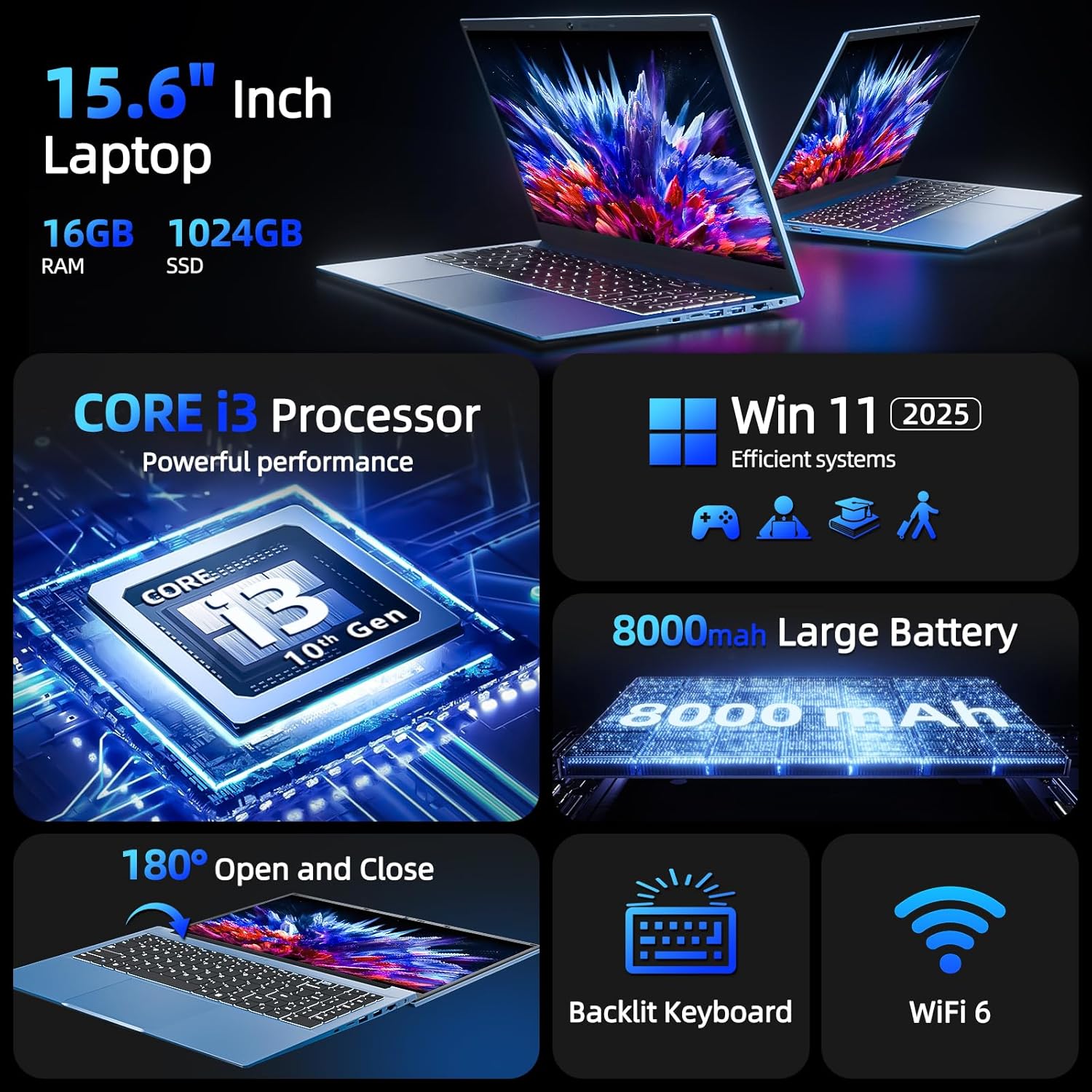
ചിത്രം 3.1: കഴിഞ്ഞുview of SGIN Laptop's key features including CPU, OS, battery, display, keyboard, and WiFi 6.

Image 3.2: Visual representation of the Intel Core i3 CPU performance.
ഉൽപ്പന്ന വീഡിയോ:
വീഡിയോ 3.1: ഒരു ഓവർview of the SGIN 15.6-inch Laptop Computer, highlighting its design, wide mousepad, 16GB RAM, 1024GB SSD, Windows 11 operating system, backlit keyboard, 53.2WH battery, 15.6-inch Full HD screen, 180-degree hinge, and various connectivity ports including Type-C, HDMI, and USB.
4. സജ്ജീകരണം
4.1 പ്രാരംഭ ചാർജിംഗ്
- ലാപ്ടോപ്പിലെ ചാർജിംഗ് പോർട്ടിലേക്ക് പവർ അഡാപ്റ്റർ ബന്ധിപ്പിക്കുക.
- ഒരു മതിൽ ഔട്ട്ലെറ്റിലേക്ക് പവർ അഡാപ്റ്റർ പ്ലഗ് ചെയ്യുക.
- Allow the laptop to charge for at least 3 hours before initial use, or until the battery indicator shows a full charge.
4.2 First Power-On and Windows 11 Setup
- ലാപ്ടോപ്പ് ലിഡ് തുറക്കുക.
- കീബോർഡിൽ സ്ഥിതിചെയ്യുന്ന പവർ ബട്ടൺ അമർത്തുക.
- ഭാഷാ തിരഞ്ഞെടുപ്പ്, പ്രദേശം, നെറ്റ്വർക്ക് കണക്ഷൻ, ഉപയോക്തൃ അക്കൗണ്ട് സൃഷ്ടിക്കൽ എന്നിവയുൾപ്പെടെ Windows 11 പ്രാരംഭ സജ്ജീകരണം പൂർത്തിയാക്കാൻ ഓൺ-സ്ക്രീൻ നിർദ്ദേശങ്ങൾ പാലിക്കുക.
4.3 Wi-Fi-ലേക്ക് ബന്ധിപ്പിക്കുന്നു
- During Windows 11 setup, you will be prompted to connect to a Wi-Fi network. Select your desired network from the list.
- ആവശ്യപ്പെടുകയാണെങ്കിൽ Wi-Fi പാസ്വേഡ് നൽകുക.
- If you skip this step, you can connect later via the Windows Settings menu: Go to ആരംഭിക്കുക > ക്രമീകരണങ്ങൾ > നെറ്റ്വർക്കും ഇൻ്റർനെറ്റും > വൈഫൈ.
5. നിങ്ങളുടെ ലാപ്ടോപ്പ് പ്രവർത്തിപ്പിക്കുക
5.1 കീബോർഡും ടച്ച്പാഡും
Your SGIN laptop features a full-size keyboard with a numeric keypad and a large touchpad for navigation.
- ബാക്ക്ലൈറ്റ് കീബോർഡ്: To turn the keyboard backlight on or off, press the Fn കീ ഒരേസമയം F5 താക്കോൽ.
- ടച്ച്പാഡ്: Supports multi-touch gestures for scrolling, zooming, and other functions. Refer to Windows 11 settings for customization.

Image 5.1: The backlit keyboard of the SGIN laptop, showing illumination in low-light conditions.
5.2 ഡിസ്പ്ലേ
The 15.6-inch Full HD IPS display offers clear visuals and wide viewing angles. The 180° hinge allows the screen to lay flat, facilitating easy content sharing and collaboration.

Image 5.2: Demonstration of the 180-degree hinge design, allowing the laptop screen to lay completely flat.
5.3 പോർട്ടുകളും കണക്റ്റിവിറ്റിയും
The laptop provides various ports for connecting peripherals and external devices:
- ഇടത് വശം: Power input, USB Type-C (full-featured, rechargeable), HDMI, USB 3.0.
- വലത് വശം: Kensington lock slot, Micro SD card slot, 2x USB 3.0, Ethernet (RJ45), 3.5mm Headphone Jack.

ചിത്രം 5.3: വിശദമായത് view of the various ports and interfaces on both sides of the SGIN laptop.
5.4 Webcam Privacy Switch
For enhanced privacy, your laptop includes a physical switch to cover the webcam. Slide the switch to the left to open the camera and to the right to close it.
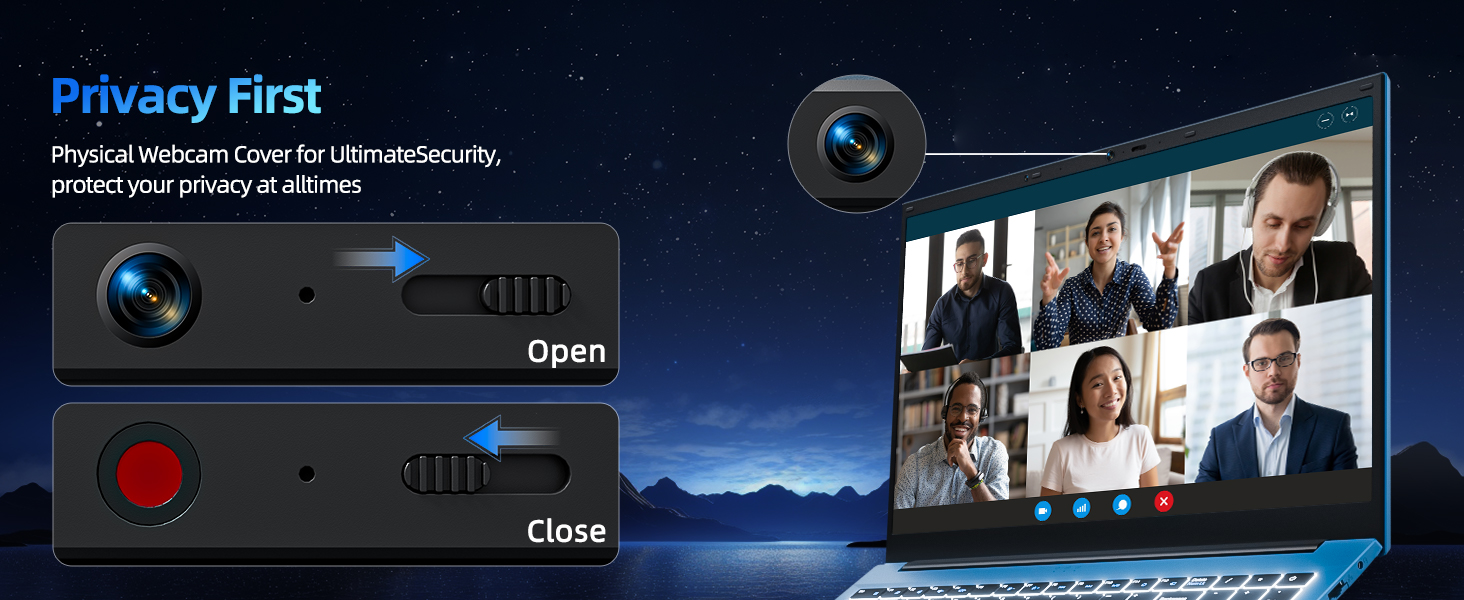
Image 5.4: Illustration of the physical webcam cover for privacy.
6. പരിപാലനം
6.1 ബാറ്ററി കെയർ
- ബാറ്ററി ഇടയ്ക്കിടെ പൂർണ്ണമായും ഡിസ്ചാർജ് ചെയ്യുന്നത് ഒഴിവാക്കുക.
- ദീർഘനേരം ഉപയോഗിക്കാത്തപ്പോൾ ലാപ്ടോപ്പ് തണുത്തതും വരണ്ടതുമായ സ്ഥലത്ത് സൂക്ഷിക്കുക.
- ബാറ്ററിയുടെ മികച്ച ആരോഗ്യത്തിന്, ചാർജ് ലെവൽ 20% നും 80% നും ഇടയിൽ നിലനിർത്താൻ ശ്രമിക്കുക.
6.2 വൃത്തിയാക്കൽ
- സ്ക്രീൻ: മൃദുവായ, ലിൻ്റ് രഹിത തുണി ഉപയോഗിക്കുകampവെള്ളമോ സ്ക്രീൻ ക്ലീനറോ ഉപയോഗിച്ച് നനയ്ക്കുക. കഠിനമായ രാസവസ്തുക്കൾ ഒഴിവാക്കുക.
- കീബോർഡും ചേസിസും: Use a soft, dry cloth. A can of compressed air can help remove dust from between keys.
- വൃത്തിയാക്കുന്നതിനുമുമ്പ് ലാപ്ടോപ്പ് പവർ ഓഫ് ചെയ്തിട്ടുണ്ടെന്നും പ്ലഗ് ഊരിവെച്ചിട്ടുണ്ടെന്നും ഉറപ്പാക്കുക.
6.3 സോഫ്റ്റ്വെയർ അപ്ഡേറ്റുകൾ
Regularly update your Windows 11 operating system and device drivers to ensure security, stability, and optimal performance. Access updates via ആരംഭിക്കുക > ക്രമീകരണങ്ങൾ > വിൻഡോസ് അപ്ഡേറ്റ്.
7. പ്രശ്നപരിഹാരം
This section addresses common issues you might encounter with your SGIN laptop.
7.1 ലാപ്ടോപ്പ് ഓണാകുന്നില്ല
- പവർ അഡാപ്റ്റർ ലാപ്ടോപ്പിലേക്കും പ്രവർത്തിക്കുന്ന ഒരു പവർ ഔട്ട്ലെറ്റിലേക്കും സുരക്ഷിതമായി ബന്ധിപ്പിച്ചിട്ടുണ്ടെന്ന് ഉറപ്പാക്കുക.
- മറ്റൊരു ഉപകരണം പ്ലഗ് ഇൻ ചെയ്ത് പവർ ഔട്ട്ലെറ്റ് പ്രവർത്തനക്ഷമമാണെന്ന് ഉറപ്പാക്കുക.
- ബാറ്ററി പൂർണ്ണമായും തീർന്നാൽ, വീണ്ടും പവർ ഓൺ ചെയ്യാൻ ശ്രമിക്കുന്നതിന് മുമ്പ് കുറഞ്ഞത് 30 മിനിറ്റെങ്കിലും ചാർജ് ചെയ്യാൻ അനുവദിക്കുക.
7.2 വൈ-ഫൈ കണക്റ്റിവിറ്റി പ്രശ്നങ്ങൾ
- Check if Wi-Fi is enabled in Windows Settings (ആരംഭിക്കുക > ക്രമീകരണങ്ങൾ > നെറ്റ്വർക്കും ഇൻ്റർനെറ്റും > വൈഫൈ).
- നിങ്ങളുടെ റൂട്ടറും മോഡവും പുനരാരംഭിക്കുക.
- Ensure you are within range of the Wi-Fi network and have entered the correct password.
7.3 മന്ദഗതിയിലുള്ള പ്രകടനം
- പശ്ചാത്തലത്തിൽ പ്രവർത്തിക്കുന്ന അനാവശ്യ ആപ്ലിക്കേഷനുകൾ അടയ്ക്കുക.
- ശേഷിക്കുന്ന ഏതെങ്കിലും വിൻഡോസ് അപ്ഡേറ്റുകൾ പരിശോധിച്ച് ഇൻസ്റ്റാൾ ചെയ്യുക.
- Ensure your SSD has sufficient free space.
- മാൽവെയർ പരിശോധിക്കാൻ ഒരു വൈറസ് സ്കാൻ പ്രവർത്തിപ്പിക്കുക.
7.4 കീബോർഡ് ബാക്ക്ലൈറ്റ് പ്രവർത്തിക്കുന്നില്ല
- അമർത്തുക Fn + F5 ബാക്ക്ലൈറ്റ് ഓൺ/ഓഫ് ടോഗിൾ ചെയ്യാൻ.
- Ensure your laptop's drivers are up to date.
8 സ്പെസിഫിക്കേഷനുകൾ
| ഫീച്ചർ | സ്പെസിഫിക്കേഷൻ |
|---|---|
| മോഡലിൻ്റെ പേര് | SGIN-Y101 |
| സ്റ്റാൻഡിംഗ് സ്ക്രീൻ ഡിസ്പ്ലേ വലുപ്പം | 15.6 ഇഞ്ച് |
| സ്ക്രീൻ റെസല്യൂഷൻ | 1920 x 1080 പിക്സലുകൾ (ഫുൾ എച്ച്ഡി) |
| പ്രോസസ്സർ | ഇന്റൽ കോർ i3 (3.9 GHz വരെ) |
| റാം | 16 GB DDR3 |
| ഹാർഡ് ഡ്രൈവ് | 1024 ജിബി എസ്എസ്ഡി |
| ഗ്രാഫിക്സ് കോപ്രൊസസർ | സംയോജിപ്പിച്ചത് |
| വയർലെസ് തരം | WiFi 6, Bluetooth |
| USB 3.0 പോർട്ടുകളുടെ എണ്ണം | 3 |
| ഓപ്പറേറ്റിംഗ് സിസ്റ്റം | വിൻഡോസ് 11 |
| ഇനത്തിൻ്റെ ഭാരം | 4.99 പൗണ്ട് |
| ഉൽപ്പന്ന അളവുകൾ | 15.6 x 9 x 0.6 ഇഞ്ച് |
| നിറം | ചാരനിറം |
| ബാറ്ററികൾ | 1 ലിഥിയം അയോൺ ബാറ്ററി (ഉൾപ്പെടുത്തിയിരിക്കുന്നു) |
| പ്രത്യേക ഫീച്ചർ | Memory Card Slot, Backlit Keyboard, 180° Hinge |
9. വാറൻ്റിയും പിന്തുണയും
Your SGIN laptop comes with a 1-year protection plan. For any technical assistance, product inquiries, or warranty claims, please contact SGIN customer support. They offer 24/7 instant help to address your concerns.
Please refer to the official SGIN webഏറ്റവും കാലികമായ പിന്തുണാ വിശദാംശങ്ങൾക്ക് നിങ്ങളുടെ വാങ്ങലിനൊപ്പം നൽകിയിരിക്കുന്ന വെബ്സൈറ്റ് അല്ലെങ്കിൽ കോൺടാക്റ്റ് വിവരങ്ങൾ സന്ദർശിക്കുക.


