1 പ്രധാനപ്പെട്ട സുരക്ഷാ വിവരങ്ങൾ
- Ensure the camera is placed on a stable surface or securely mounted to prevent falls.
- Avoid exposing the camera to extreme temperatures, direct sunlight, or moisture.
- Keep the camera away from strong magnetic fields.
- ക്യാമറ സ്വയം വേർപെടുത്താനോ നന്നാക്കാനോ ശ്രമിക്കരുത്. സഹായത്തിനായി ഉപഭോക്തൃ പിന്തുണയുമായി ബന്ധപ്പെടുക.
- Use only the provided power adapter and charging cable.
2. ബോക്സിൽ എന്താണുള്ളത്?

Image: VSTARCAM CS24B camera and its accessories, including charging cable, power adapter, mounting screws, and instruction manual.
- 1 x VSTARCAM CS24B Indoor Camera with Battery
- 1 x ചാർജിംഗ് കേബിൾ
- 1 x പവർ അഡാപ്റ്റർ
- 1 x ഇൻസ്ട്രക്ഷൻ മാനുവൽ
- 1 x മൗണ്ടിംഗ് സ്ക്രൂകളുടെ സെറ്റ്
3. ഉൽപ്പന്നം കഴിഞ്ഞുview
പ്രധാന സവിശേഷതകൾ
- 2K UHD വ്യക്തത: Delivers sharp and detailed video footage.
- Wireless Battery-Powered: Offers flexible placement without power cord hassles.
- 360° Rotation Coverage: Ensures no blind spots with comprehensive surveillance.
- Smart Motion Detection & Auto Tracking: Alerts you instantly to activity and tracks movement.
- Vivid Color Night Vision: Captures detailed visuals in low light conditions.
- Interactive Two-Way Audio & DIY Voice: Enables seamless communication and customized alerts.
- Flexible Cloud & SD Card Storage: Supports cloud storage and SD cards up to 256GB for secure footage.
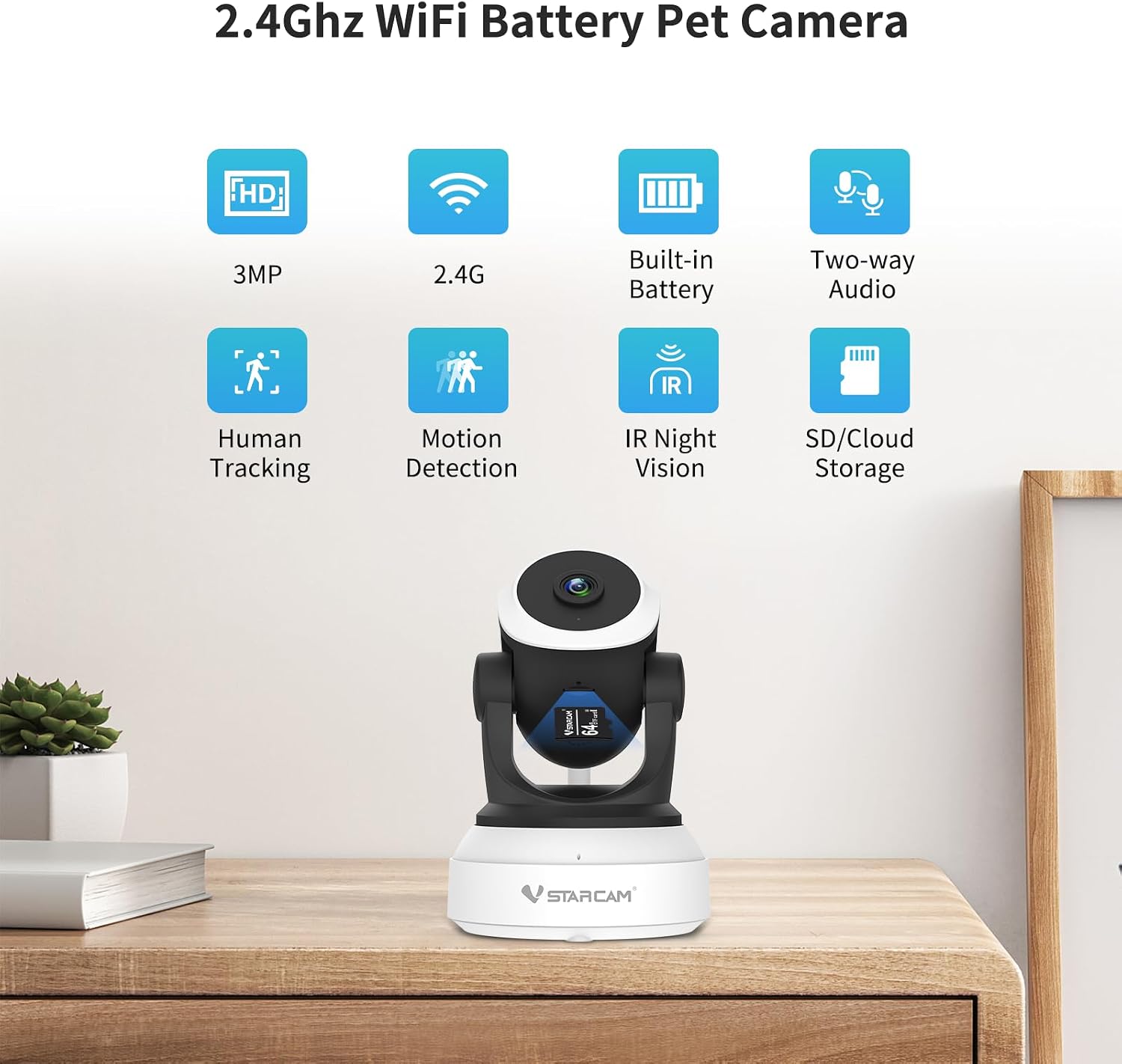
Image: Visual representation of key features including 3MP HD, 2.4GHz WiFi, built-in battery, two-way audio, human tracking, motion detection, IR night vision, and SD/cloud storage.
ഘടകം തിരിച്ചറിയൽ
The VSTARCAM CS24B features a compact design with a rotating head for wide area coverage. Key components include the camera lens, infrared sensors for night vision, a microphone and speaker for two-way audio, and a power input port.

ചിത്രം: മുൻഭാഗം view of the VSTARCAM CS24B camera, highlighting its lens and compact design.
4. സജ്ജീകരണ ഗൈഡ്
പ്രാരംഭ സജ്ജീകരണം
- ക്യാമറ ചാർജ് ചെയ്യുക: Before first use, fully charge the camera using the provided charging cable and power adapter.
- പവർ ഓൺ: Locate the power button (usually on the bottom or back) and press it to turn on the camera. An indicator light will illuminate.
ആപ്പ് ഡൗൺലോഡ് ചെയ്ത് ഇൻസ്റ്റാൾ ചെയ്യുക
The VSTARCAM CS24B camera operates with the VicoHome app. Download the app from your smartphone's app store (Android or iOS) or scan the QR code provided in the manual or on the packaging.

Image: Step-by-step guide for app download, connecting to 2.4GHz WiFi, resetting the camera, and scanning a QR code for setup.
Wi-Fi കണക്ഷൻ
- Open the VicoHome app and create an account or log in.
- Follow the in-app instructions to add a new device. Select your camera model.
- Ensure your smartphone is connected to a 2.4GHz Wi-Fi network. The camera does not support 5GHz Wi-Fi.
- The app will guide you to connect the camera to your Wi-Fi network, often by displaying a QR code on your phone screen for the camera to scan.
മൗണ്ടിംഗ് ഓപ്ഷനുകൾ
The VSTARCAM CS24B can be placed on a tabletop or mounted to a wall or ceiling using the included mounting screws. Ensure the mounting location has a stable Wi-Fi signal.

Image: The camera is shown on a table and mounted on a ceiling, demonstrating easy, wireless installation.
Video: This video demonstrates the VSTARCAM camera's setup process, including unboxing, connecting to power, and initial app configuration. It highlights the ease of installation and connection to the VicoHome app.
5. പ്രവർത്തന നിർദ്ദേശങ്ങൾ
തത്സമയം View നിയന്ത്രണങ്ങളും
Once connected, open the VicoHome app to access the live feed from your camera. Use the on-screen controls to pan (horizontal movement), tilt (vertical movement), and zoom to adjust your view. The camera offers 360° rotation for comprehensive coverage.

Image: The VicoHome app interface showing controls for 360° panoramic viewing, including pan and tilt functions.
ടു-വേ ഓഡിയോ
The camera features two-way audio, allowing you to listen to your environment and speak through the camera's built-in speaker. This is useful for communicating with family members, pets, or deterring unwanted visitors.

Image: A child interacting with a parent through the camera's two-way audio feature, with speech bubbles indicating communication.
Motion Detection & Auto Tracking
Enable motion detection in the app to receive instant alerts on your smartphone when movement is detected. The auto-tracking feature allows the camera to follow detected motion, ensuring the subject remains in view.

Image: The camera detects and tracks a child's movement, illustrating human detection, human framing, and motion detection capabilities.
നൈറ്റ് വിഷൻ
The camera is equipped with vivid color night vision, providing clear and detailed images even in low-light conditions. This ensures continuous monitoring day and night.

ചിത്രം: ഒരു വിഭജനം view demonstrating clear night vision, with one side showing a person in a dimly lit room and the other showing a sharp, black and white image of a dog.
സ്റ്റോറേജ് ഓപ്ഷനുകൾ
ഫൂtage can be securely stored using either cloud storage (subscription may be required) or a local SD card (up to 256GB, not included). The app allows for remote playback of recorded videos.

Image: The camera offers dual storage options: 7 days of free cloud storage and local Micro SD card storage (up to 256GB, card not included).
മൾട്ടി-ക്യാമറ View & Family Sharing
The VicoHome app supports managing multiple cameras simultaneously, allowing you to monitor different areas of your home from a single interface. You can also securely share camera access with family members.

Image: The VicoHome app displays a multi-camera view across different devices (Android, iOS, Windows) and illustrates the family sharing feature with a QR code.
6. പരിപാലനം
- വൃത്തിയാക്കൽ: മൃദുവായതും ഉണങ്ങിയതുമായ തുണി ഉപയോഗിച്ച് ക്യാമറ ലെൻസും ബോഡിയും സൌമ്യമായി തുടയ്ക്കുക. കഠിനമായ രാസവസ്തുക്കളോ ഉരച്ചിലുകളോ ഉള്ള വസ്തുക്കൾ ഉപയോഗിക്കുന്നത് ഒഴിവാക്കുക.
- ഫേംവെയർ അപ്ഡേറ്റുകൾ: Regularly check the VicoHome app for available firmware updates to ensure optimal performance and security.
- ബാറ്ററി കെയർ: For battery-powered cameras, ensure regular charging to maintain functionality. Avoid fully depleting the battery frequently.
7. പ്രശ്നപരിഹാരം
- ക്യാമറ ഓഫ്ലൈൻ: Check Wi-Fi connection, ensure camera is powered on, and verify router settings (2.4GHz only).
- മോശം ചിത്രത്തിന്റെ ഗുണനിലവാരം: Ensure the lens is clean, check Wi-Fi signal strength, and adjust camera placement if necessary.
- മോഷൻ അലേർട്ടുകൾ ലഭിച്ചില്ല: Verify motion detection settings in the app, check notification permissions on your phone, and ensure the camera is online.
- ടു-വേ ഓഡിയോ പ്രശ്നങ്ങൾ: Check microphone and speaker volume settings in the app, and ensure there is no obstruction to the microphone/speaker.
- Camera Not Connecting to App: Try resetting the camera (refer to the manual for reset button location) and repeat the setup process.
8 സ്പെസിഫിക്കേഷനുകൾ
| ഫീച്ചർ | വിശദാംശങ്ങൾ |
|---|---|
| മോഡലിൻ്റെ പേര് | CS24B |
| ഇൻഡോർ/ഔട്ട്ഡോർ ഉപയോഗം | ഇൻഡോർ |
| വീഡിയോ ക്യാപ്ചർ റെസല്യൂഷൻ | 1440p (2K UHD) |
| ഫലപ്രദമായ സ്റ്റിൽ റെസല്യൂഷൻ | 4 എം.പി |
| കണക്റ്റിവിറ്റി ടെക്നോളജി | Wired, Wireless (2.4GHz Wi-Fi) |
| പവർ ഉറവിടം | Corded Electric (Battery Powered) |
| മൗണ്ടിംഗ് തരം | Tabletop Mount, Self Adhesive |
| Viewing ആംഗിൾ | 101 ഡിഗ്രി |
| നൈറ്റ് വിഷൻ റേഞ്ച് | 15 മീറ്റർ |
| ഫ്രെയിം റേറ്റ് | സെക്കൻഡിൽ 15 ഫ്രെയിമുകൾ |
| നിയന്ത്രണ രീതി | App (VicoHome) |
| ഉൽപ്പന്ന അളവുകൾ | 3 x 3 x 5 ഇഞ്ച് |
| ഇനത്തിൻ്റെ ഭാരം | 1.28 പൗണ്ട് |
9. വാറൻ്റിയും പിന്തുണയും
VSTARCAM products typically come with a manufacturer's warranty. Please refer to the product packaging or the official VSTARCAM webനിർദ്ദിഷ്ട വാറൻ്റി വിശദാംശങ്ങൾക്കും നിബന്ധനകൾക്കുമുള്ള സൈറ്റ്.
For technical support, troubleshooting assistance, or any inquiries regarding your VSTARCAM CS24B camera, please contact VSTARCAM customer service through their official webസൈറ്റ് അല്ലെങ്കിൽ നിങ്ങളുടെ ഉൽപ്പന്ന ഡോക്യുമെന്റേഷനിൽ നൽകിയിരിക്കുന്ന ബന്ധപ്പെടാനുള്ള വിവരങ്ങൾ.


