1. ആമുഖം
This instruction manual provides comprehensive guidance for the installation, operation, and maintenance of your EONON 10.1-inch Display Audio System, Model UX7J-PLUS. Please read this manual thoroughly before using the product to ensure proper functionality and safety. Keep this manual for future reference.
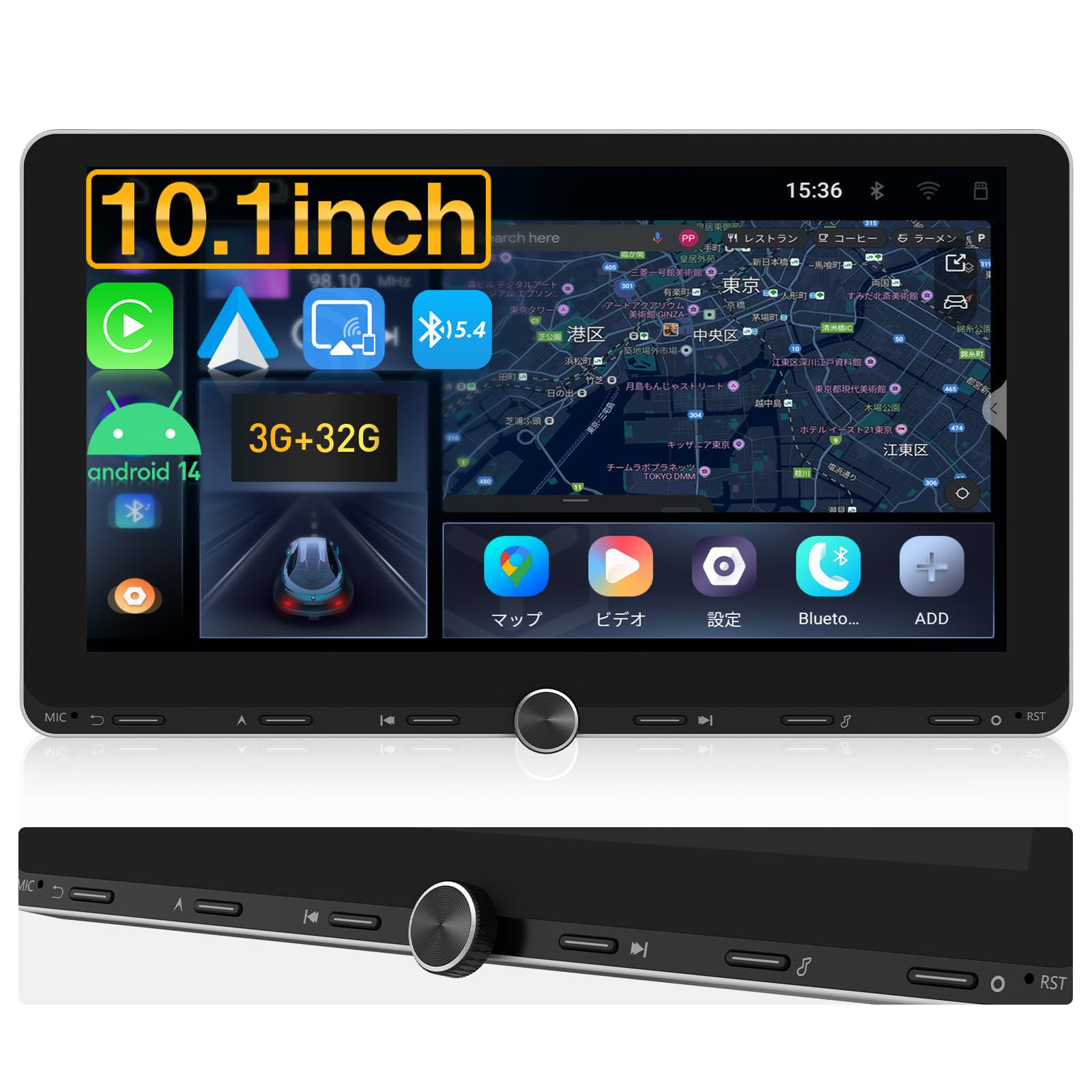
Figure 1: EONON 10.1-inch Display Audio System UX7J-PLUS
2 പ്രധാന സവിശേഷതകൾ
- ആൻഡ്രോയിഡ് 14 ഓപ്പറേറ്റിംഗ് സിസ്റ്റം: Experience enhanced speed, stability, and compatibility with a wide range of applications. Supports OTA updates for software fixes and security improvements.
- ഉയർന്ന പ്രകടനമുള്ള പ്രോസസ്സർ: Equipped with an energy-efficient processor (3GB RAM + 32GB ROM) for smooth operation of multiple applications and fast data transfer. An optional 4GB RAM + 64GB ROM version is available for increased performance and storage.
- Physical Buttons & Knob Control: Features physical buttons and a rotary knob for intuitive and safe operation while driving. The aluminum alloy frame provides durability and a stylish design.
- 10.1-ഇഞ്ച് IPS ഡിസ്പ്ലേ: A large 10.1-inch IPS screen with 1280x720 resolution offers clear, detailed visuals and wide viewing angles for an improved navigation and entertainment experience.
- CarPlay & Android Auto: Seamlessly connect your smartphone for navigation, calls, music, and voice assistance. Supports both wired and wireless connections.
- Mirroring Function (TLINK): Synchronize photos, music, and videos from your smartphone directly to the unit.
- WiFi & Bluetooth 5.4 Connectivity: Connect to the internet via Wi-Fi or smartphone tethering to download and install apps like YouTube and Netflix. Bluetooth 5.4 ensures faster data transfer, wider communication range, and enhanced anti-interference for clear calls and high-quality music.
- Enhanced In-Car Audio: Features a TDA7388 surround stereo for an immersive audio experience with powerful output (4 x 45W max) and a 36-band graphic equalizer for optimal sound customization.
- AHD Rear Camera Support: Compatible with AHD rear cameras (up to 1920x1080 resolution). Automatically switches to the rear camera view when reversing, with adjustable guidelines and image flip options.
- വികസിപ്പിക്കാവുന്ന ഓപ്ഷനുകൾ: Supports various optional accessories such as TV tuners (EONON V0051), dash cams (EONON A100), OBD2 (EONON V0056), and RCA/HDMI output for full-screen sharing (EONON A0595/A0596). Note: Some apps may not support video output.
- UI Customization & Multi-Window: Choose from three UI options and customize the home screen. Panel light colors can also be adjusted. Multi-window support allows simultaneous display of navigation and other applications (e.g., 5:5 split screen), reducing distractions while driving. Note: Multi-window may not be supported for some services like CarPlay or Bluetooth.
- FM/AM/Wide FM: Wide FM support covers a broad frequency range, ensuring reliable reception of emergency broadcasts during disasters. Features SI4755 radio module for stable reception sensitivity.
- New Embedded Screen Connection & Short Body Design: The newly developed screen connection structure eliminates the need for cumbersome power cables, simplifying installation and removal. The short body design makes installation easier, even for beginners.

ചിത്രം 2: സിസ്റ്റം കഴിഞ്ഞുview

Figure 3: Physical Buttons and Display
3. സജ്ജീകരണവും ഇൻസ്റ്റാളേഷനും
3.1 വയറിംഗ് ഡയഗ്രം
ശരിയായ വയറിംഗ് കണക്ഷനുകൾക്ക് ഇനിപ്പറയുന്ന ഡയഗ്രം കാണുക. യൂണിറ്റ് ഓൺ ചെയ്യുന്നതിന് മുമ്പ് എല്ലാ കണക്ഷനുകളും സുരക്ഷിതമാണെന്ന് ഉറപ്പാക്കുക.

Figure 4: Wiring Diagram and Accessories
3.2 Connecting the Rear Camera
To connect the rear camera, follow the steps in the video below. Ensure the camera's power cable is connected to the reverse lamp +12V and ground, and the RCA video output is connected to the unit's camera input. The reverse signal wire from the camera should connect to the unit's reverse signal code.
Video 1: EONON UX7SKJ-PRO-MAX Back Camera Installation Guide. This video demonstrates the correct wiring and connection procedure for the rear camera.
3.3 Steering Wheel Control Setup
To configure your steering wheel controls, connect the vehicle's SWC wires to the corresponding SWC wires on the head unit. Then, use the learning function in the settings menu to map the buttons. If your vehicle has only one SWC wire, connect it to either SW1 or SW2. Do not use one of these as a ground wire. The main unit's ground wire (ACC) can be used for the steering wheel control ground.
Video 2: EONON UX7SKJ-PRO-MAX Steering Remote Control Connection and Setup. This video illustrates how to connect and program your steering wheel controls.
3.4 Front Panel Removal and Installation
The front panel of the UX7J-PLUS is designed for easy removal and installation. This is useful for security or maintenance. Follow the steps in the video to detach and reattach the panel.
Video 3: EONON UX6SKJ-PRO-MAX Front Panel Removal and Installation. This video demonstrates the process of detaching and reattaching the front panel.
4. പ്രവർത്തന നിർദ്ദേശങ്ങൾ
4.1 അടിസ്ഥാന പ്രവർത്തനം
The unit features a user-friendly interface with intuitive touch controls and physical buttons. Navigate through menus by swiping and tapping. Use the physical knob for volume control and quick access to essential functions.

ചിത്രം 5: പ്രധാന ഉപയോക്തൃ ഇന്റർഫേസ്
4.2 കാർപ്ലേയും ആൻഡ്രോയിഡ് ഓട്ടോയും
Connect your iPhone or Android smartphone to enable CarPlay or Android Auto. This allows you to access navigation, make calls, send messages, and play music directly from your phone's interface on the unit's screen.
Video 4: EONON GA2198J Wireless CarPlay Connection Guide. This video demonstrates how to connect your iPhone wirelessly to CarPlay.

Figure 6: CarPlay, Android Auto, and Mirroring
4.3 Multi-Window Function
The multi-window feature allows you to run two applications simultaneously on a split screen, such as navigation and a music player. This enhances convenience and reduces the need to switch between apps.

Figure 7: Multi-Window Display
5. പരിപാലനം
To ensure the longevity and optimal performance of your EONON Display Audio System, regular maintenance is recommended:
- സ്ക്രീൻ ക്ലീനിംഗ്: സ്ക്രീൻ മൃദുവായി തുടയ്ക്കാൻ മൃദുവായ, ലിന്റ് രഹിത തുണി ഉപയോഗിക്കുക. കഠിനമായ കറകൾക്ക്, ചെറുതായി dampതുണിയിൽ വെള്ളം അല്ലെങ്കിൽ സ്ക്രീൻ-സേഫ് ക്ലീനർ ഉപയോഗിക്കുക. കഠിനമായ രാസവസ്തുക്കൾ ഒഴിവാക്കുക.
- സോഫ്റ്റ്വെയർ അപ്ഡേറ്റുകൾ: Periodically check for available OTA (Over-The-Air) software updates in the system settings. These updates can improve performance, fix bugs, and enhance security.
- കേബിൾ കണക്ഷനുകൾ: Ensure all cables are securely connected. Loose connections can lead to intermittent issues.
- താപനില നിയന്ത്രണം: യൂണിറ്റ് ദീർഘനേരം തീവ്രമായ താപനിലയിൽ തുറന്നുകാട്ടുന്നത് ഒഴിവാക്കുക.

Figure 8: Software Update Interface
6. പ്രശ്നപരിഹാരം
If you encounter any issues with your unit, refer to the following common troubleshooting tips:
- ശക്തിയില്ല: Check all power connections. Ensure the ACC and 12V battery wires are correctly connected and fused.
- ശബ്ദമില്ല: Verify speaker connections. Check volume levels and equalizer settings. Ensure the correct audio source is selected.
- ടച്ച് സ്ക്രീൻ പ്രതികരിക്കുന്നില്ല: യൂണിറ്റ് പുനരാരംഭിക്കാൻ ശ്രമിക്കുക. പ്രശ്നം നിലനിൽക്കുകയാണെങ്കിൽ, ഒരു ഫാക്ടറി റീസെറ്റ് നടത്തുക (ശ്രദ്ധിക്കുക: ഇത് എല്ലാ ഉപയോക്തൃ ഡാറ്റയും മായ്ക്കും).
- കാർപ്ലേ/ആൻഡ്രോയിഡ് ഓട്ടോ കണക്റ്റ് ചെയ്യുന്നില്ല: Ensure Bluetooth and Wi-Fi are enabled on your phone and the unit. Check that the correct app (e.g., Zlink) is running. Try reconnecting Bluetooth.
- പിൻ ക്യാമറ പ്രദർശിപ്പിക്കുന്നില്ല: Check the rear camera's power and video connections. Ensure the reverse signal wire is correctly connected to trigger the camera view.
- മന്ദഗതിയിലുള്ള പ്രകടനം: ആവശ്യമില്ലാത്ത പശ്ചാത്തല ആപ്ലിക്കേഷനുകൾ അടയ്ക്കുക. കാഷെ മായ്ക്കുക, താൽക്കാലികം files. Consider upgrading to a higher RAM/ROM model if performance remains an issue with heavy usage.
For further assistance, please contact EONON customer support.
7 സ്പെസിഫിക്കേഷനുകൾ
| ഫീച്ചർ | സ്പെസിഫിക്കേഷൻ |
|---|---|
| സ്ക്രീൻ വലിപ്പം | 10.1 ഇഞ്ച് |
| ഡിസ്പ്ലേ തരം | LCD (IPS Touchscreen) |
| ഉൽപ്പന്ന അളവുകൾ | 17.8 x 8 x 10 സെ.മീ |
| ഉൽപ്പന്ന മോഡൽ നമ്പർ | UX7J-PLUS |
| മെമ്മറി സ്റ്റോറേജ് കപ്പാസിറ്റി | 32 ജിബി (റോം) |
| റാം | 3 ജിബി |
| കണക്റ്റിവിറ്റി ടെക്നോളജി | ബ്ലൂടൂത്ത് 5.4, വൈ-ഫൈ |
| മാപ്പ് തരം | Asia (compatible with various navigation apps) |
| മൗണ്ടിംഗ് തരം | ഡാഷ്ബോർഡ് മ .ണ്ട് |
| അനുയോജ്യമായ വാഹന തരം | SUV (Universal 2DIN fit) |
| ഉൾപ്പെടുത്തിയ ഘടകങ്ങൾ | Audio cable x1, Power cable x1, AV conversion cable x1, Backup camera input x1, GPS antenna (2m) x1, Microphone (3m) x1, Mounting screws x10, Spare fuse x1, Instruction manual x1, USB cable (80mm) x1, CarPlay USB cable (80mm) x1 |
8. വാറൻ്റിയും പിന്തുണയും
EONON products come with a standard warranty. Please refer to the warranty card included in your package for specific terms and conditions. For technical support, troubleshooting, or warranty claims, please contact EONON customer service through their official webനിങ്ങളുടെ വാങ്ങലിനൊപ്പം നൽകിയിരിക്കുന്ന സൈറ്റ് അല്ലെങ്കിൽ ബന്ധപ്പെടാനുള്ള വിവരങ്ങൾ.
Official EONON Store: EONON Amazon Store


