1. ആമുഖം
This manual provides detailed instructions for the installation, operation, and maintenance of your Eonon UX7-PLUS Android 14 Double Din Car Stereo. Please read this manual thoroughly before using the product to ensure proper function and safety. The Eonon UX7-PLUS is an advanced car multimedia system designed to enhance your driving experience with smart features and robust performance.

Image 1.1: Eonon UX7-PLUS Car Stereo with included backup camera and a view of the screen connection.
2 സുരക്ഷാ വിവരങ്ങൾ
- ഉപകരണം എപ്പോഴും ഉത്തരവാദിത്തത്തോടെയും പ്രാദേശിക ഗതാഗത നിയമങ്ങൾക്കനുസൃതമായും പ്രവർത്തിപ്പിക്കുക. ശ്രദ്ധ തെറ്റിയുള്ള ഡ്രൈവിംഗ് അപകടങ്ങൾക്ക് കാരണമാകും.
- Do not attempt to disassemble or modify the unit. This may cause damage, electric shock, or fire, and will void the warranty.
- ഷോർട്ട് സർക്യൂട്ടുകളോ വാഹനത്തിന്റെ ഇലക്ട്രിക്കൽ സിസ്റ്റത്തിന് കേടുപാടുകളോ ഉണ്ടാകാതിരിക്കാൻ എല്ലാ വയറിംഗുകളും ശരിയായി ബന്ധിപ്പിച്ചിട്ടുണ്ടെന്ന് ഉറപ്പാക്കുക.
- ഏതെങ്കിലും ഘട്ടങ്ങളെക്കുറിച്ച് നിങ്ങൾക്ക് ഉറപ്പില്ലെങ്കിൽ, ഇൻസ്റ്റാളേഷനായി ഒരു പ്രൊഫഷണലിനെ സമീപിക്കുക.
- യൂണിറ്റ് വെള്ളത്തിൽ നിന്നും അമിതമായ ഈർപ്പത്തിൽ നിന്നും അകറ്റി നിർത്തുക.
3. പാക്കേജ് ഉള്ളടക്കം
താഴെ കൊടുത്തിരിക്കുന്ന എല്ലാ ഇനങ്ങളും നിങ്ങളുടെ പാക്കേജിൽ ഉണ്ടെന്ന് ഉറപ്പാക്കുക:
- Eonon UX7-PLUS Car Stereo Unit
- ബാക്കപ്പ് ക്യാമറ (A0125)
- Audio Video Adapter Cable *1
- Audio Adapter Cable *1
- CarPlay & Android Auto USB Adapter Cable *1
- USB Adapter Cable *1
- Backup Camera Video Input Cable *1
- പവർ കേബിൾ *1
- GPS Antenna *1
- External Microphone *1
- സ്ക്രൂകൾ *10
- Spare Fuse *1
- ഉപയോക്തൃ മാനുവൽ *1

Image 3.1: Visual representation of the Eonon UX7-PLUS package contents.
4. ഇൻസ്റ്റലേഷൻ
4.1. അനുയോജ്യതാ പരിശോധന
The Eonon UX7-PLUS is a double din car stereo designed to fit a car dashboard size of 178 മിമി * 100 മിമി. It is not compatible with vehicles that have a single din factory stereo. If your car's dashboard size is not 178mm * 100mm, an additional installation kit (not included) will be required.

Image 4.1: Dashboard compatibility guidelines for the Eonon UX7-PLUS.

ചിത്രം 4.2: ഉദാample of an installation kit required for non-standard dashboard sizes.
4.2. വയറിംഗ് ഡയഗ്രം
Refer to the wiring diagram for correct connections. Ensure all wires are securely connected to their corresponding ports. If your factory car radio does not have an ISO standard interface, you may need to purchase a compatible ISO wiring harness (not included).

Image 4.3: Eonon UX7-PLUS wiring diagram with labeled ports.
- ISO പോർട്ട്
- ഇല്യൂമിനേഷൻ വയർ
- SWC വയർ 1
- റിവേഴ്സ് ട്രിഗർ വയർ
- SWC വയർ 2
- ജിഎൻഡി വയർ
- AMP
- ഓഡിയോ ഔട്ട്പുട്ട് FR
- ഓഡിയോ ഔട്ട്പുട്ട് FL
- AUX ഓഡിയോ ഇൻ ആർ
- എൽ ലെ ഓക്സ് ഓഡിയോ
- ബാഹ്യ മൈക്രോഫോൺ
- വീഡിയോ ഇൻപുട്ട്
- ഫ്രണ്ട് ക്യാമറ ഇൻപുട്ട്
- സബ് വൂഫർ ഔട്ട്പുട്ട്
- Center Audio Out
- ഓഡിയോ ഔട്ട്പുട്ട് RL
- ഓഡിയോ ഔട്ട്പുട്ട് RR
- RX/TX ഇൻപുട്ട്
- കാർപ്ലേയ്ക്കുള്ള യുഎസ്ബി പോർട്ട്
- USB പോർട്ട്
- ജിഎൻഡി വയർ
- ക്യാമറ ഇൻപുട്ട് ബാക്കപ്പ് ചെയ്യുക
- ബ്രേക്ക് ഷിഫ്റ്റ് നിയന്ത്രണം
- ജിപിഎസ് ആൻ്റിന
- എ.എൻ.ടി
- വൈഫൈ ആൻ്റിന
- ബ്ലൂടൂത്ത് ആൻ്റിന
4.3. Screen Connection
The UX7-PLUS features a redesigned screen connection mechanism for easier and more reliable assembly. Ensure the screen is securely attached to the main unit.

Image 4.4: Details of the redesigned screen connection and unit construction.
5. പ്രവർത്തന നിർദ്ദേശങ്ങൾ
5.1. User Interface and Controls
The UX7-PLUS features a 10.1-inch IPS display with 1280*720 resolution and a 2.5D capacitive touchscreen. It includes physical buttons and a volume knob for quick and precise control. You can also customize the boot logo, button color, and wallpaper to match your vehicle's interior.

Image 5.1: 10.1-inch IPS Display features.

Image 5.2: User-friendly physical controls.

Image 5.3: Customization options for the user interface.
5.2. കാർപ്ലേയും ആൻഡ്രോയിഡ് ഓട്ടോയും
The unit supports both wired and wireless Apple CarPlay and Android Auto. This allows seamless integration of your smartphone for navigation, calls, and music.
5.2.1. Wireless Apple CarPlay Connection
- കാർ സ്റ്റീരിയോയിലെ Zlink5 ആപ്പിൽ ക്ലിക്ക് ചെയ്യുക.
- നിങ്ങളുടെ iPhone-ൽ Wi-Fi, Bluetooth എന്നിവ ഓണാക്കുക.
- നിങ്ങളുടെ ഫോണിന്റെ ബ്ലൂടൂത്ത് ഉപകരണ ലിസ്റ്റിൽ 'EONON' കണ്ടെത്തി അത് ജോടിയാക്കുക. കണക്റ്റ് ചെയ്തുകഴിഞ്ഞാൽ, 'CarPlay ഉപയോഗിക്കുക' ടാപ്പ് ചെയ്യുക.
- കണക്ഷൻ പൂർത്തിയാക്കാൻ കുറച്ച് നിമിഷങ്ങൾ കാത്തിരിക്കുക.

ചിത്രം 5.4: വയർലെസ്സ് ആപ്പിൾ കാർപ്ലേ കണക്ഷൻ ഘട്ടങ്ങൾ.
5.2.2. വയർലെസ് ആൻഡ്രോയിഡ് ഓട്ടോ കണക്ഷൻ
- കാർ സ്റ്റീരിയോയിലെ Zlink5 ആപ്പിൽ ക്ലിക്ക് ചെയ്യുക.
- നിങ്ങളുടെ ആൻഡ്രോയിഡ് ഫോണിൽ വൈഫൈയും ബ്ലൂടൂത്തും ഓണാക്കുക.
- നിങ്ങളുടെ ഫോണിന്റെ ബ്ലൂടൂത്ത് ഉപകരണ ലിസ്റ്റിൽ 'EONON' കണ്ടെത്തി അത് ജോടിയാക്കുക.
- കണക്ഷൻ പൂർത്തിയാക്കാൻ കുറച്ച് നിമിഷങ്ങൾ കാത്തിരിക്കുക.

ചിത്രം 5.5: വയർലെസ് ആൻഡ്രോയിഡ് ഓട്ടോ കണക്ഷൻ ഘട്ടങ്ങൾ.
5.3. സ്ക്രീൻ മിററിംഗ്
Display your phone's screen directly on the car's display.
5.3.1. Screen Mirroring for iOS
- കാർ സ്റ്റീരിയോയിലെ Zlink5 ആപ്പിൽ ക്ലിക്ക് ചെയ്യുക. കാർ സ്റ്റീരിയോ ഐഫോൺ വയർലെസ് സ്ക്രീൻ മിററിംഗ് മോഡിലേക്ക് സജ്ജമാക്കുക.
- ഐഫോൺ ഹോട്ട്സ്പോട്ട് ഓണാക്കി കാർ സ്റ്റീരിയോയുമായി ബന്ധിപ്പിക്കുക.
- ഐഫോൺ സ്ക്രീൻ മിററിംഗ് ഫംഗ്ഷൻ ഓണാക്കി "zj-airplay" തിരഞ്ഞെടുക്കുക.

Image 5.6: iOS Screen Mirroring instructions.
5.3.2. Screen Mirroring for Android
- കാർ സ്റ്റീരിയോയിലെ Zlink5 ആപ്പിൽ ക്ലിക്ക് ചെയ്യുക. കാർ സ്റ്റീരിയോ ആൻഡ്രോയിഡ് വയർലെസ് സ്ക്രീൻ മിററിംഗ് മോഡിലേക്ക് സജ്ജമാക്കുക.
- നിങ്ങളുടെ ഫോണിന്റെ ബ്ലൂടൂത്ത് ഉപകരണ ലിസ്റ്റിൽ 'EONON' കണ്ടെത്തി അത് ജോടിയാക്കുക.
- Turn on your phone's hotspot and connect to the car stereo.
- നിങ്ങളുടെ ഫോണിൽ Zplus ആപ്പ് ഇൻസ്റ്റാൾ ചെയ്യുക. ആപ്പ് ഓണാക്കി "വയർലെസ് കണക്ഷൻ" തിരഞ്ഞെടുക്കുക.

Image 5.7: Android Screen Mirroring instructions.
5.4. ബ്ലൂടൂത്ത് 5.4
The independent Bluetooth module and extra Bluetooth antenna ensure quick, stable connections, noise reduction, crystal-clear call quality, and high-quality Bluetooth music streaming.

Image 5.8: Bluetooth 5.4 features.
5.5. സ്റ്റിയറിംഗ് വീൽ നിയന്ത്രണങ്ങൾ (SWC)
The Eonon UX7-PLUS supports analog SWC signals, allowing you to control the unit while keeping your hands on the steering wheel. If your car uses a digital signal, a separate SWC adapter cable (not included) is required to convert the digital signal to analog.

ചിത്രം 5.9: സ്റ്റിയറിംഗ് വീൽ നിയന്ത്രണ പ്രവർത്തനം.
5.6. Split Screen Multitasking
The unit supports split-screen functionality, allowing you to view and use two applications simultaneously on the 10.1-inch display.

Image 5.10: Split Screen Multitasking in action.
5.7. ക്രമീകരിക്കാവുന്ന Viewing ആംഗിൾ
The screen offers an adjustable viewing angle for optimal visibility from various seating positions.

ചിത്രം 5.11: ക്രമീകരിക്കാവുന്നത് viewing angles for the display.
6. സവിശേഷതകൾ
6.1. പ്രകടനം
The UX7-PLUS runs on Android 14 OS, powered by an RK3562 Quad-core ARM Cortex-A53 @ 2.0GHz CPU, 3GB RAM, and 32GB ROM. This configuration ensures smooth and responsive performance for various applications.

Image 6.1: Internal architecture and key components of the Eonon X7 Series.
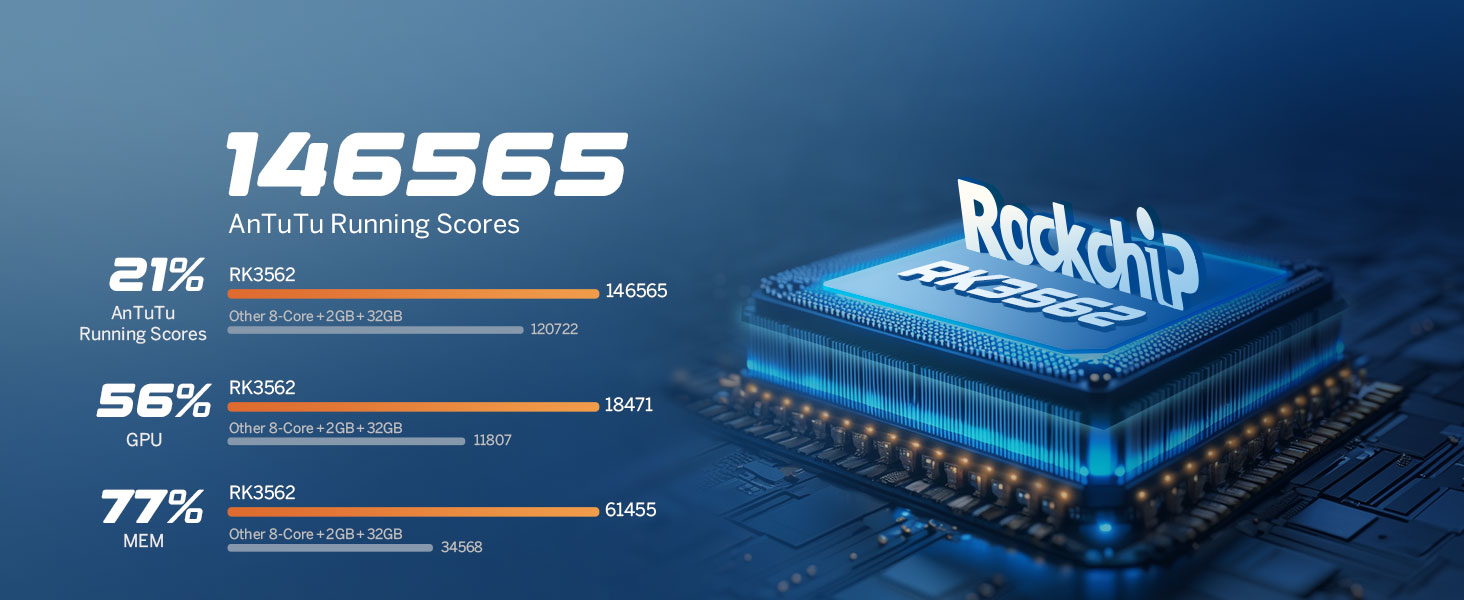
Image 6.2: Performance benchmarks for the RK3562 processor.
6.2. ഓഡിയോ അനുഭവം
Equipped with a built-in DSP Audio Processor and a 48-band equalizer, the UX7-PLUS allows for precise sound customization. The ST TDA7388 Amplifier delivers 4x45W surround sound output. RCA Audio Outputs include 4-Channel FR/FL/RR/RL outputs + 1 Subwoofer output. EQ Modes include Custom, Standard, Popular, Rock, Classical, and Jazz.

ചിത്രം 6.3: ഡിജിറ്റൽ സൗണ്ട് പ്രോസസർ (DSP) കഴിവുകൾ.
6.3. ഫേംവെയർ അപ്ഡേറ്റുകൾ
The unit supports Over-the-Air (OTA) firmware updates to fix software issues and enhance security. Note that Android system upgrades are not supported via OTA.
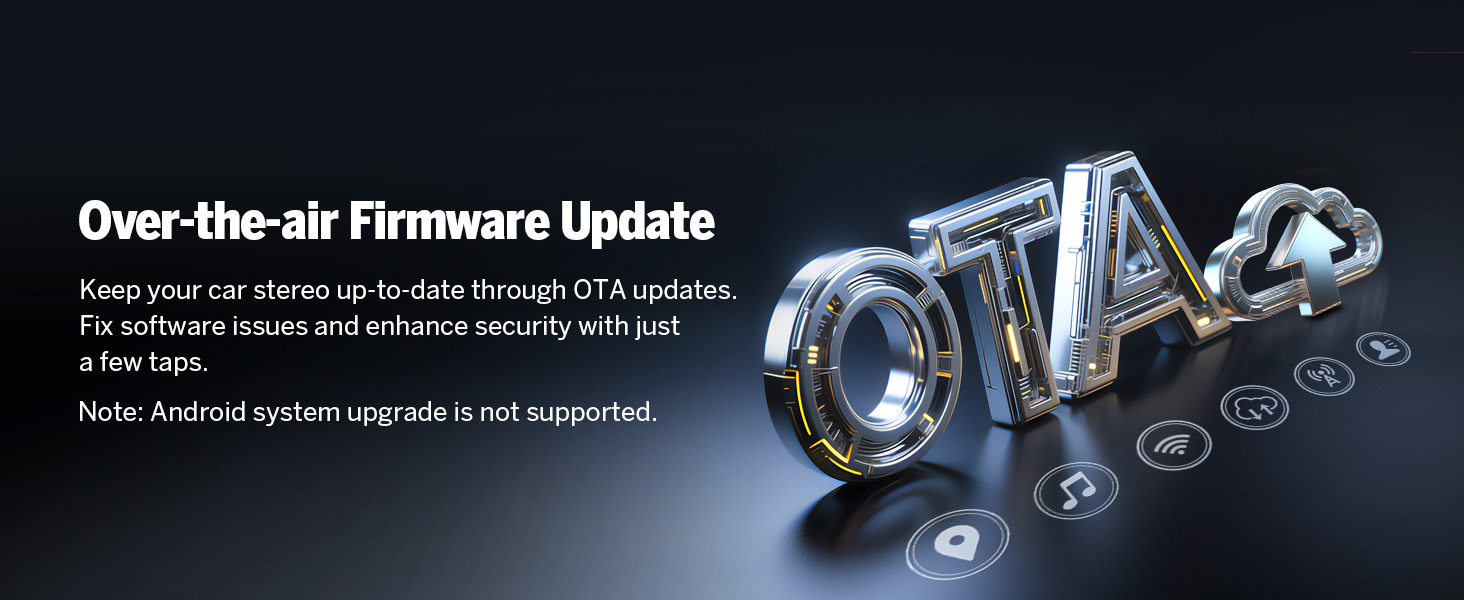
Image 6.4: Over-the-Air Firmware Update feature.
6.4. ആക്സസറി അനുയോജ്യത
The Eonon UX7-PLUS is compatible with various Eonon accessories, including dash cams (e.g., A100 Dash Cam, not included) and OBD2 diagnostic tools (e.g., V0056 OBD2, not included).

Image 6.5: Backup camera features (included).

Image 6.6: Dash Cam compatibility (A100 Dash Cam, not included).
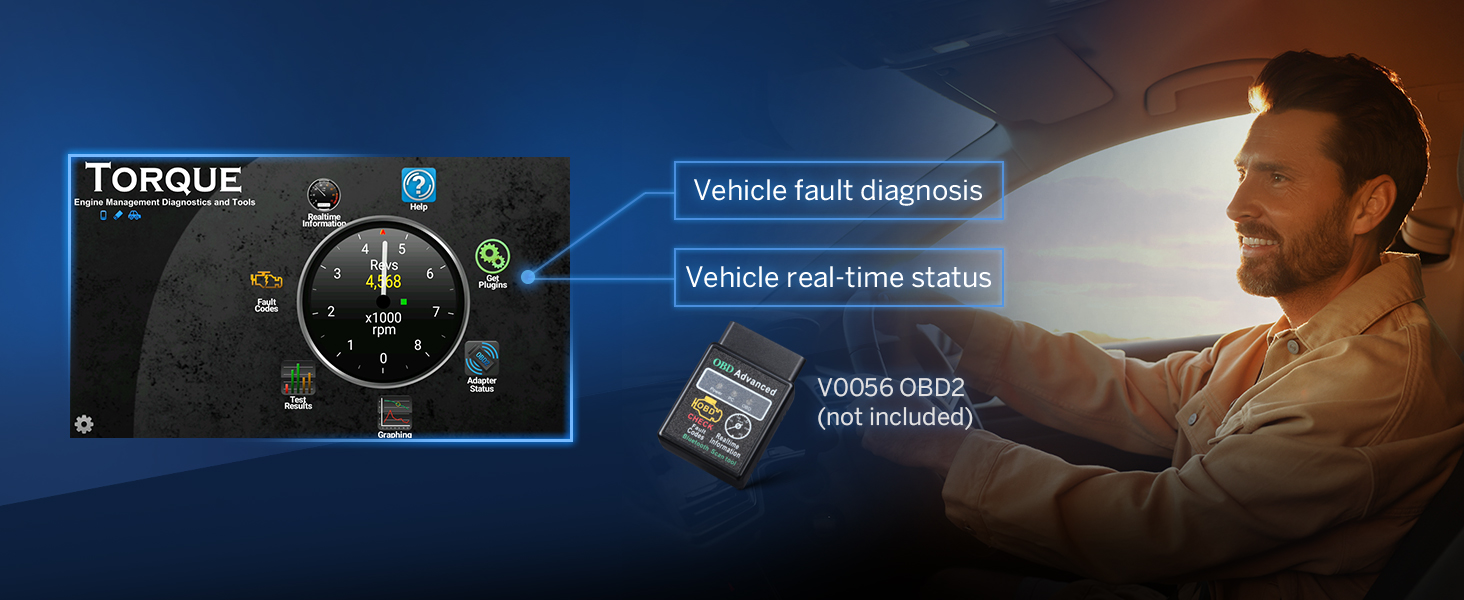
Image 6.7: OBD2 diagnostic tool compatibility (V0056 OBD2, not included).

Image 6.8: External DSP Amplifier compatibility (A303 DSP Amplifier, not included).
7. പരിപാലനം
- സ്ക്രീൻ വൃത്തിയാക്കൽ: സ്ക്രീൻ മൃദുവായി തുടയ്ക്കാൻ മൃദുവായ, ലിന്റ് രഹിത തുണി ഉപയോഗിക്കുക. അബ്രാസീവ് ക്ലീനറുകളോ ലായകങ്ങളോ ഉപയോഗിക്കരുത്.
- പൊതു പരിചരണം: യൂണിറ്റ് പൊടിയിൽ നിന്നും അവശിഷ്ടങ്ങളിൽ നിന്നും മുക്തമായി സൂക്ഷിക്കുക. തീവ്രമായ താപനിലയിലോ നേരിട്ടുള്ള സൂര്യപ്രകാശത്തിലോ ദീർഘനേരം തുറന്നുകാട്ടുന്നത് ഒഴിവാക്കുക.
- സോഫ്റ്റ്വെയർ അപ്ഡേറ്റുകൾ: മികച്ച പ്രകടനവും സുരക്ഷയും ഉറപ്പാക്കാൻ ഫേംവെയർ അപ്ഡേറ്റുകൾക്കായി പതിവായി പരിശോധിക്കുക.
8. പ്രശ്നപരിഹാരം
- ശക്തിയില്ല: എല്ലാ പവർ കണക്ഷനുകളും ഫ്യൂസുകളും പരിശോധിക്കുക. വാഹനത്തിന്റെ ഇഗ്നിഷൻ ഓണാണെന്ന് ഉറപ്പാക്കുക.
- ശബ്ദമില്ല: Verify speaker connections. Check volume levels and audio settings (EQ, balance, fader). Ensure the ampലൈഫയർ (ബാഹ്യമാണെങ്കിൽ) ഓണാണ്.
- ബ്ലൂടൂത്ത് കണക്ഷൻ പ്രശ്നങ്ങൾ: സ്റ്റീരിയോയിലും ഫോണിലും ബ്ലൂടൂത്ത് പ്രവർത്തനക്ഷമമാക്കിയിട്ടുണ്ടെന്ന് ഉറപ്പാക്കുക. മുമ്പത്തെ ജോടിയാക്കലുകൾ ഇല്ലാതാക്കി വീണ്ടും കണക്റ്റ് ചെയ്യാൻ ശ്രമിക്കുക.
- കാർപ്ലേ/ആൻഡ്രോയിഡ് ഓട്ടോ കണക്റ്റ് ചെയ്യുന്നില്ല: Ensure the Zlink5 app is running. Check USB cable connection for wired connections. For wireless, verify Wi-Fi and Bluetooth are active and paired correctly.
- സ്ക്രീൻ പ്രതികരിക്കുന്നില്ല: യൂണിറ്റ് പുനരാരംഭിക്കാൻ ശ്രമിക്കുക. പ്രശ്നം നിലനിൽക്കുകയാണെങ്കിൽ, ഒരു ഫാക്ടറി റീസെറ്റ് ആവശ്യമായി വന്നേക്കാം (ശ്രദ്ധിക്കുക: ഇത് എല്ലാ ഉപയോക്തൃ ഡാറ്റയും മായ്ക്കും).
9 സ്പെസിഫിക്കേഷനുകൾ
| ഫീച്ചർ | സ്പെസിഫിക്കേഷൻ |
|---|---|
| ഓപ്പറേറ്റിംഗ് സിസ്റ്റം | ആൻഡ്രോയിഡ് 14 |
| സിപിയു | RK3562 Quad-core ARM Cortex-A53 @ 2.0GHz |
| റാം | 3 ജിബി |
| ROM | 32 ജിബി |
| ഡിസ്പ്ലേ വലിപ്പം | 10.1 ഇഞ്ച് ഐ.പി.എസ് |
| റെസലൂഷൻ | 1280*720 |
| ടച്ച് സ്ക്രീൻ | 2.5D Capacitive |
| ബ്ലൂടൂത്ത് പതിപ്പ് | 5.4 |
| Ampജീവപര്യന്തം | ST TDA7388 (4x45W) |
| ഡി.എസ്.പി | Built-in, 48-band equalizer |
| CarPlay/Android ഓട്ടോ | വയർഡ് & വയർലെസ്സ് |
| സ്റ്റിയറിംഗ് വീൽ നിയന്ത്രണം | Analog SWC Signal Support |
| ഇനത്തിൻ്റെ ഭാരം | 5.28 പൗണ്ട് |
| പാക്കേജ് അളവുകൾ | 11.81 x 8.66 x 7.87 ഇഞ്ച് |
| മോഡൽ നമ്പർ | UX7-PLUS-U |
10. വാറൻ്റിയും പിന്തുണയും
The Eonon UX7-PLUS comes with a 2 വർഷത്തെ നിർമ്മാതാവിൻ്റെ വാറൻ്റി. For technical support, warranty claims, or further assistance, please contact Eonon customer service through their official website or the retailer where the product was purchased. Please have your model number (UX7-PLUS) and purchase details ready when contacting support.


