1. ഉൽപ്പന്നം കഴിഞ്ഞുview
The OnePlus 15 is an advanced Android smartphone designed for high performance and extended usage. It features a powerful Snapdragon 8 Elite Gen 5 processor, a large 7,300mAh battery, and a vibrant 6.78-inch 165 Hz AMOLED display. The device is equipped with a triple 50 MP camera system for detailed photography and offers robust durability with IP66/IP68/IP69 and IP19K ratings for dust and water resistance.
പ്രധാന സവിശേഷതകൾ:
- Massive 7,300 mAh Battery: Provides extended power for all-day use and beyond.
- Tri-Chip System: Integrates the Snapdragon 8 Elite Gen 5, a dedicated Wi-Fi chip, and a CPU scheduler for optimized performance, connectivity, and efficiency.
- Triple 50 MP Camera System: Captures high-quality images with wide, ultra-wide, and telephoto capabilities.
- മോടിയുള്ള ഡിസൈൻ: Built to resist dust and water, with IP66/IP68/IP69 and IP19K ratings for enhanced protection.
- 6.78-inch 165 Hz AMOLED Display: Delivers vivid colors, smooth motion, and exceptional clarity.
2. ബോക്സിൽ എന്താണുള്ളത്?
നിങ്ങളുടെ ഉൽപ്പന്ന പാക്കേജിംഗിൽ എല്ലാ ഇനങ്ങളും ഉണ്ടെന്ന് ഉറപ്പാക്കുക:
- OnePlus 15 Smartphone x1
- ചാർജർ x1
- യുഎസ്ബി ഡാറ്റ കേബിൾ x1
- SIM Ejector Tool x1
- ദ്രുത ഗൈഡ് x1
- Safety Guide x1

Image: Contents of the OnePlus 15 retail box, showing the smartphone, charger, USB data cable, SIM ejector tool, quick guide, and safety guide.
3. സജ്ജീകരണം
3.1 സിം കാർഡ് ഇൻസ്റ്റാളേഷൻ
- Locate the SIM card tray on the side of your OnePlus 15.
- Insert the provided SIM ejector tool into the small hole on the SIM tray. Press firmly until the tray pops out.
- Place your Nano-SIM card(s) into the tray with the gold contacts facing down. Ensure they are correctly oriented according to the tray's outline.
- Carefully push the SIM tray back into the phone until it is flush with the device.
3.2 പ്രാരംഭ പവർ ഓണും കോൺഫിഗറേഷനും
- Press and hold the Power button (located on the right side of the device) until the OnePlus logo appears.
- നിങ്ങളുടെ ഭാഷ തിരഞ്ഞെടുക്കുന്നതിനും, ഒരു Wi-Fi നെറ്റ്വർക്കിലേക്ക് കണക്റ്റുചെയ്യുന്നതിനും, നിങ്ങളുടെ Google അക്കൗണ്ട് സജ്ജീകരിക്കുന്നതിനും ഓൺ-സ്ക്രീൻ നിർദ്ദേശങ്ങൾ പാലിക്കുക.
- You may be prompted to transfer data from an old device. Follow the instructions or skip this step to set up as a new device.
- Configure security settings such as fingerprint unlock, face unlock, or a PIN/pattern.

ചിത്രം: മുൻഭാഗം view of the OnePlus 15 smartphone, showcasing അതിന്റെ ഡിസ്പ്ലേയും ഫ്രണ്ട് ക്യാമറയും.
4. നിങ്ങളുടെ ഉപകരണം പ്രവർത്തിപ്പിക്കുന്നു
4.1 Screen and Navigation
The OnePlus 15 features a 6.78-inch 165 Hz AMOLED display. Navigate the interface using touch gestures:
- ടാപ്പ് ചെയ്യുക: ഒരു ഇനം തിരഞ്ഞെടുക്കുക അല്ലെങ്കിൽ ഒരു ഫംഗ്ഷൻ സജീവമാക്കുക.
- സ്വൈപ്പ്: സ്ക്രീനുകളിലൂടെയോ ലിസ്റ്റുകളിലൂടെയോ സ്ക്രോൾ ചെയ്യുക.
- പിഞ്ച്: ചിത്രങ്ങൾ സൂം ഇൻ ചെയ്യുകയോ ഔട്ട് ചെയ്യുകയോ ചെയ്യുക, web പേജുകൾ.
- ലോംഗ് പ്രസ്സ്: സന്ദർഭോചിത മെനുകൾ ആക്സസ് ചെയ്യുക അല്ലെങ്കിൽ ഐക്കണുകൾ നീക്കുക.
4.2 ബട്ടണുകളും പോർട്ടുകളും
Familiarize yourself with the physical controls and connections:
- പവർ ബട്ടൺ: Located on the right side. Press to wake/sleep the screen, long press to power off or restart.
- വോളിയം ബട്ടണുകൾ: Located on the left side. Adjust media volume, ringtone volume, and alarm volume.
- യുഎസ്ബി ടൈപ്പ്-സി പോർട്ട്: Located at the bottom. Used for charging, data transfer, and connecting Type-C headphones.
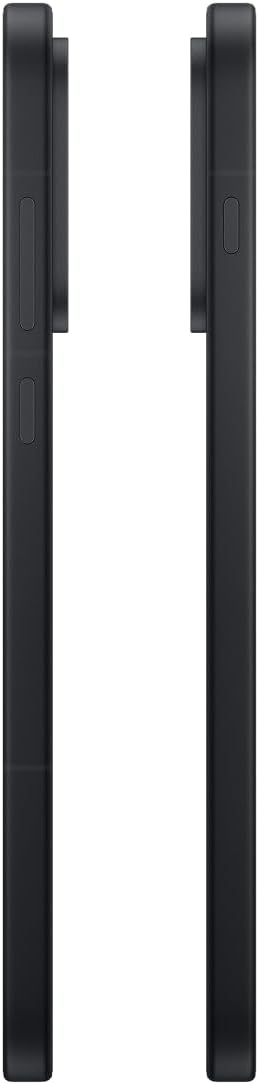
ചിത്രം: വശം view of the OnePlus 15, showing the placement of the power and volume buttons.
4.3 ക്യാമറ ഉപയോഗം
The OnePlus 15 features a versatile triple 50 MP camera system. To open the camera app, tap the camera icon on your home screen or lock screen.
- സ്വിച്ച് മോഡുകൾ: Swipe left or right on the screen to switch between Photo, Video, Portrait, and other modes.
- സൂം: Pinch in or out on the viewfinder, or tap the zoom icons (e.g., 0.6x, 1x, 2x) to adjust magnification.
- ക്യാപ്ചർ: ഒരു ഫോട്ടോ എടുക്കാൻ ഷട്ടർ ബട്ടൺ ടാപ്പ് ചെയ്യുക അല്ലെങ്കിൽ വീഡിയോ റെക്കോർഡിംഗ് ആരംഭിക്കുക/നിർത്തുക.
- ക്രമീകരണങ്ങൾ: Access camera settings for features like flash, timer, aspect ratio, and more.

ചിത്രം: പിന്നിലേക്ക് view of the OnePlus 15, highlighting the triple 50 MP camera system.
4.4 ബാറ്ററി മാനേജ്മെൻ്റ്
Your OnePlus 15 is equipped with a 7,300 mAh battery. To optimize battery life:
- Adjust screen brightness and set a shorter screen timeout.
- ഉപയോഗത്തിലില്ലാത്തപ്പോൾ വൈഫൈ, ബ്ലൂടൂത്ത്, ജിപിഎസ് എന്നിവ ഓഫാക്കുക.
- Close background apps that are consuming power.
- Utilize Battery Saver mode when your battery is low.
- Use the provided charger and USB cable for optimal fast charging.
5. പരിപാലനം
5.1 നിങ്ങളുടെ ഉപകരണം വൃത്തിയാക്കൽ
To clean your OnePlus 15:
- സ്ക്രീനും പിൻ പാനലും തുടയ്ക്കാൻ മൃദുവായ, ലിന്റ് രഹിത തുണി ഉപയോഗിക്കുക.
- കഠിനമായ പാടുകൾക്ക്, ചെറുതായി dampen വെള്ളമുള്ള തുണി അല്ലെങ്കിൽ ഒരു സ്ക്രീൻ ക്ലീനർ.
- കഠിനമായ രാസവസ്തുക്കൾ, ഉരച്ചിലുകൾ ഉള്ള വസ്തുക്കൾ, അല്ലെങ്കിൽ കംപ്രസ് ചെയ്ത വായു എന്നിവ ഉപയോഗിക്കുന്നത് ഒഴിവാക്കുക.
5.2 സോഫ്റ്റ്വെയർ അപ്ഡേറ്റുകൾ
പതിവ് സോഫ്റ്റ്വെയർ അപ്ഡേറ്റുകൾ പുതിയ സവിശേഷതകൾ, സുരക്ഷാ മെച്ചപ്പെടുത്തലുകൾ, ബഗ് പരിഹാരങ്ങൾ എന്നിവ നൽകുന്നു. അപ്ഡേറ്റുകൾക്കായി പരിശോധിക്കാൻ:
- പോകുക ക്രമീകരണങ്ങൾ > ഉപകരണത്തെക്കുറിച്ച് > OxygenOS version.
- ടാപ്പ് ചെയ്യുക അപ്ഡേറ്റുകൾക്കായി പരിശോധിക്കുക.
- If an update is available, follow the on-screen instructions to download and install it. Ensure your device has sufficient battery and is connected to Wi-Fi before updating.
6. പ്രശ്നപരിഹാരം
If you encounter issues with your OnePlus 15, try the following common troubleshooting steps:
- ഉപകരണം പ്രതികരിക്കുന്നില്ല: പുനരാരംഭിക്കാൻ നിർബന്ധിക്കുന്നതിന് പവർ ബട്ടൺ ഏകദേശം 10 സെക്കൻഡ് അമർത്തിപ്പിടിക്കുക.
- ആപ്പുകൾ ക്രാഷാകുന്നു: Clear the cache and data for the problematic app in ക്രമീകരണങ്ങൾ > ആപ്പുകൾ > [ആപ്പ് നാമം] > സംഭരണവും കാഷെയും.
- ബാറ്ററി വേഗത്തിൽ തീർന്നു: Review ബാറ്ററി ഉപയോഗം ക്രമീകരണങ്ങൾ > ബാറ്ററി to identify power-hungry apps. Adjust settings as described in Section 4.4.
- നെറ്റ്വർക്ക് കണക്റ്റിവിറ്റി പ്രശ്നങ്ങൾ: Toggle Airplane Mode on and off, restart your device, or reset network settings in ക്രമീകരണങ്ങൾ > സിസ്റ്റം ക്രമീകരണങ്ങൾ > ബാക്കപ്പ് ചെയ്ത് പുനഃസജ്ജമാക്കുക > ഫോൺ റീസെറ്റ് ചെയ്യുക > വൈഫൈ, മൊബൈൽ, ബ്ലൂടൂത്ത് എന്നിവ പുനഃസജ്ജമാക്കുക.
- Screen protector installation: For assistance with screen protector installation, refer to the following video guide:
Video: Installation guide for a screen protector on the OnePlus 15 5G. This video demonstrates the steps to correctly apply a screen protector to your device.
7 സ്പെസിഫിക്കേഷനുകൾ
| മോഡലിൻ്റെ പേര് | വൺപ്ലസ് 15 |
| ഇനം മോഡൽ നമ്പർ | CPH2749 |
| ഉൽപ്പന്ന അളവുകൾ | 6.36 x 3.02 x 0.33 ഇഞ്ച് |
| ഇനത്തിൻ്റെ ഭാരം | 1.29 പൗണ്ട് |
| ഓപ്പറേറ്റിംഗ് സിസ്റ്റം | ആൻഡ്രോയിഡ് 16 |
| സിപിയു മോഡൽ | Snapdragon 8 Elite Gen 5 |
| സിപിയു വേഗത | 4.61 GHz |
| ഇൻസ്റ്റാൾ ചെയ്ത RAM മെമ്മറി വലുപ്പം | 12 ജിബി |
| മെമ്മറി സ്റ്റോറേജ് കപ്പാസിറ്റി | 256 ജിബി |
| സ്ക്രീൻ വലിപ്പം | 6.78 ഇഞ്ച് |
| റെസലൂഷൻ | 2772*1272 |
| പുതുക്കിയ നിരക്ക് | 165 Hz |
| ബാറ്ററി ശേഷി | 7300 മില്ലിamp മണിക്കൂറുകൾ |
| ഫോൺ ടോക്ക് ടൈം | 68.7 മണിക്കൂർ |
| കണക്റ്റിവിറ്റി ടെക്നോളജികൾ | ബ്ലൂടൂത്ത്, ഇൻഫ്രാറെഡ്, എൻഎഫ്സി, യുഎസ്ബി, വൈ-ഫൈ |
| പ്രത്യേക സവിശേഷതകൾ | Dual SIM, Wireless Charging |
| നിർമ്മാതാവ് | OnePlus |
8 പ്രധാനപ്പെട്ട സുരക്ഷാ വിവരങ്ങൾ
Please read all safety information before using your device to ensure safe and proper use. Improper use may cause damage to the device or personal injury.
- ഉപകരണത്തെ ദീർഘനേരം തീവ്രമായ താപനിലയിലോ നേരിട്ടുള്ള സൂര്യപ്രകാശത്തിലോ തുറന്നുകാട്ടരുത്.
- Use only approved chargers, batteries, and accessories.
- ഉപകരണം താഴെയിടുകയോ ഗുരുതരമായ ആഘാതത്തിന് വിധേയമാക്കുകയോ ചെയ്യുന്നത് ഒഴിവാക്കുക.
- Keep the device away from water and liquids, despite its water resistance ratings, to prevent potential damage.
- ഉപകരണം ഡിസ്അസംബ്ലിംഗ് ചെയ്യാനോ പരിഷ്ക്കരിക്കാനോ ശ്രമിക്കരുത്.
9. വാറൻ്റിയും പിന്തുണയും
Your OnePlus 15 is covered by a manufacturer's warranty. For detailed warranty information, technical support, or service inquiries, please visit the official OnePlus webസൈറ്റ് അല്ലെങ്കിൽ ഉപഭോക്തൃ സേവനവുമായി ബന്ധപ്പെടുക.
നിങ്ങൾക്ക് കൂടുതൽ പിന്തുണയും ഉൽപ്പന്ന വിവരങ്ങളും ഇവിടെ കണ്ടെത്താനാകും OnePlus Store.


