ആമുഖം
The MELONARE MA-1 Mini Guitar Amplifier is a versatile and portable 10W electric guitar amplifier designed for practice and recording. It features 30 built-in rhythm patterns, switchable clean and overdrive channels, adjustable reverb, and Bluetooth 5.3 connectivity. Its compact design and long-lasting rechargeable battery make it an ideal companion for musicians on the go.
ബോക്സിൽ എന്താണുള്ളത്
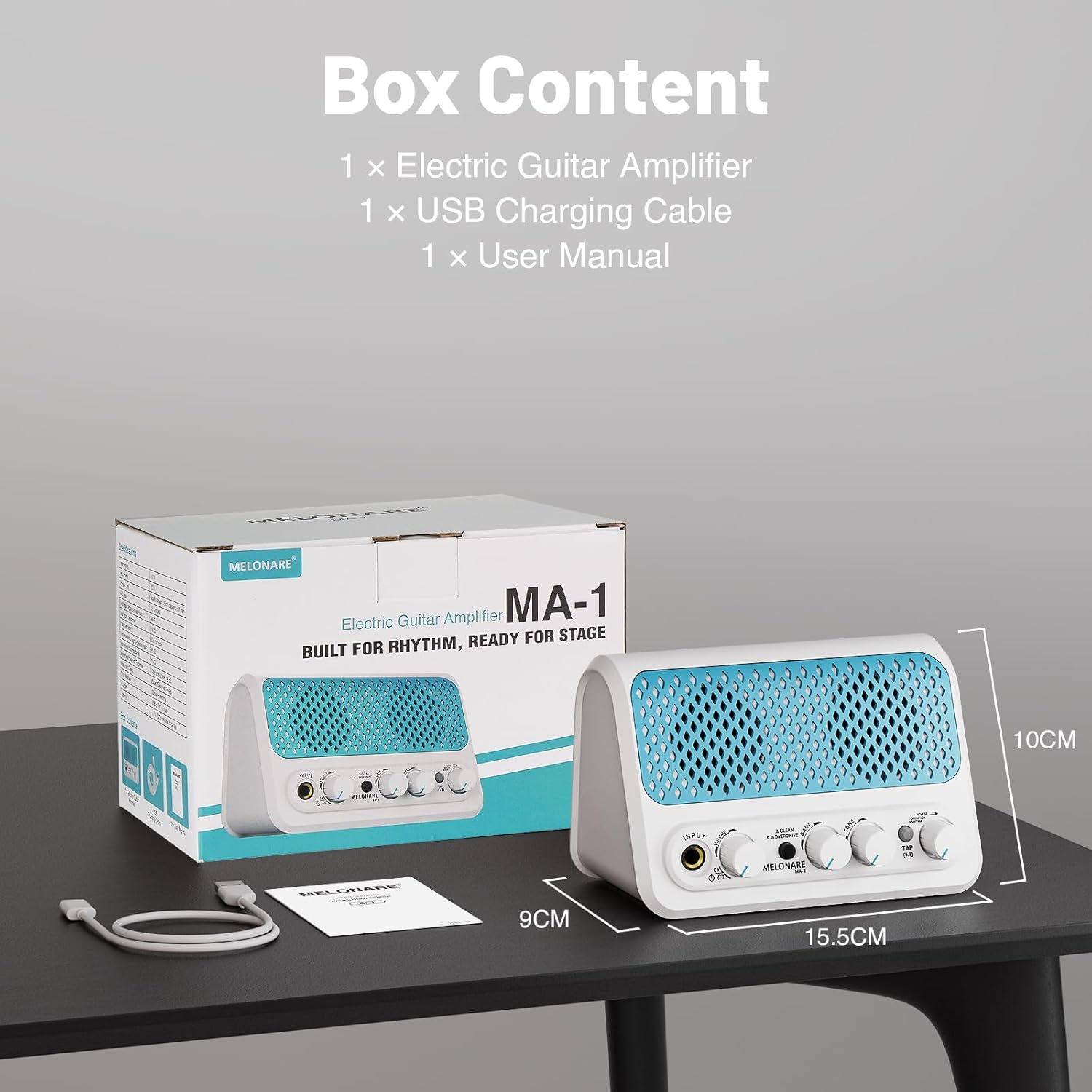
- ഗിറ്റാർ Ampലൈഫയർ *1
- ഇൻസ്ട്രക്ഷൻ മാനുവൽ *1
- USB ചാർജിംഗ് കേബിൾ *1
- ഗിറ്റാർ Amplifier packaging bag *1
- Charging cable packaging bag *1
ഉൽപ്പന്നം കഴിഞ്ഞുview നിയന്ത്രണങ്ങളും
എന്നതുമായി സ്വയം പരിചയപ്പെടുക amplifier's front panel controls:
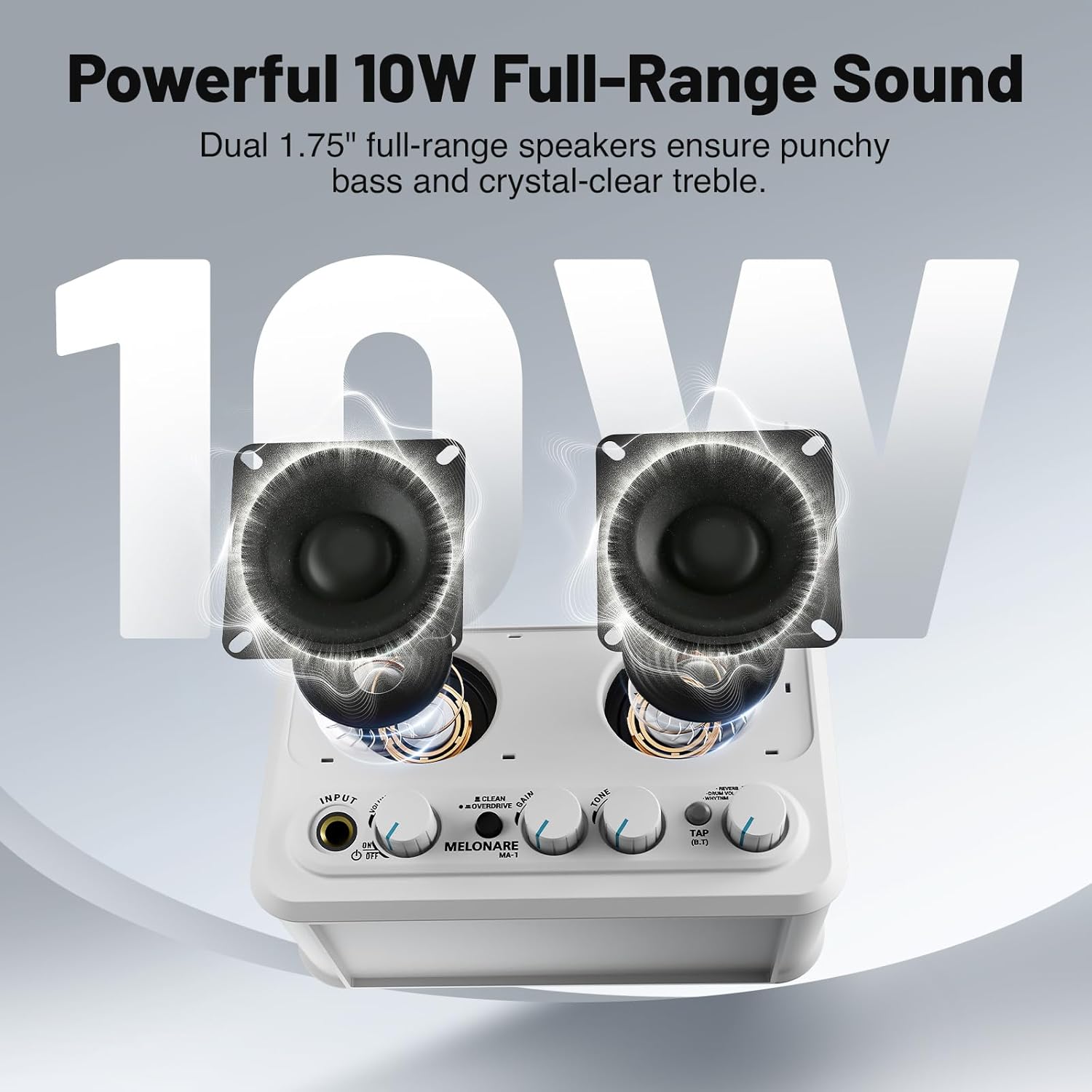
- ഇൻപുട്ട്: 6.35mm jack for connecting your electric guitar.
- വ്യാപ്തം: യുടെ മൊത്തത്തിലുള്ള ഔട്ട്പുട്ട് വോളിയം ക്രമീകരിക്കുന്നു ampജീവൻ.
- ഓൺ/ഓഫ് സ്വിച്ച്: യൂണിറ്റ് ഓണാക്കുകയോ ഓഫാക്കുകയോ ചെയ്യുന്നു.
- CLEAN/OVERDRIVE Button: Toggles between clean and overdrive sound modes.
- ഗെയിൻ: Controls the amount of distortion or overdrive in the signal.
- ടോൺ: Shapes the treble and bass frequencies of your sound.
- TAP (B.T) Button: Used for tap tempo for rhythms and Bluetooth pairing.
- REVERB/DRUM VOL/RHYTHM Knob: This multi-function knob controls reverb depth, drum volume, and selects rhythm patterns.

സജ്ജമാക്കുക
1 ബാറ്ററി ചാർജ് ചെയ്യുന്നു
The MA-1 features a built-in 2000mAh rechargeable battery, providing approximately 6-7 hours of continuous playtime on a full charge (actual playtime may vary based on volume and mode). To charge, connect the amplifier to a USB power source (power bank, computer, or wall adapter) using the provided USB charging cable. A full charge typically takes about 3 hours.

2. നിങ്ങളുടെ ഗിറ്റാർ ബന്ധിപ്പിക്കുന്നു
Plug your electric guitar into the ഇൻപുട്ട് 6.35mm jack on the front panel. Ensure the amplifier is powered on using the ON/OFF switch.
3. ബ്ലൂടൂത്ത് കണക്റ്റിവിറ്റി
To stream audio wirelessly from your phone or other Bluetooth-enabled device, press and hold the TAP (B.T) button until the indicator light flashes, indicating pairing mode. On your device, search for and select 'MELONARE MA-1' to connect. Once connected, the indicator light will remain solid.

4. AUX ഇൻപുട്ട്
For wired audio input, connect your phone, MP3 player, tablet, or computer to the 3.5mm AUX IN jack located on the rear of the ampജീവൻ.
5. ഹെഡ്ഫോൺ ഔട്ട്പുട്ട്
For personal monitoring or quiet practice, plug your 3.5mm headphones into the HEADPHONE OUT jack on the rear of the amplifier. This mutes the main speakers.
പ്രവർത്തിപ്പിക്കുന്നത് Ampജീവപര്യന്തം
1. Clean and Overdrive Modes
അമർത്തുക ക്ലീൻ/ഓവർഡ്രൈവ് button to switch between the two primary sound modes:
- ക്ലീൻ മോഡ്: Delivers a clear, transparent sound suitable for daily practice or acoustic-style performances.
- Overdrive Mode: Adds a heavy, powerful tone for improvisation or solos.
ക്രമീകരിക്കുക നേട്ടം ഒപ്പം ടോൺ knobs to fine-tune your sound in either mode.
2. Metronome and Rhythm Patterns
ദി amplifier includes 30 built-in rhythm patterns. To activate and control them:
- താളം തിരഞ്ഞെടുക്കുക: തള്ളുക REVERB/DRUM VOL/RHYTHM knob to cycle through the modes. A green LED indicates rhythm selection mode. Turn the knob to choose from the 30 patterns.
- ടെമ്പോ ക്രമീകരിക്കുക: ടാപ്പ് ചെയ്യുക TAP (B.T) button three times to set the desired tempo.
- Adjust Drum Volume: തള്ളുക REVERB/DRUM VOL/RHYTHM knob again. A red LED indicates drum volume mode. Turn the knob to adjust the volume of the rhythm pattern independently.

3. Reverb Control
When no LED is lit on the REVERB/DRUM VOL/RHYTHM knob, you are in reverb control mode. Turn the knob to fine-tune the depth of the reverb effect, adding space and atmosphere to your sound.
4. വീഡിയോ പ്രദർശനം
മെയിൻ്റനൻസ്
To ensure the longevity and optimal performance of your MELONARE MA-1 Mini Guitar Ampലിഫയർ, ഈ പരിപാലന മാർഗ്ഗനിർദ്ദേശങ്ങൾ പാലിക്കുക:
- വൃത്തിയാക്കൽ: പുറംഭാഗം വൃത്തിയാക്കാൻ മൃദുവായതും ഉണങ്ങിയതുമായ തുണി ഉപയോഗിക്കുക amplifier. Avoid using abrasive cleaners, solvents, or waxes, as these can damage the finish.
- സംഭരണം: സംഭരിക്കുക amplifier in a cool, dry place away from direct sunlight, extreme temperatures, and high humidity.
- ബാറ്ററി കെയർ: For best battery life, avoid fully discharging the battery frequently. Charge the amplifier regularly, even if not in use, to maintain battery health. If storing for an extended period, charge the battery to approximately 50% every few months.
- കൈകാര്യം ചെയ്യൽ: കൈകാര്യം ചെയ്യുക amplifier with care to prevent drops or impacts, which can damage internal components.
ട്രബിൾഷൂട്ടിംഗ്
If you encounter issues with your MELONARE MA-1 Mini Guitar Amplifier-നെ കുറിച്ച് അറിയണമെങ്കിൽ, താഴെ പറയുന്ന പൊതുവായ ട്രബിൾഷൂട്ടിംഗ് ഘട്ടങ്ങൾ കാണുക:
- ശബ്ദമില്ല:
- ഉറപ്പാക്കുക amplifier is powered on and fully charged.
- Check that your guitar cable is securely connected to both the guitar and the amplifier's INPUT jack.
- Verify that the VOLUME knob is turned up.
- If using headphones, ensure they are properly plugged into the HEADPHONE OUT jack and that the main speakers are muted.
- Poor Sound Quality/Distortion (in Clean Mode):
- Reduce the guitar's volume or the amplifier's GAIN setting.
- Check for damaged cables or faulty guitar pickups.
- ബ്ലൂടൂത്ത് കണക്ഷൻ പ്രശ്നങ്ങൾ:
- ഉറപ്പാക്കുക amplifier is in Bluetooth pairing mode (flashing blue LED).
- നിങ്ങളുടെ ഉപകരണത്തിൽ ബ്ലൂടൂത്ത് പ്രവർത്തനരഹിതമാക്കി വീണ്ടും പ്രവർത്തനക്ഷമമാക്കുക.
- നിങ്ങളുടെ ഉപകരണം അടുത്തേക്ക് നീക്കുക amplifier to ensure a strong signal.
- നിങ്ങളുടെ ബ്ലൂടൂത്ത് ക്രമീകരണത്തിൽ നിന്ന് ഉപകരണം മറന്ന് വീണ്ടും ജോടിയാക്കാൻ ശ്രമിക്കുക.
- Rhythm Pattern Not Playing:
- ഉറപ്പാക്കുക amplifier is in rhythm selection mode (green LED on REVERB/DRUM VOL/RHYTHM knob).
- Check the drum volume setting.
- Tap the TAP (B.T) button to start the rhythm.
സ്പെസിഫിക്കേഷനുകൾ
| ബ്രാൻഡ് | മെലോനാരെ |
| മോഡൽ | MA-1 |
| ഔട്ട്പുട്ട് വാട്ട്tage | 10 വാട്ട്സ് |
| ഇനത്തിൻ്റെ ഭാരം | 1.21 പൗണ്ട് |
| ഉൽപ്പന്ന അളവുകൾ | 5.5 x 3.5 x 1.4 ഇഞ്ച് |
| ബാറ്ററി തരം | ലിഥിയം അയോൺ (2000mAh) |
| പവർ ഉറവിടം | ബാറ്ററി പവർ |
| മെറ്റീരിയൽ തരം | പ്ലാസ്റ്റിക് |
| നിറം | ടർക്കോയ്സ് |
| കണക്റ്റിവിറ്റി | Bluetooth 5.3, 3.5mm Jack (AUX IN, Headphone OUT), 6.35mm Jack (Guitar INPUT), USB (Charging) |
വാറൻ്റിയും പിന്തുണയും
For warranty information and customer support, please refer to the contact details provided on the product packaging or visit the official MELONARE webസൈറ്റ്. ഏതെങ്കിലും വാറന്റി ക്ലെയിമുകൾക്ക് വാങ്ങിയതിന്റെ തെളിവായി നിങ്ങളുടെ വാങ്ങൽ രസീത് സൂക്ഷിക്കുക.


