ആമുഖം
The HyperGear Mag Vac Magnetic Phone Mount provides a hands-free solution for securing your smartphone on various smooth, flat surfaces. Featuring a powerful suction cup base and a compact, foldable design, this mount allows for flexible placement in your car, office, kitchen, or bathroom. It offers MagSafe compatibility and includes an adapter for non-MagSafe devices, ensuring universal use.
ബോക്സിൽ എന്താണുള്ളത്
Your HyperGear Mag Vac Magnetic Phone Mount package includes the following items:
- HyperGear Mag Vac Magnetic Phone Mount
- Adhesive-backed adapter plate (for non-MagSafe devices)
- Transparent protective sticker (for use with adapter plate)
സജ്ജീകരണ നിർദ്ദേശങ്ങൾ
Follow these steps to properly set up and install your HyperGear Mag Vac Magnetic Phone Mount:
Preparing Your Device for Magnetic Attachment
If your phone or phone case is not MagSafe compatible, use the included adapter plate:
- നിങ്ങളുടെ ഫോണിന്റെയോ ഫോൺ കെയ്സിന്റെയോ പിൻഭാഗം നന്നായി വൃത്തിയാക്കുക.
- Apply the transparent protective sticker to the desired area on the back of your device or case. This helps protect the surface.
- Peel the adhesive backing from the adapter plate.
- Carefully center and firmly press the adapter plate onto the transparent protective sticker (or directly onto your non-MagSafe case). Apply pressure for a few seconds to ensure a strong bond.
- Allow the adhesive to cure for at least 30 minutes before attaching to the mount.
Note: MagSafe compatible iPhones (iPhone 12 and newer) and MagSafe cases do not require the adapter plate.

Image: Demonstration of the mount's universal compatibility with MagSafe iPhones and Android devices using the included adapter ring.
ഉപകരണം മൌണ്ട് ചെയ്യുന്നു
- ഒരു ഉപരിതലം തിരഞ്ഞെടുക്കുക: Select a smooth, flat, and clean surface for mounting. Ensure it is free of dust, dirt, and moisture.
- സക്ഷൻ കപ്പ് വൃത്തിയാക്കുക: For optimal adhesion, wipe the suction cup clean with a damp cloth and let it air dry completely.
- മൗണ്ട് ഘടിപ്പിക്കുക:
- Place the suction cup base firmly onto the desired clean, smooth surface.
- Press down on the mount and twist the dial on the base clockwise until it locks to engage the powerful vacuum suction.
- നിങ്ങളുടെ ഫോൺ അറ്റാച്ചുചെയ്യുക: Once the mount is securely attached, hold your phone (MagSafe compatible or with adapter plate) near the magnetic head. The strong N52 magnets will automatically snap your phone into place.
- To Remove the Mount: Twist the dial counter-clockwise to release the vacuum seal, then gently lift the mount from the surface.

Image: Quick installation guide showing how to clean the surface, remove the plastic liner from the suction cup, and secure the mount by twisting the dial clockwise.

Image: Visual guide on how to attach and release the mount using the twist mechanism, highlighting its strong suction and portable design.
പ്രവർത്തന നിർദ്ദേശങ്ങൾ
മൗണ്ട് ക്രമീകരിക്കുന്നു
The HyperGear Mag Vac features an adjustable telescopic design and a reinforced metal hinge, allowing you to achieve the perfect height and viewing ആംഗിൾ.
- Tilt and Extend: Gently tilt and extend the arm of the mount to position your phone as desired. The hinge maintains stability at any angle.
- തിരിക്കുക: The magnetic head allows for easy rotation of your phone between portrait and landscape orientations.
- Folding for Travel: The mount can fold down significantly (up to 65% smaller) for convenient portability.

Image: Illustration of the mount's adjustable arm, demonstrating its telescopic extension and wide range of tilt for optimal viewകോണുകൾ.
Using the Magnetic Grip
The integrated N52 magnets provide a strong and secure hold for your device.
- Simply bring your MagSafe-compatible phone or a phone with the adapter plate close to the mount's head.
- The magnets will automatically align and secure your phone.
- To remove, gently pull your phone away from the magnetic head.

Image: A smartphone magnetically attached to the mount, illustrating the secure and effortless snap-on mounting feature.
ബഹുമുഖ പ്ലെയ്സ്മെൻ്റ്
The powerful suction cup allows for mounting on various smooth, flat surfaces.
- വീട്/ഓഫീസ്: Mount on desks, kitchen counters, mirrors, or glass surfaces for hands-free calls, streaming, or tutorials.
- വാഹനം: Securely attach to your car's dashboard display screen or windshield for navigation and hands-free communication.

ചിത്രം: ഉദാamples of the phone mount being used in a kitchen, office, and car, demonstrating its versatility for hands-free operation.

Image: Visual demonstration of the mount's compatibility with various smooth and flat surfaces like tables, mirrors, glass, and counters.
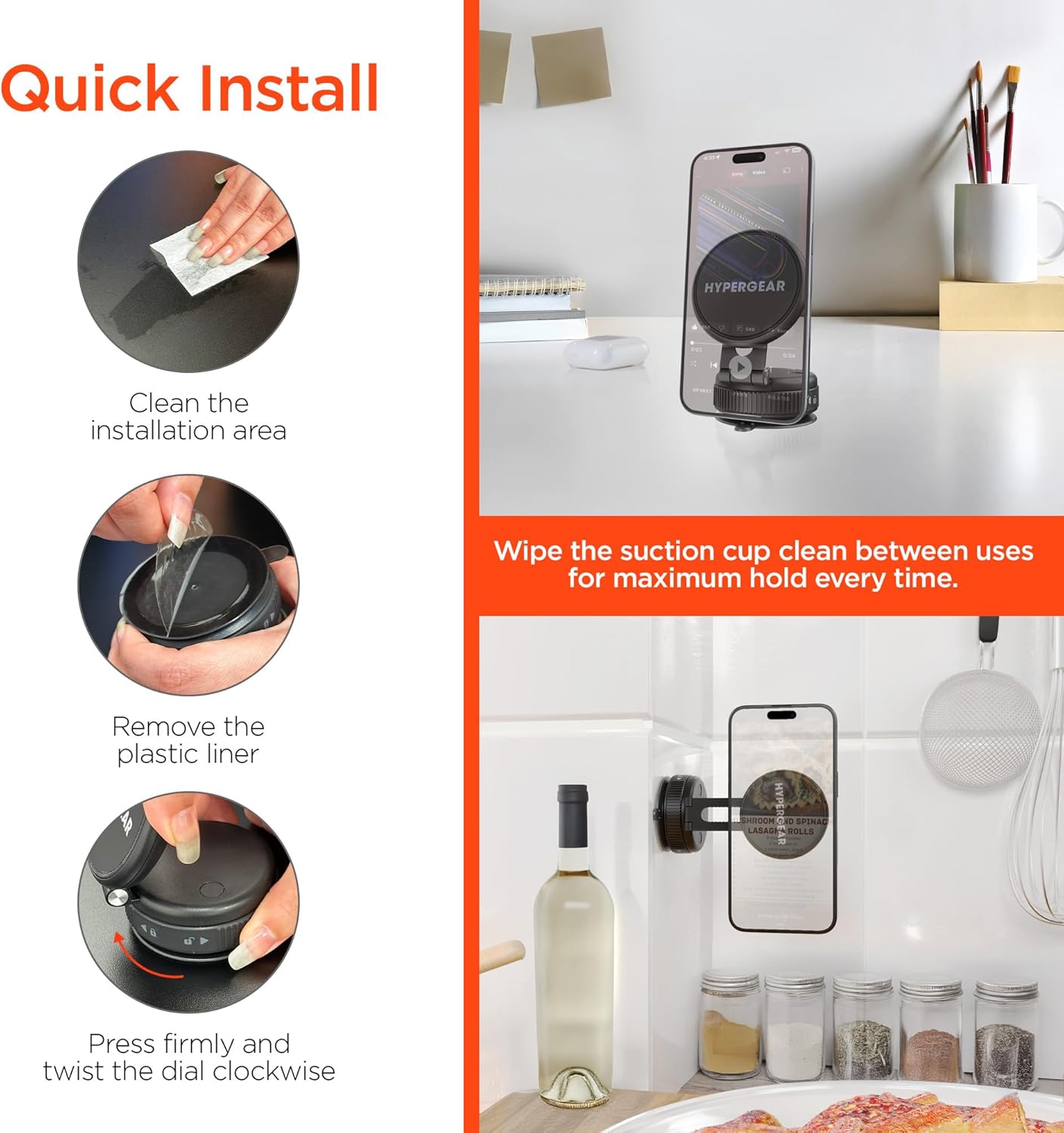
Image: The phone mount installed in a car, showing placement on both the dashboard screen and the windshield for navigation. Includes a note about incompatibility with textured or curved dashboard surfaces.
മെയിൻ്റനൻസ്
To ensure optimal performance and maximum suction power, regular maintenance of the suction cup is recommended:
- സക്ഷൻ കപ്പ് വൃത്തിയാക്കുക: Between uses, or if you notice reduced suction, wipe the suction cup with a damp, lint-free cloth to remove any dust or debris. Allow it to air dry completely before re-mounting.
- സംഭരണം: When not in use for extended periods, store the mount in a clean, dry place.
ട്രബിൾഷൂട്ടിംഗ്
- Problem: The suction cup does not hold firmly.
- പരിഹാരം 1: Ensure the mounting surface is perfectly smooth, clean, and dry. Textured, porous, or curved surfaces are not compatible with the suction cup.
- പരിഹാരം 2: Clean the suction cup thoroughly with a damp cloth and let it dry before re-applying.
- പരിഹാരം 3: Make sure the dial on the base is twisted fully clockwise to engage the vacuum lock.
- Problem: Phone does not attach magnetically.
- പരിഹാരം 1: Verify your phone or case is MagSafe compatible.
- പരിഹാരം 2: If not MagSafe compatible, ensure the adhesive adapter plate is correctly applied to the back of your phone or case.
- പരിഹാരം 3: Check for any obstructions between the phone and the magnetic head.
സ്പെസിഫിക്കേഷനുകൾ
| ബ്രാൻഡ് | ഹൈപ്പർഗിയർ |
| മോഡലിൻ്റെ പേര് | Mag Vac Magnetic Phone Mount |
| മോഡൽ നമ്പർ | 16348 |
| യു.പി.സി | 633755163487 |
| മെറ്റീരിയൽ | പ്ലാസ്റ്റിക് |
| ഇനത്തിൻ്റെ ഭാരം | 163 ഗ്രാം |
| ഉൽപ്പന്ന അളവുകൾ (L x W x H) | 16.51 x 3.56 x 13.97 സെ.മീ |
| പ്രത്യേക സവിശേഷതകൾ | Magnetic snap-on grip, 65% smaller foldable design for travel, MagSafe compatible, Powerful suction cup |
| അനുയോജ്യമായ ഉപകരണങ്ങൾ | Mobile Phones (Apple iPhone 12 and newer MagSafe models, Android phones and older iPhones with adapter plate) |
വാറൻ്റിയും പിന്തുണയും
Specific warranty information for the HyperGear Mag Vac Magnetic Phone Mount is not provided in this document. Please refer to the official HyperGear webവിശദമായ വാറന്റി നിബന്ധനകൾക്കും വ്യവസ്ഥകൾക്കും സൈറ്റ് അല്ലെങ്കിൽ നിങ്ങളുടെ വാങ്ങൽ ഡോക്യുമെന്റേഷൻ കാണുക.
For technical support, product inquiries, or assistance with troubleshooting, please contact HyperGear customer service through their official webസൈറ്റ് അല്ലെങ്കിൽ നിങ്ങളുടെ ഉൽപ്പന്ന പാക്കേജിംഗിനൊപ്പം നൽകിയിരിക്കുന്ന ബന്ധപ്പെടാനുള്ള വിവരങ്ങൾ.


