1. ആമുഖം
Welcome to the NIMO N179 17-inch Laptop user manual. This guide provides essential information for setting up, operating, maintaining, and troubleshooting your new laptop. The NIMO N179 is designed for versatile use, offering a large display, powerful AMD Ryzen 7 7735HS processor with Radeon 680M graphics, 16GB DDR5 RAM, and a 512GB NVMe SSD for efficient performance in business, study, and light gaming applications.
2. ബോക്സിൽ എന്താണുള്ളത്?
എല്ലാ ഇനങ്ങളും ഉണ്ടെന്ന് ഉറപ്പാക്കാൻ നിങ്ങളുടെ പാക്കേജിന്റെ ഉള്ളടക്കങ്ങൾ പരിശോധിക്കുക:
- 1 x NIMO N179 Laptop
- 1 x Type-C 100W PD Fast Charger
- 1 x ഉപയോക്തൃ മാനുവൽ (ഈ പ്രമാണം)
- Windows 11 Home (pre-installed)
- Warranty Information (2 Years Warranty, 90 Days Return)
3. സജ്ജീകരണ ഗൈഡ്
Follow these steps to set up your NIMO N179 laptop for the first time.
3.1 പ്രാരംഭ ചാർജിംഗ്
Before first use, it is recommended to fully charge your laptop. Connect the provided 100W Type-C PD Fast Charger to the laptop's Type-C port and a power outlet. The charging indicator light will illuminate.
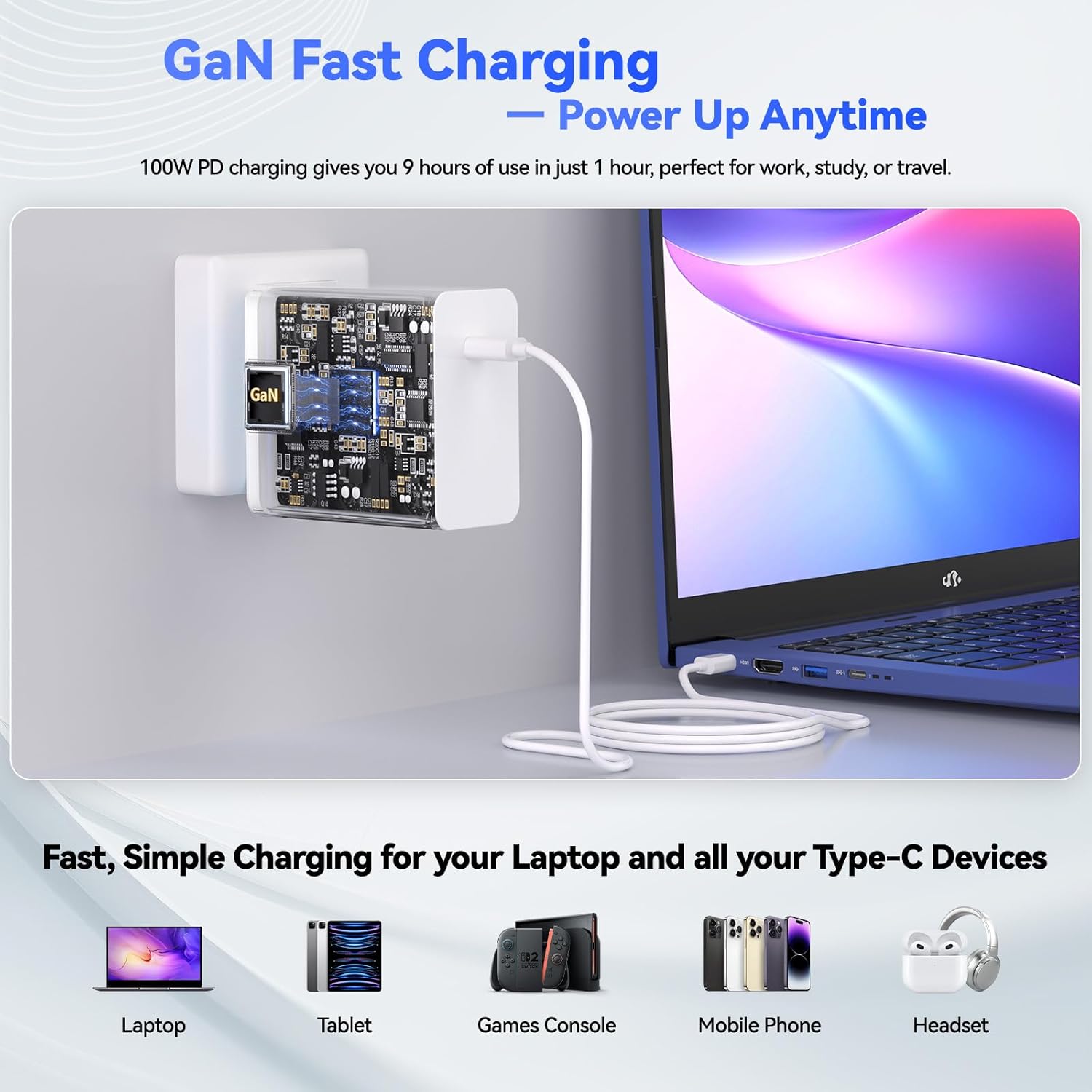
Figure 3.1: Connecting the 100W Type-C PD Fast Charger to the NIMO N179 laptop.
3.2 പവർ ചെയ്യുന്നു
Open the laptop lid and press the power button, usually located on the top right of the keyboard or side panel. The laptop will boot up, and you will be guided through the Windows 11 initial setup process.
3.3 വിൻഡോസ് 11 സജ്ജീകരണം
Follow the on-screen instructions to configure Windows 11. This includes selecting your region, keyboard layout, connecting to a Wi-Fi network, and creating a user account. Ensure you have your Wi-Fi password ready.
4. പ്രവർത്തന നിർദ്ദേശങ്ങൾ
This section details the primary functions and features of your NIMO N179 laptop.
4.1 ഡിസ്പ്ലേയും ദൃശ്യങ്ങളും
The NIMO N179 features an immersive 17.3-inch Full HD (1920 x 1080 pixels) display. This large screen provides ample workspace for multitasking and an enhanced viewവിവിധ ആപ്ലിക്കേഷനുകൾക്കുള്ള അനുഭവം.

Figure 4.1: The 17.3-inch Full HD display offers a broad visual experience for productivity.
4.2 പ്രോസസ്സറും പ്രകടനവും
Your laptop is equipped with an AMD Ryzen 7 7735HS processor (8 cores, 16 threads) and integrated AMD Radeon 680M graphics. This combination delivers responsive performance for demanding applications, creative tasks, and light gaming.

Figure 4.2: The AMD Ryzen 7 7735HS processor provides robust performance.

Figure 4.3: AMD Radeon 680M graphics for gaming and creative work.
4.3 മെമ്മറിയും സംഭരണവും
The laptop includes 16GB of DDR5 RAM for efficient multitasking and a 512GB NVMe SSD for fast boot times and quick application loading. The storage is designed for rapid data access.
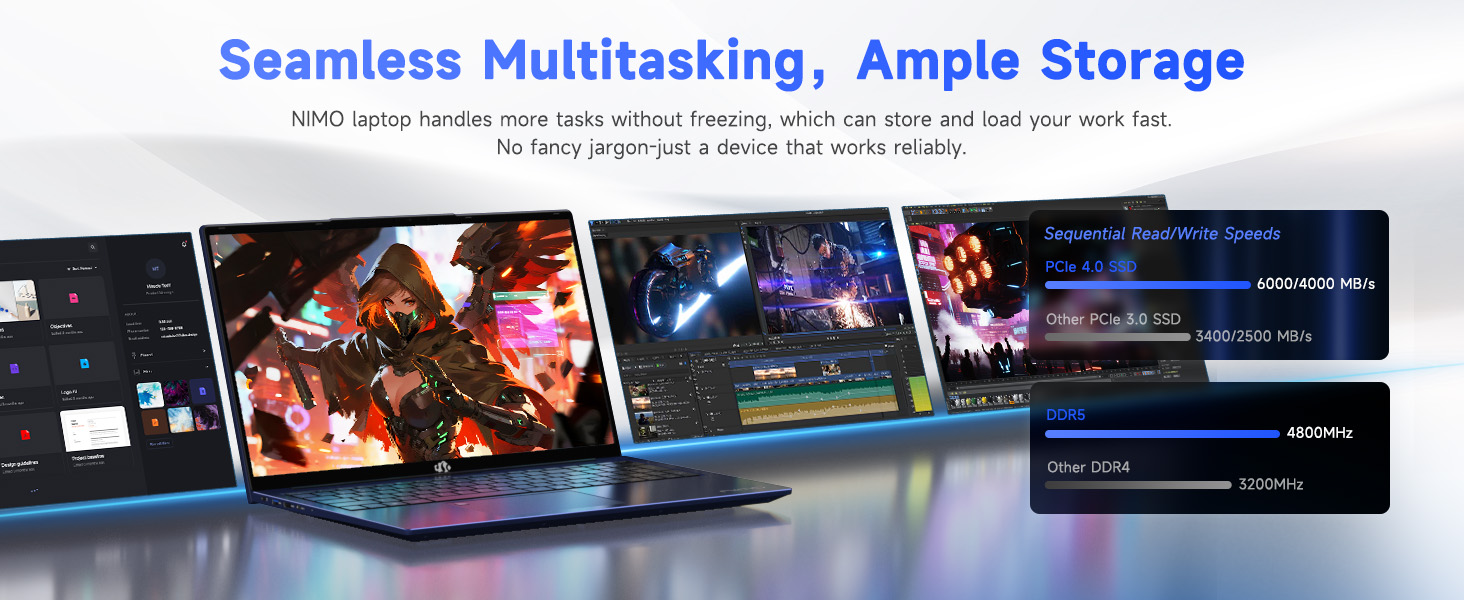
Figure 4.4: High-speed DDR5 memory and NVMe SSD for seamless operation.
4.4 കണക്റ്റിവിറ്റി
The NIMO N179 supports Wi-Fi 6E for faster and more stable wireless connections, and Bluetooth 5.2 for connecting wireless peripherals. It also features multiple ports for external devices:
- USB 3.2 Gen1 ports
- USB 2.0 പോർട്ട്
- Type-C Gen2 (multifunction) ports
- HDMI 2.0 പോർട്ട്
- ഓഡിയോ ജാക്ക്
- SD കാർഡ് റീഡർ
- കെൻസിംഗ്ടൺ ലോക്ക് സ്ലോട്ട്

ചിത്രം 4.5: ഓവർview of laptop ports for various connections.

Figure 4.6: Wi-Fi 6E provides advanced wireless connectivity.
4.5 Security and Comfort Features
The laptop integrates several features for security and user comfort:
- Webcam പ്രൈവസി ഷട്ടർ: A physical slider to cover the webcam when not in use, ensuring privacy.
- വിരലടയാള തിരിച്ചറിയൽ: സുരക്ഷിതവും വേഗത്തിലുള്ളതുമായ ലോഗിൻ ചെയ്യുന്നതിന്.
- ബാക്ക്ലൈറ്റ് കീബോർഡ്: Allows for comfortable typing in low-light conditions. Press F9 to cycle through backlight settings (temporary light, constant light, off).
- സംഖ്യാ കീപാഡ്: A dedicated numeric keypad for enhanced data entry efficiency.

Figure 4.7: Fingerprint unlock and backlit keyboard for security and comfort.

ചിത്രം 4.8: വിശദമായി view of security and comfort features.
5. പരിപാലനം
Proper maintenance ensures the longevity and optimal performance of your NIMO N179 laptop.
5.1 വൃത്തിയാക്കൽ
- സ്ക്രീനും പുറം പ്രതലങ്ങളും വൃത്തിയാക്കാൻ മൃദുവായ, ലിന്റ് രഹിത തുണി ഉപയോഗിക്കുക.
- കഠിനമായ അടയാളങ്ങൾക്ക്, ചെറുതായി dampതുണിയിൽ വെള്ളം അല്ലെങ്കിൽ സ്ക്രീൻ-സേഫ് ക്ലീനർ ഉപയോഗിക്കുക. കഠിനമായ രാസവസ്തുക്കൾ ഒഴിവാക്കുക.
- Regularly clean the keyboard with compressed air to remove dust and debris.
5.2 ബാറ്ററി കെയർ
The laptop is equipped with a 58Wh battery. To maximize battery life:
- തീവ്രമായ താപനില ഒഴിവാക്കുക.
- ലാപ്ടോപ്പ് പൂർണ്ണമായി ചാർജ് ചെയ്തിട്ടോ അല്ലെങ്കിൽ പൂർണ്ണമായി ഡിസ്ചാർജ് ചെയ്തിട്ടോ ദീർഘനേരം വയ്ക്കരുത്.
- ദീർഘകാല സംഭരണത്തിനായി, ബാറ്ററി ഏകദേശം 50-60% വരെ ചാർജ് ചെയ്യുക.

Figure 5.1: Battery features and charging efficiency.
5.3 സോഫ്റ്റ്വെയർ അപ്ഡേറ്റുകൾ
ഒപ്റ്റിമൽ പ്രകടനം, സുരക്ഷ, അനുയോജ്യത എന്നിവ ഉറപ്പാക്കാൻ നിങ്ങളുടെ വിൻഡോസ് ഓപ്പറേറ്റിംഗ് സിസ്റ്റവും ഡ്രൈവറുകളും പതിവായി അപ്ഡേറ്റ് ചെയ്യുക. വിൻഡോസ് ക്രമീകരണങ്ങൾ വഴി നിങ്ങൾക്ക് അപ്ഡേറ്റുകൾക്കായി പരിശോധിക്കാം.
5.4 കൂളിംഗ് സിസ്റ്റം
The NIMO N179 features an efficient cooling system to maintain performance. Ensure the vents are not obstructed to allow proper airflow.

Figure 5.2: Internal cooling system for sustained performance.
6. പ്രശ്നപരിഹാരം
This section addresses common issues you might encounter with your NIMO N179 laptop.
6.1 പവർ ഇല്ല / ലാപ്ടോപ്പ് ഓണാകുന്നില്ല
- പവർ അഡാപ്റ്റർ ലാപ്ടോപ്പിലേക്കും പ്രവർത്തിക്കുന്ന ഒരു പവർ ഔട്ട്ലെറ്റിലേക്കും സുരക്ഷിതമായി ബന്ധിപ്പിച്ചിട്ടുണ്ടെന്ന് ഉറപ്പാക്കുക.
- മറ്റൊരു ഉപകരണം പ്ലഗ് ഇൻ ചെയ്ത് പവർ ഔട്ട്ലെറ്റ് പ്രവർത്തനക്ഷമമാണെന്ന് ഉറപ്പാക്കുക.
- ബാറ്ററി പൂർണ്ണമായും തീർന്നാൽ, ലാപ്ടോപ്പ് ഓൺ ആകുന്നതിന് മുമ്പ് ചാർജ് ചെയ്യാൻ കുറച്ച് മിനിറ്റ് എടുത്തേക്കാം.
6.2 വൈ-ഫൈ കണക്റ്റിവിറ്റി പ്രശ്നങ്ങൾ
- വിൻഡോസ് ക്രമീകരണങ്ങളിൽ വൈഫൈ പ്രവർത്തനക്ഷമമാക്കിയിട്ടുണ്ടോയെന്ന് പരിശോധിക്കുക.
- നിങ്ങളുടെ റൂട്ടറും മോഡവും പുനരാരംഭിക്കുക.
- Ensure you are within range of your Wi-Fi network and have entered the correct password.
- Update your Wi-Fi drivers through Device Manager.
- If issues persist, try restarting the network adapter via Windows Network Settings.
6.3 കീബോർഡ് ബാക്ക്ലൈറ്റ് പ്രവർത്തിക്കുന്നില്ല
- അമർത്തുക F9 key to cycle through the backlight settings (off, temporary, constant).
- Ensure your laptop's power settings are not configured to disable the backlight to save power.
6.4 Fingerprint Reader Issues
- Ensure your finger is clean and dry when using the sensor.
- Re-register your fingerprint in Windows Settings if you experience consistent issues.
- Update fingerprint reader drivers.
6.5 സിസ്റ്റം സ്ലോഡൗൺ അല്ലെങ്കിൽ ഫ്രീസിംഗ്
- പശ്ചാത്തലത്തിൽ പ്രവർത്തിക്കുന്ന അനാവശ്യ ആപ്ലിക്കേഷനുകൾ അടയ്ക്കുക.
- ഉയർന്ന CPU അല്ലെങ്കിൽ RAM ഉപയോഗിക്കുന്ന പ്രക്രിയകൾക്കായി ടാസ്ക് മാനേജർ പരിശോധിക്കുക.
- Ensure your system has sufficient free storage space on the SSD.
- ഒരു വൈറസ് സ്കാൻ പ്രവർത്തിപ്പിക്കുക.
- Ensure the laptop's cooling vents are clear and not obstructed.
7 സ്പെസിഫിക്കേഷനുകൾ
Detailed technical specifications for the NIMO N179 laptop:
| ഫീച്ചർ | വിശദാംശങ്ങൾ |
|---|---|
| മോഡലിൻ്റെ പേര് | NIMO N179 |
| സ്ക്രീൻ വലിപ്പം | 17.3 ഇഞ്ച് |
| സ്ക്രീൻ റെസല്യൂഷൻ | 1920 x 1080 പിക്സലുകൾ (ഫുൾ എച്ച്ഡി) |
| പ്രോസസ്സർ | എഎംഡി റൈസൺ 7 7735HS (8 കോറുകൾ, 16 ത്രെഡുകൾ, 4.75 GHz വരെ) |
| ഗ്രാഫിക്സ് കോപ്രൊസസർ | എഎംഡി റേഡിയൻ 680എം (ഇന്റഗ്രേറ്റഡ്) |
| റാം | 16 ജിബി DDR5 (4800 MHz) |
| ഹാർഡ് ഡ്രൈവ് | 512 GB SSD (NVMe, Solid State) |
| ഓപ്പറേറ്റിംഗ് സിസ്റ്റം | വിൻഡോസ് 11 ഹോം |
| വയർലെസ് തരം | Wi-Fi 6E (802.11a/b/g/n/ac), Bluetooth 5.2 |
| തുറമുഖങ്ങൾ | 1x USB 2.0, 4x USB 3.0 (Gen1), 2x Type-C Gen2 (Multifunction), 1x HDMI 2.0, 1x Audio Jack, 1x SD Card Reader, 1x Kensington Lock |
| ബാറ്ററി | 58Wh Lithium Metal (up to 9.9 hours average battery life) |
| ചാർജർ | 100W Type-C PD Fast Charger (GaN Technology) |
| ഇനത്തിൻ്റെ ഭാരം | 4.6 പൗണ്ട് |
| ഉൽപ്പന്ന അളവുകൾ | 15.66 x 9.99 x 0.74 ഇഞ്ച് |
| പ്രത്യേക സവിശേഷതകൾ | Backlit Keyboard, Fingerprint Reader, HD Audio, Numeric Keypad, Webക്യാമറ സ്വകാര്യത ഷട്ടർ |
8. വാറൻ്റിയും പിന്തുണയും
NIMO provides comprehensive support for your N179 laptop.
8.1 വാറൻ്റി വിവരങ്ങൾ
Your NIMO N179 laptop comes with a 2 വർഷത്തെ വാറൻ്റി. കൂടാതെ, ഒരു 90 ദിവസത്തെ റിട്ടേൺ പോളിസി is offered from the date of purchase. Please retain your proof of purchase for warranty claims.
8.2 ഉപഭോക്തൃ പിന്തുണ
For technical assistance or any inquiries, NIMO offers 24/7 online technical support. Refer to the contact information provided with your product packaging or visit the official NIMO support webവിശദാംശങ്ങൾക്ക് സൈറ്റ്.


