1. ആമുഖം
This user manual provides comprehensive instructions for the installation, operation, and maintenance of your NiSi Lens Adapter for the Ricoh GR IV camera. This adapter is specifically designed to enable the use of 49mm diameter lens filters with your Ricoh GR IV, expanding your creative photographic options.
The NiSi Lens Adapter is crafted from a durable, lightweight aluminum alloy, ensuring robust protection without adding significant bulk to your camera. It is engineered to maintain the stylish aesthetic of the Ricoh GR IV while enhancing its functionality.
2. ഉൽപ്പന്നം കഴിഞ്ഞുview
The NiSi Lens Adapter (Model: GR4-Filter Adapter) is a precision-engineered accessory for the Ricoh GR IV camera. Its primary function is to provide a secure mounting point for 49mm circular filters.
പ്രധാന സവിശേഷതകൾ:
- 49mm Filter Compatibility: Designed to securely attach 49mm diameter lens filters.
- Retractable Lens Support: Allows the camera lens to retract fully even with the adapter attached.
- നീണ്ടുനിൽക്കുന്ന നിർമ്മാണം: Made from high-quality, lightweight aluminum alloy for longevity and protection.
- തടസ്സമില്ലാത്ത സംയോജനം: Maintains the camera's original design and aesthetics.
- മെച്ചപ്പെടുത്തിയ സംരക്ഷണം: Can be used in conjunction with the separately sold GR IV Lens Cap for additional lens protection.
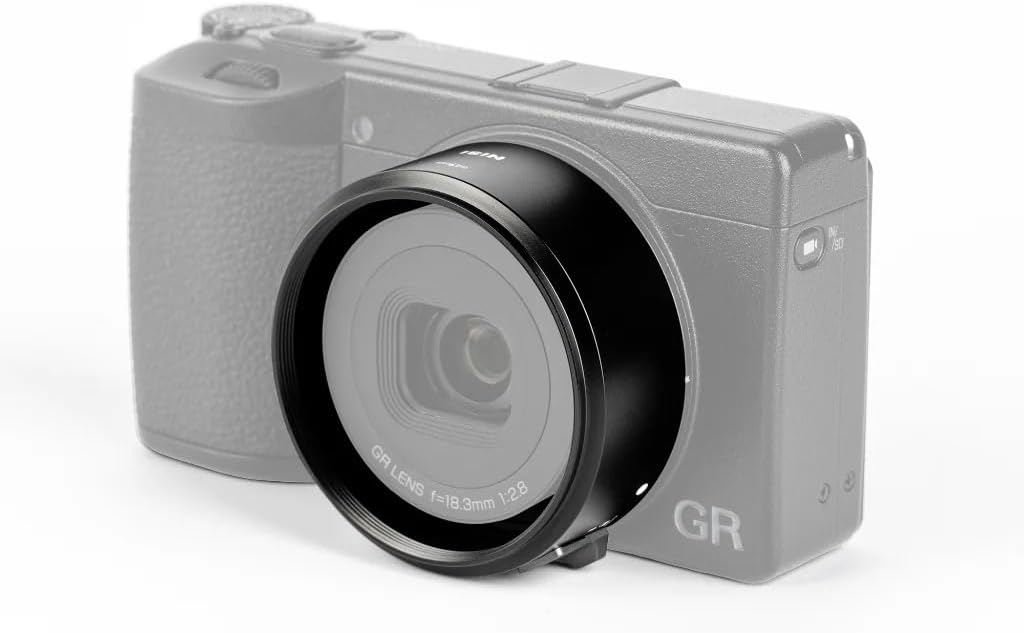
Figure 2.1: NiSi Lens Adapter installed on a Ricoh GR IV camera.
3. സജ്ജീകരണവും ഇൻസ്റ്റാളേഷനും
Follow these steps to correctly install the NiSi Lens Adapter on your Ricoh GR IV camera.
- ക്യാമറ തയ്യാറാക്കുക: Ensure your Ricoh GR IV camera is powered off.
- Remove Original Lens Ring: Locate the removable lens ring on the front of your Ricoh GR IV camera. Gently twist and remove it.

Figure 3.1: Detail of the camera's lens mounting area, indicating the unlock position.
- Align the Adapter: Take the NiSi Lens Adapter. Align the white dot on the adapter with the corresponding white dot on the camera's lens barrel.

Figure 3.2: NiSi Lens Adapter with alignment mark and unlock switch.
- അഡാപ്റ്റർ അറ്റാച്ചുചെയ്യുക: Gently push the adapter onto the camera's lens barrel while aligning the dots. Once seated, twist the adapter clockwise until it clicks into place and is securely locked.

Figure 3.3: The NiSi Lens Adapter, ready for installation.
- Attach 49mm Filter (Optional): Once the adapter is securely attached, you can screw in any 49mm diameter lens filter onto the front threads of the NiSi Lens Adapter.
4. പ്രവർത്തന നിർദ്ദേശങ്ങൾ
Using the NiSi Lens Adapter is straightforward once installed. It allows you to utilize 49mm filters with your Ricoh GR IV camera.
ഫിൽട്ടറുകൾ ഉപയോഗിക്കുന്നത്:
- Screw your desired 49mm filter onto the front threads of the NiSi Lens Adapter.
- Ensure the filter is securely but not overtightened.
- The camera's lens can still retract into the body even with the adapter and a filter attached, offering convenience for storage and portability.
Using a Lens Cap:
For additional protection, especially when not in use, it is recommended to use a lens cap. The NiSi Lens Adapter is compatible with the separately sold Ricoh GR IV Lens Cap.

Figure 4.1: Camera with adapter and lens cap for protection.
5. പരിചരണവും പരിപാലനവും
To ensure the longevity and optimal performance of your NiSi Lens Adapter, follow these care guidelines:
- വൃത്തിയാക്കൽ: Use a soft, dry cloth to wipe the adapter. Avoid abrasive materials or harsh chemicals.
- സംഭരണം: When not in use, store the adapter in a clean, dry place, preferably in its original packaging or a protective pouch.
- കൈകാര്യം ചെയ്യൽ: Handle the adapter carefully to prevent scratches or damage to the threads.
- പരിസ്ഥിതി വ്യവസ്ഥകൾ: Avoid exposing the adapter to extreme temperatures, high humidity, or corrosive environments.
6. പ്രശ്നപരിഹാരം
If you encounter any issues with your NiSi Lens Adapter, refer to the following common problems and solutions:
| പ്രശ്നം | സാധ്യമായ കാരണം | പരിഹാരം |
|---|---|---|
| Adapter does not attach securely. | Incorrect alignment or debris in the mounting mechanism. | Ensure the white dots on the adapter and camera are perfectly aligned. Check for any obstructions and clean the mounting area. Twist firmly until it clicks. |
| Filter does not screw onto the adapter. | Incorrect filter size or cross-threading. | Verify the filter is 49mm in diameter. Carefully align the filter threads with the adapter threads and turn gently. Do not force it. |
| Lens retraction issue with adapter attached. | Adapter not fully seated or a non-standard filter is used. | Ensure the adapter is correctly installed and locked. While the adapter is designed for lens retraction, some thicker or non-standard 49mm filters might interfere. |
If the problem persists, please contact NiSi customer support for further assistance.
7 സ്പെസിഫിക്കേഷനുകൾ
| ബ്രാൻഡ് | നിസി |
| മോഡൽ നമ്പർ | GR4-Filter Adapter |
| അനുയോജ്യത | Ricoh GR IV Camera |
| ഫിൽട്ടർ ത്രെഡ് വലുപ്പം | 49 മി.മീ |
| മെറ്റീരിയൽ | അലുമിനിയം അലോയ് |
| നിറം | കറുപ്പ് |
| പാക്കേജ് അളവുകൾ | 8.1 x 7.8 x 4.5 സെ.മീ |
| ഇനത്തിൻ്റെ ഭാരം | 30 ഗ്രാം |
8. വാറൻ്റിയും പിന്തുണയും
For warranty information and customer support, please refer to the official NiSi website or contact your local NiSi distributor. Keep your purchase receipt as proof of purchase for any warranty claims.
NiSi Official Webസൈറ്റ്: www.nisioptics.com


