1. ആമുഖം
വാങ്ങിയതിന് നന്ദി.asing the ThermoPro TP210B Wireless Refrigerator/Freezer Thermometer. This device is designed to help you monitor the temperature of your refrigerator and freezer wirelessly, ensuring your food is stored at optimal temperatures. With a strong 500ft/150m wireless range and customizable alarms, you can easily keep track of temperature fluctuations.
2. പാക്കേജ് ഉള്ളടക്കം
- 1 x റിസീവർ യൂണിറ്റ്
- 1 x ട്രാൻസ്മിറ്റർ യൂണിറ്റ്
- 2 x AAA Batteries (for Receiver)
- 1 x USB Charging Cable (for Transmitter)
- 1 x ഉപയോക്തൃ മാനുവൽ
3 പ്രധാന സവിശേഷതകൾ
- വിപുലീകരിച്ച വയർലെസ് ശ്രേണി: Up to 500ft/150m using advanced RF technology for stable connection.
- Pre-Paired for Immediate Use: No complex setup required; units are pre-paired from the factory.
- വിശാലമായ അളവെടുപ്പ് ശ്രേണി: Accurate readings within ±0.9°F across -40°F to 158°F (-40°C to 70°C).
- Smart Temperature Alerts: Customizable high/low temperature limits with audio-visual alarms.
- Easy-to-Read Backlit Display: Shows fridge and freezer readings, Max/Min records, and low-battery status.
- Considerate Power Design: Receiver uses AAA batteries, transmitter features a rechargeable lithium battery.
- ഫ്ലെക്സിബിൾ പ്ലേസ്മെന്റ് ഓപ്ഷനുകൾ: Receiver has hook, stand, or magnet; transmitter has clip or stand.
4. സജ്ജീകരണം
4.1. Receiver Battery Installation
- Open the battery compartment on the back of the receiver unit.
- ശരിയായ പോളാരിറ്റി (+/-) ഉറപ്പാക്കിക്കൊണ്ട് 2 AAA ബാറ്ററികൾ ഇടുക.
- ബാറ്ററി കമ്പാർട്ട്മെൻ്റ് സുരക്ഷിതമായി അടയ്ക്കുക.
Note: The receiver requires 2 AAA batteries, which are included in the package.
4.2. Transmitter Charging
- Locate the charging port on the transmitter unit.
- Connect the provided USB charging cable to the transmitter and a standard USB power source (e.g., wall adapter, computer USB port).
- Allow the transmitter to charge fully before first use. The charging indicator will change when fully charged.
Note: The transmitter uses a rechargeable lithium battery designed for low-temperature environments.
4.3. Initial Pairing (Pre-Paired)
The ThermoPro TP210B units are pre-paired at the factory. Simply power on both the receiver and transmitter, and they should automatically connect. If connection issues occur, refer to the Troubleshooting section.
4.4. പ്ലേസ്മെന്റ്
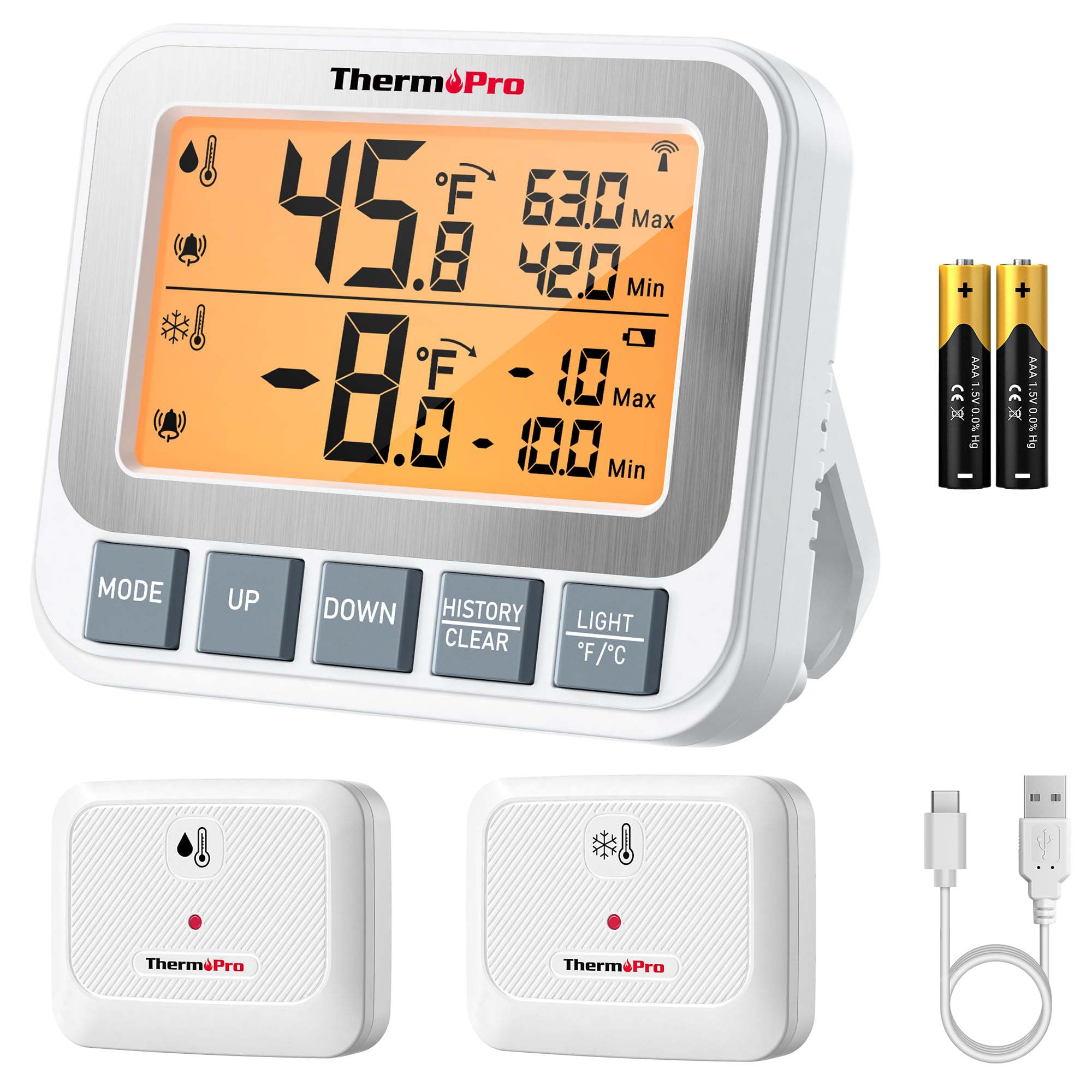
Image: ThermoPro TP210B Receiver and Transmitter. The receiver displays temperatures, while the transmitter sends data from inside the appliance.
റിസീവർ പ്ലേസ്മെന്റ്:
- Use the integrated stand to place it on a countertop.
- Utilize the magnetic back to attach it to a metallic surface.
- Hang it using the hook on the back.
- Place the receiver in a location where you can easily view the display and hear alarms, within the 500ft/150m range of the transmitter.
ട്രാൻസ്മിറ്റർ പ്ലേസ്മെന്റ്:
- Place the transmitter inside your refrigerator or freezer.
- Use the integrated clip to attach it to a shelf or rack.
- Ensure the transmitter is not obstructed by large items that could block the wireless signal.
5. പ്രവർത്തന നിർദ്ദേശങ്ങൾ
5.1. പവർ ഓൺ/ഓഫ്
- അമർത്തുക പവർ button on both the receiver and transmitter to turn them on or off.
5.2. താപനില വായന
- The receiver's backlit LCD display will show the current temperature from the transmitter.
- The display typically shows both the current temperature and the all-time Max/Min records.
5.3. താപനില അലാറങ്ങൾ സജ്ജീകരിക്കൽ
The TP210B allows you to set custom high and low temperature limits for alerts.
- അമർത്തുക അലേർട്ട് button on the receiver. The high limit will flash.
- ഉപയോഗിക്കുക UP or താഴേക്ക് buttons to adjust the high temperature limit.
- അമർത്തുക അലേർട്ട് again to confirm the high limit and move to the low limit setting.
- ഉപയോഗിക്കുക UP or താഴേക്ക് buttons to adjust the low temperature limit.
- അമർത്തുക അലേർട്ട് a third time to confirm the low limit and exit alarm setting mode.
When the temperature exceeds the set range, the receiver will emit an audio-visual alarm.
5.4. Max/Min Temperature Records
- The receiver automatically records the maximum and minimum temperatures detected since the last reset.
- അമർത്തുക പരമാവധി/മിനിറ്റ് button to cycle through current, maximum, and minimum temperature readings.
- To reset the Max/Min records, press and hold the പരമാവധി/മിനിറ്റ് 3 സെക്കൻഡ് നേരത്തേക്ക് ബട്ടൺ viewing the Max/Min display.
5.5. ബാക്ക്ലൈറ്റ്
- The receiver features a bright backlit display for easy reading in low-light conditions.
- The backlight will activate automatically when a button is pressed and will turn off after a short period of inactivity to conserve battery.
6. പരിപാലനം
6.1. വൃത്തിയാക്കൽ
- Wipe the units with a damp തുണി. വെള്ളത്തിൽ മുക്കരുത്.
- ഉരച്ചിലുകളുള്ള ക്ലീനറുകളോ ലായകങ്ങളോ ഉപയോഗിക്കരുത്.
6.2. Battery Replacement (Receiver)
- When the low battery indicator appears on the receiver display, replace the 2 AAA batteries.
- Ensure proper polarity when inserting new batteries.
6.3. Transmitter Charging
- Recharge the transmitter's lithium battery when the low battery indicator appears.
- നൽകിയിരിക്കുന്ന USB ചാർജിംഗ് കേബിൾ ഉപയോഗിക്കുക.
6.4. സംഭരണം
- If storing the device for an extended period, remove the AAA batteries from the receiver.
- തീവ്രമായ ഊഷ്മാവിൽ നിന്ന് ഉണങ്ങിയ സ്ഥലത്ത് സൂക്ഷിക്കുക.
7. പ്രശ്നപരിഹാരം
| പ്രശ്നം | സാധ്യമായ കാരണം | പരിഹാരം |
|---|---|---|
| No temperature reading / "--" displayed | Transmitter not powered on, out of range, or low battery. |
|
| കൃത്യമല്ലാത്ത താപനില റീഡിംഗുകൾ | Sensor obstruction, extreme environmental conditions, or sensor malfunction. |
|
| അലാറങ്ങൾ മുഴങ്ങുന്നില്ല | Alarm limits not set correctly or alarm function disabled. |
|
| Transmitter battery drains quickly | Operating in extremely low temperatures or frequent signal transmission. |
|
8 സ്പെസിഫിക്കേഷനുകൾ
- താപനില പരിധി: -40°F മുതൽ 158°F വരെ (-40°C മുതൽ 70°C വരെ)
- താപനില കൃത്യത: ± 0.9 ° F (± 0.5 ° C)
- വയർലെസ് ശ്രേണി: Up to 500ft (150m) in open air
- ട്രാൻസ്മിഷൻ ഫ്രീക്വൻസി: 433 MHz
- റിസീവർ പവർ: 2 x AAA ബാറ്ററികൾ (ഉൾപ്പെട്ടിരിക്കുന്നു)
- ട്രാൻസ്മിറ്റർ പവർ: Rechargeable Lithium battery (included, with USB charging cable)
- ഡിസ്പ്ലേ: ബാക്ക്ലിറ്റ് എൽസിഡി
- അളവുകൾ (റിസീവർ): Approximately 4.33 inches (length)
- ഭാരം (ഇനം): ഏകദേശം 11.2 ഔൺസ്
9. വാറണ്ടിയും പിന്തുണയും
ThermoPro provides a warranty for this product against defects in materials and workmanship. For detailed warranty information, product registration, or technical support, please visit the official ThermoPro webസൈറ്റ് അല്ലെങ്കിൽ അവരുടെ ഉപഭോക്തൃ സേവനവുമായി നേരിട്ട് ബന്ധപ്പെടുക.
ഉദ്യോഗസ്ഥൻ Webസൈറ്റ്: www.thermopro.com
ഉപഭോക്തൃ പിന്തുണ: Refer to the contact information provided on the ThermoPro webസൈറ്റ് അല്ലെങ്കിൽ ഉൽപ്പന്ന പാക്കേജിംഗ്.


