ആമുഖം
This manual provides detailed instructions for the safe and efficient operation of your TOOLTOP UKF10 Foot Pedal Capacitor Spot Welder. This device is designed for precise spot welding of 18650 lithium battery packs and other compatible materials, offering multiple welding modes and high power output for various DIY welding applications.
Please read this manual thoroughly before operating the device to ensure proper usage, prevent damage, and maintain safety.
സുരക്ഷാ നിർദ്ദേശങ്ങൾ
മുന്നറിയിപ്പ്: ഈ സുരക്ഷാ നിർദ്ദേശങ്ങൾ പാലിക്കുന്നതിൽ പരാജയപ്പെടുന്നത് വൈദ്യുതാഘാതം, തീപിടുത്തം, ഗുരുതരമായ പരിക്കുകൾ അല്ലെങ്കിൽ മരണത്തിന് കാരണമായേക്കാം.
- Always wear appropriate personal protective equipment (PPE), including safety glasses, welding gloves, and protective clothing, when operating the spot welder.
- ജോലിസ്ഥലം നന്നായി വായുസഞ്ചാരമുള്ളതും കത്തുന്ന വസ്തുക്കളിൽ നിന്ന് മുക്തവുമാണെന്ന് ഉറപ്പാക്കുക.
- വെൽഡർ d-യിൽ പ്രവർത്തിപ്പിക്കരുത്amp അല്ലെങ്കിൽ ആർദ്ര സാഹചര്യങ്ങൾ.
- വെൽഡിംഗ് ഏരിയയിൽ നിന്ന് കുട്ടികളെയും അനധികൃത വ്യക്തികളെയും അകറ്റി നിർത്തുക.
- Do not touch the welding electrodes or workpieces immediately after welding, as they will be hot.
- ഏതെങ്കിലും അറ്റകുറ്റപ്പണികൾ അല്ലെങ്കിൽ വൃത്തിയാക്കൽ നടത്തുന്നതിന് മുമ്പ് വൈദ്യുതി വിതരണം വിച്ഛേദിക്കുക.
- Use only the original charging cable and accessories provided with the device.
- സ്പോട്ട് വെൽഡർ ഡിസ്അസംബ്ലിംഗ് ചെയ്യാനോ പരിഷ്ക്കരിക്കാനോ ശ്രമിക്കരുത്. എല്ലാ സേവനങ്ങളും യോഗ്യതയുള്ള ഉദ്യോഗസ്ഥരെ ഏൽപ്പിക്കുക.
- Be aware of potential sparks and molten metal during operation.
ഉൽപ്പന്നം കഴിഞ്ഞുview ഘടകങ്ങളും
The TOOLTOP UKF10 is a compact and powerful capacitor spot welder. Familiarize yourself with its main components:
- പ്രധാന യൂണിറ്റ്: Contains the control panel, power knob, and charging port.
- Welding Pens: Two intelligent manual spot welding pens for precise application.
- കാൽ ചവിട്ടുപടി: For triggering welds in foot pedal mode.
- ചാർജിംഗ് കേബിളുകൾ: Type-C to Type-C and Type-A to Type-C for charging.
- Nickel Coil: For welding applications.
- Spare Soldering Pins: Replacement pins for the welding pens.
- സാൻഡ്പേപ്പർ: For preparing surfaces.

Image: The main unit of the TOOLTOP UKF10 spot welder with its intelligent manual welding pens and foot pedal.

Image: Included accessories: foot pedal, nickel coil, C-C charging cable, A-C charging cable, spare soldering pins, and sandpaper.

ചിത്രം: വിശദമായത് view of the intelligent manual spot welding pen, highlighting its ergonomic design and connection points.
സജ്ജമാക്കുക
- അൺപാക്ക് ചെയ്യുന്നു: പാക്കേജിംഗിൽ നിന്ന് എല്ലാ ഘടകങ്ങളും ശ്രദ്ധാപൂർവ്വം നീക്കം ചെയ്ത് എന്തെങ്കിലും കേടുപാടുകൾ ഉണ്ടോ എന്ന് പരിശോധിക്കുക.
- ചാർജിംഗ്: Before first use, fully charge the spot welder using the provided Type-C charging cable. Connect one end to the welder's Type-C port and the other to a compatible USB power adapter (not included). The display will indicate charging status.
- വെൽഡിംഗ് പേനകൾ ബന്ധിപ്പിക്കുക: Insert the intelligent manual spot welding pens firmly into their designated ports on the main unit. Ensure a secure connection.
- കണക്ട് ഫൂട്ട് പെഡൽ (ഓപ്ഷണൽ): If using foot pedal mode, connect the foot pedal to its dedicated port on the main unit.
- വർക്ക്പീസ് തയ്യാറാക്കുക: Ensure the surfaces to be welded are clean, dry, and free from rust, oil, or other contaminants. Use the provided sandpaper if necessary.
പ്രവർത്തന നിർദ്ദേശങ്ങൾ
പവർ ഓൺ/ഓഫ്
- To power on, press and hold the power button (usually integrated with the knob) for a few seconds until the display illuminates.
- പവർ ഓഫ് ചെയ്യാൻ, ഡിസ്പ്ലേ ഓഫാകുന്നതുവരെ പവർ ബട്ടൺ വീണ്ടും അമർത്തിപ്പിടിക്കുക.
Mode Selection and Adjustments
The UKF10 offers multiple welding modes and adjustable parameters for precise control. Use the main knob and display to navigate and adjust settings.

Image: The control system interface displaying various adjustable parameters: Mode (Manual/Auto), Preheat, Pause, Gear (power level), Trigger, and Stitch Welding.
- വെൽഡിംഗ് മോഡുകൾ: Select between Manual, Automatic, or Foot Pedal welding modes.
- മാനുവൽ മോഡ്: Triggered by a button on the welding pen.
- യാന്ത്രിക മോഡ്: Welds automatically when both pen tips contact the workpiece.
- Foot Pedal Mode: Triggered by pressing the connected foot pedal.
- Preheat (0.1-0.5ms): Adjusts the preheating time to prepare the material for welding, improving weld quality.
- Pause (1-20ms): Sets the pause duration between welding pulses.
- Gear (001-100): Controls the welding power level. Start with lower settings and gradually increase as needed.
- Trigger (0.5-5.0s): Sets the trigger delay or duration.
- Stitch Welding (1-2 times): Configures the number of welding pulses for a single trigger.
Rotate the knob to select a parameter and press the knob to confirm or enter adjustment mode. Rotate again to change the value, and press to confirm.
വെൽഡിംഗ് പ്രക്രിയ
- മോഡ് തിരഞ്ഞെടുക്കുക: Choose your desired welding mode (Manual, Automatic, or Foot Pedal).
- ക്രമീകരണങ്ങൾ ക്രമീകരിക്കുക: Based on the material thickness and type, adjust the Preheat, Gear (power), and other parameters. Refer to the material compatibility guidelines below.
- സ്ഥാനം വർക്ക്പീസ്: Place the nickel strip or other material onto the battery terminal or workpiece.
- Apply Welding Pens: Firmly press both welding pen tips onto the nickel strip, ensuring good contact with both the strip and the underlying material. Maintain even pressure.
- ട്രിഗർ വെൽഡ്:
- മാനുവൽ മോഡ്: Press the button on the welding pen.
- യാന്ത്രിക മോഡ്: The weld will trigger automatically once good contact is detected.
- Foot Pedal Mode: കാൽ പെഡൽ അമർത്തുക.
- വെൽഡിംഗ് പരിശോധിക്കുക: After welding, carefully inspect the weld joint for strength and appearance. Adjust settings if the weld is too weak or too strong.
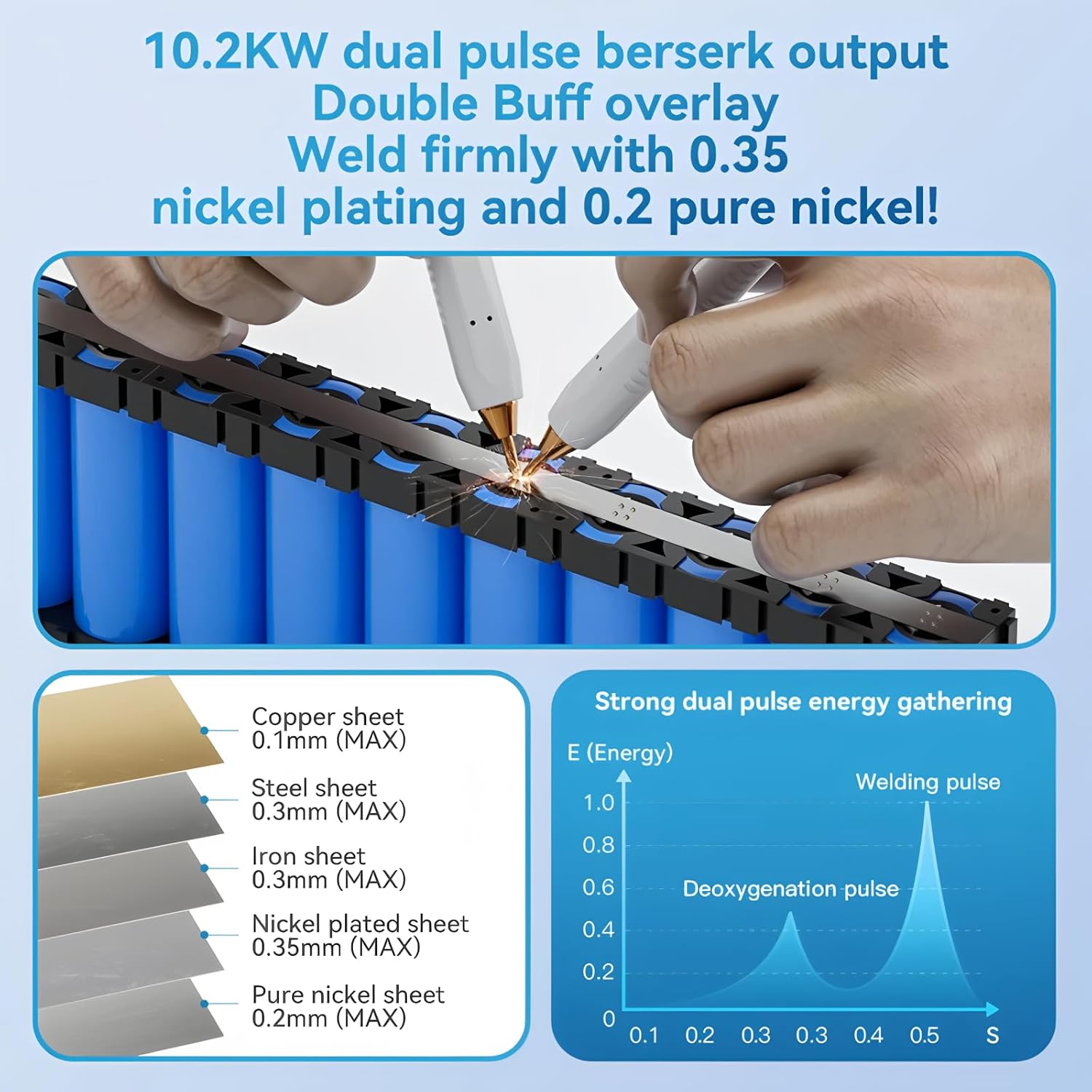
Image: Illustration of the spot welding process on battery cells, showing the application of welding pens to a nickel strip.
മെറ്റീരിയൽ അനുയോജ്യത
The UKF10 spot welder is capable of welding various materials with specific thickness limitations:
| മെറ്റീരിയൽ തരം | പരമാവധി കനം |
|---|---|
| ചെമ്പ് ഷീറ്റ് | 0.1 മി.മീ |
| സ്റ്റീൽ ഷീറ്റ് | 0.3 മി.മീ |
| ഇരുമ്പ് ഷീറ്റ് | 0.3 മി.മീ |
| Nickel plated sheet | 0.35 മി.മീ |
| Pure nickel sheet | 0.2 മി.മീ |
Note: Optimal welding results depend on material cleanliness, proper pressure, and correct power settings.
മെയിൻ്റനൻസ്
- വൃത്തിയാക്കൽ: Regularly clean the welding pen tips and the main unit with a dry, soft cloth. Ensure no metal dust or debris accumulates around the connections.
- ഇലക്ട്രോഡ് അവസ്ഥ: Inspect welding pen tips for wear or oxidation. If necessary, gently sand them with fine sandpaper to ensure good conductivity. Replace worn-out soldering pins with the provided spares.
- സംഭരണം: Store the spot welder in a cool, dry place, away from direct sunlight and moisture. Ensure it is fully charged before long-term storage to preserve battery life.
- ബാറ്ററി കെയർ: ബാറ്ററി ഇടയ്ക്കിടെ പൂർണ്ണമായും ഡിസ്ചാർജ് ചെയ്യുന്നത് ഒഴിവാക്കുക. ബാറ്ററി ഇൻഡിക്കേറ്റർ കുറവായിരിക്കുമ്പോൾ റീചാർജ് ചെയ്യുക.
ട്രബിൾഷൂട്ടിംഗ്
| പ്രശ്നം | സാധ്യമായ കാരണം | പരിഹാരം |
|---|---|---|
| വെൽഡർ പവർ ഓൺ ചെയ്യുന്നില്ല | ബാറ്ററി ചാർജ് കുറവാണ്; പവർ ബട്ടൺ ശരിയായി അമർത്തിയിട്ടില്ല. | ഉപകരണം ചാർജ് ചെയ്യുക; പവർ ബട്ടൺ അമർത്തിപ്പിടിക്കുക. |
| ദുർബലമായ അല്ലെങ്കിൽ പൊരുത്തമില്ലാത്ത വെൽഡിങ്ങുകൾ | Insufficient power setting; Dirty or oxidized welding tips; Poor contact with workpiece; Material too thick | Increase "Gear" (power) setting; Clean or replace welding tips; Ensure firm and even pressure; Check material thickness against specifications. |
| Excessive sparks or burn-through | Too high power setting; Material too thin | Decrease "Gear" (power) setting; Verify material thickness is within limits. |
| Welder overheats | Continuous heavy use; Poor ventilation | Allow the welder to cool down; Ensure adequate airflow around the unit. |
| Foot pedal not triggering | Foot pedal not connected; Welder not in Foot Pedal mode | Ensure foot pedal is securely connected; Select "Foot Pedal" mode on the welder. |
സ്പെസിഫിക്കേഷനുകൾ
- മോഡൽ നമ്പർ: TT-Awithz-UKF10
- പവർ ഔട്ട്പുട്ട്: 10200W (പീക്ക്)
- ചാർജിംഗ് പോർട്ട്: ടൈപ്പ്-സി
- വെൽഡിംഗ് മോഡുകൾ: Manual, Automatic, Foot Pedal
- ക്രമീകരിക്കാവുന്ന പാരാമീറ്ററുകൾ: Preheat, Pause, Gear (1-100), Trigger, Stitch Welding
- Capacitor Lifespan: 500,000+ cycles (based on AWithZ laboratory testing)
- സർട്ടിഫിക്കേഷനുകൾ: CE, RoHS
- നിർമ്മാതാവ്: ടൂൾടോപ്പ്

ചിത്രം: ആന്തരികം view highlighting the high-quality Farad capacitors, indicating a life extension of 120%, over 500,000 cycles, and a 30% increase in charging speed.
വാറൻ്റിയും പിന്തുണയും
The TOOLTOP UKF10 Foot Pedal Capacitor Spot Welder comes with a manufacturer's warranty. Please refer to your purchase documentation for specific warranty terms and conditions.
- EU സ്പെയർ പാർട്സ് ലഭ്യത: 1 വർഷം
- For technical support, warranty claims, or service inquiries, please contact your retailer or the manufacturer directly.
- Do not attempt to repair the device yourself, as this may void the warranty and pose safety risks.


