1. ആമുഖം
This manual provides detailed instructions for the safe and effective operation, setup, and maintenance of your TOOLTOP Awithz HD2 Battery Spot Welder. Please read this manual thoroughly before using the device to ensure proper function and to prevent damage or injury. This spot welder is designed for welding nickel sheets onto 18650 battery cells and similar applications.

Image 1.1: The Awithz HD2 Battery Spot Welder being used to weld battery cells.
2. സുരക്ഷാ മുൻകരുതലുകൾ
WARNING: Improper use of this device can result in serious injury or damage to property. Always follow safety guidelines.
- സ്പോട്ട് വെൽഡർ പ്രവർത്തിപ്പിക്കുമ്പോൾ സുരക്ഷാ ഗ്ലാസുകൾ ഉൾപ്പെടെയുള്ള ഉചിതമായ വ്യക്തിഗത സംരക്ഷണ ഉപകരണങ്ങൾ (പിപിഇ) എല്ലായ്പ്പോഴും ധരിക്കുക.
- ജോലിസ്ഥലം നന്നായി വായുസഞ്ചാരമുള്ളതും കത്തുന്ന വസ്തുക്കളിൽ നിന്ന് മുക്തവുമാണെന്ന് ഉറപ്പാക്കുക.
- Do not touch the welding pins or the workpiece immediately after welding, as they may be hot.
- Keep the device away from water and moisture. Do not operate in wet conditions.
- Do not attempt to weld materials other than those specified (e.g., nickel sheets, copper sheets up to specified thickness).
- കുട്ടികൾക്ക് ലഭ്യമാകാതെ സൂക്ഷിക്കുക.
- ഉപകരണം ഡിസ്അസംബ്ലിംഗ് ചെയ്യുകയോ പരിഷ്കരിക്കുകയോ ചെയ്യരുത്. എല്ലാ സേവനങ്ങളും യോഗ്യതയുള്ള ഉദ്യോഗസ്ഥരെ ഏൽപ്പിക്കുക.
- Ensure batteries being welded are not damaged or leaking.
3. പാക്കേജ് ഉള്ളടക്കം
താഴെ കൊടുത്തിരിക്കുന്ന എല്ലാ ഇനങ്ങളും നിങ്ങളുടെ പാക്കേജിൽ ഉണ്ടെന്ന് ഉറപ്പാക്കുക:
- 1 x TOOLTOP Awithz HD2 Battery Spot Welder
- 1 x 2M Nickel Roll
- 1 x സാൻഡ്പേപ്പർ
- 1 x ടൈപ്പ്-സി ചാർജിംഗ് കേബിൾ
- 2 x Spare Welding Needles (Alumina Copper Solder Pins)

Image 3.1: Included accessories with the Awithz HD2 Battery Spot Welder.
4. ഉൽപ്പന്ന സവിശേഷതകൾ
The Awithz HD2 Battery Spot Welder incorporates several advanced features for efficient and precise welding:
- Weldable Thickness: Capable of welding up to 0.2mm (MAX) nickel sheet and 0.15mm copper sheet.
- ക്രമീകരിക്കാവുന്ന ഗിയറുകൾ: Features 90 levels of power adjustment for precise control over welding strength.
- High-Definition Digital Display: Provides real-time information on battery level, gear setting, preheat time, trigger time, and temperature.
- Detachable & Replaceable Pins: Alumina copper solder pins are detachable and replaceable, with adjustable spacing for versatility.
- High-Magnification A-Grade Battery Cells: Utilizes quality battery cells for extended machine life and stable power supply.
- ഓട്ടോമാറ്റിക്, മാനുവൽ മോഡുകൾ: Offers flexibility in operation.
- എർഗണോമിക് ഡിസൈൻ: Engineered for comfortable handheld use.
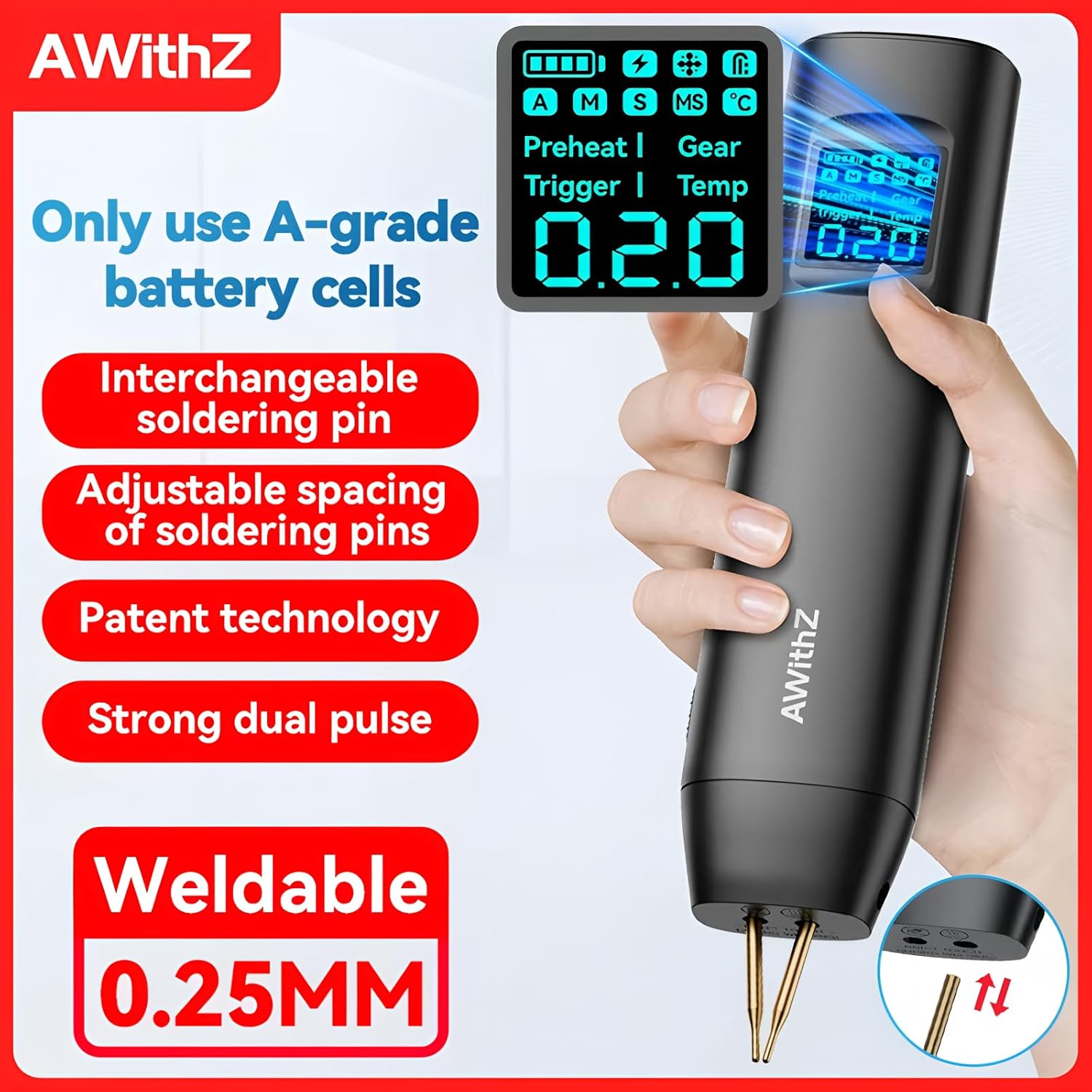
ചിത്രം 4.1: കഴിഞ്ഞുview of the Awithz HD2's primary features.

Image 4.2: The high-definition digital display and its adjustable settings.

Image 4.3: Illustration of the high-magnification A-grade battery cells.
5. സജ്ജീകരണ ഗൈഡ്
5.1 ഉപകരണം ചാർജ് ചെയ്യുന്നു
Before first use, fully charge the spot welder using the provided Type-C charging cable and a compatible USB power adapter (not included). The display will indicate charging status.
5.2 Installing/Adjusting Welding Pins
- ഉപകരണം ഓഫാണെന്ന് ഉറപ്പാക്കുക.
- Insert the alumina copper solder pins into the designated slots on the device.
- Adjust the spacing of the pins as needed for your specific welding application. Ensure both pins are securely fastened.
- The scientific needle changing design allows for easy and secure pin installation, avoiding issues common with threaded or parallel welding needles.

Image 5.1: Proper installation of welding pins.
6. പ്രവർത്തന നിർദ്ദേശങ്ങൾ
6.1 പവർ ഓൺ/ഓഫ്
Press and hold the power button to turn the device on or off. The digital display will illuminate upon power-on.
6.2 വെൽഡിംഗ് പാരാമീറ്ററുകൾ ക്രമീകരിക്കൽ
Use the control buttons to navigate through the settings on the high-definition digital display. You can adjust:
- Gear (Power Level): Select from 90 levels of power adjustment. Start with lower settings and gradually increase as needed for your material.
- പ്രീഹീറ്റ് സമയം: Adjust the preheating duration for optimal welding results, especially with thicker materials.
- ട്രിഗർ സമയം: വെൽഡിംഗ് പൾസിന്റെ ദൈർഘ്യം സജ്ജമാക്കുക.
- മോഡ്: Switch between Automatic and Manual welding modes.
6.3 Welding Procedure
- Prepare your workpiece: Ensure the nickel strip and battery terminals are clean and free of oxidation. Use sandpaper if necessary.
- നിക്കൽ സ്ട്രിപ്പ് ബാറ്ററി ടെർമിനലിന് നേരെ ദൃഢമായി വയ്ക്കുക.
- Position the welding pins squarely onto the nickel strip, ensuring both pins make good contact.
- In ഓട്ടോമാറ്റിക് മോഡ്, the device will detect contact and automatically trigger the weld after a short delay.
- In മാനുവൽ മോഡ്, press the trigger button (if available, or apply pressure until weld initiates) to perform the weld.
- After welding, lift the pins straight up to avoid damaging the weld.
- Inspect the weld for strength and consistency. Adjust gear settings if the weld is too weak or too strong.

ചിത്രം 6.1: ഉദാample of welding results on battery cells.
7. പരിപാലനം
7.1 വൃത്തിയാക്കൽ
Regularly clean the welding pins and the device casing. Use a dry, soft cloth. Do not use abrasive cleaners or solvents. Ensure no metal dust or debris accumulates around the welding pins.
7.2 പിൻ മാറ്റിസ്ഥാപിക്കൽ
Over time, the alumina copper solder pins may wear down. Replace them with new pins from the spare set provided or purchase genuine replacements. Refer to Section 5.2 for pin installation instructions.
7.3 സംഭരണം
Store the spot welder in a cool, dry place, away from direct sunlight and extreme temperatures. Ensure the device is powered off before storage.
8. പ്രശ്നപരിഹാരം
- No Weld/Weak Weld:
- Check battery charge level. Recharge if low.
- Increase the gear (power) setting.
- Ensure welding pins are clean and making good contact with both the nickel strip and battery.
- Verify the nickel strip and battery terminals are clean.
- Adjust preheat and trigger times. - അമിത ചൂടാക്കൽ:
- Allow the device to cool down. The display shows real-time temperature monitoring.
- Reduce the frequency of welds. - ഉപകരണം പവർ ചെയ്യുന്നില്ല:
- Ensure the device is fully charged.
- Check the Type-C charging cable and power adapter. - പൊരുത്തമില്ലാത്ത വെൽഡുകൾ:
- Ensure consistent pressure is applied to the welding pins.
- Check for worn or damaged welding pins.
- Verify stable power supply from the internal battery.
പ്രശ്നങ്ങൾ നിലനിൽക്കുകയാണെങ്കിൽ, ഉപഭോക്തൃ പിന്തുണയുമായി ബന്ധപ്പെടുക.
9 സാങ്കേതിക സവിശേഷതകൾ
| സ്പെസിഫിക്കേഷൻ | മൂല്യം |
|---|---|
| മോഡൽ നമ്പർ | TT-Awithz-HD2 |
| ബ്രാൻഡ് | ടൂൾടോപ്പ് |
| Weldable Nickel Sheet Thickness | 0.2 മിമി വരെ (പരമാവധി) |
| Weldable Copper Sheet Thickness | 0.15 മില്ലിമീറ്റർ വരെ |
| Power Adjustment Gears | 90 ലെവലുകൾ |
| ബാറ്ററി തരം | High-magnification A-grade battery cells |
| ചാർജിംഗ് പോർട്ട് | ടൈപ്പ്-സി |
| സർട്ടിഫിക്കേഷനുകൾ | CE, RoHS |
10. വാറൻ്റിയും പിന്തുണയും
This product is manufactured by TOOLTOP. For specific warranty details, please refer to the warranty card included with your purchase or contact the retailer. EU spare part availability duration is 1 year from the date of purchase.
For technical support or inquiries, please contact your point of purchase or visit the official TOOLTOP webഉപഭോക്തൃ സേവന വിവരങ്ങൾക്കായുള്ള സൈറ്റ്.


