1. ആമുഖം
Thank you for choosing the CINMOORE BC22U Wireless Home Security Camera. This manual provides essential information for setting up, operating, and maintaining your security camera. Please read it carefully before use to ensure proper functionality and safety. This camera is designed for both indoor and outdoor use, offering 2.5K resolution, AI person detection, and full-color night vision for enhanced surveillance.
2. പാക്കേജ് ഉള്ളടക്കം
താഴെ ലിസ്റ്റ് ചെയ്തിരിക്കുന്ന എല്ലാ ഇനങ്ങളും നിങ്ങളുടെ പാക്കേജിൽ ഉൾപ്പെടുത്തിയിട്ടുണ്ടെന്ന് ഉറപ്പാക്കുക:
- CINMOORE BC22U Camera x1
- Mounting Screws x1 set
- ദ്രുത ഗൈഡ് x1
- പവർ കേബിൾ x1
3. ഉൽപ്പന്നം കഴിഞ്ഞുview
The CINMOORE BC22U camera is a compact, battery-powered device designed for versatile placement. It features a 4MP lens for 2.5K Quad HD video, integrated spotlights for color night vision, and a microphone/speaker for two-way audio. The magnetic base allows for flexible installation.

Image: The CINMOORE BC22U camera, a compact white unit, shown alongside a smartphone displaying a live feed of a delivery person. This illustrates the camera's design and remote viewകഴിവ്.

Image: A diagram highlighting key features of the CINMOORE BC22U camera, including 2.5K QHD, wire-free installation, free person detection, sound & light siren, color night vision, built-in 5200mAh battery, and full duplex two-way audio.
4. സജ്ജീകരണ ഗൈഡ്
4.1 ക്യാമറ ചാർജ് ചെയ്യുന്നു
Before initial use, fully charge the camera's built-in 5200mAh rechargeable battery using the provided power cable. A full charge ensures optimal performance and battery life.
4.2 അപ്ലിക്കേഷൻ ഇൻസ്റ്റാളേഷൻ
Download the dedicated mobile application from your smartphone's app store (iOS or Android). ഇതിനായി തിരയുക 'CINMOORE' or refer to the Quick Guide for specific app details. Create an account and log in.
4.3 Wi-Fi-ലേക്ക് ബന്ധിപ്പിക്കുന്നു
- Open the app and select 'Add Device'.
- ക്യാമറ ഓണാക്കി പെയറിംഗ് മോഡിലേക്ക് പ്രവേശിക്കുന്നതിന് ഓൺ-സ്ക്രീൻ നിർദ്ദേശങ്ങൾ പാലിക്കുക.
- Connect the camera to your 2.4GHz Wi-Fi network. Ensure your smartphone is also connected to the same 2.4GHz network during setup.
- ആവശ്യപ്പെടുമ്പോൾ ക്യാമറ ലെൻസ് ഉപയോഗിച്ച് നിങ്ങളുടെ ഫോണിൽ പ്രദർശിപ്പിച്ചിരിക്കുന്ന QR കോഡ് സ്കാൻ ചെയ്യുക.
- കണക്ട് ചെയ്തുകഴിഞ്ഞാൽ, നിങ്ങളുടെ ക്യാമറയ്ക്ക് പേര് നൽകി സജ്ജീകരണ പ്രക്രിയ പൂർത്തിയാക്കുക.
4.4 ക്യാമറ മൗണ്ടിംഗ്
The camera features a magnetic base for flexible installation. Choose a location that provides the desired viewing angle and strong Wi-Fi signal. Use the included mounting screws to secure the base to a wall or ceiling, then attach the camera magnetically. Ensure the camera is positioned to cover the area of interest without obstructions.
5. പ്രവർത്തന നിർദ്ദേശങ്ങൾ
5.1 തത്സമയം View
Open the CINMOORE app and select your camera from the device list to access the live video feed. You can view തത്സമയ footagഇന്റർനെറ്റ് കണക്ഷനുള്ള എവിടെ നിന്നും ഇ.
5.2 ടു-വേ ഓഡിയോ
ലൈവിൽ ആയിരിക്കുമ്പോൾ view, tap the microphone icon in the app to enable two-way audio. You can speak through your phone, and your voice will be projected through the camera's speaker. Similarly, you can hear audio from the camera's surroundings.
5.3 റെക്കോർഡിംഗും പ്ലേബാക്കും
The camera automatically records when motion is detected. Recordings are stored on the installed microSD card (if applicable) or in the cloud. Access recorded events through the app's playback feature, typically found in the event history or video library section.
5.4 അലേർട്ടുകളും അറിയിപ്പുകളും
The camera utilizes AI person detection to minimize false alarms. When a person is detected, you will receive real-time push notifications on your smartphone. The camera can also activate a built-in siren and spotlight as an alert mechanism.

Image: A night scene showing the CINMOORE BC22U camera mounted above a door, with a person approaching. The image illustrates the camera's AI person detection feature, spotlight activation, and a smartphone notification indicating 'Someone is at the door'.
5.5 സ്റ്റോറേജ് മാനേജ്മെൻ്റ്
The camera supports local storage via a microSD card (up to 256GB, not included) and optional cloud storage. Manage storage settings and view രേഖപ്പെടുത്തി footage within the app. Cloud storage offers encrypted, bank-level security.

Image: The CINMOORE BC22U camera mounted on a wall, with an inset showing the DC-5V power port and the microSD card slot. Icons for 'SD Local Storage' (up to 256GB) and 'AWS Cloud Storage' (30 Days Free Trail, Bank Level Encrypted) are displayed, emphasizing flexible and secure storage options.
6. പ്രധാന സവിശേഷതകൾ വിശദീകരിച്ചു
6.1 2.5K 1440P Quad HD Resolution
The camera captures video in 2.5K (2560x1440) resolution, providing clear and detailed images. This higher resolution allows for better identification of objects and faces compared to standard 1080P or 2K cameras.

Image: A split image comparing video quality. The top half shows a car in a driveway with '2.5K QHD' overlay, demonstrating superior clarity. The bottom half shows the same scene with '2K FHD' overlay, appearing less detailed, highlighting the benefit of 2.5K resolution.
6.2 പൂർണ്ണ വർണ്ണ നൈറ്റ് വിഷൻ
Equipped with integrated spotlights, the camera can record in full color even in low-light conditions, providing more informative footage than traditional black-and-white infrared night vision.
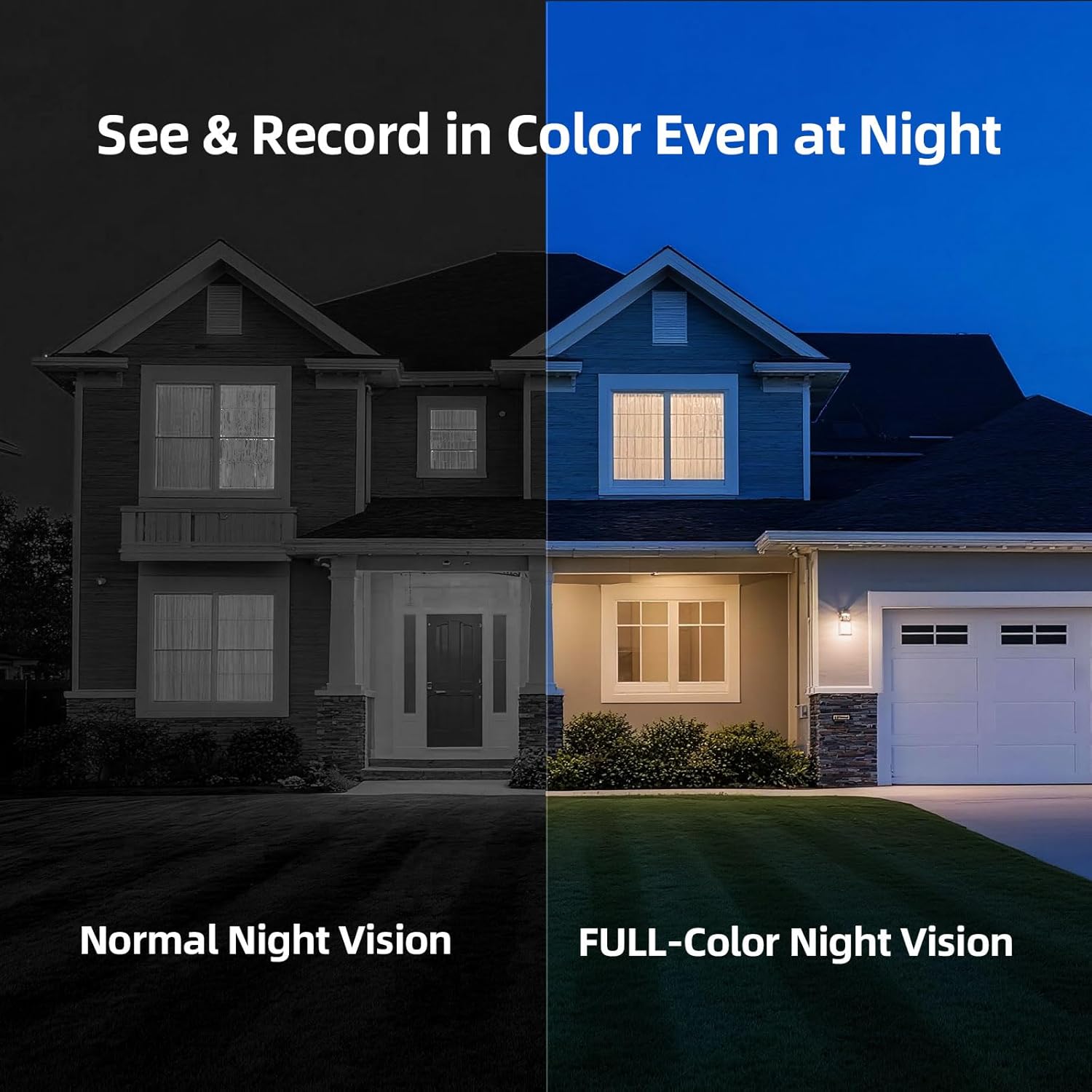
Image: A split image comparing night vision modes. The left side shows a house at night with 'Normal Night Vision' (monochrome). The right side shows the same house with 'FULL-Color Night Vision', revealing colors and more detail, demonstrating the camera's advanced night vision capability.
6.3 AI Person Detection
The camera's advanced AI algorithm can distinguish human shapes from other moving objects (like pets or vehicles), significantly reducing false alarms and ensuring you only receive relevant alerts.
6.4 IP66 Weatherproof Rating
With an IP66 rating, the camera is protected against dust and powerful water jets, making it suitable for outdoor installation and reliable operation in various weather conditions.
7. പരിപാലനം
7.1 ബാറ്ററി ചാർജിംഗ്
Monitor the battery level via the app. Recharge the camera promptly when the battery is low to ensure continuous operation. Charging time may vary.
7.2 വൃത്തിയാക്കൽ
Periodically clean the camera lens with a soft, dry cloth to ensure clear image quality. Do not use harsh chemicals or abrasive materials.
8. പ്രശ്നപരിഹാരം
- ക്യാമറ വൈഫൈയിലേക്ക് കണക്റ്റ് ചെയ്യുന്നില്ല: Ensure your Wi-Fi network is 2.4GHz. Check Wi-Fi signal strength at the camera's location. Restart your router and the camera, then attempt pairing again.
- മോശം ചിത്ര നിലവാരം: ക്യാമറ ലെൻസ് വൃത്തിയാക്കുക. ക്യാമറയുടെ ലെൻസ് ഫീൽഡിൽ തടസ്സങ്ങളൊന്നുമില്ലെന്ന് ഉറപ്പാക്കുക. view. Check your Wi-Fi connection speed.
- ചലന മുന്നറിയിപ്പുകളൊന്നുമില്ല: Verify that motion detection and notification settings are enabled in the app. Check the camera's battery level. Ensure the camera is positioned correctly to detect movement in the desired area.
- ബാറ്ററി വേഗത്തിൽ തീർന്നു: Frequent motion detection events, continuous live viewing, or poor Wi-Fi signal can increase battery consumption. Adjust motion sensitivity and recording duration in the app.
- ടു-വേ ഓഡിയോ പ്രശ്നങ്ങൾ: Ensure your phone's microphone and speaker are enabled for the app. Check the camera's microphone and speaker for any physical obstructions.
9 സ്പെസിഫിക്കേഷനുകൾ
| മോഡലിൻ്റെ പേര് | Cinmoore BC22U Security Camera |
| വീഡിയോ ക്യാപ്ചർ റെസല്യൂഷൻ | 2.5K (1440P) |
| കണക്റ്റിവിറ്റി ടെക്നോളജി | വൈഫൈ (2.4GHz) |
| പവർ ഉറവിടം | ബാറ്ററി പവർ (5200mAh) |
| ഇൻഡോർ/ഔട്ട്ഡോർ ഉപയോഗം | Indoor/Outdoor (IP66 Weatherproof) |
| പ്രത്യേക ഫീച്ചർ | Waterproof, AI Person Detection, Color Night Vision, Two-Way Audio |
| സ്റ്റോറേജ് ഓപ്ഷനുകൾ | മൈക്രോ എസ്ഡി കാർഡ് (256 ജിബി വരെ), ക്ലൗഡ് സ്റ്റോറേജ് |
| അളവുകൾ (L x W x H) | 3 x 2 x 2 ഇഞ്ച് |
| ഇനത്തിൻ്റെ ഭാരം | 13.4 ഔൺസ് |
10. വാറൻ്റിയും പിന്തുണയും
The CINMOORE BC22U Wireless Home Security Camera comes with a 2 വർഷത്തെ വാറൻ്റി. For any product issues, technical assistance, or support, please contact our customer service hotline during weekdays. Refer to the Quick Guide or our official webബന്ധപ്പെടാനുള്ള വിശദാംശങ്ങൾക്കുള്ള സൈറ്റ്.


