1. ആമുഖം
This manual provides detailed instructions for setting up, operating, and maintaining your MINISFORUM M1 Pro-285H AI Mini PC. Please read this manual thoroughly before using the device to ensure proper functionality and to prevent damage.
The MINISFORUM M1 Pro-285H is a high-performance AI Mini PC equipped with an Intel Core Ultra 9 Processor 285H, designed for demanding tasks, content creation, light gaming, and multimedia editing. It features advanced connectivity and expansion options to enhance your computing experience.
2. ഉൽപ്പന്നം കഴിഞ്ഞുview
The M1 Pro-285H features a compact and sleek design, crafted from durable aluminum alloy. It integrates powerful components within a small footprint.
2.1. ഘടകങ്ങളും സവിശേഷതകളും
- പ്രോസസ്സർ: Intel Core Ultra 9 Processor 285H (16 Cores, 16 Threads, up to 5.4GHz) with integrated Intel Arc Graphics.
- മെമ്മറി: DDR5-5600GHz SODIMM, expandable up to 128 GB (supports up to 6400 MT/s).
- സംഭരണം: Dual M.2 2280 PCIe 4.0 slots, each supporting up to 4TB capacity. Supports RAID 0 and RAID 1 configurations.
- ഡിസ്പ്ലേ ഔട്ട്പുട്ട്: Supports up to 4 displays via HDMI 2.1 (4K@60Hz), DP 1.4 (up to 8K@60Hz or 4K@144Hz), and dual USB4 ports (up to 8K@60Hz).
- കണക്റ്റിവിറ്റി: Wi-Fi 7, Bluetooth 5.4, 2.5G Ethernet port.
- തുറമുഖങ്ങൾ: USB4 (40Gbps, 15W output, 65-100W input), USB 3.2 Gen2 Type-A, 3.5mm Audio Jack, OCuLink.
- തണുപ്പിക്കൽ: Efficient heat dissipation system with phase change material, dual pure copper heat pipes, and dual large-diameter silent fans.
2.2. ഭൗതിക ലേഔട്ടും പോർട്ടുകളും

Image: Diagram showing the front and rear ports of the MINISFORUM M1 Pro-285H Mini PC. The front includes a power button, two USB3.2 Gen2 Type-A ports, one USB4 port, a 3.5mm audio jack, and a Clear CMOS pinhole. The rear includes a DC 19V power input, a 2.5G LAN port, a DP 1.4 port, an OCuLink port, an HDMI 2.1 port, and another USB4 port.
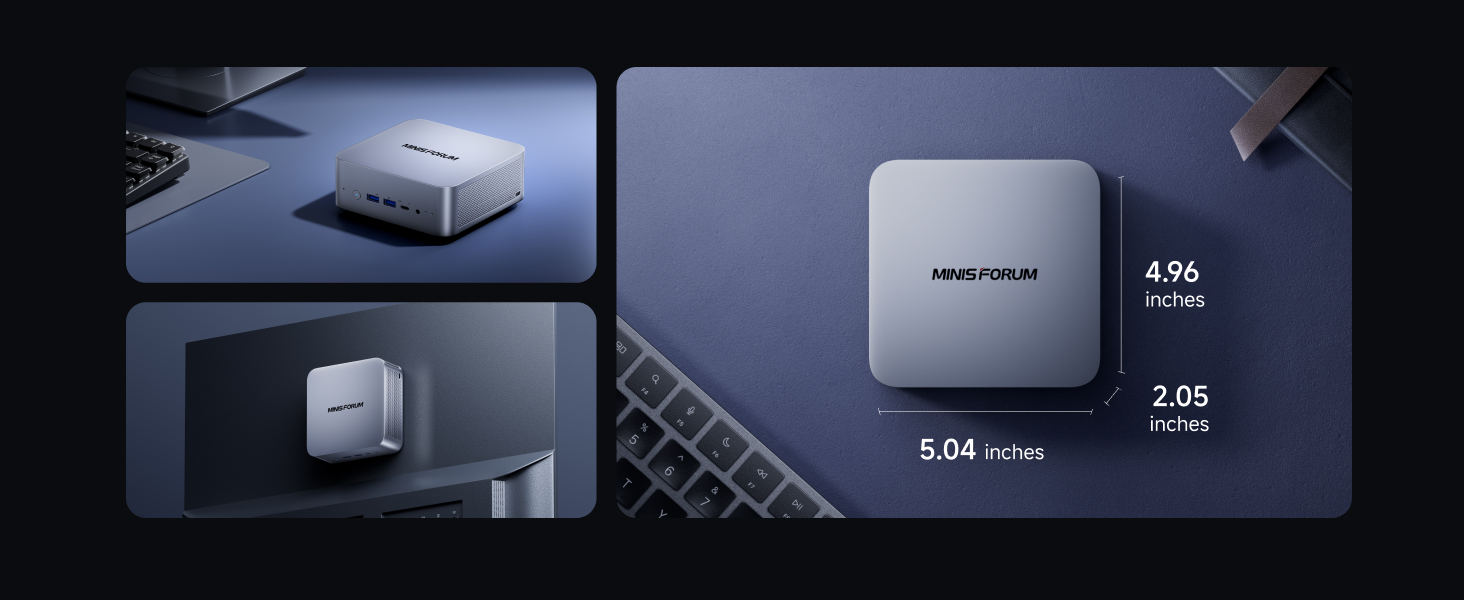
Image: The MINISFORUM M1 Pro-285H Mini PC shown from a top-down perspective, highlighting its compact dimensions of approximately 5.04 inches by 4.96 inches by 2.05 inches. Additional views show the device mounted behind a monitor and placed on a desk.
3. സജ്ജീകരണ ഗൈഡ്
3.1. പെരിഫറലുകൾ ബന്ധിപ്പിക്കുന്നു
- ഡിസ്പ്ലേ ബന്ധിപ്പിക്കുക: Connect your monitor(s) to the HDMI 2.1, DP 1.4, or USB4 ports using appropriate cables. The device supports up to four 4K displays simultaneously.
- കീബോർഡും മൗസും ബന്ധിപ്പിക്കുക: Plug your USB keyboard and mouse into the available USB 3.2 Gen2 Type-A ports.
- നെറ്റ്വർക്ക് ബന്ധിപ്പിക്കുക: For wired internet, connect an Ethernet cable to the 2.5G LAN port. For wireless, ensure Wi-Fi 7 is enabled in the operating system.
- ഓഡിയോ ബന്ധിപ്പിക്കുക: If using external speakers or headphones, connect them to the 3.5mm audio jack.
- പവർ കണക്ഷൻ: Connect the power adapter to the DC 19V input port on the rear of the Mini PC, then plug the adapter into a power outlet.
3.2. പ്രാരംഭ ബൂട്ട്
- ഉപകരണത്തിന്റെ മുൻവശത്തുള്ള പവർ ബട്ടൺ അമർത്തുക.
- The system will boot up. Follow the on-screen instructions to complete the operating system setup (if applicable).
4. പ്രവർത്തന നിർദ്ദേശങ്ങൾ
4.1. Multi-Display Configuration

Image: A user working at a desk with four monitors connected to the MINISFORUM M1 Pro-285H Mini PC, demonstrating its quad 4K display capability for efficient multitasking. The image highlights the DP 1.4, USB4 x2, and HDMI 2.1 ports.
The M1 Pro-285H supports connecting up to four 4K displays simultaneously. To configure your displays:
- Connect your monitors to the available HDMI, DisplayPort, and USB4 ports.
- Access your operating system's display settings to arrange and extend your desktop across multiple screens.
4.2. OCuLink GPU Expansion

ചിത്രം: ഒരു ക്ലോസ്-അപ്പ് view of the OCuLink port on the MINISFORUM M1 Pro-285H, with a glowing blue OCuLink cable connected, illustrating the eGPU expansion capability for faster performance. Note: OCuLink requires one M.2 2280 PCIe4.0 SSD slot.
The OCuLink port allows for external GPU expansion, providing enhanced graphics performance for demanding applications and gaming. To use OCuLink:
- Connect a compatible external GPU enclosure to the OCuLink port.
- Ensure the external GPU is properly powered and configured according to its manufacturer's instructions.
- Note: OCuLink is not hot-swappable and utilizes one M.2 2280 PCIe4.0 SSD slot.
4.3. Storage Expansion (RAID)

ചിത്രം: വിശദമായ ഒരു ചിത്രം view of the two M.2 2280 PCIe 4.0 SSD slots on the MINISFORUM M1 Pro-285H motherboard, indicating support for high-speed storage expansion.
The Mini PC supports dual M.2 2280 PCIe 4.0 SSDs, allowing for significant storage expansion and RAID configurations:
- റെയ്ഡ് 0: Combines two drives into a single logical unit for increased performance.
- റെയ്ഡ് 1: Mirrors data across two drives for data redundancy and protection.
- Consult your operating system or BIOS settings for instructions on configuring RAID.
4.4. USB4 Functionality

Image: A visual representation of the USB4 port on the MINISFORUM M1 Pro-285H, emphasizing its high-speed data transfer capabilities of 40Gbps, up to 8K video output, and 15W (5V 3A) power output (PD 3.0).
The dual USB4 ports offer versatile connectivity:
- ഹൈ-സ്പീഡ് ഡാറ്റ ട്രാൻസ്ഫർ: വേഗത്തിലുള്ള ഡാറ്റയ്ക്ക് 40Gbps വരെ file കൈമാറ്റങ്ങൾ.
- വീഡിയോ ഔട്ട്പുട്ട്: Supports up to 8K@60Hz display output.
- പവർ ഡെലിവറി: Provides 15W output and supports 65-100W input for dynamic power supply to compatible devices.
5. പരിപാലനം
5.1. വൃത്തിയാക്കൽ
- Regularly clean the exterior of the Mini PC with a soft, dry cloth.
- Use compressed air to clear dust from ventilation openings to maintain optimal airflow.
- Do not use liquid cleaners or solvents directly on the device.
5.2. സോഫ്റ്റ്വെയർ അപ്ഡേറ്റുകൾ
- Keep your operating system and drivers updated to ensure system stability and performance.
- Check the MINISFORUM official website for the latest BIOS and driver updates.
5.3. തണുപ്പിക്കൽ സംവിധാനം

ചിത്രം: പൊട്ടിത്തെറിച്ച ഒരു view of the MINISFORUM M1 Pro-285H's internal cooling system, showing the dual copper heatpipes and dual fans. Performance metrics indicate a standby temperature of 47°C, full-load temperature below 86°C, and noise levels below 45dB.
The M1 Pro-285H features an advanced cooling system. To ensure its effectiveness:
- Ensure the Mini PC is placed in a well-ventilated area.
- എയർ വെൻ്റുകൾ തടയുന്നത് ഒഴിവാക്കുക.
6. പ്രശ്നപരിഹാരം
6.1. പവർ ഇല്ല
- പവർ അഡാപ്റ്റർ മിനി പിസിയിലും പവർ ഔട്ട്ലെറ്റിലും സുരക്ഷിതമായി ബന്ധിപ്പിച്ചിട്ടുണ്ടോ എന്ന് പരിശോധിക്കുക.
- പവർ ഔട്ട്ലെറ്റ് പ്രവർത്തനക്ഷമമാണോയെന്ന് പരിശോധിക്കുക.
- ലഭ്യമാണെങ്കിൽ മറ്റൊരു പവർ ഔട്ട്ലെറ്റോ അഡാപ്റ്ററോ പരീക്ഷിച്ചുനോക്കൂ.
6.2. ഡിസ്പ്ലേ ഔട്ട്പുട്ട് ഇല്ല
- Ensure the monitor is powered on and the correct input source is selected.
- Check all display cables (HDMI, DP, USB4) for secure connections.
- Try connecting to a different display port or monitor to isolate the issue.
6.3. നെറ്റ്വർക്ക് കണക്റ്റിവിറ്റി പ്രശ്നങ്ങൾ
- For wired connections, ensure the Ethernet cable is properly connected and your router is functioning.
- For Wi-Fi, check if Wi-Fi is enabled in your operating system and if you are connected to the correct network.
- Restart your router and the Mini PC.
6.4. System Performance Issues
- മിനി പിസിക്ക് ആവശ്യത്തിന് വായുസഞ്ചാരം ലഭിക്കുന്നുണ്ടെന്നും അമിതമായി ചൂടാകുന്നില്ലെന്നും ഉറപ്പാക്കുക.
- പശ്ചാത്തലത്തിൽ പ്രവർത്തിക്കുന്ന അനാവശ്യ ആപ്ലിക്കേഷനുകൾ അടയ്ക്കുക.
- Check for and install any available system or driver updates.
7 സ്പെസിഫിക്കേഷനുകൾ
| ഫീച്ചർ | വിശദാംശങ്ങൾ |
|---|---|
| പ്രോസസ്സർ | Intel Core Ultra 9 Processor 285H (16 Cores, 16 Threads, up to 5.4GHz) |
| ഗ്രാഫിക്സ് കോപ്രൊസസർ | ഇൻ്റൽ ആർക്ക് ഗ്രാഫിക്സ് |
| റാം | 32 GB DDR5 (Expandable up to 128 GB DDR5-6400MHz) |
| ഹാർഡ് ഡ്രൈവ് | 1 TB SSD (Dual M.2 2280 PCIe 4.0 slots, supports RAID 0/1) |
| പരമാവധി സ്ക്രീൻ റെസല്യൂഷൻ | 7680x4320 (8K) |
| വയർലെസ് തരം | വൈ-ഫൈ 7 (802.11ax), ബ്ലൂടൂത്ത് 5.4 |
| ഇഥർനെറ്റ് | 2.5 ജി ലാൻ |
| USB പോർട്ടുകൾ | 2x USB 3.0 (USB 3.2 Gen2 Type-A), 2x USB4 (40Gbps, 15W output, 65-100W input) |
| വീഡിയോ ഔട്ട്പുട്ട് | 1x HDMI 2.1, 1x DP 1.4, 2x USB4 (supports Quad 4K display) |
| മറ്റ് തുറമുഖങ്ങൾ | OCuLink, 3.5mm Audio Jack, DC 19V Power Input |
| ഓപ്പറേറ്റിംഗ് സിസ്റ്റം | OS (Pre-installed Copilot for AI productivity) |
| ഇനത്തിൻ്റെ ഭാരം | 2.94 പൗണ്ട് |
| അളവുകൾ | 7.09 x 6.3 x 4.49 ഇഞ്ച് (പാക്കേജ്) |
8. ഔദ്യോഗിക ഉൽപ്പന്ന വീഡിയോ
വീഡിയോ: ഔദ്യോഗിക ഉൽപ്പന്ന വീഡിയോ ഷോasing the MINISFORUM M1 Pro-285H AI Mini PC, highlighting its features and design, including internal components, connectivity, and cooling system.
9. വാറൻ്റിയും പിന്തുണയും
For warranty information, technical support, and service inquiries, please refer to the official MINISFORUM webസൈറ്റിൽ ബന്ധപ്പെടുക അല്ലെങ്കിൽ അവരുടെ ഉപഭോക്തൃ സേവനവുമായി നേരിട്ട് ബന്ധപ്പെടുക. വാറന്റി ക്ലെയിമുകൾക്കായി നിങ്ങളുടെ വാങ്ങൽ രസീത് സൂക്ഷിക്കുക.
MINISFORUM Official Webസൈറ്റ്: www.minisforum.com


